Skip to content
FacebookTwitterPinterest
HOWTOHOWTO
  • All
    • Tips
      • Google
      • Facebook
      • Tiktok
    • Instruct
      • What is Q&A?
      • Taobao
    • WordPress
      • Code
      • Plugins
      • Themes
        • Flatsome
        • Theme Nevo
  • Share
    • WordPress
    • Code
    • Plugins
    • Tips
    • Windows
    • Apple
    • Graphics
    • Experience
  • Graphics documents
    • illustrator
    • Sketchup
    • Coreldraw
    • 3ds max
    • Enscape
    • Photoshop
    • Graphics Plugin
  • Course
    • Photoshop course
    • illustrator course
    • Coreldraw course
    • Edit video course
    • Course Sketchup
    • Autocad course
    • Website management course
  • Service
  • Software
    • Windows
      • Tips
      • Office
      • Necessary
      • Tools
    • Apple
  • Game
  • News
    • Technology
    • Review
HOWTOHOWTO
  • Home > 
  • Graphics > 
  • Adobe Photoshop > 
  • Fix Crash Report Photoshop error quickly and effectively

Fix Crash Report Photoshop error quickly and effectively

By thindv 19/07/2026 0 419 Views
Fix Crash Report Photoshop
Article categories

Crash Report Photoshop is a very annoying error in photoshop. When you have this error, you will suddenly see the software Crash Report Photoshop while you are using it. Or when your computer opens photoshop, the software will also immediately report the error Crash Report Photoshop.

So what is Crash Report Photoshop and how to fix it? Let's find out and fix this error in detail.

See more errors in photoshop

  • Fix scratch disk are full error in photoshop

Cause of Crash Report Photoshop error

Crash Report errors in Photoshop can come from a variety of causes. Here are some common causes:

  1. Outdated software version: You are using an old version of Photoshop which may have many errors, make sure you are using the latest version.
  2. Plugin not compatible: Some plugins or extensions you install may not be compatible with your version of Photoshop, causing problems when starting or using it. Please check if you have installed any plugins that cause the software to crash.
  3. System Resources: If your computer does not have enough RAM or CPU or the software takes up unusual resources, opening photoshop can cause errors.
  4. Incorrect configuration settings: Incorrect configuration options in Photoshop can lead to problems.
  5. Corrupt file: If you are working with a corrupt or unstable file, this can also cause errors.
  6. Software conflict: Other software running on your computer may conflict with Photoshop and cause problems.
  7. Graphics driver error: Outdated or incompatible graphics card drivers can cause problems when using Photoshop.

To fix this, you can try updating your software, checking and removing unnecessary plugins, or upgrading your computer's hardware if necessary.

  • Crash Report Photoshop error, This is an extremely annoying error when you are working. Crash Report Photoshop error You may lose files if we work without saving. This Photoshop Crash Report error often appears when you render files or open camera raw.
  • When you work with these functions, your computer has to work at high intensity. If your computer does not meet the requirements. Crashing is very easy to happen.
  • In addition, when you get this error, you will see your computer run slower. The software does not work properly and crashes suddenly

How to fix Crash Report Photoshop error.

1. Reset Photoshop settings

Step 1: Open Photoshop > select Edit > select Preferences > select General (shortcut is Ctrl + K)
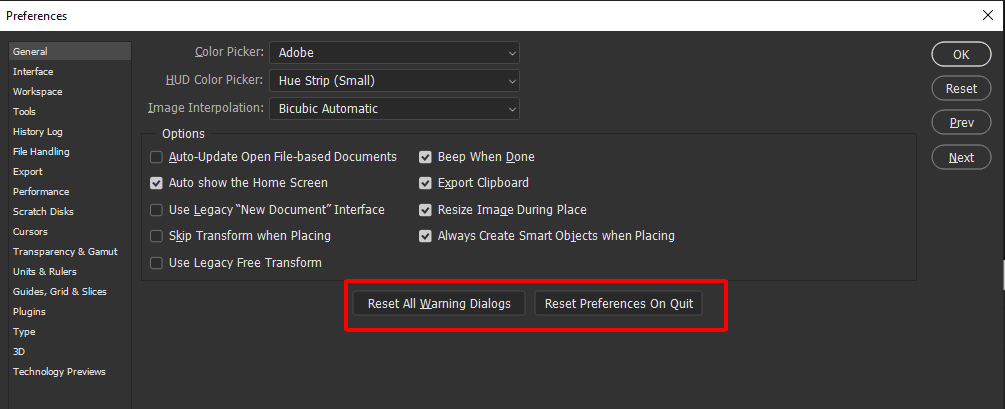
Crash Report Photoshop error
Reset Photoshop settings

Step 2: At the window Preferences > the way you choose Reset Preferences On Quit > Select OK
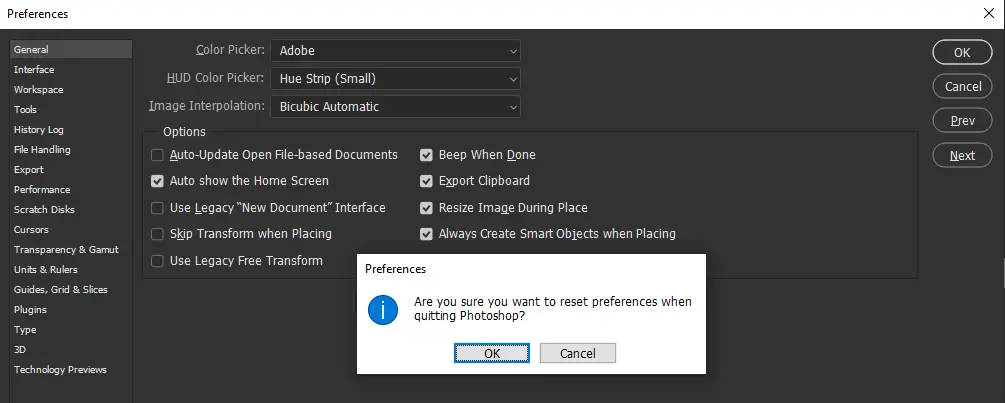
Crash Report Photoshop error
Reset Photoshop settings

Step 3: After Reset For this setting, please close Photoshop and reopen it before using it.

2. Fix Crash Report error when using Camera Raw

Step 1: Open the software Photoshop > go to section Edit > Scroll down to select the item Preferences > Click General (shortcut is Ctrl + K)

Step 2: In the window Preferences select item Performance > Uncheck the item Use Graphics Processor > Select Ok to save
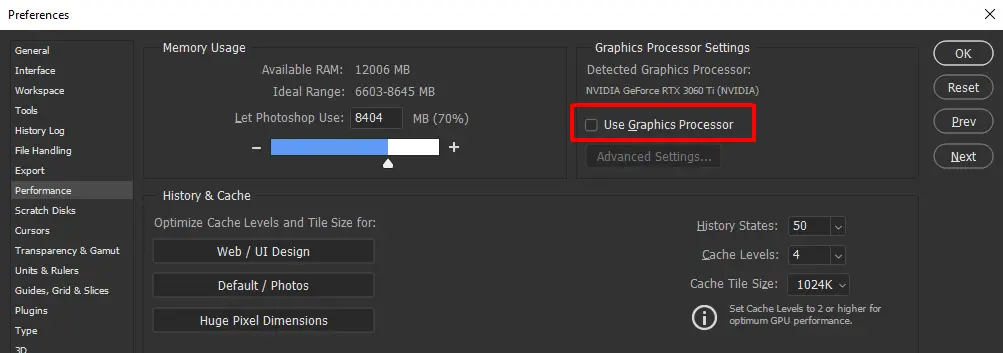
Crash Report Photoshop error
Fixed Crash Report error when using Camera Raw

Step 3: You guys come File handling > Canera Raw Preferences… > Performance > Select Use Graphics Processor You switch from Auto to Off > Select Ok to save
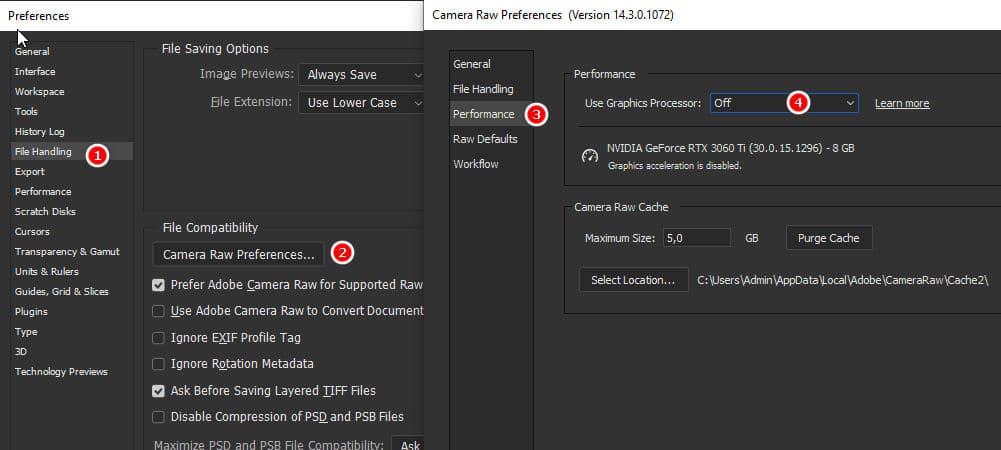
Crash Report Photoshop error
Fixed Crash Report error when using Camera Raw
  • After you're done, try opening it again and using it to see if the problem happens again.

3. Upgrade your computer

Even though you have installed the methods, it still cannot be used. So your computer is too weak or the hardware is damaged. Now you need to upgrade your devices to use this function. It's best you can take it to a store so they can replace it and then try it out to see if it works. To completely handle it, you should upgrade the video card, CPU, and Ram to use maximum capacity effectively.

If you feel not confident about Photoshop, you can refer to it course photoshop This party's express. To improve my knowledge.

Don't forget to subscribe to the same channel Graphic design community | Facebook to support us

Tags : Tags Crash Report Photoshop   photoshop error
Share
FacebookShare on FacebookpinterestShare on PinterestMessengerShare on Facebook Messenger
twitterShare on TwitterlinkedinShare on LinkedinvkShare on VkredditShare on ReddittumblrShare on TumblrvideoShare on Viadeobuffer. bufferShare on Bufferpocket. pocketShare on PocketwhatsappShare on WhatsappViberShare on ViberemailShare on EmailskypeShare on SkypediggShare on DiggmyspaceShare on MyspacebloggerShare on Blogger YahooMailShare on Yahoo mailtelegramShare on Telegram gmailShare on GmailAmazonShare on AmazonSMSShare on SMS

thindv

I am a technology enthusiast and always desire to discover new things. I like to sit down and write and share what I like

Related articles

Fix Crash Report Photoshop error quickly and effectively

Adobe photoshop cs6 professional editing software

By How To 28/06/2026 0

Adobe photoshop cs6 super light photo editing software...

Fix Crash Report Photoshop error quickly and effectively

How to create moving images in photoshop

By Tung Thai 31/03/2026 0

How to create moving images in photoshop. Creating images…

Fix Crash Report Photoshop error quickly and effectively

Remove tool in photoshop

By How To 27/03/2026 0

Remove tool in Photoshop Introduced in…

Leave a Comment Cancel reply

Categories Instruct 2 simple ways to create standard Facebook Fanpage for beginners

2 simple ways to create standard Facebook Fanpage for beginners

08/08/2026
How to ask the Facebook help center to handle related issues

How to ask the Facebook help center to handle related issues

07/08/2026
Downloading Facebook to your computer or phone is simple

Downloading Facebook to your computer or phone is simple

07/08/2026
Facebook photo size Optimize social media posts

Facebook photo size Optimize social media posts

05/08/2026
Facebook Ads payment thresholds

Facebook Ads payment thresholds

05/08/2026

Recent comments

  • male2 years ago
    On How to create a fade effect in Photoshop
    Great
  • phat phat3 years ago
    On Who is 5SMedia?
    Useful article
  • Minh Anh4 years ago
    On How to create basic materials in vray Sketchup
    Very good, admin
Copyright © 2026 HOWTO - Powered by HOWTO

5SMedia.net | hocdohoacaptoc.com | huongdansudung.vn | webantam.com

Back to Top
Hello!
  • All
    • Tips
      • Google
      • Facebook
      • Tiktok
    • Instruct
      • What is Q&A?
      • Taobao
    • WordPress
      • Code
      • Plugins
      • Themes
        • Flatsome
        • Theme Nevo
  • Share
    • WordPress
    • Code
    • Plugins
    • Tips
    • Windows
    • Apple
    • Graphics
    • Experience
  • Graphics documents
    • illustrator
    • Sketchup
    • Coreldraw
    • 3ds max
    • Enscape
    • Photoshop
    • Graphics Plugin
  • Course
    • Photoshop course
    • illustrator course
    • Coreldraw course
    • Edit video course
    • Course Sketchup
    • Autocad course
    • Website management course
  • Service
  • Software
    • Windows
      • Tips
      • Office
      • Necessary
      • Tools
    • Apple
  • Game
  • News
    • Technology
    • Review
EN
EN
VI
Hello!

  • Lost your password ?