Skip to content
FacebookTwitterPinterest
HOWTOHOWTO
  • All
    • Tips
      • Google
      • Facebook
      • Tiktok
    • Instruct
      • What is Q&A?
      • Taobao
    • WordPress
      • Code
      • Plugins
      • Themes
        • Flatsome
        • Theme Nevo
  • Share
    • WordPress
    • Code
    • Plugins
    • Tips
    • Windows
    • Apple
    • Graphics
    • Experience
  • Graphics documents
    • illustrator
    • Sketchup
    • Coreldraw
    • 3ds max
    • Enscape
    • Photoshop
    • Graphics Plugin
  • Course
    • Photoshop course
    • illustrator course
    • Coreldraw course
    • Edit video course
    • Course Sketchup
    • Autocad course
    • Website management course
  • Service
  • Software
    • Windows
      • Tips
      • Office
      • Necessary
      • Tools
    • Apple
  • Game
  • News
    • Technology
    • Review
HOWTOHOWTO
  • Home > 
  • Graphics > 
  • Adobe Photoshop > 
  • The latest way to create shadows in Photoshop

The latest way to create shadows in Photoshop

By Tung Thai 11/10/2026 0 668 Views
How to create a shadow for an object in Photoshop
Article categories

How to create shadow in photoshop. Adobe Photoshop is a professional image processing software developed by Adobe Systems. This software allows users to edit and manipulate images, design graphics, create special and complex effects on images, as well as create graphic designs and other multimedia products.

To create shadows in Photoshop, you need to understand the principles and how to use its tools. Let's find out together. how to create shadow in photoshop details

See more >> Photoshop course from basic to advanced 1 on 1 training

  • How to create coastal city effects in photoshop
  • How to create background in Photoshop
  • How to separate transparent material background in Photoshop
  • How to create classic portraits in Photoshop
  • How to change background color in Photoshop
  • How to create natural light in Photoshop

Video tutorial on creating extremely realistic shadows in photoshop

How to create shadows in photoshop

To follow this article, you need to prepare the images you need to follow. In this article, I will use a sofa set to practice. You can also take other images and then create shadows in photoshop for them.

Step 1: Open the image object in Photoshop software

  • Enter File > Open Open the image file that you want to create a shadow for (preferably a PNG image with the background removed, otherwise you will have to remove the background for it)

See more: >> How to separate background for photoshop couldn't be simpler. You just need to upload the photo and it will automatically separate the background for you.

Step 2: Copy the image object and rotate the object upside down

  • You duplicate the image object by pressing the key Ctrl + J We will have 2 identical images.
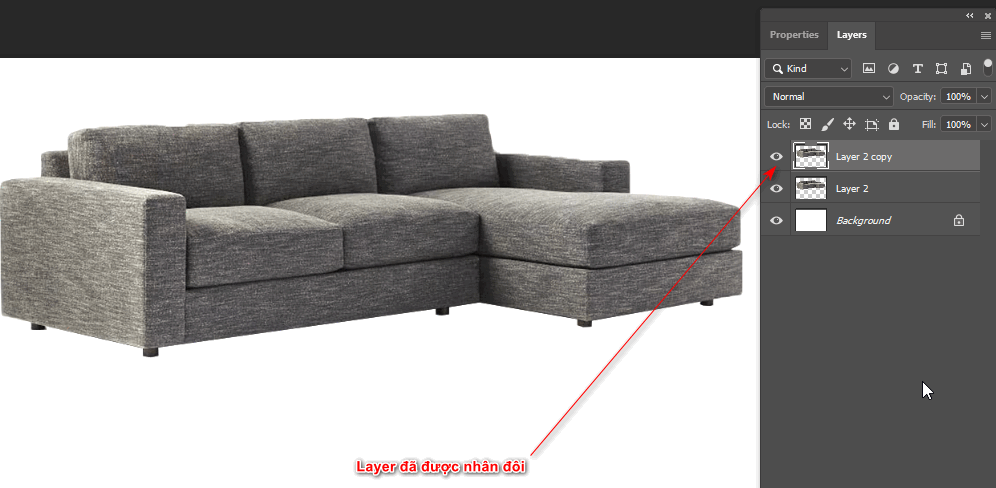
The latest way to create shadows in Photoshop
copy layer
  • After duplicating, hold down the key. Ctrl + T right click select Flip Vertical to flip the object down then drag down to fit
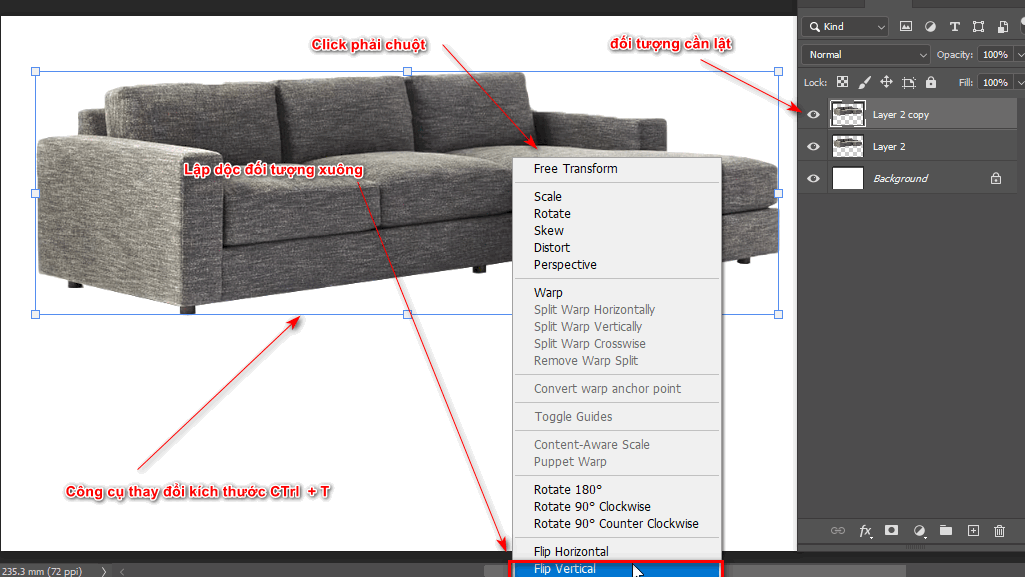
The latest way to create shadows in Photoshop
Step 2.1 Flip the object

Step 3: Change the shape and size of the object to fit

  • We select the image layer that has been flipped down and then drag the object close to the bottom of the object above.
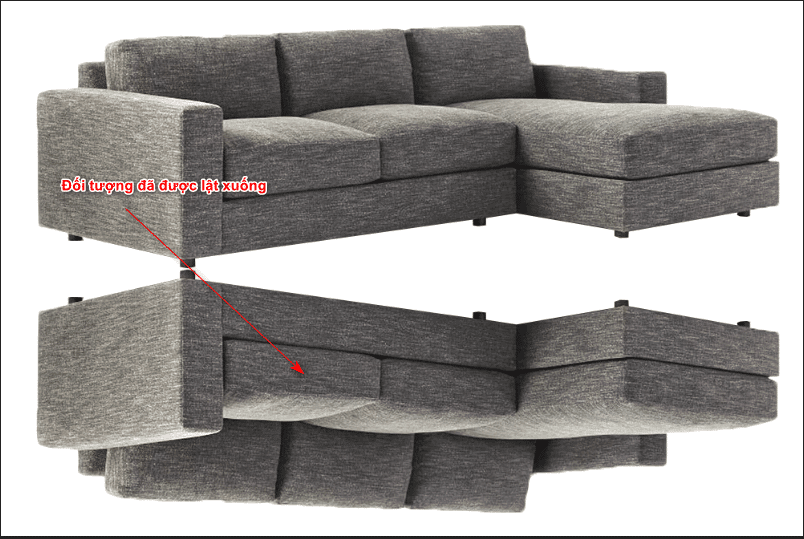
The latest way to create shadows in Photoshop
Step 3 the object is flipped down
  • When we flip down to create a drop shadow in photoshop, our object will not tilt as we want, we will need to re-adjust it so that the corners are in the right position. At this point we need to re-adjust it by going to Edit > Perspective Warp to create wireframes for each small part of the object
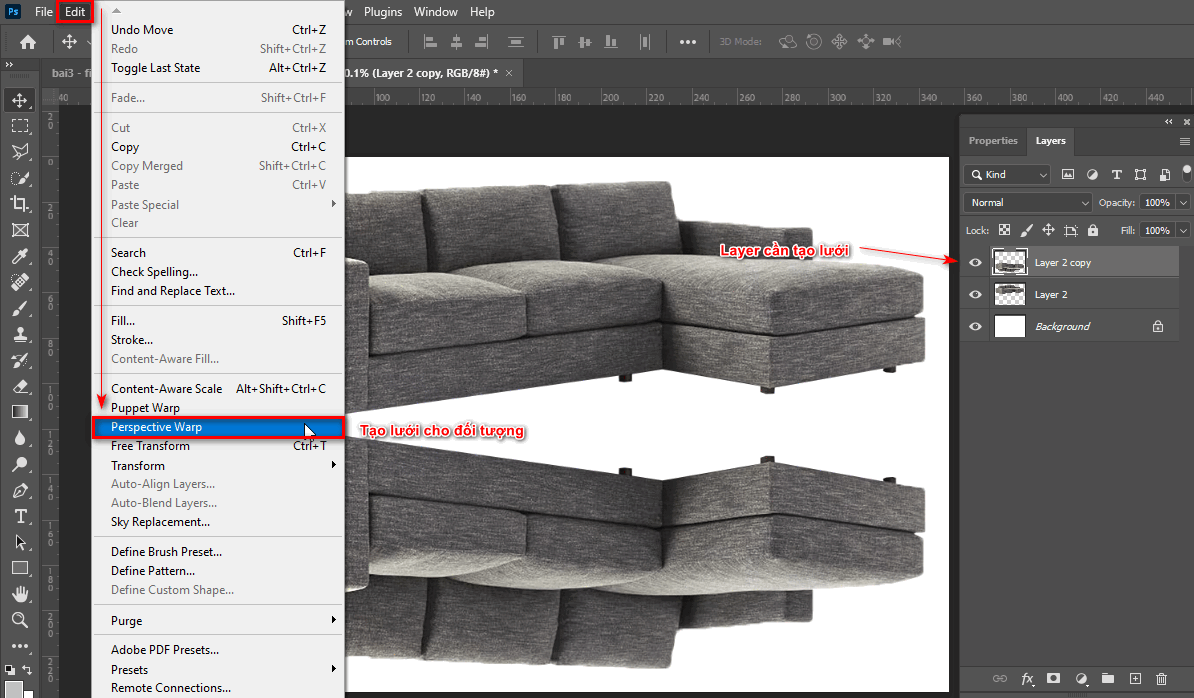
The latest way to create shadows in Photoshop
Step 3.1 create mesh for the object
  • Move the points so that the grid is inside the object.
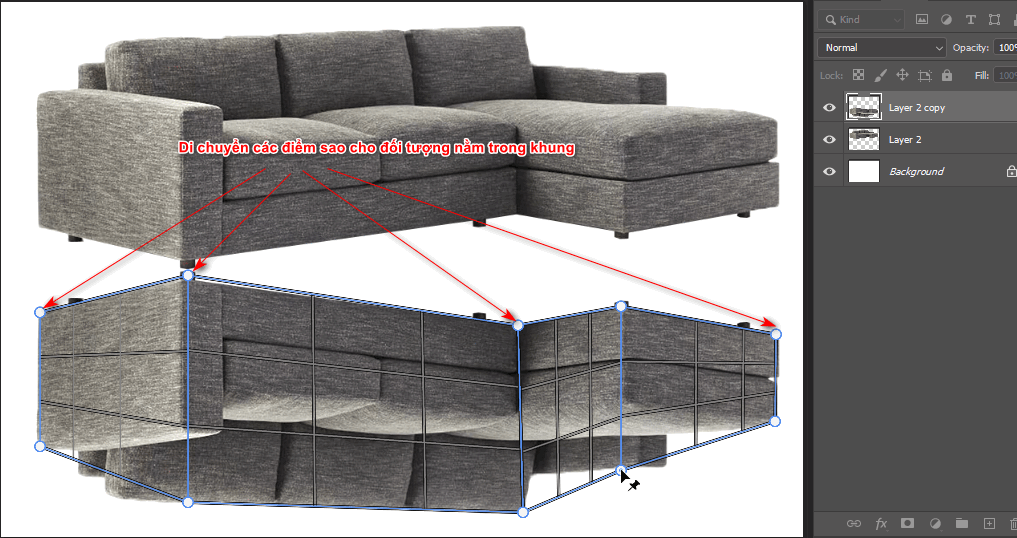
The latest way to create shadows in Photoshop
Step 3.2 move the points to fit the image
  • After creating the grid, we select the command Warp under the menu bar to move each point on the grid to fit and feel most natural. >Enter
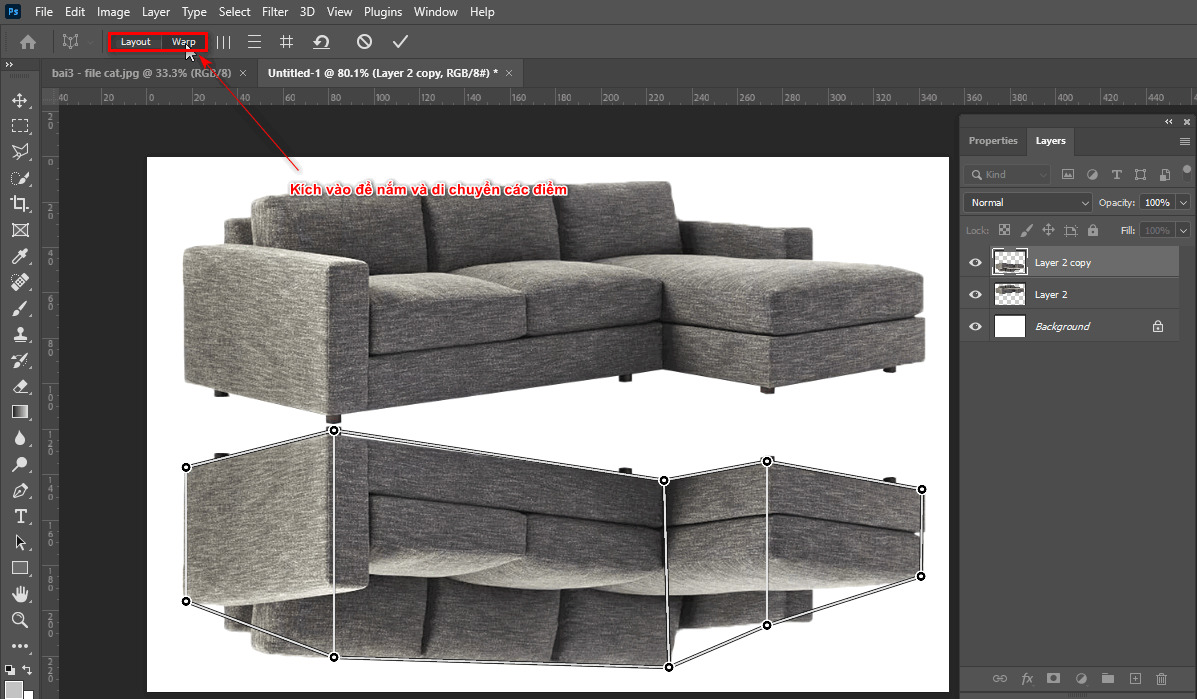
How to create shadows in photoshop
Step 3.3 move the position of the points

Step 4: Create blur and shadow for the object to make it look most realistic

  • We create a layer mask for the object that has been flipped down. (tool located next to layer panel next to fx tool)
  • Then we click on layer mask and select the tool Gradient Tool (G) then we select the color on the bottom left corner of the toolbar to change it to black and transparent
  • When clicking on that color object, select Basic to select the color palette. black switch to look through
  • Now we drag the mouse from the bottom contact point of the object to the part we want to keep to create a fading effect.
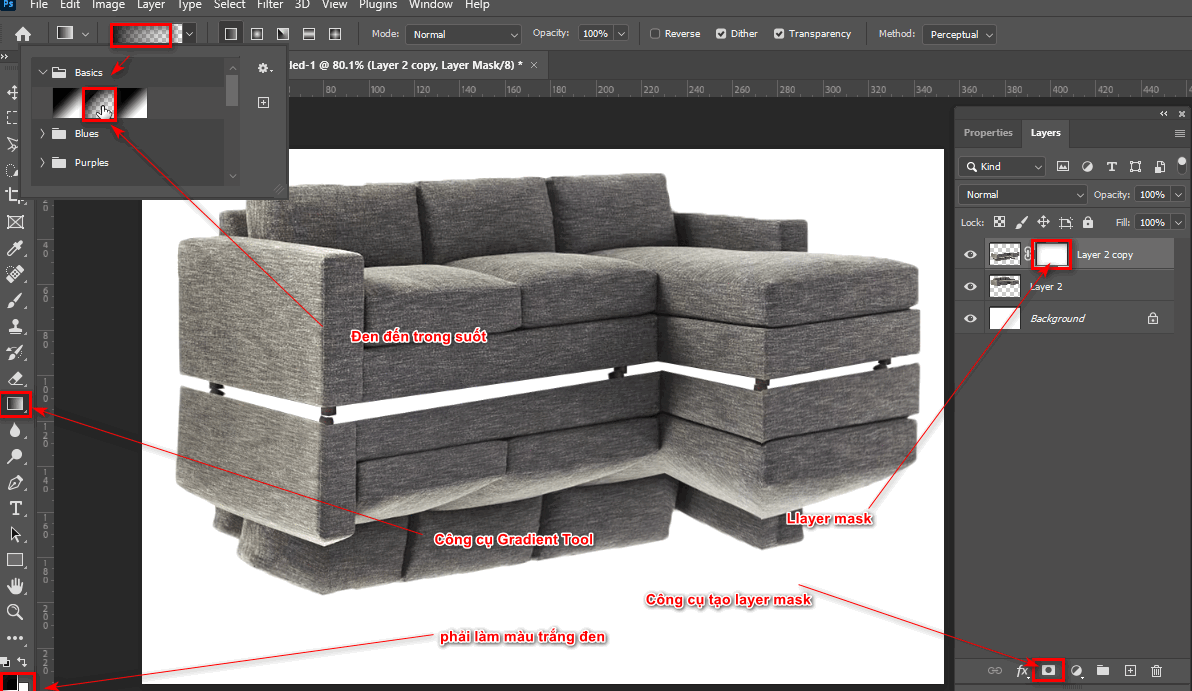
How to create shadows in photoshop
Step 4 blur the object
  • Then create a new layer using the + icon next to the trash can icon located below the layer panel.
  • Then use the Brush tool and reduce the Hardness and Opacity To get the most beautiful and natural shadow, we scan the bottom of the object.
  • Then move the shadow layer above the background layer to create the most realistic and natural look.
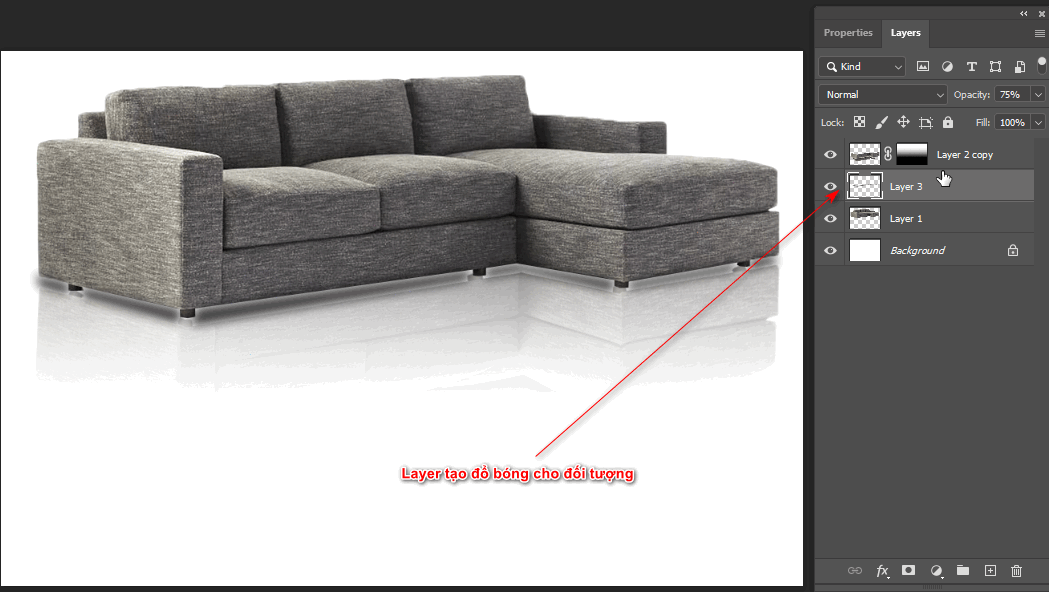
How to create shadows in photoshop
Step 4.1 create shadow for the object

So you have completed the lesson on how to create shadows in photoshop.

Step 5: Finishing

After creating the shadow change we have a finished product so you can see its practical application.

How to create shadows in photoshop

Conclude

I just gave you instructions how to create shadow in photoshop This tool will help your products become more vivid. The objects will become real and natural. After finishing, you will see the article how to create shadow in photoshop If you find this interesting and useful, please do not hesitate to share it with everyone. Your sharing is the motivation to help us publish more articles.

If you want to learn more about photoshop, sign up for our photoshop course. Photoshop course Our students are tutored 1:1 and learn at Graphic Express Class hours and costs are suitable for students and office workers.

In addition, we also support documents and libraries to help the work process become more efficient and faster. We also have courses on 3D home design, objects, interior and exterior, videos, website management to help promote the company's products better. Please quickly register for advice and study.


Tags : Tags adobe photoshop   How to create a shadow for an object in Photoshop   learn photoshop   study pts   study graphic design   good tips pts
Share
FacebookShare on FacebookpinterestShare on PinterestMessengerShare on Facebook Messenger
twitterShare on TwitterlinkedinShare on LinkedinvkShare on VkredditShare on ReddittumblrShare on TumblrvideoShare on Viadeobuffer. bufferShare on Bufferpocket. pocketShare on PocketwhatsappShare on WhatsappViberShare on ViberemailShare on EmailskypeShare on SkypediggShare on DiggmyspaceShare on MyspacebloggerShare on Blogger YahooMailShare on Yahoo mailtelegramShare on Telegram gmailShare on GmailAmazonShare on AmazonSMSShare on SMS

Tung Thai

As a student at the center. I write what I know to share with you.
1 is to share with you so you can know and learn.
2 improve knowledge and remember longer, with the motto of giving to receive, I want to write more

Related articles

The latest way to create shadows in Photoshop

3 Ways to create speed effects in Photoshop

By Tung Thai 18/10/2026 0

3 Ways to create speed effects in photoshop Speed effects…

The latest way to create shadows in Photoshop

How to create a beautiful picture in photoshop

By Tung Thai 17/10/2026 0

How to create a beautiful picture in photoshop below…

The latest way to create shadows in Photoshop

How to create shadows in photoshop

By Tung Thai 17/10/2026 0

How to create drop shadow in photoshop. How to create…

Leave a Comment Cancel reply

Categories Adobe Photoshop 3 Ways to create speed effects in Photoshop

3 Ways to create speed effects in Photoshop

18/10/2026
How to create a beautiful picture in photoshop

How to create a beautiful picture in photoshop

17/10/2026
Download Microsoft Visual C++ full to fix many errors

Download Microsoft Visual C++ full to fix many errors

17/10/2026
How to create shadows in photoshop

How to create shadows in photoshop

17/10/2026
The most detailed way to reset Windows 10 without losing data

The most detailed way to reset Windows 10 without losing data

17/10/2026

Recent comments

  • male2 years ago
    On How to create a fade effect in Photoshop
    Great
  • phat phat3 years ago
    On Who is 5SMedia?
    Useful article
  • Minh Anh4 years ago
    On How to create basic materials in vray Sketchup
    Very good, admin
Copyright © 2026 HOWTO - Powered by HOWTO

5SMedia.net | hocdohoacaptoc.com | huongdansudung.vn | webantam.com

Back to Top
Hello!
  • All
    • Tips
      • Google
      • Facebook
      • Tiktok
    • Instruct
      • What is Q&A?
      • Taobao
    • WordPress
      • Code
      • Plugins
      • Themes
        • Flatsome
        • Theme Nevo
  • Share
    • WordPress
    • Code
    • Plugins
    • Tips
    • Windows
    • Apple
    • Graphics
    • Experience
  • Graphics documents
    • illustrator
    • Sketchup
    • Coreldraw
    • 3ds max
    • Enscape
    • Photoshop
    • Graphics Plugin
  • Course
    • Photoshop course
    • illustrator course
    • Coreldraw course
    • Edit video course
    • Course Sketchup
    • Autocad course
    • Website management course
  • Service
  • Software
    • Windows
      • Tips
      • Office
      • Necessary
      • Tools
    • Apple
  • Game
  • News
    • Technology
    • Review
EN
EN
VI
Hello!

  • Lost your password ?