Skip to content
FacebookTwitterPinterest
HOWTOHOWTO
  • All
    • Tips
      • Google
      • Facebook
      • Tiktok
    • Instruct
      • What is Q&A?
      • Taobao
    • WordPress
      • Code
      • Plugins
      • Themes
        • Flatsome
        • Theme Nevo
  • Share
    • WordPress
    • Code
    • Plugins
    • Tips
    • Windows
    • Apple
    • Graphics
    • Experience
  • Graphics documents
    • illustrator
    • Sketchup
    • Coreldraw
    • 3ds max
    • Enscape
    • Photoshop
    • Graphics Plugin
  • Course
    • Photoshop course
    • illustrator course
    • Coreldraw course
    • Edit video course
    • Course Sketchup
    • Autocad course
    • Website management course
  • Service
  • Software
    • Windows
      • Tips
      • Office
      • Necessary
      • Tools
    • Apple
  • Game
  • News
    • Technology
    • Review
HOWTOHOWTO
  • Home > 
  • Graphics > 
  • Adobe Photoshop > 
  • How to use the Brush Tool Photoshop

How to use the Brush Tool Photoshop

By Tung Thai 14/12/2025 0 648 Views
brush-tool
Article categories

Photoshop includes many basic tools and functions for beginners. It is one of the most basic software in the design industry.
Includes tools to help us delete or add to the positions we want. It can help us create beautiful and virtual photos for ourselves

How to use Brush Tool Photoshop

What is Brush Tool Photoshop? What is the function used for?

Brush Tool There is a keyboard shortcut (B)
Brush Tool is one of those drawing tools, like a pen that you can draw on any layer Which includes the class Background if you want.
Brush Tool There are a variety of pen tips to use for every situation and purpose of the user, meaning the pen tips will have types such as Brush Soft Round, Brush Hard Round, Pollen Brush, Hair Brush, Water Drop Brush, etc.
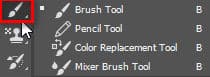
Brush Tool 1
Brush Tool

[note]

  • How to use Photoshop Online
  • How to download simple, beautiful Vietnamese fonts for free
  • Extremely fast free background separation guide
  • 6 Steps to learn interior design for beginners

[/note]

Brush Tool includes 4 small supporting tools
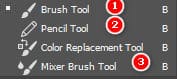
Brush Tool 1 small tools
Brush Tool mini tool
illustration
illustration

Bush tools (number 1): used to apply color with the brush tip and can change multiple brush tips for each different situation.
Pencil tool (number 2): used to apply color with a very small or large tip with high hardness.
Mixer Brush Tool (number 3): used to blur or blur some objects that we do not want.

Tools Brush Tools Photoshop it combines with the add-on toolbar

support tool 1
supplementary tools
  • Size (Size), Hardness (Hardness, softness): number 1
  • Mode (regime), Opacity (Opacity), Flow (Darkness): numbers 2, 3, 4

    You can quickly change the brush size with keyboard shortcuts [ and ]. And you can change the size and mode (light, dark, blend) depending on your desired purpose.

Epilogue:

After this article, I introduced to myself a new tool, tool Brush Tools Photoshop. Help me learn more tools, as well as the image editing process in Photoshop, if you find this article interesting and useful. Then I would like you to give me 5* so that I have more motivation to produce more good articles to support you.

If you want to learn about photoshop, you can refer to it photoshop course by Graphic Express. There will be 1-on-1 training to help you understand better, and is convenient for students and workers, and the study time can be freely chosen.

Good luck. Don't forget to subscribe to the channel Facebook To receive more good articles from me.


Tags : Tags Brush Tools Photoshop   learn photoshop   learn basic photoshop   study pts   Using the Brush Tool in Photoshop
Share
FacebookShare on FacebookpinterestShare on PinterestMessengerShare on Facebook Messenger
twitterShare on TwitterlinkedinShare on LinkedinvkShare on VkredditShare on ReddittumblrShare on TumblrvideoShare on Viadeobuffer. bufferShare on Bufferpocket. pocketShare on PocketwhatsappShare on WhatsappViberShare on ViberemailShare on EmailskypeShare on SkypediggShare on DiggmyspaceShare on MyspacebloggerShare on Blogger YahooMailShare on Yahoo mailtelegramShare on Telegram gmailShare on GmailAmazonShare on AmazonSMSShare on SMS

Tung Thai

As a student at the center. I write what I know to share with you.
1 is to share with you so you can know and learn.
2 improve knowledge and remember longer, with the motto of giving to receive, I want to write more

Related articles

How to use the Brush Tool Photoshop

How to create moving images in photoshop

By Tung Thai 31/03/2026 0

How to create moving images in photoshop. Creating images…

How to use the Brush Tool Photoshop

Remove tool in photoshop

By How To 27/03/2026 0

Remove tool in Photoshop Introduced in…

How to use the Brush Tool Photoshop

4 Ways to create speed effects in Photoshop

By Tung Thai 27/03/2026 0

Here are 4 ways to create speed effects in Photoshop...

Leave a Comment Cancel reply

Categories Service Corel software installation service

Corel software installation service

21/05/2026
3ds max software installation service

Reliable and affordable 3ds Max software installation service

19/05/2026
Sketchup software installation service

Quick, professional Sketchup software installation service

12/05/2026
How to Upload SVG Files to WordPress Latest Update

How to Upload SVG Files to WordPress Latest Update

11/05/2026
Fix failure to load 3dwarehouse Sketchup library

Fix failure to load 3dwarehouse Sketchup library

10/05/2026

Recent comments

  • male2 years ago
    On How to create a fade effect in Photoshop
    Great
  • phat phat2 years ago
    On Who is 5SMedia?
    Useful article
  • Minh Anh4 years ago
    On How to create basic materials in vray Sketchup
    Very good, admin
Copyright © 2026 HOWTO - Powered by HOWTO

5SMedia.net | hocdohoacaptoc.com | huongdansudung.vn | webantam.com

Back to Top
Hello!
  • All
    • Tips
      • Google
      • Facebook
      • Tiktok
    • Instruct
      • What is Q&A?
      • Taobao
    • WordPress
      • Code
      • Plugins
      • Themes
        • Flatsome
        • Theme Nevo
  • Share
    • WordPress
    • Code
    • Plugins
    • Tips
    • Windows
    • Apple
    • Graphics
    • Experience
  • Graphics documents
    • illustrator
    • Sketchup
    • Coreldraw
    • 3ds max
    • Enscape
    • Photoshop
    • Graphics Plugin
  • Course
    • Photoshop course
    • illustrator course
    • Coreldraw course
    • Edit video course
    • Course Sketchup
    • Autocad course
    • Website management course
  • Service
  • Software
    • Windows
      • Tips
      • Office
      • Necessary
      • Tools
    • Apple
  • Game
  • News
    • Technology
    • Review
EN
EN
VI
Hello!

  • Lost your password ?