Code to automatically save images to hot when copying images from other pages. This feature helps automatically save images that you have copied from another website to the hot folder on your computer.
When you copy an image from the website, the code will automatically recognize the copying of the image and save it to the hot folder you specified earlier. This makes it easy to organize and quickly access images you've copied from the web without having to save them manually.
You can also find more content in good code or wordpress code ours
Code to automatically save images to hot when copying images from other pages
This code is functional.
- 1 as the title says it can automatically save images to our hotbox when we copy images from another page.
- Automatically rename files according to Seo standards when saving to your hotline
For example, when copying another party's file name, it can be abcxyz.jpg Change the title of the article: title-de-bait-viet-xxx.jpg
In there xxx is a series of jumping numbers to avoid duplicates
Experience: Let the code to automatically save images work effectively. You should give the article a title first and then copy the images and content. Now the code will automatically rename the file according to our title, which will be better for SEO
Note: This code is used to execute on PHP or WordPress website platform
- Website design service according to SEO standards, good conversion
- Website management services effectively take care of websites
- Learn about graphic design services
The steps to insert code to automatically save images to hot are as follows.
Step 1: Log in to your account
You need to log in to an account with administrator rights to use it
Step 2: Copy the code below
Copy the code below then continue to step 3 to paste the code into the website
/* Code Tự động lưu ảnh vào hots */
/* author: https://how.congdongso.net */
class Auto_Save_Images{
function __construct(){
add_filter( 'content_save_pre',array($this,'post_save_images') ); }
function post_save_images( $content ){
if( ($_POST['save'] || $_POST['publish'] )){
set_time_limit(240);
global $post;
$post_id=$post->ID;
$preg=preg_match_all('/<img.*?src="(.*?)"/',stripslashes($content),$matches);
if($preg){
foreach($matches[1] as $image_url){
if(empty($image_url)) continue;
$pos=strpos($image_url,$_SERVER['HTTP_HOST']);
if($pos===false){
$res=$this->save_images($image_url,$post_id);
$replace=$res['url'];
$content=str_replace($image_url,$replace,$content);}}}}
remove_filter( 'content_save_pre', array( $this, 'post_save_images' ) );
return $content;}
function save_images($image_url,$post_id){
$file=file_get_contents($image_url);
$post = get_post($post_id);
$posttitle = $post->post_title;
$postname = sanitize_title($posttitle);
$im_name = "$postname-$post_id.jpg";
$res=wp_upload_bits($im_name,'',$file);
$this->insert_attachment($res['file'],$post_id);
return $res;}
function insert_attachment($file,$id){
$dirs=wp_upload_dir();
$filetype=wp_check_filetype($file);
$attachment=array(
'guid'=>$dirs['baseurl'].'/'._wp_relative_upload_path($file),
'post_mime_type'=>$filetype['type'],
'post_title'=>preg_replace('/.[^.]+$/','',basename($file)),
'post_content'=>'',
'post_status'=>'inherit'
);
$attach_id=wp_insert_attachment($attachment,$file,$id);
$attach_data=wp_generate_attachment_metadata($attach_id,$file);
wp_update_attachment_metadata($attach_id,$attach_data);
return $attach_id;}}
new Auto_Save_Images();
Step 3: Access the link to paste the code
After you have logged in and copied the code, follow the link below to paste the code into your website
Go to Interface > Theme file editor > look to the left and find the section Function.php.
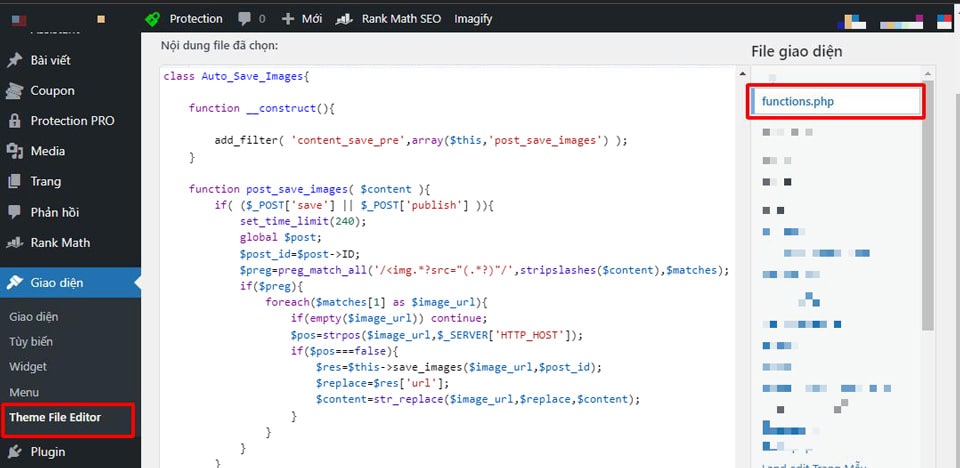
Some of your websites may not be found, maybe they are using a child theme or a theme that has not created this section yet, please switch to the parent theme.
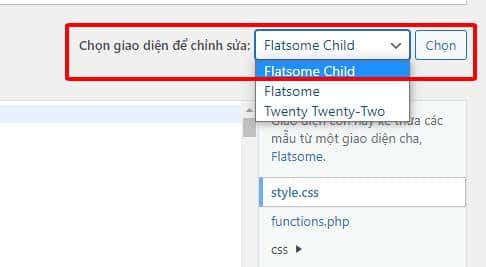
Step 4: Check the results
To check Code to automatically save images to hot when copying images from other pages Whether it works or not, please do the following:
Create an article with the title of your choice > Copy images and content from another site to this article. At this time, when you check, you still see that the link is from the other party. You proceed to Save the draft of the website and it will automatically reload. Now you just need to check the results again.
Summary.
I recently shared with you the passage The code automatically saves images to hot when copying images from another page. At the same time, detailed instructions on how to insert and use that code. Hope this article will be really useful to you.
If you find it useful, don't forget 5* rating and follow Facebook channel us to be updated with the latest news.
Source: Collector