Taobao is a large e-commerce platform from China. Like Shopee and Tiki in Vietnam, Taobao is a distributor and supplier of thousands of different products. To shop directly at this app, you need to know how Register for Taobao. The following article will detail how Register for Taobao on phones for users in Vietnam.
Overview of Taobao
Before learning how to register for Taobao on your phone, we should learn a little about this application. This is a large e-commerce platform, originating from China. Currently, Taobao is managed by Alibaba Group. Taobao has a similar way of operating as Amazon and eBay, or Shopee, Tiki in Vietnam.
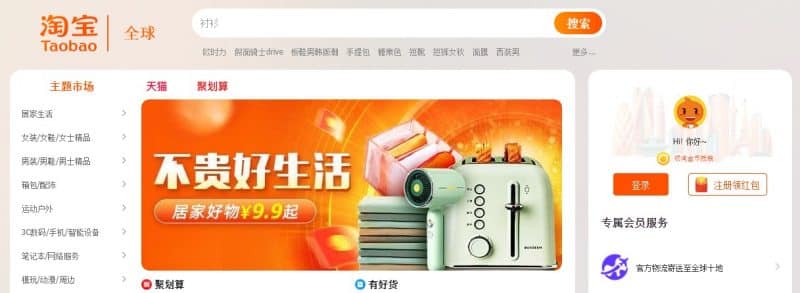
Taobao is a Chinese website and has no international trade orientation. So currently this app only supports Chinese, no other language options are available. If you don't understand how to register for Taobao on your phone, you need to know a little Chinese to use it.
Currently, stores on Taobao are strictly managed by Alibaba. This is to ensure the quality of goods and the rights of sellers and buyers. So the service and quality of products here are highly appreciated. Not only does it attract huge purchases from domestic people but it also attracts international customers.
If you are in need import taobao goods with cheap price please Contact us now for more details
What products does Taobao have?
Anyone who intends to do business will think of importing goods from Taobao. This is a large e-commerce platform, with many diverse sources from China. So it is an ideal place for sellers in Vietnam to import goods for business.
Taobao offers all kinds of items from electronics, home appliances, cosmetics and clothing. The products have a variety of designs, targeting many different audiences.
For those who like to sell fashion, accessories, etc., Taobao is truly paradise. It can be seen that fashion items on Taobao are very diverse and unique. However, the price is extremely cheap and meets the needs of the majority of consumers today.
Maybe you are interested
- How to create a taobao account in Vietnamese
- Taobao Order service at factory prices without intermediaries
- Experience in shipping Chinese goods to Vietnam from az
- What does the Chinese goods shipping service to Hanoi include?
- Instructions for shipping Chinese goods to Vietnam fastest
Should I buy from Taobao?
The problem that many people worry about is whether or not they should buy Taobao products. Because this is a domestic Chinese e-commerce platform, shopping will be quite complicated. You are limited in reading product information, and products with problems are difficult to return. However, if you check the products carefully, this is also a place that provides quite quality items.
In addition, products on Taobao also have many other outstanding advantages as follows.
1. Diverse designs
The biggest advantage of Taobao is that the goods are extremely diverse in design and style. This is considered a "giant market" with diverse items. You can find all kinds of unique goods right on this application and website. For fashion items and accessories, there will be many colors for many different ages.
As for electronic items and household appliances, the hottest products are always available. With diverse designs, sizes and colors. You can even import Taobao goods to open a large home appliance store.
2. Reasonable price
An issue that also causes a lot of controversy is that goods on Taobao are sold at quite cheap prices. This makes many people worry about price versus quality. But the current Taobao stores are carefully managed by Alibaba at this stage. So the problem of cheap and poor quality products is quite low.
You just need to take the trouble to read product reviews before ordering. In general, the products on Taobao have reasonable prices. Whether you buy it for personal use or take it in large quantities for business, it's fine.
How to register for Taobao on your phone
As mentioned, Taobao is a Chinese application, so it will not support other languages. Currently, if you want to register for Taobao, you will have to know a little about Chinese. If you do not know Chinese, please refer to how to register for Taobao on your phone as follows.
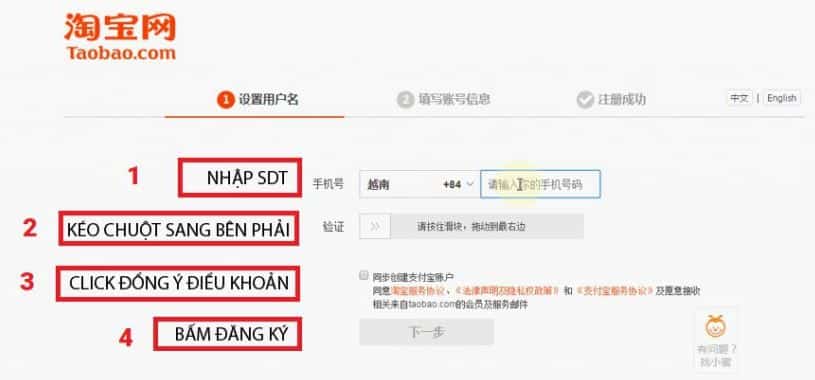
- Step 1: Download the Taobao App to your phone. Currently, the Taobao app is available on cH Play and the App Store, so anyone using Android or iOS can go there to download the app.
- Step 2: After downloading the app, open the app > Select Agree to Taobao's terms.
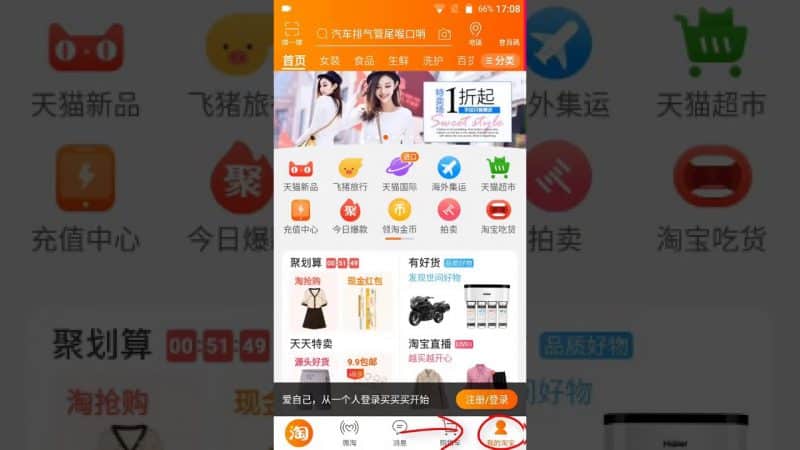
- Step 3: Register for a Taobao account: Click on the orange box or smiley face in the lower left corner of the application interface > Next click on the orange text that appears on the screen > Select Vietnamese number (+84) and enter the phone number you are using to register an account.
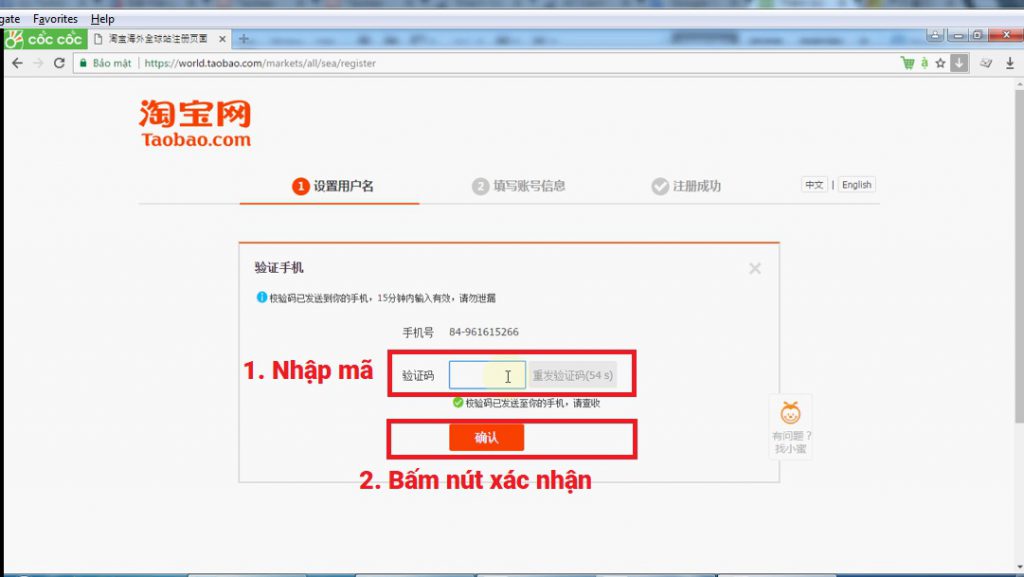
- Step 4: After successfully entering the phone number, Taobao will send a verification code to your phone. The 4-digit verification code will be automatically updated by the system and you have successfully registered for a Taobao account.
How to register for Taobao on your phone is generally quite simple and easy to do. You only need to use a few steps to complete your Taobao account registration.
Some common errors when registering Taobao on your phone
During the Taobao registration process on the phone, problems sometimes occur. Please note the following errors to avoid encountering them when registering for Taobao on your phone.
1. Did not receive verification code
Many people encounter the problem of not receiving the verification code during the Taobao registration process on their phone. This error often occurs for the following two reasons:
- Using an unofficial phone number: If you want to use a relative's phone number to register, you should pay attention to the verification code message. Usually, the Taobao system will recognize the phone verification code and fill it in automatically. However, when using another phone number to register, you need to pay attention to the phone and enter the verification code directly into the phone used to register.
- The phone has foreign number blocking software installed: Nowadays, to avoid trouble, some people install foreign number blocking software on their phones. So it will not be possible to receive confirmation code messages from Taobao. You should open the settings again or transfer the SIM to another phone to receive the account verification code.
Usually, errors in verification codes will have a lot to do with the phone number you used to register. Sometimes due to network congestion, you can click resend code to receive a new verification code.
2. Blocked registered phone number
In some other cases, because they did not receive the verification code, they hastily clicked resend code many times and their phone number was blocked. Please note, this is a foreign system, so sending the verification code will take a bit more time. You need to wait for the correct time specified by the system for the verification code to be sent to your phone.
Only in certain unfortunate cases should you click resend code to receive a new code. If you click resend code repeatedly, the system will be forced to block the phone number. At this time, if you want to register for a Taobao account, you must use a different phone number.
Can I not register for Taobao?
To use this application, you need to register for an account. If you do not register an account, you can still view the items on the app. However, product and store information may be limited. You also cannot buy Taobao products if you do not register an account on this app.
How to register for Taobao on your phone is also quite simple. You just need to follow the steps that we instruct above. If you know a little Chinese, registering for a Taobao account is also more convenient. However, for those who do not know Chinese, you should follow our instructions to register a Taobao account on your phone.
Why should you register for Taobao?
In addition to registering for Taobao to buy products, you also receive many benefits when registering an account. Taobao, like other e-commerce platforms, has many promotion codes. To minimize shopping costs and have many incentives, you should register for Taobao on your phone.
In addition, registering a Taobao account also helps you receive free shipping codes and free returns. Helps you make purchases more conveniently and easily solve bad risk problems that may occur.
Registering a Taobao account on your phone will help you receive customer rights. Your rights are protected when shopping here and receive quick support when you encounter problems. Registering an account does not take too much time, but the benefits you receive are many. So please follow the method of registering a Taobao account on your phone that we suggested above.
A few notes when registering for Taobao on your phone
Registering an account for a foreign application will be slightly more complicated than for a domestic application. However, with the way to register for Taobao on your phone that we guide, it will help you register more easily. There are also the following notes for you to limit risks when registering for Taobao on your phone:
- You can use Translate to translate from Chinese to English or Vietnamese on the Taobao app. Although the translated content is only at a relative level, it will still greatly support your registration process.
- When choosing an area code, pay attention to choosing the correct area code in the country you live in. Also check the phone number entered before confirming registration. When you enter the wrong phone number, the confirmation code will not be sent.
- Note down your username and password to avoid forgetting or losing your password. This will cause a lot of trouble when you need to check the order status or need to return it.
With these notes, you will limit problems that may occur during the registration process. Don't forget to follow the correct steps in the how to Sign up for taobao on the phone we provide. Hopefully it will help you have the best shopping experience on this e-commerce platform.
Infomation: Instructions on how to log in to Taobao on computers and phones
Also don't forget Follow our Fanpage to update the latest useful information