Skip to content
  • About us
  • Contact
  • en_USEN
  • viVI
FacebookTwitterPinterest
HOWTOHOWTO
  • All
    • Tips
      • Google
      • Facebook
      • Tiktok
    • Instruct
      • What is Q&A?
      • Taobao
    • WordPress
      • Code
      • Plugins
      • Themes
        • Flatsome
        • Theme Nevo
  • ShareHot
    • WordPress
    • Code
    • Plugins
    • Tips
    • Windows
    • Apple
    • Graphics
    • Experience
  • Graphics documents
    • illustrator
    • Sketchup
    • Coreldraw
    • 3ds max
    • Enscape
    • Photoshop
    • Graphics Plugin
  • Course
    • Photoshop course
    • illustrator course
    • Coreldraw course
    • Edit video course
    • Course Sketchup
    • Autocad course
    • Website management course
  • Service
  • Software
    • Windows
      • Tips
      • Office
      • Necessary
      • Tools
    • Apple
  • Game
  • News
    • Technology
    • Review
Hello!

  • Lost your password ?
HOWTOHOWTO
  • Home > 
  • Graphics > 
  • Sketchup > 
  • Instructions for Setting up sketchup when first installing

Instructions for Setting up sketchup when first installing

By How To 14/09/2024 1363 Views
Instructions for Setting up sketchup when first installing
Article categories

Setting sketchup là việc cực kỳ cần thiết khi lần đầu cài đặt. Setting sketchup sẽ giúp bạn tối ưu được máy tính trong quá trình làm việc được hiệu quả hơn. Giúp tăng hiệu quả trong công việc. Bây giờ chúng ta sẽ đi tiến hành setting sketchup chi tiết nhé

Instructions for Setting up sketchup when first installing

  • When you initially install Sketchup, the default interface of Sketchup will not be optimized. So if you want to work in a more scientific and convenient interface, we need to Setting Sketchup Back to the interface for Sketchup. To make it easier for us to use, the working area is wider...

Step 1: Configure the workspace in Sketchup

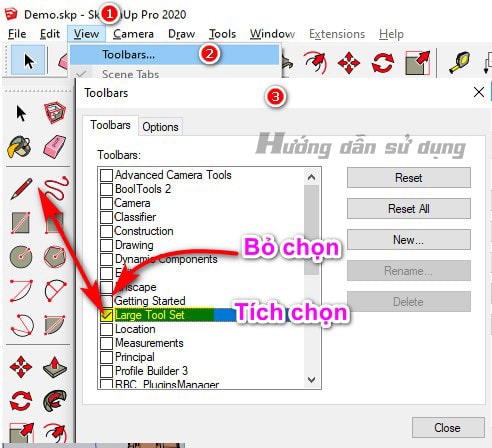
You need to optimize the interface to suit and work faster. View → Toolbars… → You collect the tools you need to go outside
Setting sketchup
Set up toolbars in sketchup

Select the tool below

  1. Large tool Set: Show all tools on the left
  2. View: The tool allows viewing in the left, right, top, bottom...
  3. Solid tools: Tool intersects selection area.
  4. Layers/tags: Object management tool in Sketchup
  5. ….

If you want to get any other tool, just select it.

  • What is Interior Design? How much does an interior design job pay?
  • HOW TO toolbar in Enscape
  • Download Enscape full
  • Detailed instructions for installing Enscape

Step 2: Set up units for Sketchup drawings

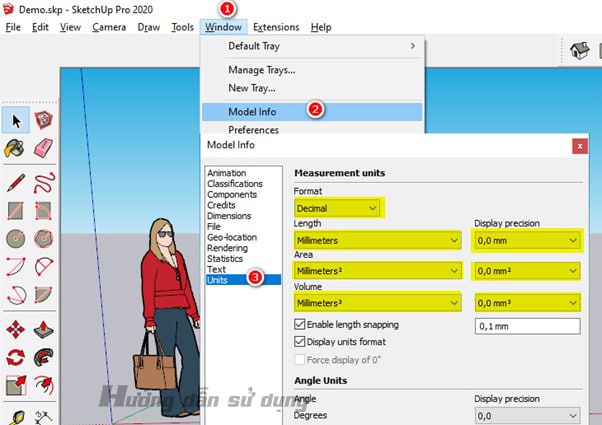
Set the unit for the file you do the following:

Menu → Window → Model info → Units: You choose all units in mm and the display of decimal numbers with 1 or 2 zeros is up to you.
Setting sketchup
Change units in sketchup

Step 3: Set up general configuration in Sketchup

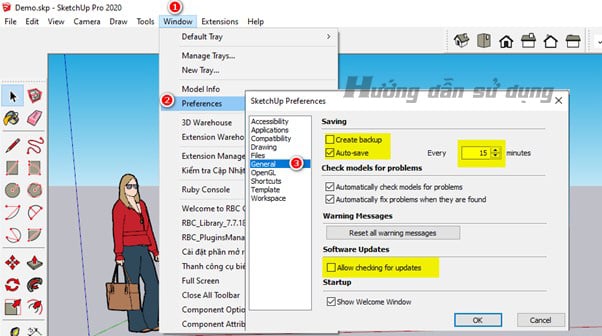
Menu → Window → Preferences → General:

  • Create backup: You should leave me feeling a bit redundant.
  • Auto save: You should leave it for 15 minutes or more to avoid the situation where we are doing it and it will save every 5 minutes, leading to a hang-up.
  • Allow checking for updates: Turn off this function in case when you turn it on it asks if you clicked the wrong update and then cannot use it.
Setting sketchup
Setting sketchup sets general parameters

Step 4: Set up keyboard shortcuts for Sketchup

    • In the same order as step 3, we follow the following path:
    • Menu → Window → Preferences → Shortcuts: You import your shortcut file. Be sure to uncheck the locations file section to avoid errors.
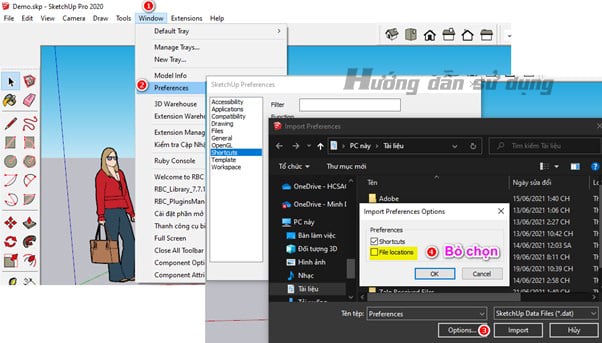
DOWNLOAD SHORTCUTS
Setting sketchup
Setting sketchup sets shortcuts in sketchup

Step 5: Set up style in Sketchup

Let your drawing be lighter as we work. We need to remove excess details and the smaller outlines you draw will be lighter. At the same time, your display also becomes more beautiful.

Set up as shown below.
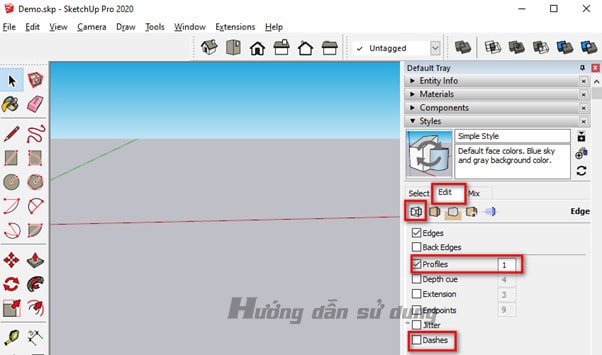
Setting sketchup
Set up the Style interface in sketchup
      • Profile: You should set it to 1 so that the lines it displays are less to avoid making the drawing too heavy
      • Remove Dashes: Do not display excess parts

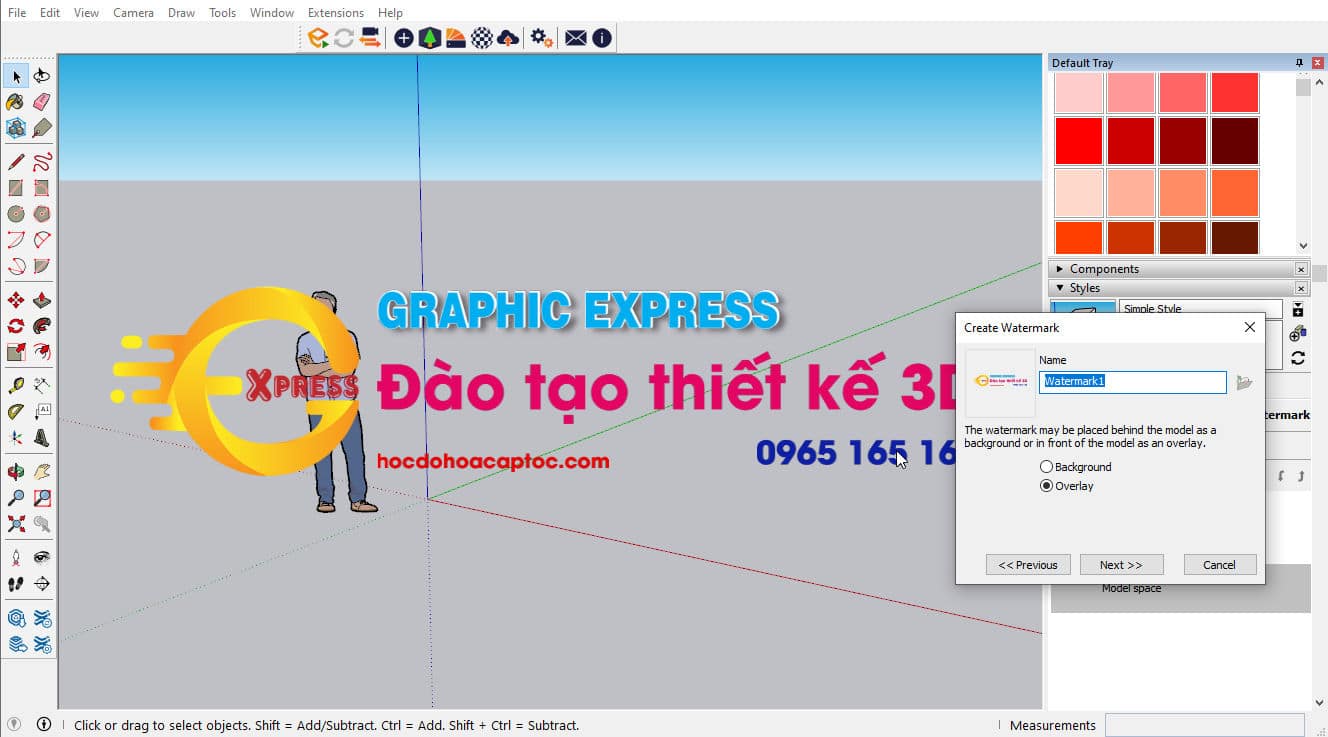
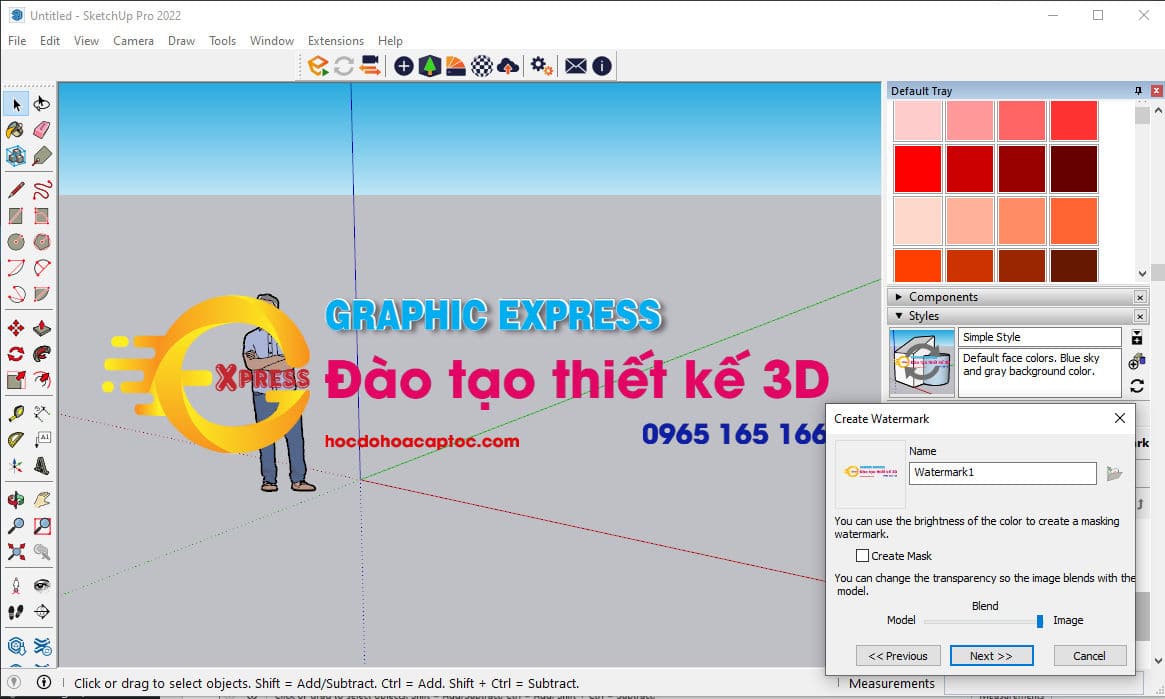
Continue to select Edit to set copyright for the drawing. When you set this up, every time you send a drawing to someone it will display your information. You should leave this part as a .PNG image so that your background image is transparent.

Refer to the Style Sketchup sample file

Download the Style Sketchup file template
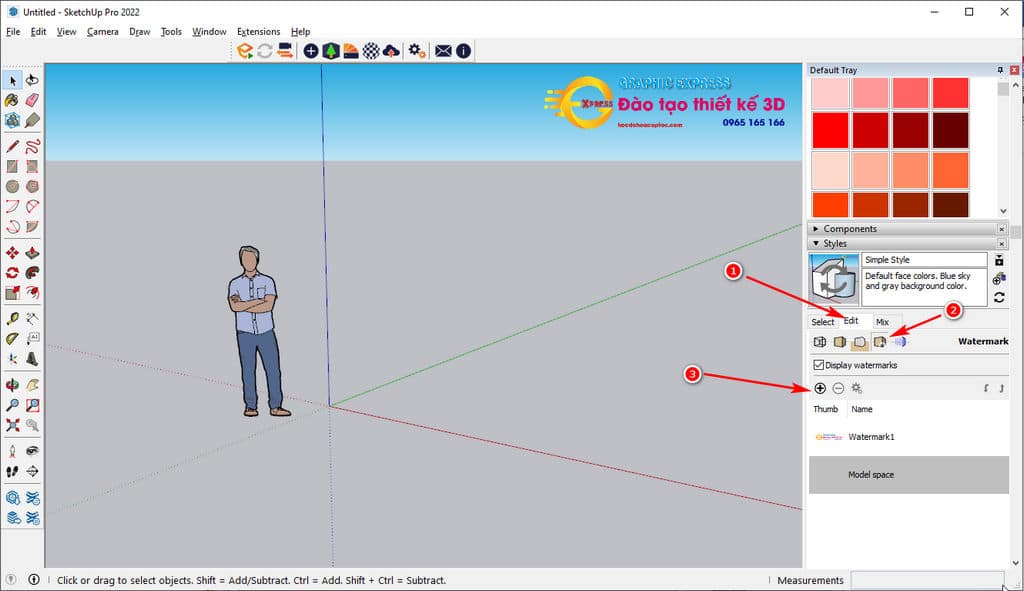
Setting sketchup
Setting sketchup copyright settings for drawings
      • Select the plus sign then navigate to the image file you want to display (Attention: For best display, you should leave the PNG image with the background separated):
      • You choose Overlay then select next according to the image below
Setting sketchup
Setting sketchup
      • Continue, select next.
Setting sketchup
Setting sketchup

Continue to choose the display position on the screen in the order 1,2,3. Step 3 is the step for you to zoom in and out of the image displayed on the screen accordingly.
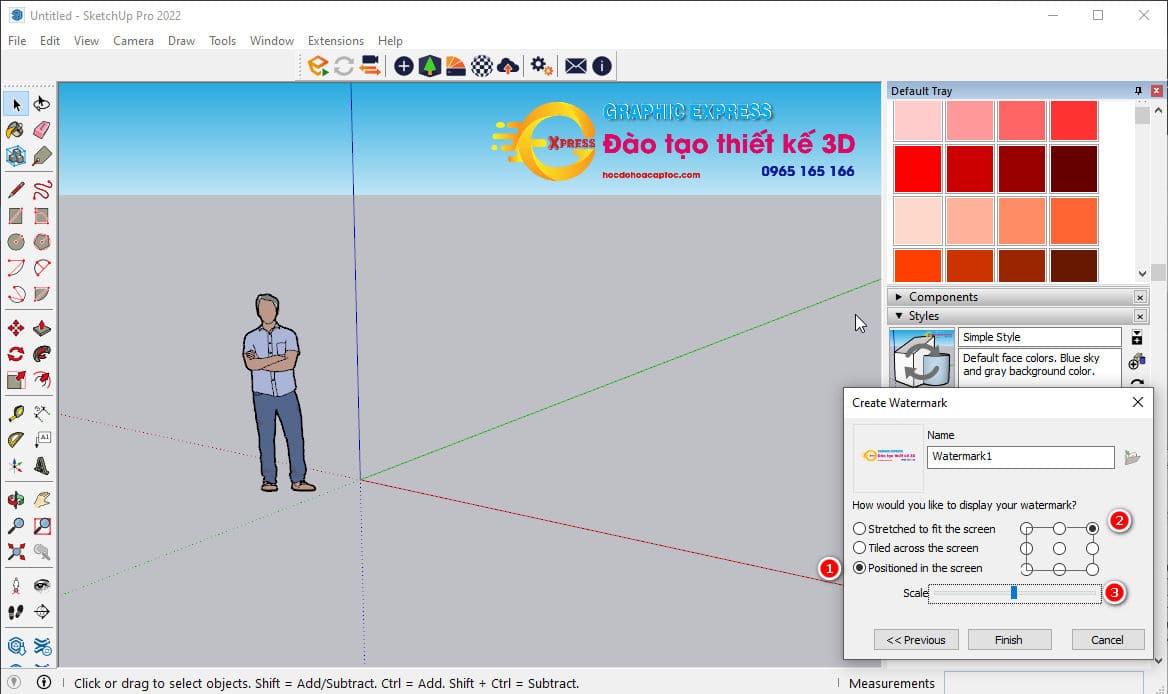
Setting sketchup
Setting sketchup

After finishing, select Finish. So you have successfully installed the Style section.

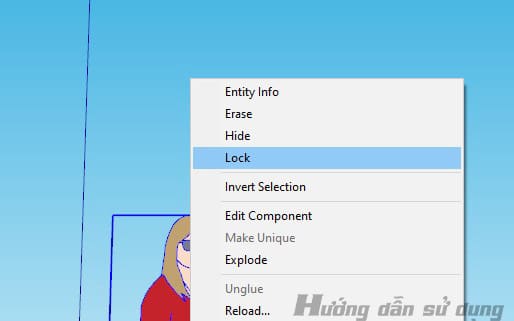
Step 6: Lock the person in the sketchup drawing.

      • Avoid situations where during the drawing process we will erase the image and that means losing the proportional relationship. You select the human image and right-click then select lock.
Setting sketchup
Lock people to avoid losing proportion in the drawing

Step 7: The most important step is to save the sample file

This is the most important step. We need to save the file we just installed to avoid having to reinstall next time. Let's save it for future use.
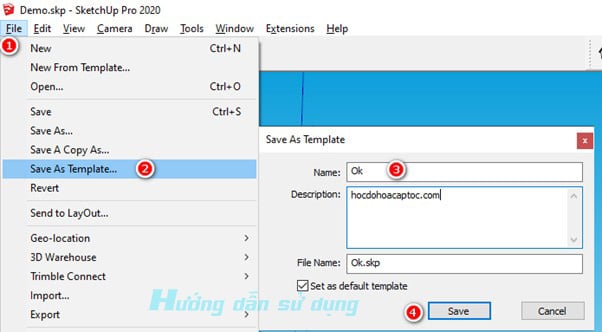
Setting sketchup
Save sample settings file in sketchup
      • Now every time we open Sketchup, a sample file will appear that we have already set up Sketchup. You just need to select that file and you can start working with sketchup.
Setting sketchup
The interface on startup does not need to be reset.

Finish setting up Sketchup.

So I just gave you instructions. Way Setting Sketchup These are the parameters that need to be initially set when we do a new installation. This step is a step that cannot be skipped with most software.

Through this article we hope to be of great help to you. Wish you all work effectively.

If you find this article useful, don't forget it follow our facebook to update the latest information.


Tags : Tags sketchup settings   Setting sketchup   sketchup   sketchup settings
Share
FacebookShare on FacebookpinterestShare on PinterestMessengerShare on Facebook Messenger
twitterShare on TwitterlinkedinShare on LinkedinvkShare on VkredditShare on ReddittumblrShare on TumblrvideoShare on Viadeobuffer. bufferShare on Bufferpocket. pocketShare on PocketwhatsappShare on WhatsappViberShare on ViberemailShare on EmailskypeShare on SkypediggShare on DiggmyspaceShare on MyspacebloggerShare on Blogger YahooMailShare on Yahoo mailtelegramShare on Telegram gmailShare on GmailAmazonShare on AmazonSMSShare on SMS
How To

How To

A person who is passionate about sharing knowledge from life. Common knowledge in life. Sharing is my passion. Hopefully my knowledge will bring many benefits to you

Related articles

Instructions for Setting up sketchup when first installing

Fix failure to load 3dwarehouse Sketchup library

By How To 21/11/2025 0

Fix failure to load 3dwarehouse Sketchup library. 3D…

Instructions for Setting up sketchup when first installing

Fix using sketchup plugin saying not licensed

By How To 10/11/2025 0

Fix using sketchup plugin saying not licensed Please…

Instructions for Setting up sketchup when first installing

Download 1001 bit pro Vietnameseization plugin 100%

By How To 09/11/2025 0

Download 1001 bit pro plugin 1001 bit plugin…

Categories What is Q&A? What is the structure of that place?

What is Interior Design? How much does an interior design job pay?

12/12/2025
What is Material?

What is Material? Material application in the field of design

11/12/2025
What is the poster?

What are posters? 9 Tips for designing beautiful, quick Posters

11/12/2025
What does graphic design do? Is it easy to get a job?

What does graphic design do? Is it easy to get a job?

11/12/2025
Water is the water material in Enscap

Water is the water material in Enscap

11/12/2025

Recent comments

  • male1 year ago
    On How to create a fade effect in Photoshop
    Great
  • phat phat2 years ago
    On Who is 5SMedia?
    Useful article
  • Minh Anh3 years ago
    On How to create basic materials in vray Sketchup
    Very good, admin
Copyright © 2025 HOWTO - Powered by HOWTO

5SMedia.net | hocdohoacaptoc.com | huongdansudung.vn | webantam.com

Back to Top
Hello!
  • All
    • Tips
      • Google
      • Facebook
      • Tiktok
    • Instruct
      • What is Q&A?
      • Taobao
    • WordPress
      • Code
      • Plugins
      • Themes
        • Flatsome
        • Theme Nevo
  • Share
    • WordPress
    • Code
    • Plugins
    • Tips
    • Windows
    • Apple
    • Graphics
    • Experience
  • Graphics documents
    • illustrator
    • Sketchup
    • Coreldraw
    • 3ds max
    • Enscape
    • Photoshop
    • Graphics Plugin
  • Course
    • Photoshop course
    • illustrator course
    • Coreldraw course
    • Edit video course
    • Course Sketchup
    • Autocad course
    • Website management course
  • Service
  • Software
    • Windows
      • Tips
      • Office
      • Necessary
      • Tools
    • Apple
  • Game
  • News
    • Technology
    • Review
en_US EN
en_US EN vi VI