

Share beautiful related article code for Flatsome.When you write an article, there will often be related topics associated with that category. Then your article will forever stay on your website and no one will know about it.
To make your SEO content better. The code below will help you display all related articles in the same category to help your articles reach better. Thereby also helping users experience your website for the longest time. That's the SEO trick. Now I will Share beautiful related article code for Flatsome Comes with detailed instructions for you to follow.
Note: This code can only be used for the Flatsome theme and cannot be used for other themes to avoid copying it to another theme and then not being able to use it.
see more
- The code condenses product details and categories on Flatsome
- The code shows nice promotions for flatsome like Cellphones
- Code to display hotline on website
- Code to automatically save images to hot when copying images from other pages
How to insert beautiful related article code for Flatsome
Step 1: Login hoting
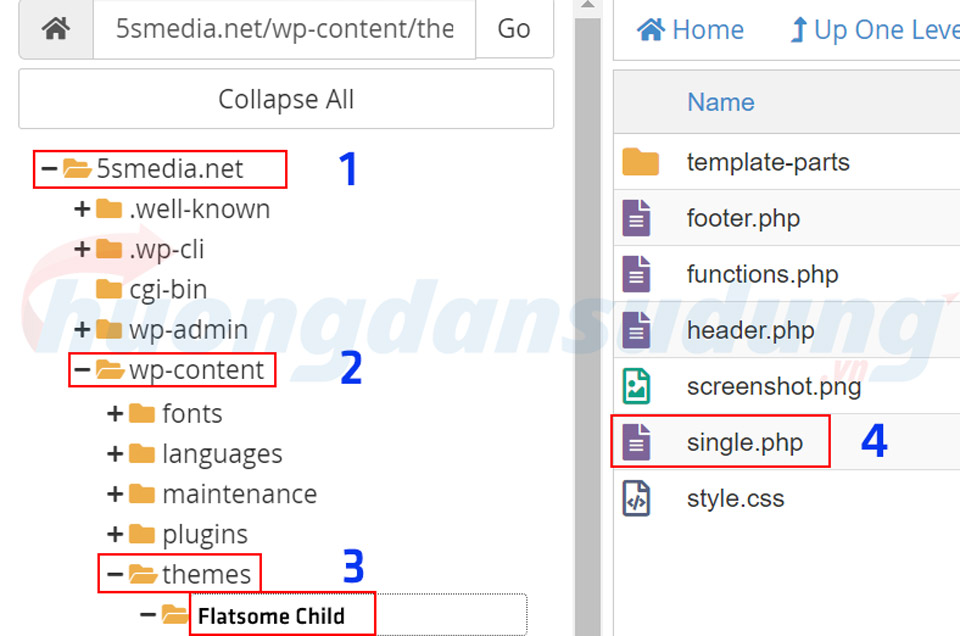
You need to log in to the hotline where you rented the server > File > Find your website > Create 1 files in hosting with name Single.php
Step 2: Copy the Code Single.php
After creating, you need to copy the entire code below inside the file Single.php
<?php
get_header();
?>
<div id="content" class="blog-wrapper blog-single page-wrapper">
<?php get_template_part( 'template-parts/posts/layout', get_theme_mod('blog_post_layout','right-sidebar') ); ?>
<div class="row row-large">
<div class="large-9 col">
<div class="danh-muc"><span class="titles">Category: </span><?php
$category_list = get_the_category_list( __( ' ', 'flatsome' ) );
printf($category_list, the_title_attribute( 'echo=0' ) );?></div>
<div class="the-tim-kiem"><span class="titles">Key word:</span><?php echo get_the_tag_list(' ',' ',''); ?></div>
</div>
</div>
<div id="secrelatedcat" class="sec-relatedcat">
<div class="row row-large">
<div class="large-12 col">
<?php
$categories = get_the_category(get_the_ID());
if ($categories){
echo '<div class="relatedcat">';
$category_ids = array();
foreach($categories as $individual_category) $category_ids[] = $individual_category->term_id;
$args=array(
'category__in' => $category_ids,
'post__not_in' => array(get_the_ID()),
'posts_per_page' => 8, // So bai viet dc hien thi
);
$my_query = new wp_query($args);
if( $my_query->have_posts() ):
echo '<h3 class="relatedcat__title"><span>Bài viết liên quan</span></h3><ul>';
while ($my_query->have_posts()):$my_query->the_post();
?>
<li>
<div class="relatedcat-thumnail">
<a href="<?php%20the_permalink()%20?>">
<?php the_post_thumbnail(); ?>
</a>
</div>
<a href="<?php%20the_permalink()%20?>" title="<?php the_title_attribute(); ?>"><?php the_title(); ?></a></li>
<?php
endwhile;
echo '</ul>';
endif; wp_reset_query();
echo '</div>';}?>
</div>
</div>
</div>
</div>
<?php get_footer();
Step 3: CSS makes it more beautiful
To make your related posts display better, you need to css it so your display will look better.
You need to copy it into your CSS section by following the following link. Display > Theme file editor > Style.css
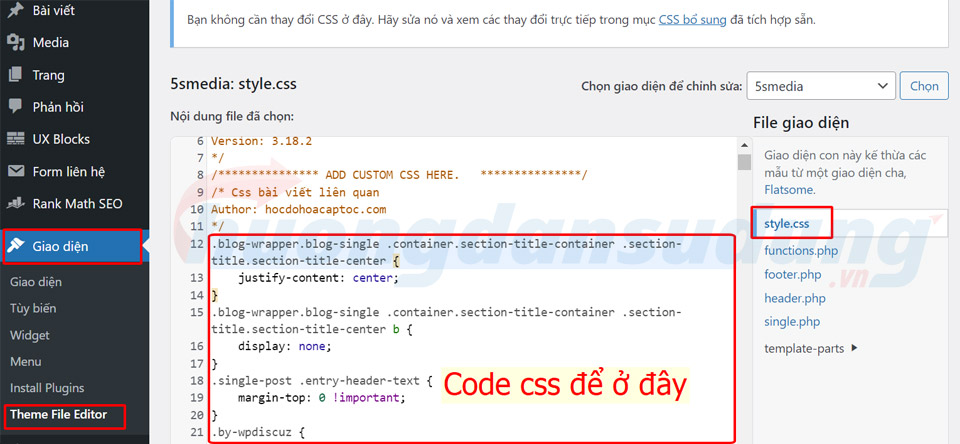
/* Related article css Author: hocdohoacaptoc.com */ .blog-wrapper.blog-single .container.section-title-container .section-title.section-title-center { justify-content: center;} .blog -wrapper.blog-single .container.section-title-container .section-title.section-title-center b { display: none;} .single-post .entry-header-text { margin-top: 0 !important; } .by-wpdiscuz { display: none;} .post-views.post-12886.entry-meta { padding-bottom: 0;} .entry-meta__entry-review { display: flex; align-items: center;} span.post-views-icon.dashicons.dashicons-chart-bar { display: none !important;} span.a_posted-on.posted-views { display: flex;} span.a_byline { color : #999; margin-bottom: 0; line-height: 23px; font-size: 14px; margin-right: 0; letter-spacing: 0;} .archive .hide-archive { display: none !important;} .relatedcat ul > li > a { overflow: hidden; display: -webkit-box; -webkit-line-clamp: 2; -webkit-box-orient: vertical; height: 40px;} .relatedcat { border: none !important;} .sec-relatedcat { background-color: #f5f5f5;} .blog-wrapper.blog-single.page-wrapper { padding-bottom: 0;} .relatedcat{ border:2px dashed red; padding:5px; margin-top:10px; margin-bottom:10px; overflow:hidden} .recent-blog-posts a{ font-size:14px} .relatedcat h3{ color:red; font-style:italic} .relatedcat li a{ color:#242424} .relatedcat li{ padding-left:10px; margin-left:0} .relatedcat li a:hover{ color:Blue} .relatedcat li i,.relatedcat h3 i{ padding-right:5px} #theh1 { display: none;} @media (min-width: 849px) { .relatedcat ul { overflow: hidden; margin: 0 -10px;} .relatedcat ul > li { list-style: none; width: 25%; padding: 8px 10px; float: left; margin-bottom: 20px;} .relatedcat ul > li img { object-fit: cover; width: 100%; height: 175px; border-radius: 5px; transition: transform .5s;} .relatedcat ul > li > a { line-height: 20px; display: block; margin-top: 10px;}} /* Running out of related article CSS */
Step 4: Check the results again.
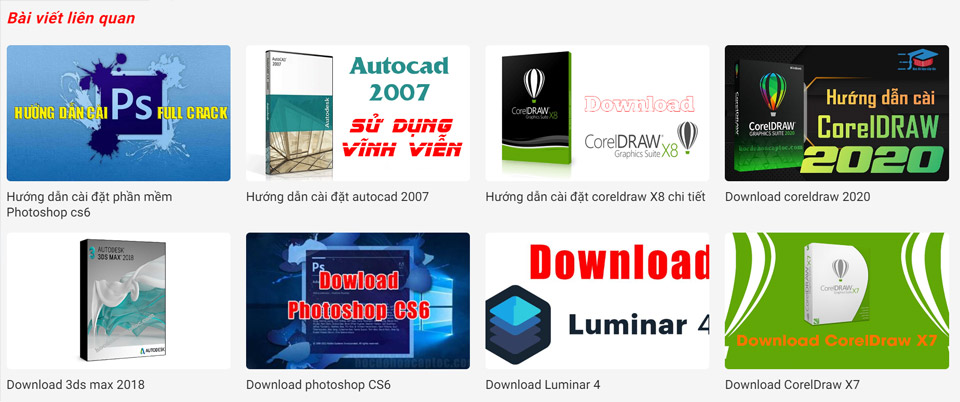
After you add correctly, we will have a section displaying related articles like the image below.
Conclude
So I just shared it Nice related article code for Flatsome beautiful for you. Hopefully this code will help make your article more lively. Through this, your articles will also become richer.
Don't forget to follow us on facebook to be updated with the latest information


