Skip to content
  • About us
  • Contact
  • en_USEN
  • viVI
FacebookTwitterPinterest
HOWTOHOWTO
  • All
    • Tips
      • Google
      • Facebook
      • Tiktok
    • Instruct
      • What is Q&A?
      • Taobao
    • WordPress
      • Code
      • Plugins
      • Themes
        • Flatsome
        • Theme Nevo
  • ShareHot
    • WordPress
    • Code
    • Plugins
    • Tips
    • Windows
    • Apple
    • Graphics
    • Experience
  • Graphics documents
    • illustrator
    • Sketchup
    • Coreldraw
    • 3ds max
    • Enscape
    • Photoshop
    • Graphics Plugin
  • Course
    • Photoshop course
    • illustrator course
    • Coreldraw course
    • Edit video course
    • Course Sketchup
    • Autocad course
    • Website management course
  • Service
  • Software
    • Windows
      • Tips
      • Office
      • Necessary
      • Tools
    • Apple
  • Game
  • News
    • Technology
    • Review
Hello!

  • Lost your password ?
HOWTOHOWTO
  • Home > 
  • Graphics > 
  • Enscape > 
  • Clearcoat metallic material in Enscape

Clearcoat metallic material in Enscape

By How To 10/12/2025 0 687 Views
Clearcoat metal materials in Enscape 1 1
Article categories

Clearcoat metallic material in Enscape

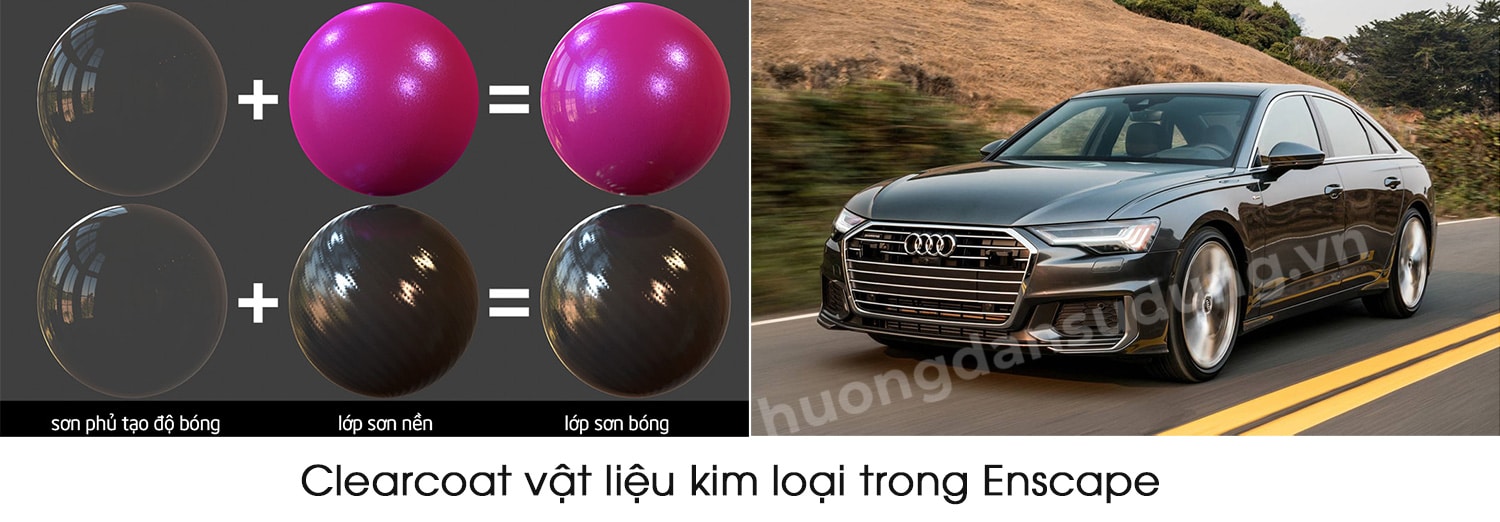
When selecting “Clearcoat” as the material type, the Enscape Material Editor interface will completely remove the transparency option.
The Clearcoat material mimics the paint you'd find on a vehicle's trunk. So basically Clearcoat is a transparent plastic material and the color is determined through the Albedo option in the Material Editor window.
The material is therefore shiny and reflective by default, although you have the option to return to the reflective properties, as well as add a bump map.
Clearcoat metal material in Enscape 1
Metal Material Clearcoat tool in Enscape

[note]

See more…

  • HOW TO materials for Carpet and Carpet in Enscape
  • HOW TO Generic materials in Enscape
  • Details of Setting parameters in Enscape
  • HOW TO toolbar in Enscape
  • HOW TO toolbar in Enscape
  • Download Enscape

[/note]

Clearcoat metallic material in Enscape
material 1
Clearcoat metallic material in Enscape

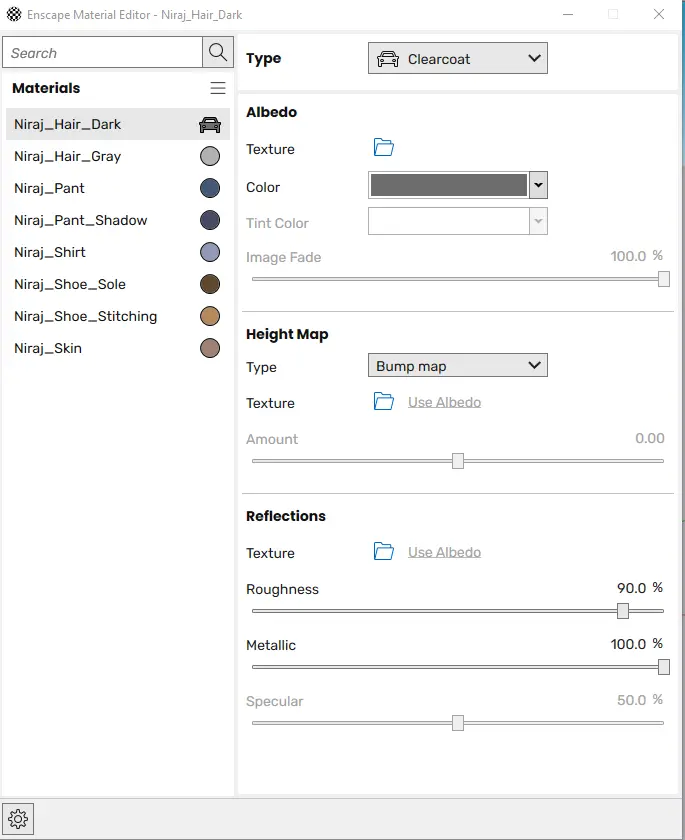
This is the tool that creates glossy paint or metal textures in Enscape. Below are the Clearcoat panel parameters in Enscape

Albedo

Texture: The part containing materials brought in from outside.

Color: The object's material color

Tint Color: Colors are blended when using Texture for materials

Image Fade: Combined blending intensity when using Tint Color

Height Map

Type: Bump map: is a mode to create details for the object. Helps subjects become sharper and clearer.

Texture: Use Albedo: used in combination with the texture map above. The system will automatically adjust to Bump map mode. Here you can also use maps imported from outside

Amount: is the intensity of detail when using Bump map, the larger the parameter, the clearer the detail. If you have a Bump map you should use it rather than using Use Albedo.

Reflection: Far reflection.

An example illustrating a Clearcoat Material reflection in Enscape

Clearcoat Material Analysis in Enscape
Reflections on metal materials in Enscape
  • Texture: You can use the map to create random reflectivity for the object. This map is often used in black and white. White will leave black which will be reflected. The keywords you can search for are: dirt map.
  • Roughness: Reflectivity. The larger the parameter, the less reflection. The smaller the parameter, the more reflection.
  • Metallic: Create and process reflections of surfaces, metallic, non-metallic (e.g. plastic, ceramic or metal surfaces...)
    Supposedly metallic surfaces act like a mirror, reflecting a clear image of their surroundings, while non-metallic surfaces represent more of their actual surface, reflecting the environment rather vaguely. .
  • Specular
    This value controls the amount of light that is reflected when it hits a non-metallic surface slope angle, as opposed to the light shining on it and not from the side.
    If you're not too familiar with this setting, it's best to leave it around 50% for realistic results.

Conclude:

So I just gave you detailed instructions Clearcoat metallic material in Enscape. Through this article, we hope that you will understand the reflective material properties in Enscape. Let's help you create a beautiful illustration.

Good luck.

Don't forget to follow us on Facebook to be updated with the latest information

Tags : Tags Clearcoat Enscape   Clearcoat Material reflections in Enscape   Metal materials in Enscape
Share
FacebookShare on FacebookpinterestShare on PinterestMessengerShare on Facebook Messenger
twitterShare on TwitterlinkedinShare on LinkedinvkShare on VkredditShare on ReddittumblrShare on TumblrvideoShare on Viadeobuffer. bufferShare on Bufferpocket. pocketShare on PocketwhatsappShare on WhatsappViberShare on ViberemailShare on EmailskypeShare on SkypediggShare on DiggmyspaceShare on MyspacebloggerShare on Blogger YahooMailShare on Yahoo mailtelegramShare on Telegram gmailShare on GmailAmazonShare on AmazonSMSShare on SMS
How To

How To

A person who is passionate about sharing knowledge from life. Common knowledge in life. Sharing is my passion. Hopefully my knowledge will bring many benefits to you

Related articles

Clearcoat metallic material in Enscape

Foliage of grass and leaf materials in Enscape

By How To 10/12/2025 0

Foliage of grass leaves material in Enscape Material…

Clearcoat metallic material in Enscape

Carpet in Enscape material Carpet, Fur

By How To 10/12/2025

HOW TO Carpet Materials, Carpet Wool in Enscape Function…

Clearcoat metallic material in Enscape

Generic materials in Enscape

By How To 09/12/2025 0

Basic material properties Generic materials in…

Leave a Comment Cancel reply

Categories Enscape Foliage information in enscape 8

Foliage of grass and leaf materials in Enscape

10/12/2025
Clearcoat metal materials in Enscape 1 1

Clearcoat metallic material in Enscape

10/12/2025
How to create flowers in illustrator

How to create flowers in illustrator

10/12/2025
Carpet in Enscape banner

Carpet in Enscape material Carpet, Fur

10/12/2025
How to create borders for text in illustrator

How to create borders for text in illustrator

10/12/2025

Recent comments

  • male1 year ago
    On How to create a fade effect in Photoshop
    Great
  • phat phat2 years ago
    On Who is 5SMedia?
    Useful article
  • Minh Anh3 years ago
    On How to create basic materials in vray Sketchup
    Very good, admin
Copyright © 2025 HOWTO - Powered by HOWTO

5SMedia.net | hocdohoacaptoc.com | huongdansudung.vn | webantam.com

Back to Top
Hello!
  • All
    • Tips
      • Google
      • Facebook
      • Tiktok
    • Instruct
      • What is Q&A?
      • Taobao
    • WordPress
      • Code
      • Plugins
      • Themes
        • Flatsome
        • Theme Nevo
  • Share
    • WordPress
    • Code
    • Plugins
    • Tips
    • Windows
    • Apple
    • Graphics
    • Experience
  • Graphics documents
    • illustrator
    • Sketchup
    • Coreldraw
    • 3ds max
    • Enscape
    • Photoshop
    • Graphics Plugin
  • Course
    • Photoshop course
    • illustrator course
    • Coreldraw course
    • Edit video course
    • Course Sketchup
    • Autocad course
    • Website management course
  • Service
  • Software
    • Windows
      • Tips
      • Office
      • Necessary
      • Tools
    • Apple
  • Game
  • News
    • Technology
    • Review
en_US EN
en_US EN vi VI