Skip to content
  • About us
  • Contact
  • en_USEN
  • viVI
FacebookTwitterPinterest
HOWTOHOWTO
  • All
    • Tips
      • Google
      • Facebook
      • Tiktok
    • Instruct
      • What is Q&A?
      • Taobao
    • WordPress
      • Code
      • Plugins
      • Themes
        • Flatsome
        • Theme Nevo
  • ShareHot
    • WordPress
    • Code
    • Plugins
    • Tips
    • Windows
    • Apple
    • Graphics
    • Experience
  • Graphics documents
    • illustrator
    • Sketchup
    • Coreldraw
    • 3ds max
    • Enscape
    • Photoshop
    • Graphics Plugin
  • Course
    • Photoshop course
    • illustrator course
    • Coreldraw course
    • Edit video course
    • Course Sketchup
    • Autocad course
    • Website management course
  • Service
  • Software
    • Windows
      • Tips
      • Office
      • Necessary
      • Tools
    • Apple
  • Game
  • News
    • Technology
    • Review
Hello!

  • Lost your password ?
HOWTOHOWTO
  • Home > 
  • Graphics > 
  • Adobe Photoshop > 
  • The best way to remove acne in photoshop

The best way to remove acne in photoshop

By Tung Thai 24/09/2024 0 514 Views
banner
Article categories

– We have heard for a long time that Photoshop is an application specializing in editing How to remove acne in photoshop about color images for photos. With some tools and ways to help our images become more beautiful and sharper. Removing acne marks or freckles on your face to make your photos look better sounds very magical, but here's how to remove freckles and acne marks on your face naturally and quickly and effectively.

– There are many ways and tools to remove acne and freckles on a face, but below I show you a very suitable and simple way that is easy to use for everyone, including those new to Photoshop. first time

Details on how to remove acne in photoshop most effectively.
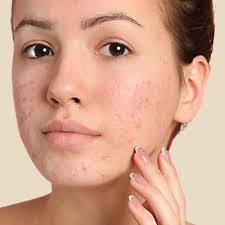
unedited photo
unedited photo

I will use the Brush tool and Layer mask (referred to as mask)

  • Step 1: We copy the image of that layer using the keyboard shortcut Ctrl+J or go to the menu bar above Layer > New > Layer Via Copy (Ctrl+J)
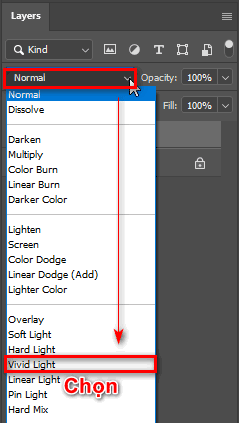
  • Step 2: After finishing, we use the blending mode for the image as Visid Light (image contrast)
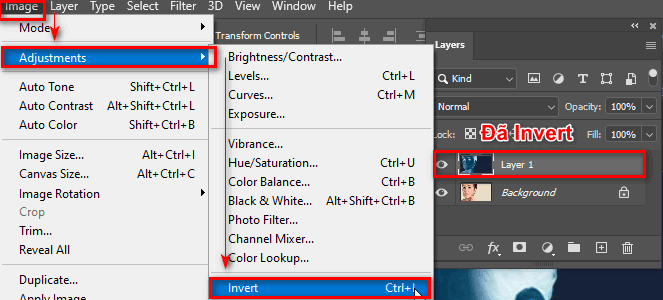
  • Step 3: I used the newly copied layer and used the command Ctrl+I to reverse or go to the menu bar above Image > Adjustments > Invert (Ctrl+I)
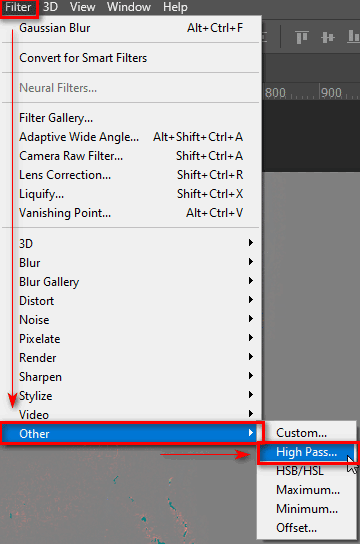
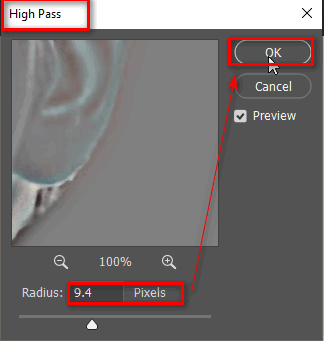
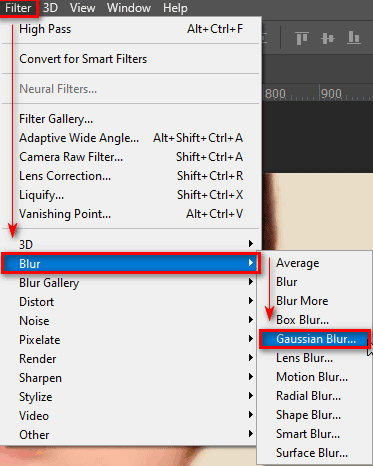
  • Step 4: I look on the menu bar then select Filter > Other > High Pass (9.4 Pixels) > OK (parameters you can edit to suit the photo you want to edit)
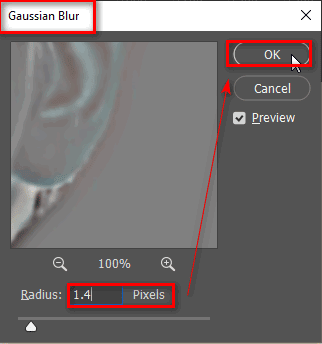
  • Step 5: Go to select menu bar Filter > Blur > Gausian Blur (1.4 Pixels) > OK (parameters you can edit to suit the photo you want to adjust)
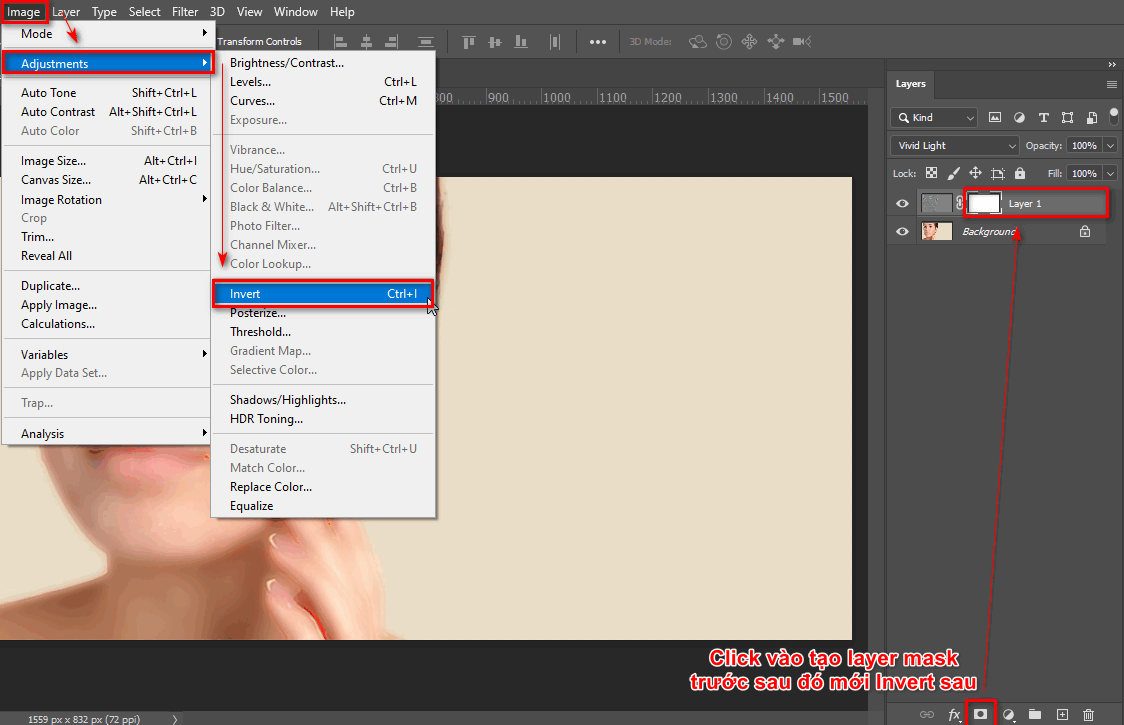
  • Step 6: Create a layer mask (mask) is a tool located in the Layer panel below next to the fx section
  • Step 7: Then we use the shortcut Ctrl + I or go to Image > Adjustments > Invert (Ctrl + I) or another way is before you create a layer mask, hold down Alt + Click on the place to create the Layer mask. (At this point we have just created a layer mask and also inverted it)
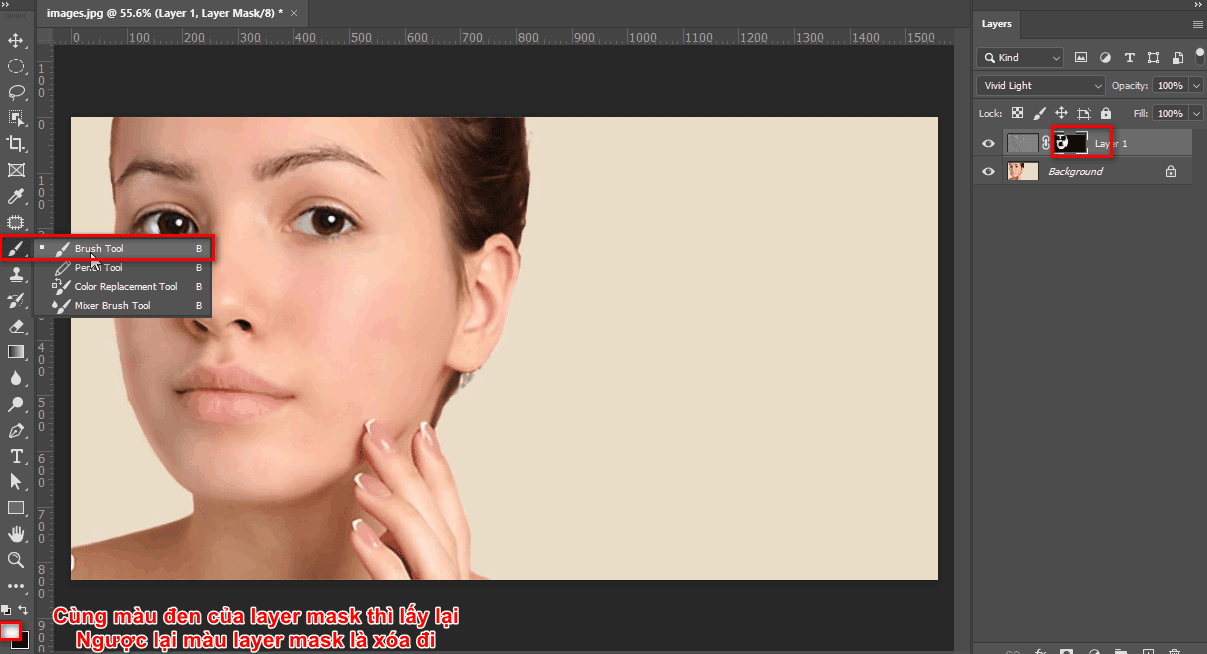
  • Step 8: Then we use the Brush tool (shortcut key is B) and put the backgroup background color opposite the color of the layer mask to delete it. Otherwise, if it is the same color as the layer mask color, we get it back.

These are all the steps when removing acne or freckles from a photo that you want
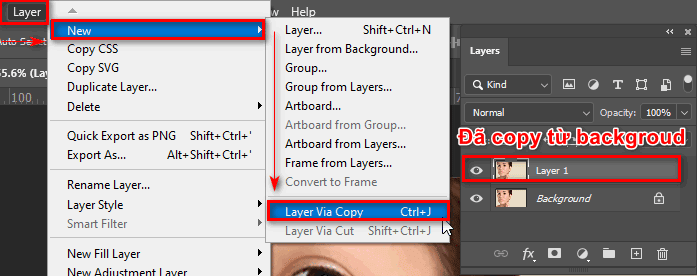
Step 1

Duplicate the object

Step 2

Step 3: Invert colors

Step 3

Step 2

Step 4

Step 4: Create sharpness for the selected area

Step 4.1

Set parameters for Hight Pass

Step 5

Step 5: Choose Gaussian Blur

Step 5.1

Set parameters for Gaussian Blur

Steps 6 and 7

Step 6,7: Continue inverting colors

Step 8

Step 8: Use the brush tool to regain the selection

After you use the above steps and do them carefully, you will have the beautiful face you desire
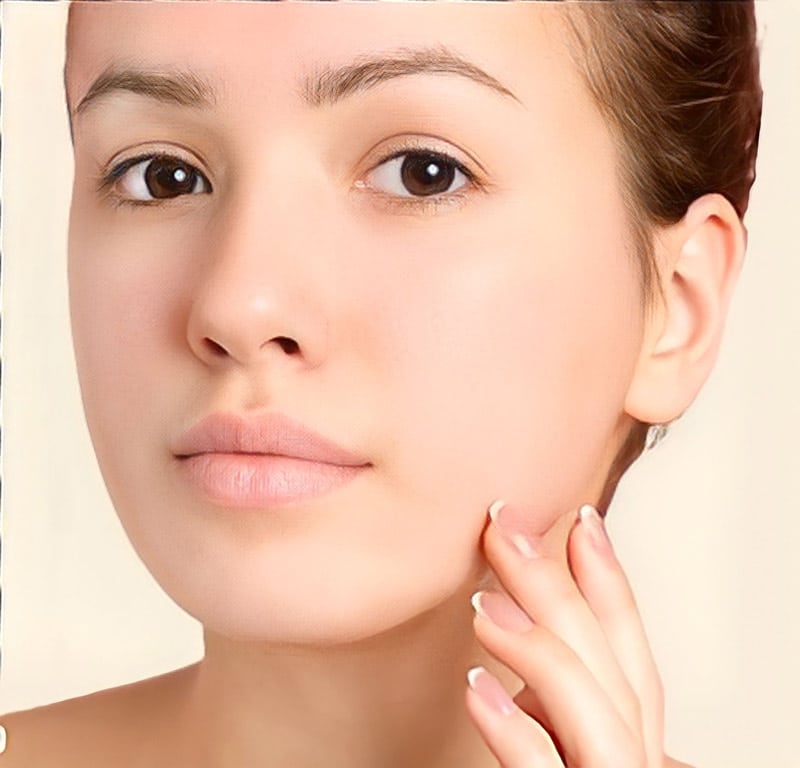
How to remove acne in photoshop
Results after removing acne in photoshop

Progress remove acne in photoshop When using this tool, sometimes it's not as smooth as the photo, so now I have to do a lot and have a lot of time compared to those who are new to or have just learned about Adobe Photoshop software. But after you apply these steps as well as this formula many times, you will be able to apply it more smoothly than when you first learned about this tool.

  • How to use Quick Selection Tool Photoshop
  • How to use Clone Stamp Tool Photoshop
  • How to use Move tool Photoshop
  • Fix the 2 most common errors in Photoshop

Conclude.

Through this article, I have just shown you how remove acne in photoshop in the most detailed way for new and old people to know Adobe Photoshop. How to quickly remove acne and blemishes from a photo, this method is extremely effective, simple, fast,...

When you use this method many times and the process of erasing is thorough, the following photos will be smoother. Maybe at first you won't do it as smooth as I instructed, but after a while you will see its effectiveness. .

If you feel like it and is useful to you, please give me 5* and share it with me so everyone can know and use it.

If you feel interesting and want to learn or want to learn, don't stop contacting photoshop course belong to Graphic Express for dedicated advice and many courses designed to suit each job and goal you want.

We will guide and train 1 on 1 and study time is comfortable including working, and there are many brothers, sisters and uncles who come to study so don't be shy about it, and the price is very reasonable even for students. student is studying.

Tags : Tags how to smooth skin photoshop   how to remove acne photoshop   how to remove acne and freckles   learn photoshop   study pts   good tips pts
Share
FacebookShare on FacebookpinterestShare on PinterestMessengerShare on Facebook Messenger
twitterShare on TwitterlinkedinShare on LinkedinvkShare on VkredditShare on ReddittumblrShare on TumblrvideoShare on Viadeobuffer. bufferShare on Bufferpocket. pocketShare on PocketwhatsappShare on WhatsappViberShare on ViberemailShare on EmailskypeShare on SkypediggShare on DiggmyspaceShare on MyspacebloggerShare on Blogger YahooMailShare on Yahoo mailtelegramShare on Telegram gmailShare on GmailAmazonShare on AmazonSMSShare on SMS
Tung Thai

Tung Thai

As a student at the center. I write what I know to share with you.
1 is to share with you so you can know and learn.
2 improve knowledge and remember longer, with the motto of giving to receive, I want to write more

Related articles

The best way to remove acne in photoshop

How to use camera Raw in photoshop

By How To 08/12/2025

Camera Raw in photoshop is a tool that has been around since…

The best way to remove acne in photoshop

Latest instructions for using camera raw in photoshop

By How To 07/12/2025

Camera raw in photoshop is a correction tool…

The best way to remove acne in photoshop

3 Ways to create speed effects in Photoshop

By Tung Thai 06/12/2025 0

3 Ways to create speed effects in photoshop Speed effects…

Leave a Comment Cancel reply

Categories What is Q&A? What is the structure of that place?

What is Interior Design? How much does an interior design job pay?

12/12/2025
What is Material?

What is Material? Material application in the field of design

11/12/2025
What is the poster?

What are posters? 9 Tips for designing beautiful, quick Posters

11/12/2025
What does graphic design do? Is it easy to get a job?

What does graphic design do? Is it easy to get a job?

11/12/2025
Water is the water material in Enscap

Water is the water material in Enscap

11/12/2025

Recent comments

  • male1 year ago
    On How to create a fade effect in Photoshop
    Great
  • phat phat2 years ago
    On Who is 5SMedia?
    Useful article
  • Minh Anh3 years ago
    On How to create basic materials in vray Sketchup
    Very good, admin
Copyright © 2025 HOWTO - Powered by HOWTO

5SMedia.net | hocdohoacaptoc.com | huongdansudung.vn | webantam.com

Back to Top
Hello!
  • All
    • Tips
      • Google
      • Facebook
      • Tiktok
    • Instruct
      • What is Q&A?
      • Taobao
    • WordPress
      • Code
      • Plugins
      • Themes
        • Flatsome
        • Theme Nevo
  • Share
    • WordPress
    • Code
    • Plugins
    • Tips
    • Windows
    • Apple
    • Graphics
    • Experience
  • Graphics documents
    • illustrator
    • Sketchup
    • Coreldraw
    • 3ds max
    • Enscape
    • Photoshop
    • Graphics Plugin
  • Course
    • Photoshop course
    • illustrator course
    • Coreldraw course
    • Edit video course
    • Course Sketchup
    • Autocad course
    • Website management course
  • Service
  • Software
    • Windows
      • Tips
      • Office
      • Necessary
      • Tools
    • Apple
  • Game
  • News
    • Technology
    • Review
en_US EN
en_US EN vi VI