Skip to content
FacebookTwitterPinterest
HOWTOHOWTO
  • All
    • Tips
      • Google
      • Facebook
      • Tiktok
    • Instruct
      • What is Q&A?
      • Taobao
    • WordPress
      • Code
      • Plugins
      • Themes
        • Flatsome
        • Theme Nevo
  • Share
    • WordPress
    • Code
    • Plugins
    • Tips
    • Windows
    • Apple
    • Graphics
    • Experience
  • Graphics documents
    • illustrator
    • Sketchup
    • Coreldraw
    • 3ds max
    • Enscape
    • Photoshop
    • Graphics Plugin
  • Course
    • Photoshop course
    • illustrator course
    • Coreldraw course
    • Edit video course
    • Course Sketchup
    • Autocad course
    • Website management course
  • Service
  • Software
    • Windows
      • Tips
      • Office
      • Necessary
      • Tools
    • Apple
  • Game
  • News
    • Technology
    • Review
HOWTOHOWTO
  • Home > 
  • Wordpress > 
  • Code > 
  • How to put category descriptions below products

How to put category descriptions below products

By How To 02/01/2026 0 712 Views
How to put category descriptions below products
Article categories

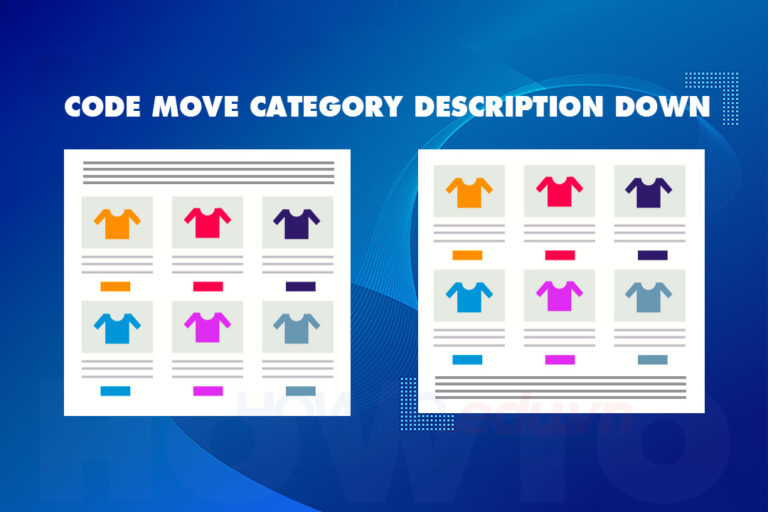
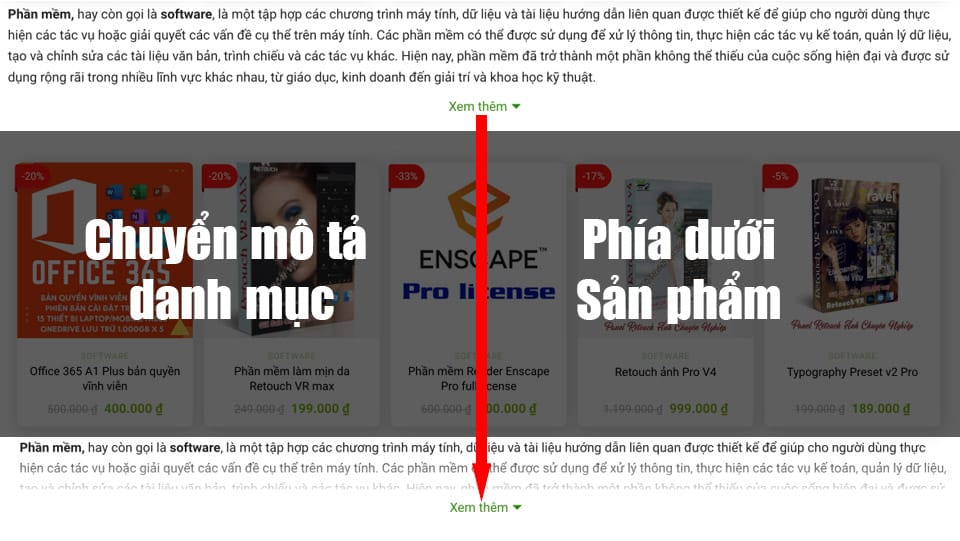
How to put category descriptions below products This is a code insertion technique that not everyone can do. This article will guide you in detail so you can easily put content below the product list.

Web usage WordPress is a popular platform for building personal, business or organizational websites and blogs. One of the important features of WordPress is the ability to create product categories, articles, static pages... to classify content and help users easily find information on the website. However, although these categories are often placed at the top of the page, this is not always convenient for users, especially when the categories are long and complex.

In this article, we will learn about How to put the category description below the product in WordPress. This technique helps users see the details of the category description more easily and without having to scroll through much when accessing the category. Let's explore how to implement this technique and create a more user-friendly WordPress website.
How to put category descriptions below products
  • Posts Collapse product description content This can help make the work you are doing more optimal.
  • Web management and SEO course to top Google very quickly
  • The code displays the hotline on a beautiful website 
  • Code to automatically save images to hot when copying images from other pages
  • The code shows nice promotions for flatsome like Cellphones
  • Website management services effectively take care of websites
  • Website design service according to SEO standards, good conversion

How to put category descriptions below products

To bring product category descriptions to the bottom in WordPress, you can follow these steps:

Step 1: Log in to the website

You need to log in with your top admin account.

Step 2: Insert code

Please access the following link to safely insert code without losing it when updating the interface. Interface > Theme file Editor > functions.php Then paste the code below inside

Note: You must choose Theme children So that when updating the interface, you don't lose code or if you don't see any themes, you can ask the programmer or Contact us to get the best support. So that when you insert the code to update the interface, it won't lose the code.

//Move category description to bottom in WooCommerce 
add_action('wp', 'tu_move_wc_archive_description');

function tu_move_wc_archive_description() {
    if (is_archive()) {
        remove_action('woocommerce_archive_description', 'woocommerce_taxonomy_archive_description', 10);
        remove_action('woocommerce_archive_description', 'woocommerce_product_archive_description', 10);
        add_action('woocommerce_after_main_content', 'woocommerce_taxonomy_archive_description', 10);
        add_action('woocommerce_after_main_content', 'woocommerce_product_archive_description', 10);
    }
}

Guest
Guest
Can this code be used for any themes on wordpress?
This code can be used for any theme on wordpress. If you use wordpress, you can use this code.
How to
How to

See more… Code displays condensed content for product categories

Step 3: Check the results.

After you have added the code to your website, we will write a description for the category then save and test as follows.

  1. Access the “Product” and select “Product portfolio” for editing.
  2. On the product category edit page, you can find the “Description” field at the bottom of the page. Here you can write SEO for your product category.
  3. After finishing editing, you can press the button “Update” to save changes.
  4. Save your changes and check that your product category description appears at the bottom of the page.

Summarize

Job How to put the category description below the product is a way to help increase aesthetics and convenience for users accessing the website. This way, users can easily view product information and technical attributes at the same time as the category description more clearly. This also helps increase customer engagement with the website and increase sales.

If you are doing business online, try putting category descriptions below the products and observe its results on your website.

Tags : Tags How to put category descriptions below products
Share
FacebookShare on FacebookpinterestShare on PinterestMessengerShare on Facebook Messenger
twitterShare on TwitterlinkedinShare on LinkedinvkShare on VkredditShare on ReddittumblrShare on TumblrvideoShare on Viadeobuffer. bufferShare on Bufferpocket. pocketShare on PocketwhatsappShare on WhatsappViberShare on ViberemailShare on EmailskypeShare on SkypediggShare on DiggmyspaceShare on MyspacebloggerShare on Blogger YahooMailShare on Yahoo mailtelegramShare on Telegram gmailShare on GmailAmazonShare on AmazonSMSShare on SMS

How To

A person who is passionate about sharing knowledge from life. Common knowledge in life. Sharing is my passion. Hopefully my knowledge will bring many benefits to you

Related articles

How to put category descriptions below products

How to create a slider that runs super smoothly on flatsome

By How To 05/01/2026

How to create a super smooth slider on flatsome. Have you ever…

How to put category descriptions below products

Code to display hotline on website

By How To 02/01/2026 0

Code displaying hotline on website in the industrial era...

How to put category descriptions below products

The code condenses product details and categories on Flatsome

By How To 02/01/2026 0

Code condensation of content is one of the techniques…

Leave a Comment Cancel reply

Categories Adobe Photoshop Remove tool in photoshop

Remove tool in photoshop

27/03/2026
4 Ways to create speed effects in Photoshop

4 Ways to create speed effects in Photoshop

27/03/2026
Graphic Design

Graphic Design The art of creating appeal

27/02/2026
What is google plays app? Is installation necessary?

What is google plays app? Is installation necessary?

24/02/2026
create flatsome slider

How to create a slider that runs super smoothly on flatsome

05/01/2026

Recent comments

  • male2 years ago
    On How to create a fade effect in Photoshop
    Great
  • phat phat2 years ago
    On Who is 5SMedia?
    Useful article
  • Minh Anh3 years ago
    On How to create basic materials in vray Sketchup
    Very good, admin
Copyright © 2026 HOWTO - Powered by HOWTO

5SMedia.net | hocdohoacaptoc.com | huongdansudung.vn | webantam.com

Back to Top
Hello!
  • All
    • Tips
      • Google
      • Facebook
      • Tiktok
    • Instruct
      • What is Q&A?
      • Taobao
    • WordPress
      • Code
      • Plugins
      • Themes
        • Flatsome
        • Theme Nevo
  • Share
    • WordPress
    • Code
    • Plugins
    • Tips
    • Windows
    • Apple
    • Graphics
    • Experience
  • Graphics documents
    • illustrator
    • Sketchup
    • Coreldraw
    • 3ds max
    • Enscape
    • Photoshop
    • Graphics Plugin
  • Course
    • Photoshop course
    • illustrator course
    • Coreldraw course
    • Edit video course
    • Course Sketchup
    • Autocad course
    • Website management course
  • Service
  • Software
    • Windows
      • Tips
      • Office
      • Necessary
      • Tools
    • Apple
  • Game
  • News
    • Technology
    • Review
EN
EN
VI
Hello!

  • Lost your password ?