How to export Illustrator files effectively is indispensable when we finish designing. So do you know how to export files in illustrator yet? Join us to learn all about it How to export Adobe Illustrator files for effective application.
Next I will guide you How to export Illustrator files quickly and accurately.
How to export Illustrator files effectively
Determine file export needs in Adobe Illustrator.
AI tool is a great graphic design tool with features that adapt creativity for many purposes such as photo design, product design for printing such as banners, posters, or products for posting on the web. . Depending on our own purposes, we will choose appropriate file export methods for each specific purpose.
Example of exporting files in Illustrator in the following cases:
- Export for print: If you're designing a document for printing, you can export the Adobe Illustrator file in a format suitable for printing, such as PDF or EPS.
- Use on the web: If you want to use your document on the web, you can export the Adobe Illustrator file as an image format such as PNG or JPEG, or export the SVG file for use on dynamic web pages.
- Include other software: If you want to use your document in another software such as Adobe Photoshop or InDesign, you can export the Adobe Illustrator file as PSD or PDF format.
- Store and share: You can export Adobe Illustrator files to store and share your documents with others.
- Put into production: If you are designing products such as billboards, product boxes, labels, t-shirts, etc., you can export Adobe Illustrator files for use in production.
see more
- Instructions for 3D design using Adobe Illustrator.
- How to export Illustrator files quickly and accurately
- How to create a 3D keyboard in illustrator
- How to use the Align tool in Illustrator
- How to use the Symbol Sprayer Tool illustrator
How to export Ai, PDF, PSD files in illustrator
For convenience in storing and reusing or editing files almost immediately, we will choose to export files such as File .ai or Adobe PDF, PSD. But how are they different?
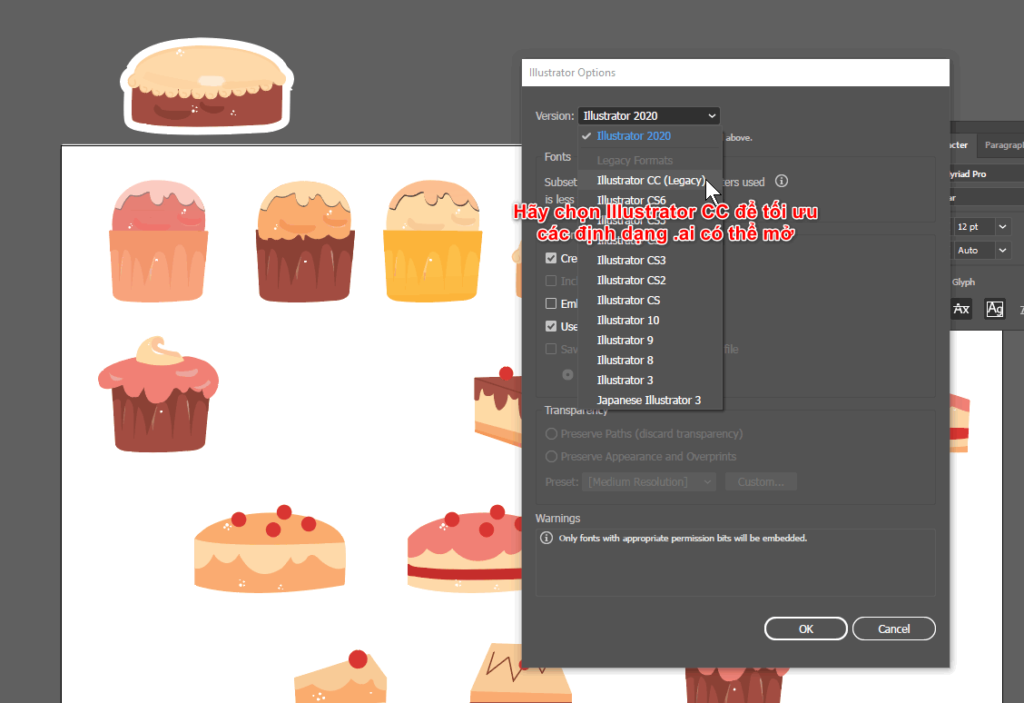
With files .Who We can reuse it as soon as we need it, but it is only in a format suitable for Adobe Illustrator, and to optimize the versions AI can open, we should choose illustrator CC.
To export an Illustrator file, choose Save As: Select File > Save As. Here, you can save the Illustrator file as .WHO, .EPS, .PDF or .PSD.
As for file formats .PDF good .PSD is much more useful with the ability to open on all ecosystems with Adobe such as Adobe Photoshop, InDesign.
We can choose the default as shown or better yet, downgrade the Acrobat format to a lower version for good use on early computers.
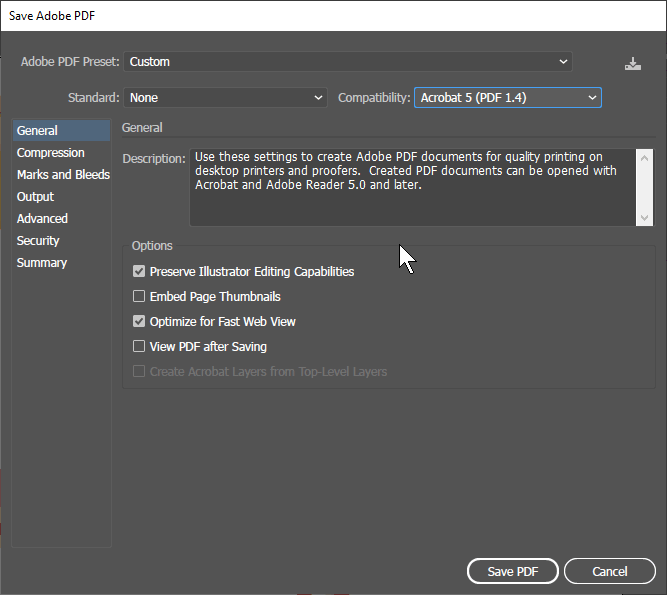
There is another file format .eps I do not recommend because these EPS files have the great advantage that users can increase the size without losing image quality and without losing details, but the disadvantage of EPS The main thing is that it can only be opened with graphic design programs and the file size is quite large.
There's still a lot left How to export Illustrator files quickly and accurately, please continue reading.
How to export GIF, JPEG, PNG files in illustrator
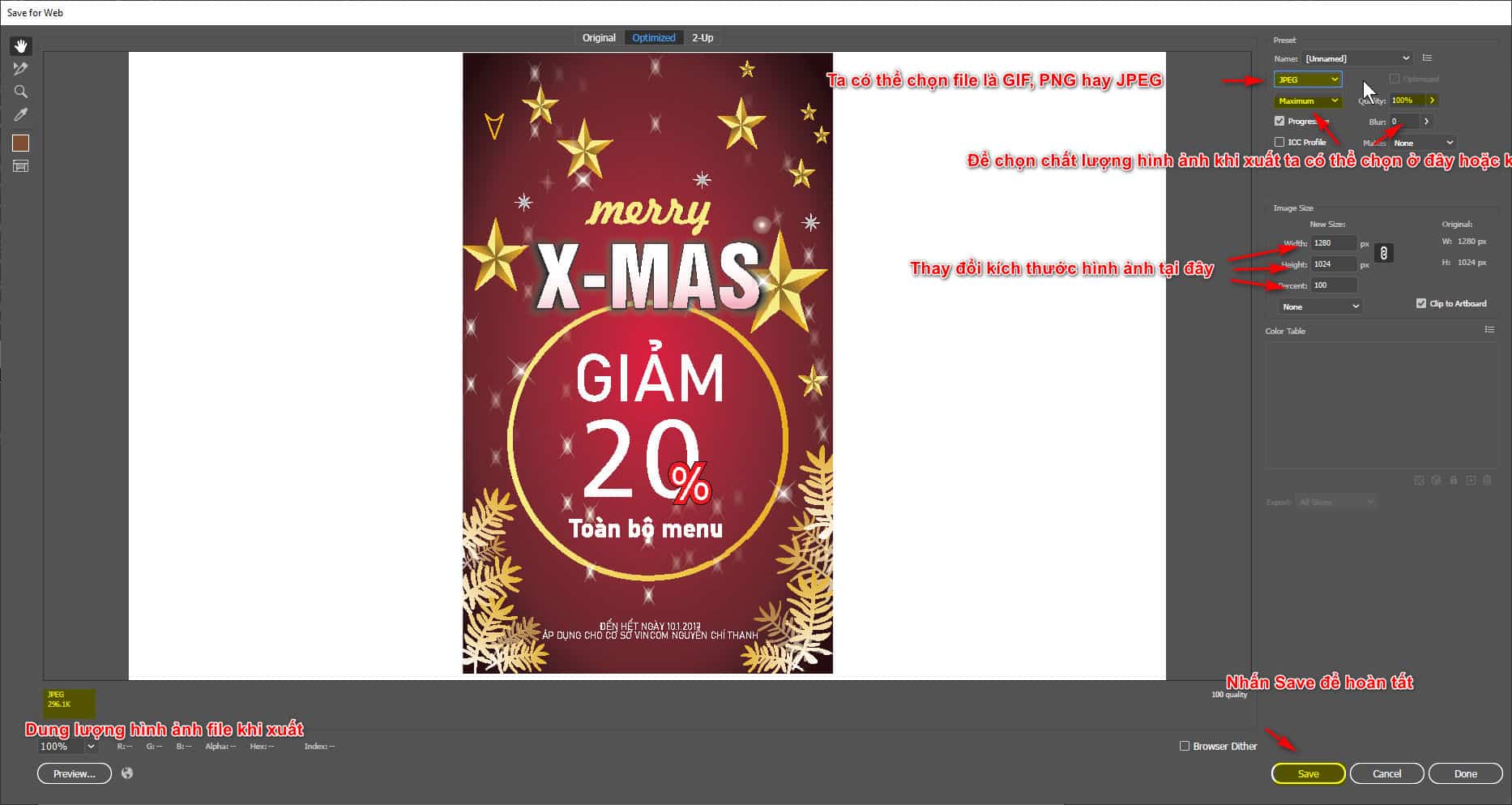
To be able to download files for web browsers or product images, we can export files GIF, JPEG or PNG.
The performance of these files is almost amazing with the ability to change file quality when exporting and extremely convenient to store.
To choose to export the desired file, select File > Export > Save for Web (Legacy). Here you can optimize the image file for use on the web and save it in GIF, JPEG or PNG format.
Differences between GIF, PNG, JPEG file formats
- GIF (Graphics Interchange Format): The GIF format is used for animated images, with a sequence of images creating movement. GIF supports a limited number of colors, only about 256 colors, but it is very effective because the file size is small and can be viewed on most web browsers.
- PNG (Portable Network Graphics): The PNG format is used for still images and supports a larger number of colors than GIF, with 24-bit colors and also 32-bit colors with transparency. PNG can contain information about transparency channels, bit depth, contrast, and color gamut, at higher quality than the GIF format. However, PNG can create larger files and is not supported on some older web browsers.
- JPEG is an image format that uses advanced compression technology to allow images to display more full colors with 16 million colors but cannot display as many colors as PNG. JPEG files are typically smaller than other image formats, but lose some image detail to reduce file size. JPEG format is often used for photography, animal photos, lifestyle photos and images that require high resolution.
Therefore, depending on the purpose of use and the user's needs, the appropriate image format can be chosen.
- How to create Pattern in Illustrator in detail
- How to use gradients in design
- 10 tips for designers to create opportunities from Instagram
How to export SVG files in illustrator
SVG stands for Scalable Vector Graphics (SVG) and is an XML-based image format that allows you to create scalable vector images without losing image clarity. Here are some pros and cons of the SVG file format:
Advantage:
- Scalability: The SVG format is designed to display high-resolution images, whether in small or large sizes. It allows you to zoom in/out of images without losing image sharpness, while also helping to optimize the user experience on different devices.
- Small file size: SVG file sizes are typically smaller than other image formats, like JPEG and PNG, thanks to storing images as vectors. This helps increase page load speed and reduce website bandwidth.
- Compatibility: The SVG format is supported on many different web browsers and terminal devices, helping to ensure image compatibility with a variety of audiences.
- Easy editing: Because images are saved as vectors, you can easily edit elements of the image in Illustrator or other vector editing software.
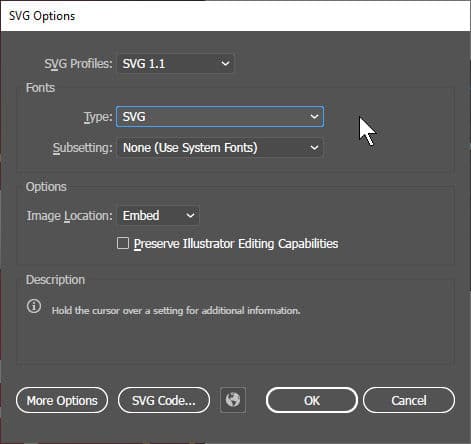
File SVG
Defect:
- Gradient colors are not supported in some cases: Although SVG supports gradients, it does not support gradients in some cases, especially when loading SVG images on older browsers.
- Does not support many visual effects: SVG does not support as many visual effects as CSS and JavaScript, which limits the ability to create complex animation effects.
- Limitations on complex graphics: SVG should not be used to create complex images, such as hand-drawn paintings or 3D graphics, as it can lead to poor performance and may not accommodate more detailed design needs.
To export an SVG file from Adobe Illustrator, follow these steps:Select File > Export…or use key combination Ctrl + Shift + S (Windows) or Command + Shift + S (Mac) to open the dialog box Export. In the dialog box Export, select SVG format from the menu on the left.
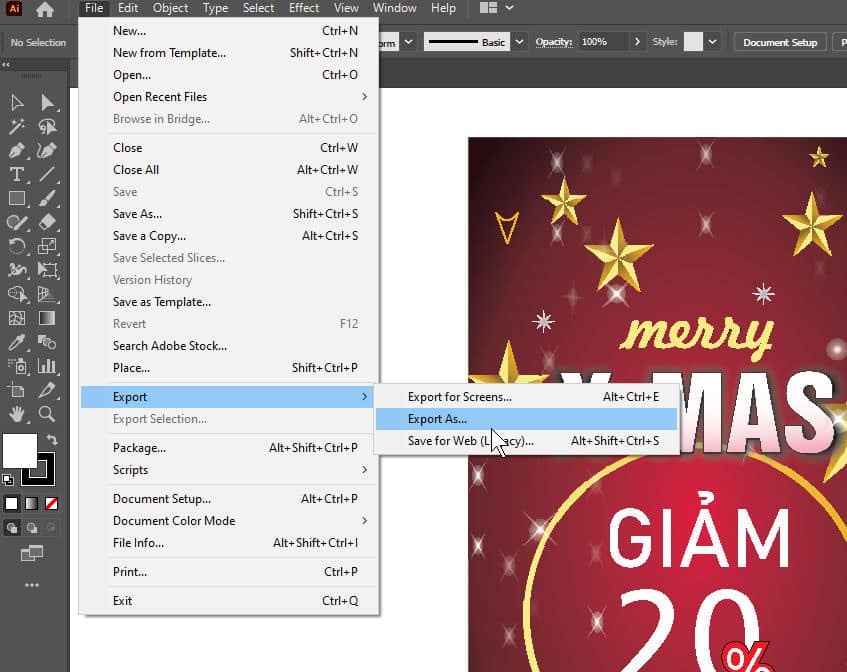
Ways to save files in Adobe Illustrator
There are many ways to export Illustrator files, below are some commonly used ways:
- Export: Select File > Export. Here, you can choose the file format you want to export, such as PNG, JPEG, PDF, SVG, AI, EPS, and many more.
- Save As: Select File > Save As. Here, you can save the Illustrator file as AI, EPS, PDF, or SVG.
- Save for Web: Select File > Export >Save for Web (Legacy). Here you can optimize the image file for use on the web and save it in GIF, JPEG or PNG format.
- Export Selection: Select the Selection Tool and select the objects you want to export. Select File > Export Selection to export an image file or Illustrator file with only selected objects.
- Export As: Select the object you want to export and select Export As from the Properties bar. Here, you can choose the file format you want to export.
The above methods are common ways to export files on Adobe Illustrator. Depending on the intended use and the format you want to export, you can choose accordingly.
summary
I recently shared it with you cEfficient way to export Adobe Illustrator files It's quick and accurate. Apply these file export methods regularly to achieve the desired goal of receiving files as well as become proficient in using the tool Adobe Illustrator.
If you want to learn about graphics, please message our page directly Graphic Express or refer Adobe Illustrator coursefor dedicated advice.
In addition, the center installs the software for free when you join the course, the course time and package are very preferential, and you will receive a set of valuable resources when registering for the course.