
Skip to content
  • About us
  • Contact
  • en_USEN
  • viVI
FacebookTwitterPinterest
HOWTOHOWTO
  • All
    • Tips
      • Google
      • Facebook
      • Tiktok
    • Instruct
      • What is Q&A?
      • Taobao
    • WordPress
      • Code
      • Plugins
      • Themes
        • Flatsome
        • Theme Nevo
  • ShareHot
    • WordPress
    • Code
    • Plugins
    • Tips
    • Windows
    • Apple
    • Graphics
    • Experience
  • Graphics documents
    • illustrator
    • Sketchup
    • Coreldraw
    • 3ds max
    • Enscape
    • Photoshop
    • Graphics Plugin
  • Course
    • Photoshop course
    • illustrator course
    • Coreldraw course
    • Edit video course
    • Course Sketchup
    • Autocad course
    • Website management course
  • Service
  • Software
    • Windows
      • Tips
      • Office
      • Necessary
      • Tools
    • Apple
  • Game
  • News
    • Technology
    • Review
Hello!

  • Lost your password ?
HOWTOHOWTO
  • Home > 
  • Office > 
  • How to draw arrows in Word is super simple and fast

How to draw arrows in Word is super simple and fast

By How To 26/09/2024 0 356 Views
How to create a name in word 1
Article categories

Arrows are symbols you will encounter a lot during your text editing process. But you already know How to draw arrows in word How is that correct? User manual Explore specifically in this article.
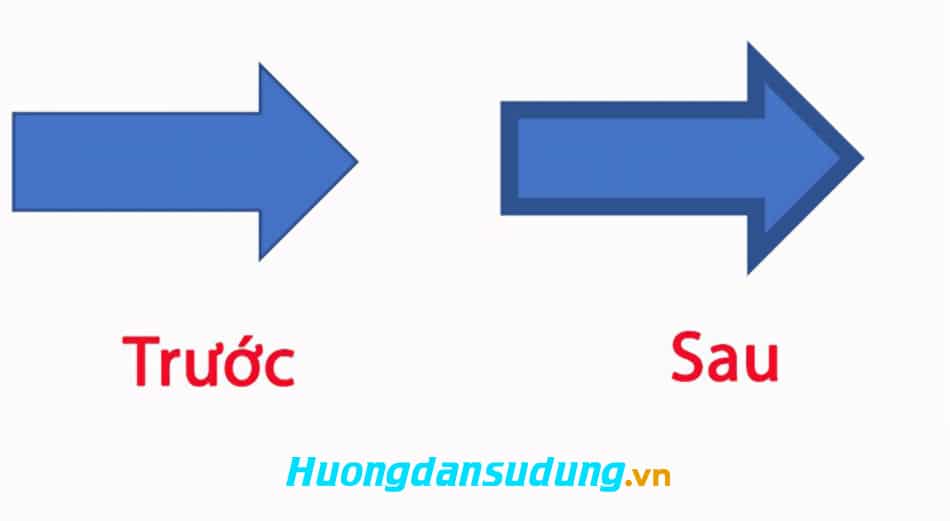
How to draw arrows in Word
How to draw arrow marks in word

Instructions on how to draw basic straight arrows and 2-way arrows in Word

Quick guide to drawing arrows in Word 

– First open Word software on your computer, select Insert.

– Select Shapes.

- Select straight arrow/two-way arrow that you want to draw.

– Use the left mouse button to drag to get the arrow you want.

– Then right-click on the arrow, select the item Format Shape.

+ If you want color change arrow, press select Inverted triangle symbol section Color and select enter color arrow you want.

+ If you want thickness change border, then enter arrow thickness size you want in the box to the right of the item Width.

+ To be able length change, select the arrow, hold down and drag one of the two round buttons at the two arrowheads to the length you want and then release.

+ To move, drag the mouse to the arrow so that a 4-way arrow icon appears and hold down the left mouse button, move the arrow to the position you want, then release.

  • Download extremely beautiful Vietnamese font for free
  • How to combine funny pictures with Photoshop
  • Download unikey latest standard version 2022
  • Download the latest Microsoft Visual C++ Redistributable 2005 to 2022

Detailed instructions for drawing arrows in Word 

Step 1: Find the location to get the tool

Open Word software on your computer, select to Insert > Select Shapes > Select section straight arrow/two-way arrow that you want to draw.
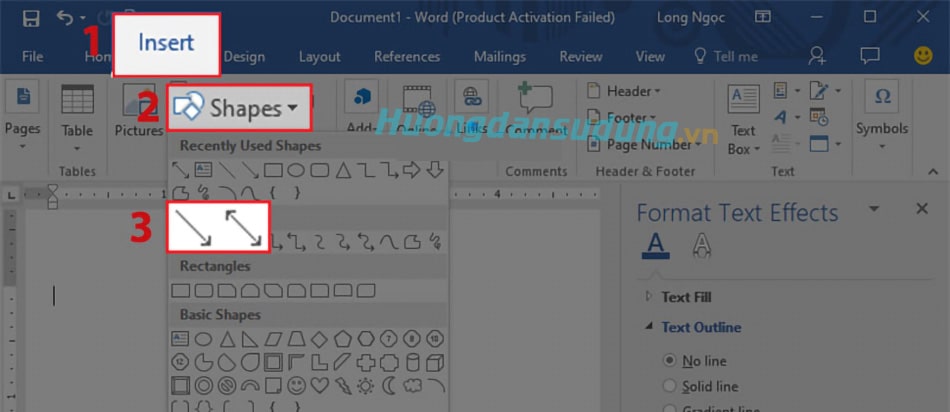
How to draw arrows in Word

Step 2: draw the object

Place the mouse at the location where you want to draw the arrow, Hold down and drag the left mouse button to create an arrow with the length in the direction you want.
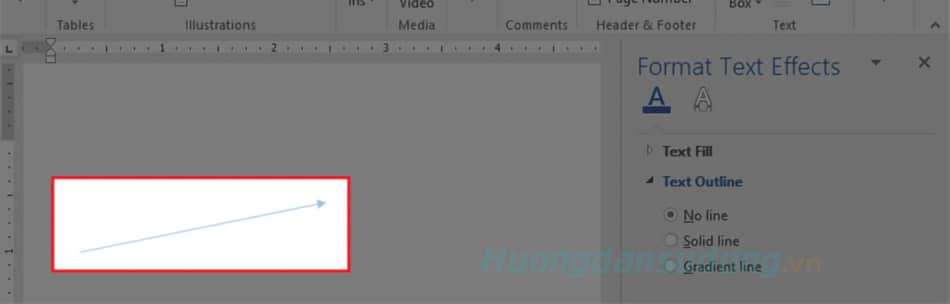
How to draw arrows in Word

Step 3: Setting arrows in Word

Right click on the arrow, select enter Format Shape.
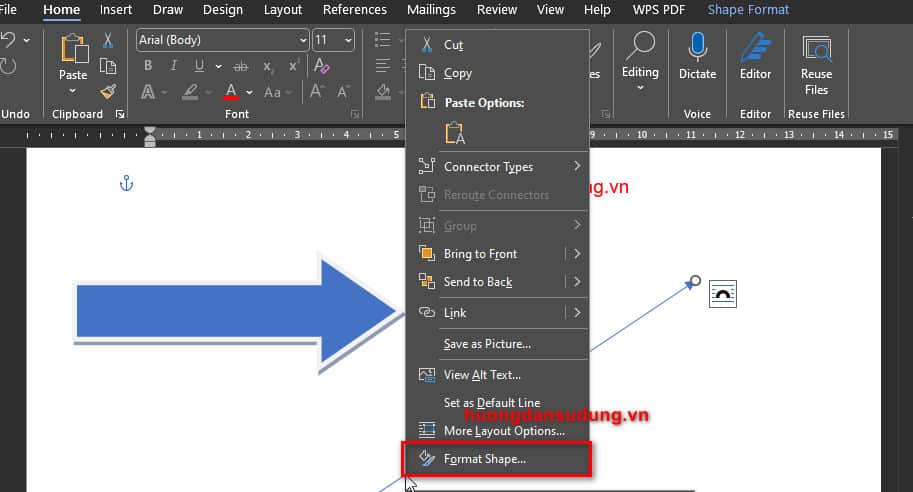
How to draw arrows in Word

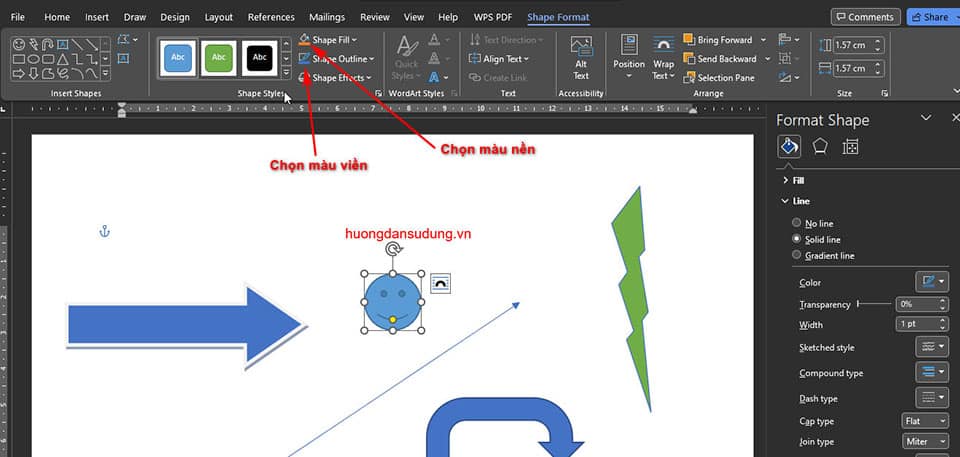
Step 4: change the arrow color in word

If you want color change arrow, press select Inverted triangle symbol section Color > Select color arrow you want.
How to draw arrows in Word
Choose color

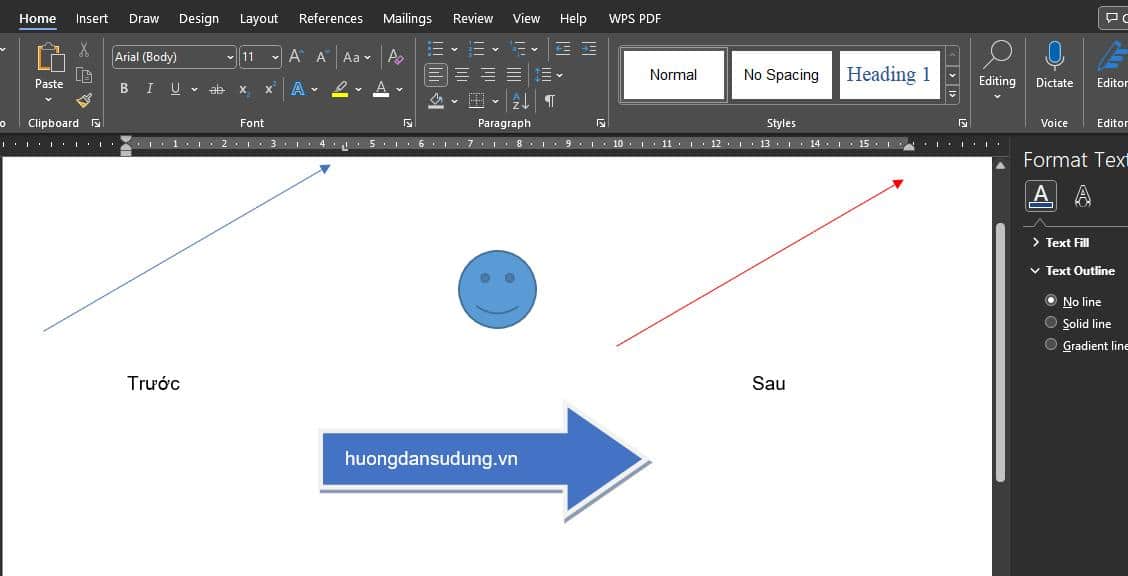
After changing we will have the following result.
How to draw arrows in Word

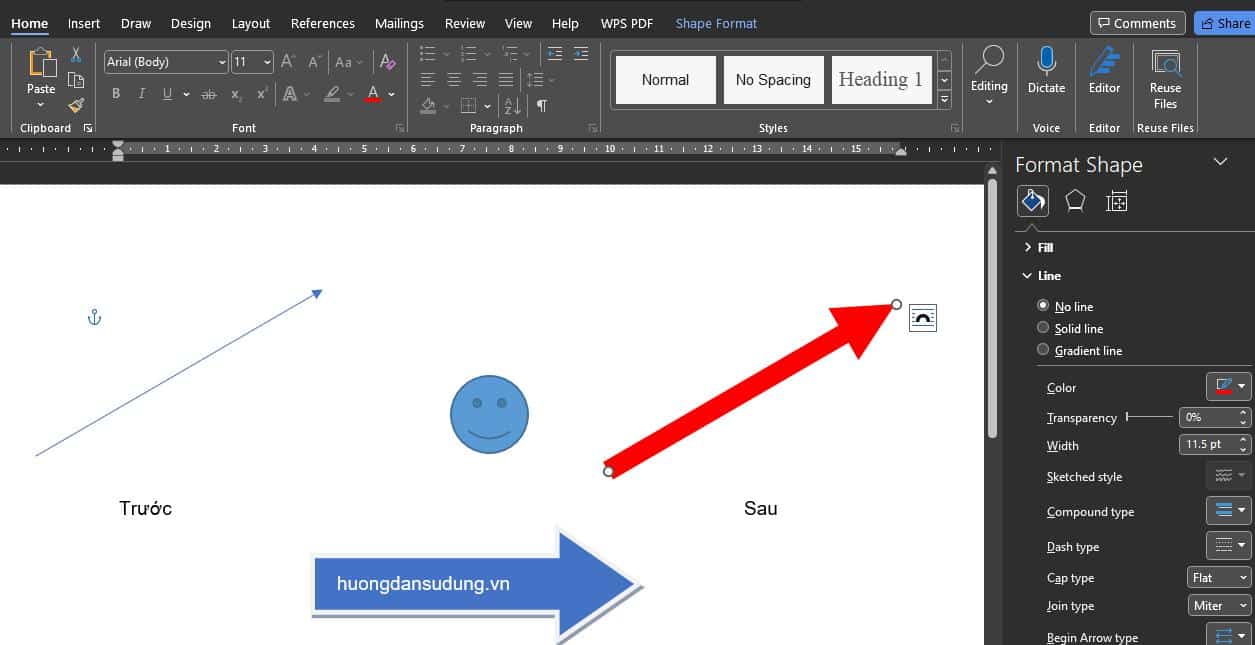
Step 5: Change the arrow thickness in word

If you want thickness change border, select the arrow, enter arrow thickness size you want in the box to the right of the item Width and press enter on the keyboard.
How to draw arrows in Word
Result:

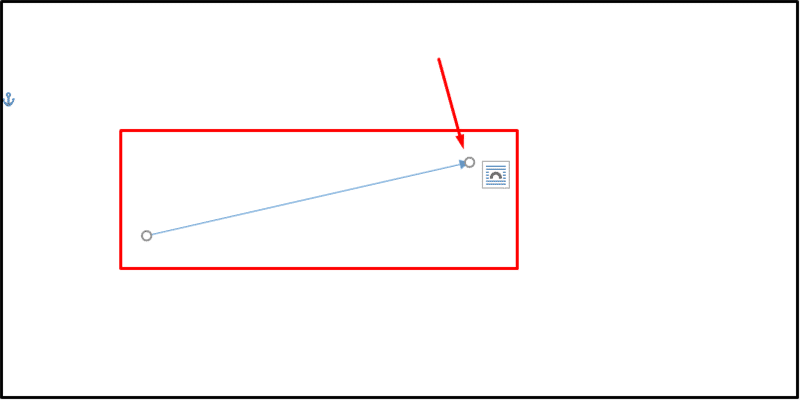
Step 6: Change the arrow length in word

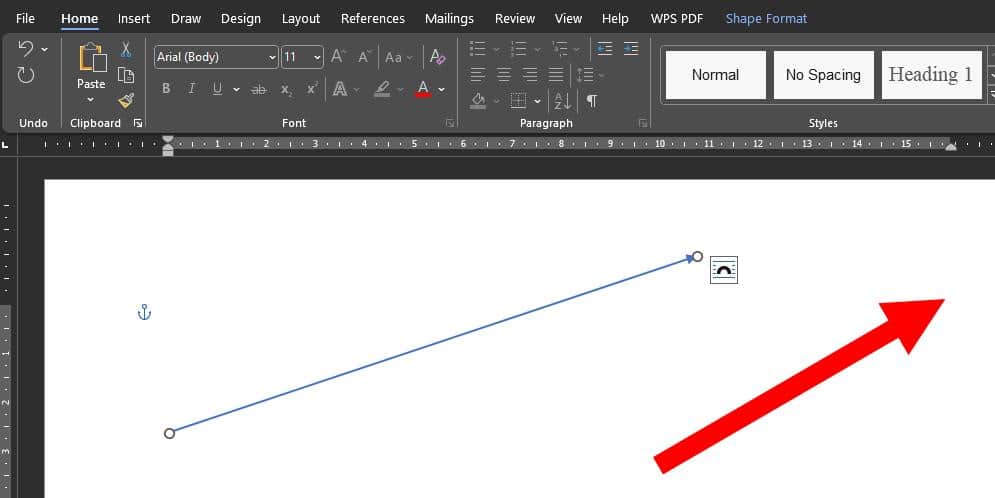
To change length arrow, left click select arrow > Then click and Hold the left mouse button on the circle button at one of the two arrowheads and drag left/right to get the length you want.
How to draw arrows in Word

Step 7: results after migration

To start move arrow, move the mouse to the arrow so that a 4-way arrow icon appears and hold down the left mouse button to execute. move to location you want.
How to draw arrows in Word


So we have suggested for you How to draw arrows in word the easiest. Hope you can improve your skills through this article.

Conclude.

So in the last article I just gave you instructions How to draw arrows in word detail. Hopefully this article will help you know many features in Word. Thereby improving your own skills.

If you find it useful, don't forget to rate it 5* and follow the channel Official Facebook us to be updated with the latest information


Tags : Tags how to create arrows in word   How to draw arrows in Word
Share
FacebookShare on FacebookpinterestShare on PinterestMessengerShare on Facebook Messenger
twitterShare on TwitterlinkedinShare on LinkedinvkShare on VkredditShare on ReddittumblrShare on TumblrvideoShare on Viadeobuffer. bufferShare on Bufferpocket. pocketShare on PocketwhatsappShare on WhatsappViberShare on ViberemailShare on EmailskypeShare on SkypediggShare on DiggmyspaceShare on MyspacebloggerShare on Blogger YahooMailShare on Yahoo mailtelegramShare on Telegram gmailShare on GmailAmazonShare on AmazonSMSShare on SMS
How To

How To

A person who is passionate about sharing knowledge from life. Common knowledge in life. Sharing is my passion. Hopefully my knowledge will bring many benefits to you

Related articles

How to draw arrows in Word is super simple and fast

How to install Vietnamese for Microsoft Office 365, 2021, 2019, 2016, 2013 

By How To 30/11/2025 0

How to install Vietnamese for Office 2010, 2016, 2019,…

How to draw arrows in Word is super simple and fast

UniKey User Guide

By How To 13/09/2024

UniKey User Guide Introduction Unikey is a program…

Leave a Comment Cancel reply

Categories What is Q&A? What is the structure of that place?

What is Interior Design? How much does an interior design job pay?

12/12/2025
What is Material?

What is Material? Material application in the field of design

11/12/2025
What is the poster?

What are posters? 9 Tips for designing beautiful, quick Posters

11/12/2025
What does graphic design do? Is it easy to get a job?

What does graphic design do? Is it easy to get a job?

11/12/2025
Water is the water material in Enscap

Water is the water material in Enscap

11/12/2025

Recent comments

  • male1 year ago
    On How to create a fade effect in Photoshop
    Great
  • phat phat2 years ago
    On Who is 5SMedia?
    Useful article
  • Minh Anh3 years ago
    On How to create basic materials in vray Sketchup
    Very good, admin
Copyright © 2025 HOWTO - Powered by HOWTO

5SMedia.net | hocdohoacaptoc.com | huongdansudung.vn | webantam.com

Back to Top
Hello!
  • All
    • Tips
      • Google
      • Facebook
      • Tiktok
    • Instruct
      • What is Q&A?
      • Taobao
    • WordPress
      • Code
      • Plugins
      • Themes
        • Flatsome
        • Theme Nevo
  • Share
    • WordPress
    • Code
    • Plugins
    • Tips
    • Windows
    • Apple
    • Graphics
    • Experience
  • Graphics documents
    • illustrator
    • Sketchup
    • Coreldraw
    • 3ds max
    • Enscape
    • Photoshop
    • Graphics Plugin
  • Course
    • Photoshop course
    • illustrator course
    • Coreldraw course
    • Edit video course
    • Course Sketchup
    • Autocad course
    • Website management course
  • Service
  • Software
    • Windows
      • Tips
      • Office
      • Necessary
      • Tools
    • Apple
  • Game
  • News
    • Technology
    • Review
en_US EN
en_US EN vi VI