Skip to content
  • About us
  • Contact
  • en_USEN
  • viVI
FacebookTwitterPinterest
HOWTOHOWTO
  • All
    • Tips
      • Google
      • Facebook
      • Tiktok
    • Instruct
      • What is Q&A?
      • Taobao
    • WordPress
      • Code
      • Plugins
      • Themes
        • Flatsome
        • Theme Nevo
  • ShareHot
    • WordPress
    • Code
    • Plugins
    • Tips
    • Windows
    • Apple
    • Graphics
    • Experience
  • Graphics documents
    • illustrator
    • Sketchup
    • Coreldraw
    • 3ds max
    • Enscape
    • Photoshop
    • Graphics Plugin
  • Course
    • Photoshop course
    • illustrator course
    • Coreldraw course
    • Edit video course
    • Course Sketchup
    • Autocad course
    • Website management course
  • Service
  • Software
    • Windows
      • Tips
      • Office
      • Necessary
      • Tools
    • Apple
  • Game
  • News
    • Technology
    • Review
Hello!

  • Lost your password ?
HOWTOHOWTO
  • Home > 
  • Facebook > 
  • How to delegate Facebook Fanpage administration rights

How to delegate Facebook Fanpage administration rights

By thindv 30/11/2025 0 117 Views
How to delegate Facebook Fanpage administration rights
Article categories

Owning a Facebook Fanpage is becoming a trend for many businesses, brands or individuals to reach and interact with customers, partners, and the social network community. However, managing and taking care of content on Fanpage requires a lot of time and effort.

To solve this problem, decentralizing Facebook Fanpage administration for many people to participate in management is an effective solution. In this article, we will guide you in detail on how to decentralize Facebook Fanpage administration on phones and computers with the latest updates.

I. Video on how to assign Facebook Fanpage administration rights on computer

II. The latest way to delegate Facebook Fanpage administration rights

1. Quick action

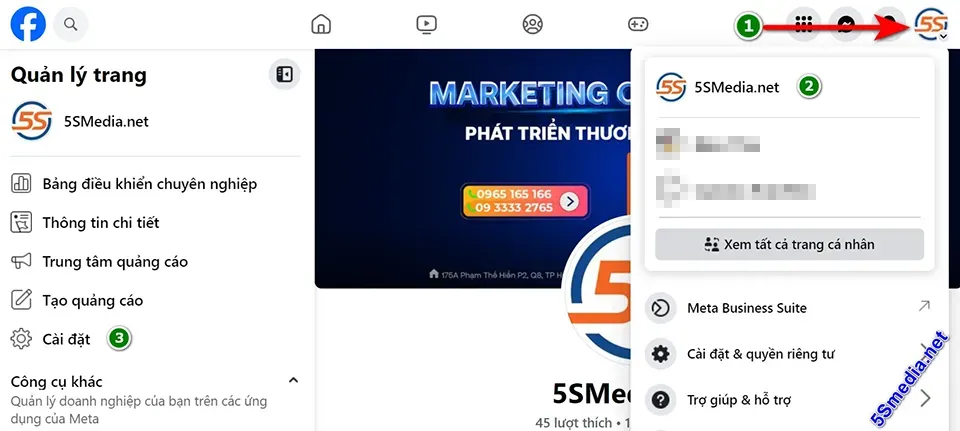
  • Access the page inside Facebook page > Select page Fanpage wants to decentralize
How to delegate Facebook Fanpage administration rights
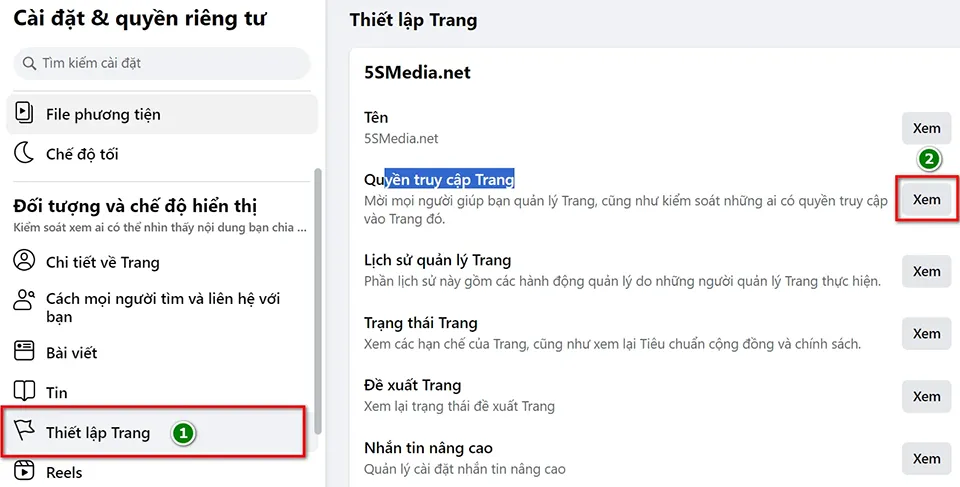
  • Click setting left >automatic import record 19877 1 Page Setup > Site Access > See
  • Select a role on the page
  • Enter name, email and select the assigned role
  • Confirm your Facebook account password and click Submit to complete.

See more.

  • How to run Facebook ads effectively and optimally?
  • How to quickly disable Facebook account
  • 2 simple ways to create standard Facebook Fanpage for beginners
Who has access on Facebook > Add new enter email > This is where users have the most permissions. These people can switch to the Page and manage it directly on Facebook or through other tools like Meta Business Suite or Creator Studio. Learn more
Who has access to the work > Add new Enter email > These people can't switch to Pages on Facebook, but can manage specific tasks using other tools like Meta Business Suite or Creator Studio. Learn more
Community Manager > Manage > Add community manager > Enter administrator email Community managers can moderate comments in chat, suspend or remove people who violate community standards, and view the list of admins for this Page.

2. Detailed instructions

Step 1: Go to your Facebook Page or go to grant access to facebook quickly here

To start, you need to access your Facebook page management section in Facebook then select the Fanpage you want to assign administrative rights to.

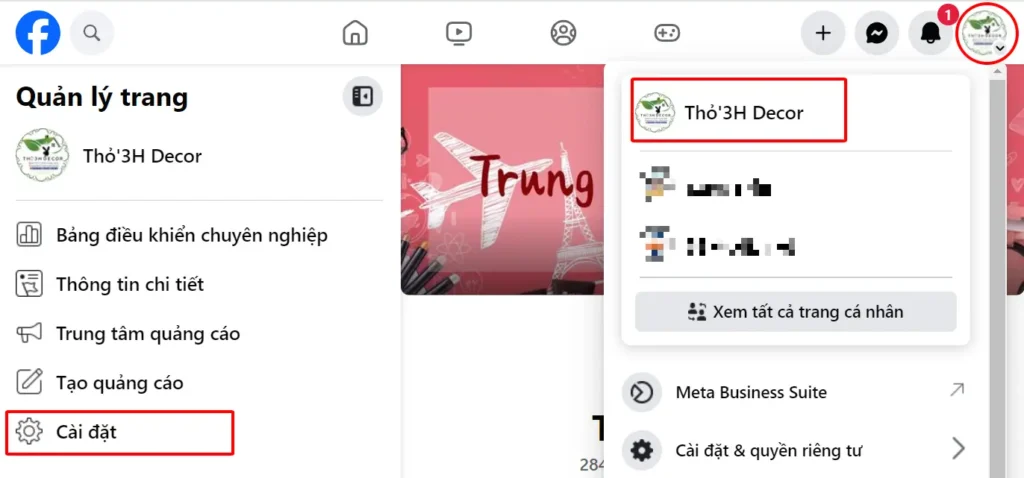
Step 2: Select the item Setting left side of Facebook order as shown below
How to delegate Facebook Fanpage administration rights

Step 3: After clicking on continue installation, you choose >automatic import record 19877 1 Page Setup

How to delegate Facebook Fanpage administration rights

In section Page Setup you choose > Site Access > See

Step 4: Enter the information of the authorized person and select the role on the Facebook Fanpage

How to delegate Facebook Fanpage administration rights

In the section “Manage and view access“, you choose who is authorized to do it what duties, what rights Later Enter Name or email of the person you want to delegate authority to. Finally, you select the role of the delegated person and click More.

There are different roles for you to choose the appropriate authorization to avoid incorrect authorization leading to damaged Facebook Fanpage or even loss of Facebook Fanpage:
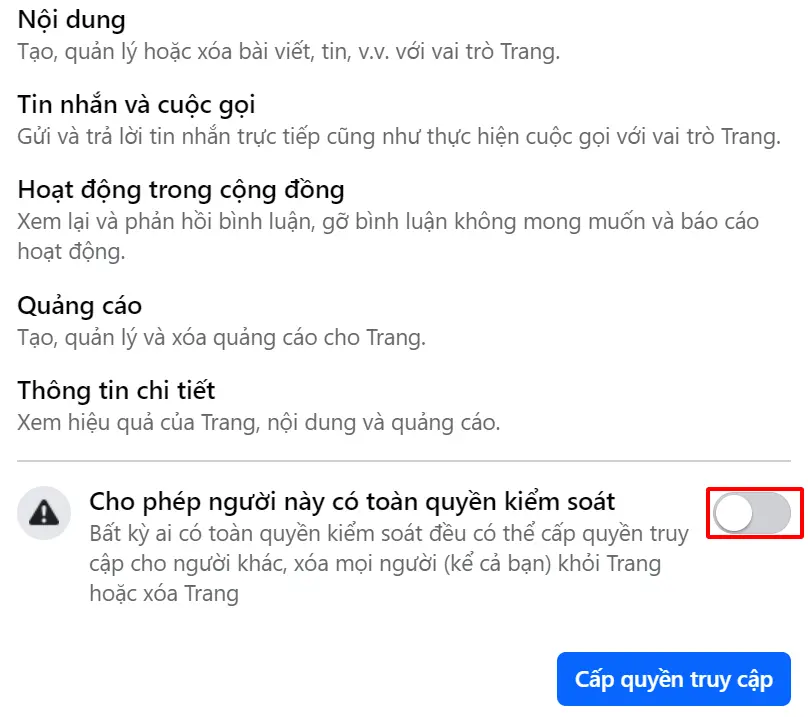
A. People with access on Facebook > Add new Enter email.With access on Facebook, 5SMedia.net can manage the following sections:
Content: Create, manage, or delete posts, stories, etc. as a Page.
Text and Call: Send and reply to direct messages and make calls as the Page.
Community Activities: Review and respond to comments, remove unwanted comments, and report activity.
Advertisement: Create, manage, and delete ads for your Page.
Details: See how your Pages, content, and ads are performing.
How to delegate Facebook Fanpage administration rights

Especially important is the check mark that allows this person to have full control. This is the function that can do everything on your Facebook Fanpage.

Some more information about permissions for you to understand.

  • Administrator: Has full authority to manage and operate the page and is the person with the highest authority on the page.
  • Editor: Can manage content, post articles, reply to comments, and assign permissions to other roles.
  • Reader: Can only view page information but cannot interact.
  • Advertiser: Can manage ads on the page.
  • Analyst: Can view and analyze site analytics data.

B. Who has access to the work > Add new Enter email >
How to delegate Facebook Fanpage administration rights
Content: Create, manage, or delete posts, stories, etc. as a Page.
Text and Call: Reply to direct messages and make calls as the Page.
Community Activities: Review and respond to comments, remove unwanted comments, and report activity.
Advertisement: Create, manage, and delete ads for your Page.
Details: See how your Pages, content, and ads are performing.
These people can't migrate to Pages on Facebook, but can manage specific tasks using other tools like Meta Business Suite or Creator Studio. Learn more
C. Community Manager > Manage > Add community manager > Enter administrator email
How to delegate Facebook Fanpage administration rights
Community managers can moderate comments in chat, suspend or remove people who violate community standards, and view the list of admins for this Page. You can assign permissions to different people with different roles depending on your site management needs.

Step 5: Confirm your Facebook account password

For security reasons, you must enter your Facebook account password and click Submit to complete the process of assigning Fanpage administration rights. After completing the above steps, the assigned person will receive a notification and can start managing the page according to the assigned role.

Note: In some cases, you may not receive email notification. In that case, you need to access the correct Facebook Fanpage address to confirm your participation.

III. How to decentralize Facebook Fanpage management on phone

1. Quick lead operation

To assign Fanpage administration rights on a computer browser, you can follow these steps:

  • Access the page inside Facebook > Select the Facebook Fanpage you want to assign permissions to
  • Click the Menu icon automatic import record 19877 9 > settings automatic import record 19877 10above
  • Select automatic import record 19877 1 Page Setup > See
  • Select user rights to choose the most appropriate authorization location.
  • Enter name or email and select the assigned role
  • Confirm your Facebook account password and click submit to complete.

2. Detailed instructions

Step 1: Open the Facebook app on your phone

First, you need to open the Facebook app on your phone.

Step 2: Select the Facebook Fanpage you want to delegate permissions to

On the main interface of the Facebook application, select the Fanpage you want to assign administrative rights to.

Step 3: Click on the menu iconautomatic import record 19877 9 > settings automatic import record 19877 10on the top

On the Fanpage interface, click on the menu iconautomatic import record 19877 9in the upper right corner of the screen. Then selectautomatic import record 19877 10Page settings.

Step 4: Selectautomatic import record 19877 1 Page Setup

In the Site Settings section, select Page Setup

Step 5: Enter the authorized person information and select the role

Similar to on the computer, in the “Assign a new role on the page” section, you enter the Name or email of the person you want to assign permissions to. Finally, you select the Role of the person to whom the permissions are assigned and click Add.

Step 6: Confirm Facebook account password

After completing the above steps, you need to enter your Facebook account password to confirm and complete the Facebook Fanpage administration authorization.

Conclude

Here are detailed instructions on How to delegate Facebook Fanpage administration rights on both computer and mobile browsers. This decentralization allows you to effectively share Fanpage management tasks with many other people, thereby optimizing content management and interaction on Fanpage. Hopefully, through this article, you have clearly understood how to decentralize Fanpage administration and successfully apply it to your Facebook Fanpage.

In addition, if you need more information about Facebook documents, you can see more in the section. Facebook Documents, Instruct

If you are a seller and want to increase orders quickly, please contact us at 5SMedia. Service Google advertising, Facebook advertising, Tiktok advertising reach people with the right needs. We guarantee that your orders will sell like crazy. At cost Google advertising, Facebook advertising Extremely preferential from only 5%. You will meet with consultants 24/7, support image design, scripting, and strategies to run ads.

FOR ANY DETAILS, PLEASE CONTACT

Address: 34 Street No. 12, Truong Tho, Thu Duc, HCMC
Hotline: 0965 165 166 or 0888 768 115
Fanpage: https://fb.com/5SMedia.net
Tiktok: https://tiktok.com/@5SMedia.net
Twitter: https://twitter.com/5SMedianet
Youtube: https://youtube.com/@5SMedianet
Email: infohowto.edu.vn@gmail.com

Tags : Tags Facebook   Facebook Decentralization   Facebook Admin
Share
FacebookShare on FacebookpinterestShare on PinterestMessengerShare on Facebook Messenger
twitterShare on TwitterlinkedinShare on LinkedinvkShare on VkredditShare on ReddittumblrShare on TumblrvideoShare on Viadeobuffer. bufferShare on Bufferpocket. pocketShare on PocketwhatsappShare on WhatsappViberShare on ViberemailShare on EmailskypeShare on SkypediggShare on DiggmyspaceShare on MyspacebloggerShare on Blogger YahooMailShare on Yahoo mailtelegramShare on Telegram gmailShare on GmailAmazonShare on AmazonSMSShare on SMS
thindv

thindv

I am a technology enthusiast and always desire to discover new things. I like to sit down and write and share what I like

Related articles

How to delegate Facebook Fanpage administration rights

How to run Facebook ads effectively and optimally?

By How To 27/11/2025 0

Running Facebook ads is very necessary...

How to delegate Facebook Fanpage administration rights

How to quickly disable Facebook account

By How To 27/11/2025 0

How to disable Facebook account is not…

How to delegate Facebook Fanpage administration rights

How to ask the Facebook help center to handle related issues

By How To 26/11/2025 0

The Facebook Help Center is where you can get support…

Leave a Comment Cancel reply

Categories What is Q&A? What is the structure of that place?

What is Interior Design? How much does an interior design job pay?

12/12/2025
What is Material?

What is Material? Material application in the field of design

11/12/2025
What is the poster?

What are posters? 9 Tips for designing beautiful, quick Posters

11/12/2025
What does graphic design do? Is it easy to get a job?

What does graphic design do? Is it easy to get a job?

11/12/2025
Water is the water material in Enscap

Water is the water material in Enscap

11/12/2025

Recent comments

  • male1 year ago
    On How to create a fade effect in Photoshop
    Great
  • phat phat2 years ago
    On Who is 5SMedia?
    Useful article
  • Minh Anh3 years ago
    On How to create basic materials in vray Sketchup
    Very good, admin
Copyright © 2025 HOWTO - Powered by HOWTO

5SMedia.net | hocdohoacaptoc.com | huongdansudung.vn | webantam.com

Back to Top
Hello!
  • All
    • Tips
      • Google
      • Facebook
      • Tiktok
    • Instruct
      • What is Q&A?
      • Taobao
    • WordPress
      • Code
      • Plugins
      • Themes
        • Flatsome
        • Theme Nevo
  • Share
    • WordPress
    • Code
    • Plugins
    • Tips
    • Windows
    • Apple
    • Graphics
    • Experience
  • Graphics documents
    • illustrator
    • Sketchup
    • Coreldraw
    • 3ds max
    • Enscape
    • Photoshop
    • Graphics Plugin
  • Course
    • Photoshop course
    • illustrator course
    • Coreldraw course
    • Edit video course
    • Course Sketchup
    • Autocad course
    • Website management course
  • Service
  • Software
    • Windows
      • Tips
      • Office
      • Necessary
      • Tools
    • Apple
  • Game
  • News
    • Technology
    • Review
en_US EN
en_US EN vi VI