Skip to content
FacebookTwitterPinterest
HOWTOHOWTO
  • All
    • Tips
      • Google
      • Facebook
      • Tiktok
    • Instruct
      • What is Q&A?
      • Taobao
    • WordPress
      • Code
      • Plugins
      • Themes
        • Flatsome
        • Theme Nevo
  • Share
    • WordPress
    • Code
    • Plugins
    • Tips
    • Windows
    • Apple
    • Graphics
    • Experience
  • Graphics documents
    • illustrator
    • Sketchup
    • Coreldraw
    • 3ds max
    • Enscape
    • Photoshop
    • Graphics Plugin
  • Course
    • Photoshop course
    • illustrator course
    • Coreldraw course
    • Edit video course
    • Course Sketchup
    • Autocad course
    • Website management course
  • Service
  • Software
    • Windows
      • Tips
      • Office
      • Necessary
      • Tools
    • Apple
  • Game
  • News
    • Technology
    • Review
HOWTOHOWTO
  • Home > 
  • Graphics > 
  • Adobe Photoshop > 
  • How to create natural light in Photoshop

How to create natural light in Photoshop

By Tung Thai 03/01/2026 0 461 Views
How to create natural light in Photoshop
Article categories

How to create natural light in Photoshop. Adobe Photoshop is a widely used software application for image editing and manipulation. It is a powerful tool that allows users to create and enhance digital images, illustrations and works of art.

With its intuitive user interface and extensive features, Adobe Photoshop is loved by photographers, designers, and digital artists. From simple edits to complex design projects, Photoshop has become the go-to software for many creative professionals. Learn about it with the User Guide How to create natural light in Photoshop How to be effective?

  • How to change background color in Photoshop
  • The ultimate way to smooth skin in Photoshop, part 2
  • Instructions for smoothing skin in Photoshop
  • The best way to remove acne in photoshop

How to effectively create natural light in Photoshop

Step 1: Open the file where you want to create light

Go to the menu bar and select File > Open to open the image we want

Step 2: Create a new file to create a light frame for the photo

  • Go to the menu bar and select File > New to create a new page
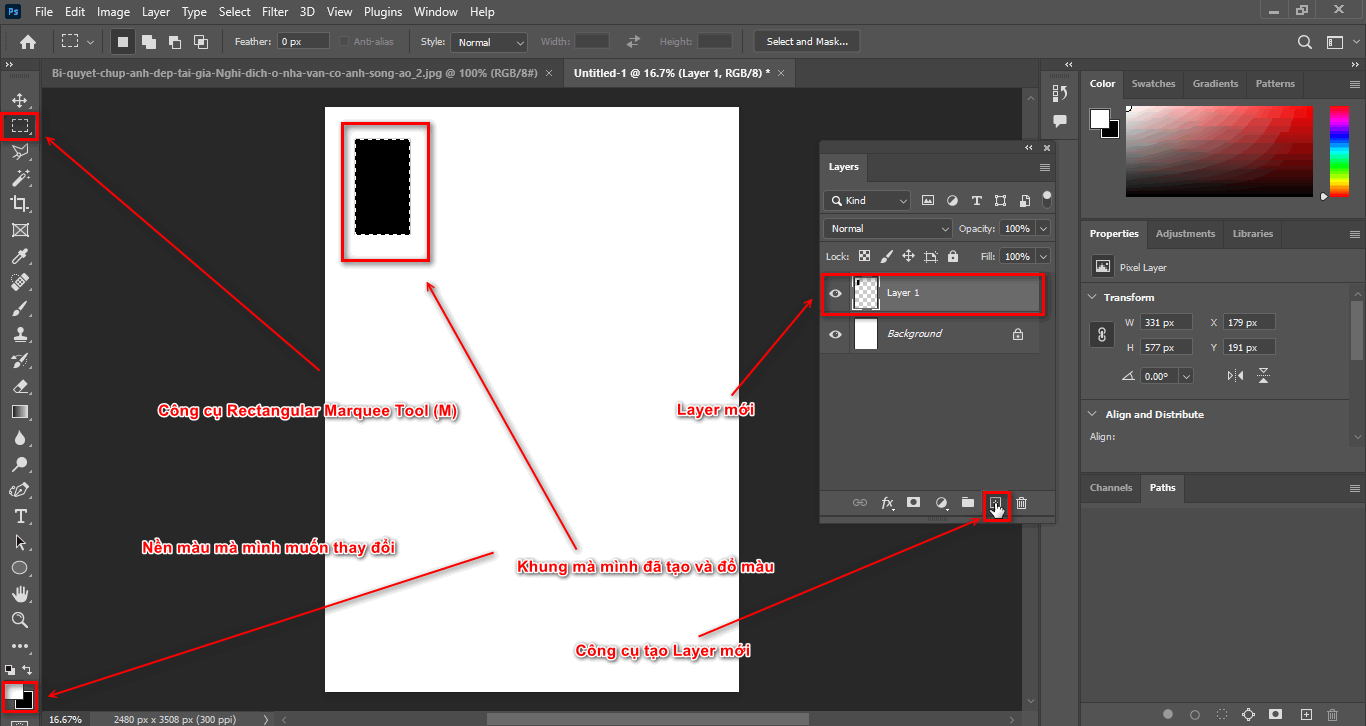
  • Now we use the tool Rectangular Marquee Tool (M) Draw rectangular frames to create window frames
  • When using the tool (M) We remember to create one for it Empty layer (Alt + Ctrl + Shifl + N) Let me pour black directly on it Alt + Delete frames that we have created
How to create natural light in Photoshop
create window frames
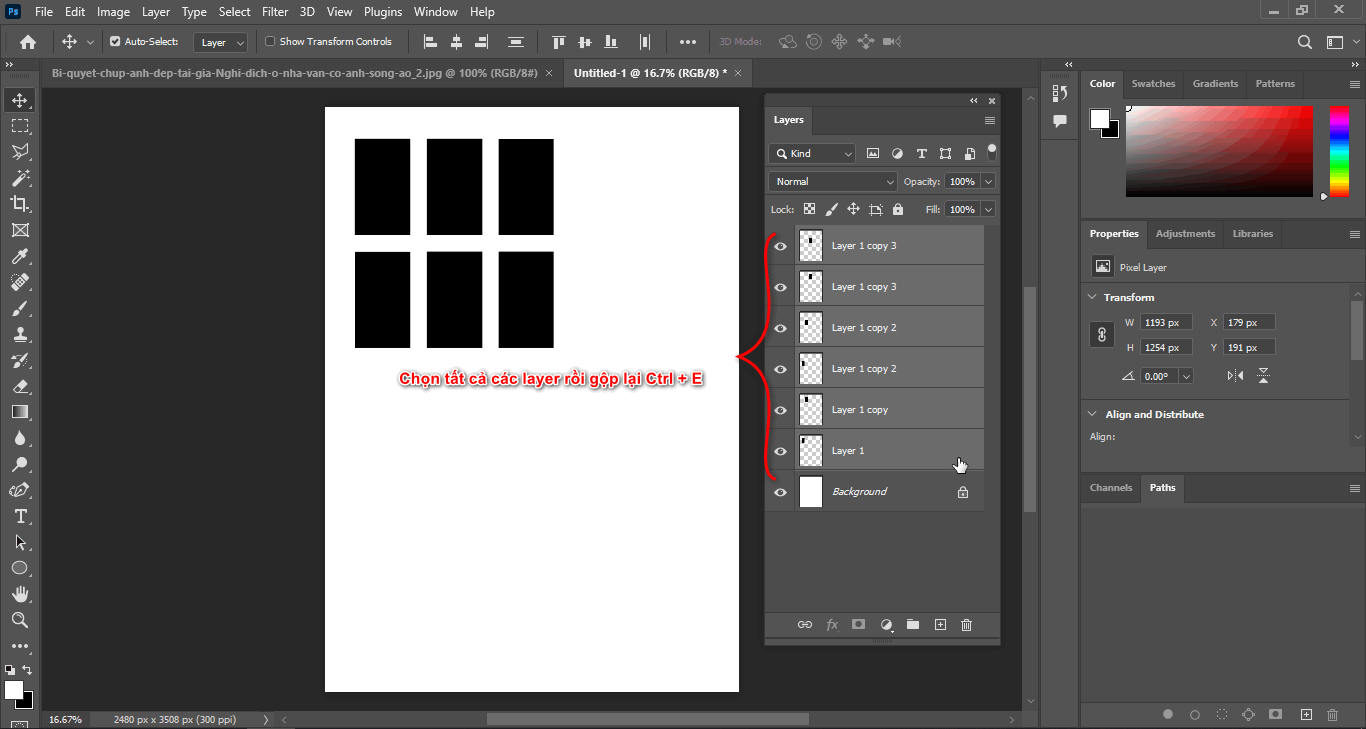
  • At this point, I will create 6 rectangular frame layers, then I will combine all those frame layers using the keyboard shortcut: Ctrl + E
How to create natural light in Photoshop
Merge layers
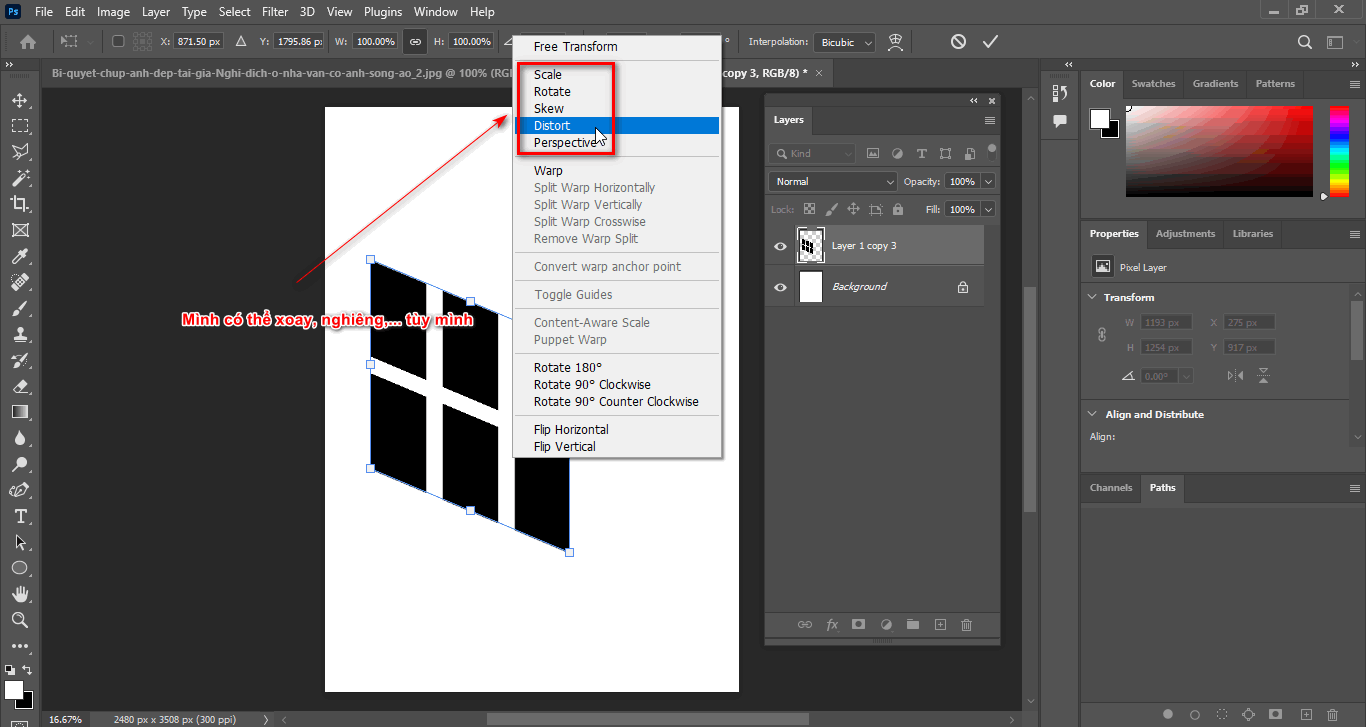
  • After merging, I will adjust the direction and tilt of the frame to best suit by clicking Ctrl + T
  • Then right click to select Skew to change the tilt of the door frame
How to create natural light in Photoshop
Change size and tilt
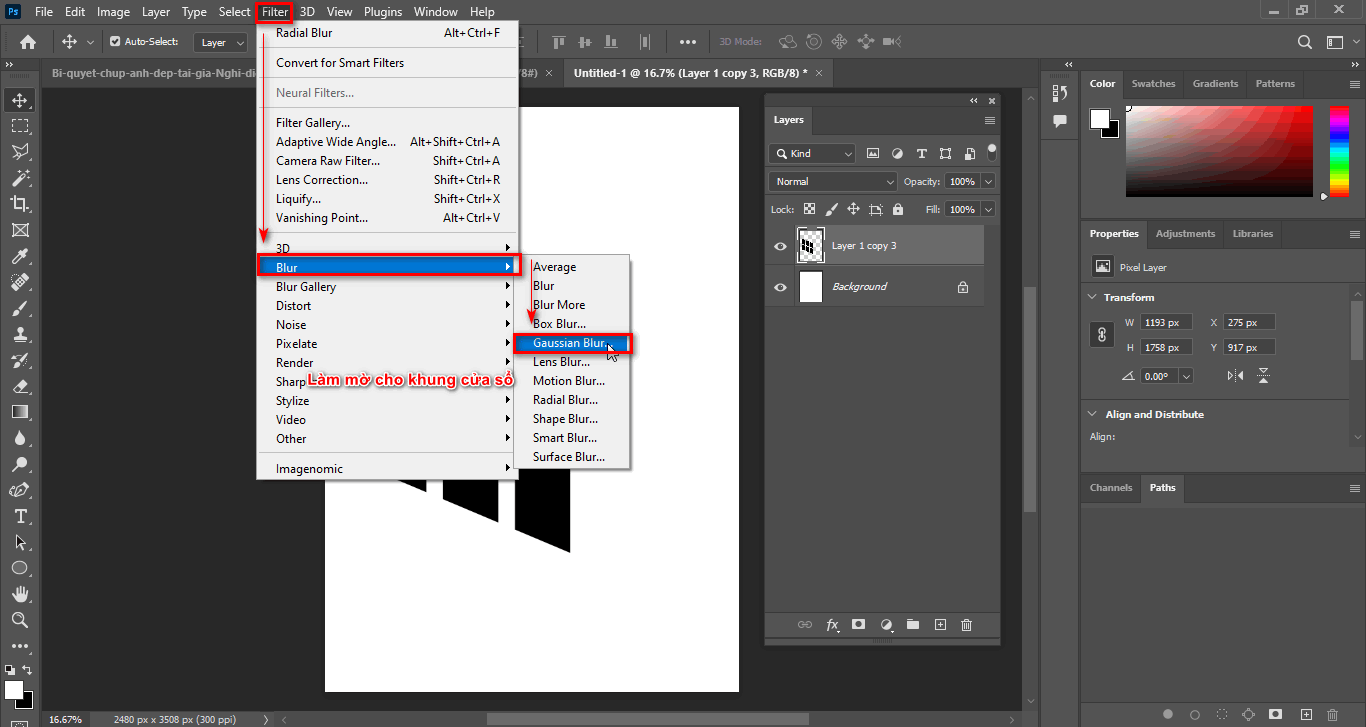
  • Then go to the menu bar and select Filter > Blur > Gaussian Blur Create the most realistic opacity for the door frame (the parameters depend on the situation you use)
How to create natural light in Photoshop
Blur the window frame

Step 3: Save the window frame

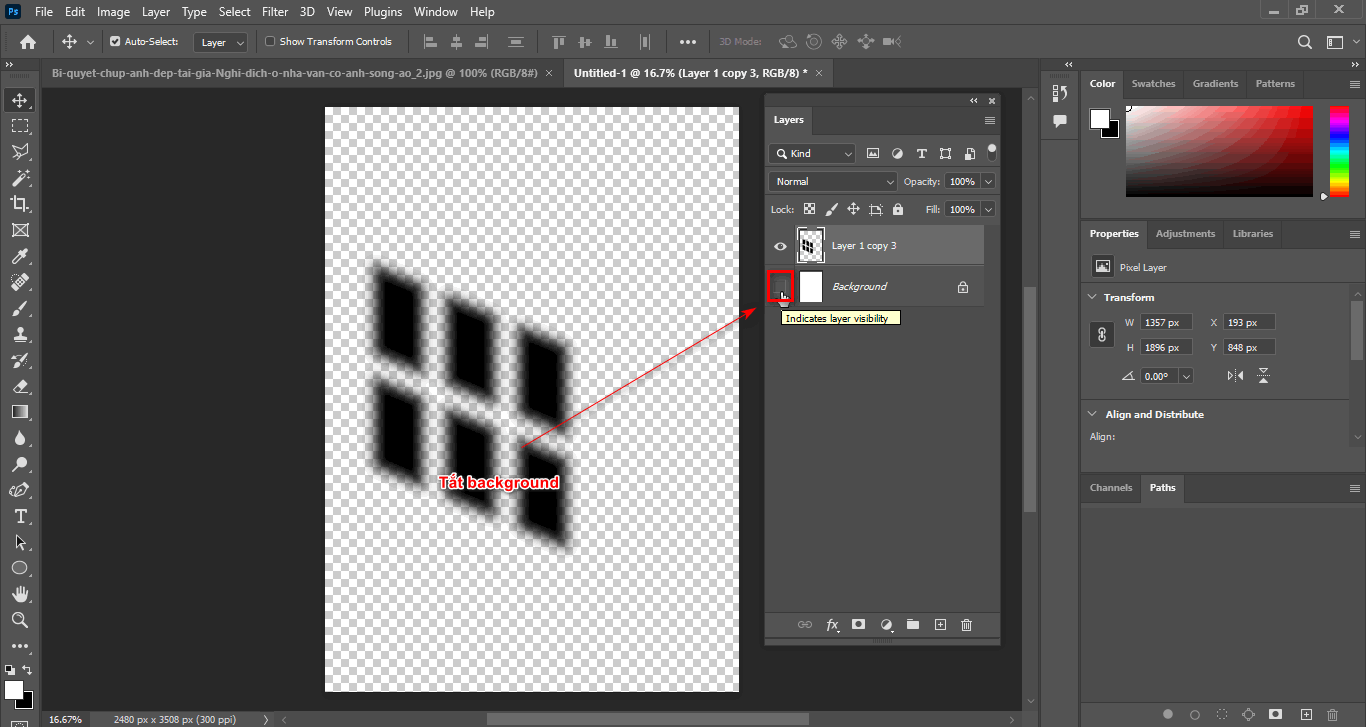
  • First of all, turn off the Background Layer
How to create natural light in Photoshop
Turn off background
  • Then use the tool Rectangular Marquee Tool (M) Create a selection surrounding the window layer you just created
  • Then select the menu bar Edit > Define Brush Preset > OK
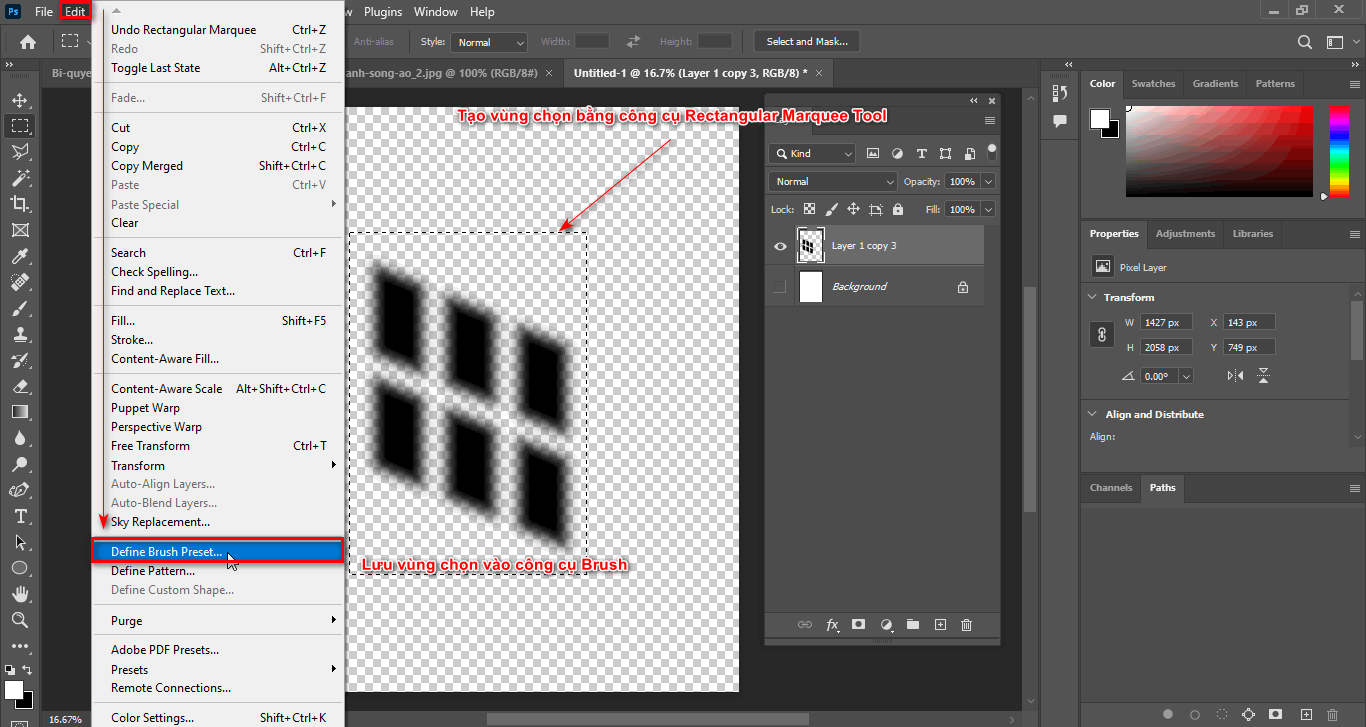
How to create natural light in Photoshop
Save to Brush tool
  • After saving the object to the tool Brush
  • Just now we were Create natural light in Photoshop Now we will include it in the image

Step 4: Go back to the image layer to add the light window to the image

  • Looking at the Layer panel below, we select the tool Create New Fill or Adjustment Layer > Color Lookup
  • At this point, a color palette will appear to suit the scene
  • The 3DLUT File section will have many formats such as: color at night, during the day, film color,...
  • I will choose 3DLUT File as the format Moonlight.3DL create a colorful night scene
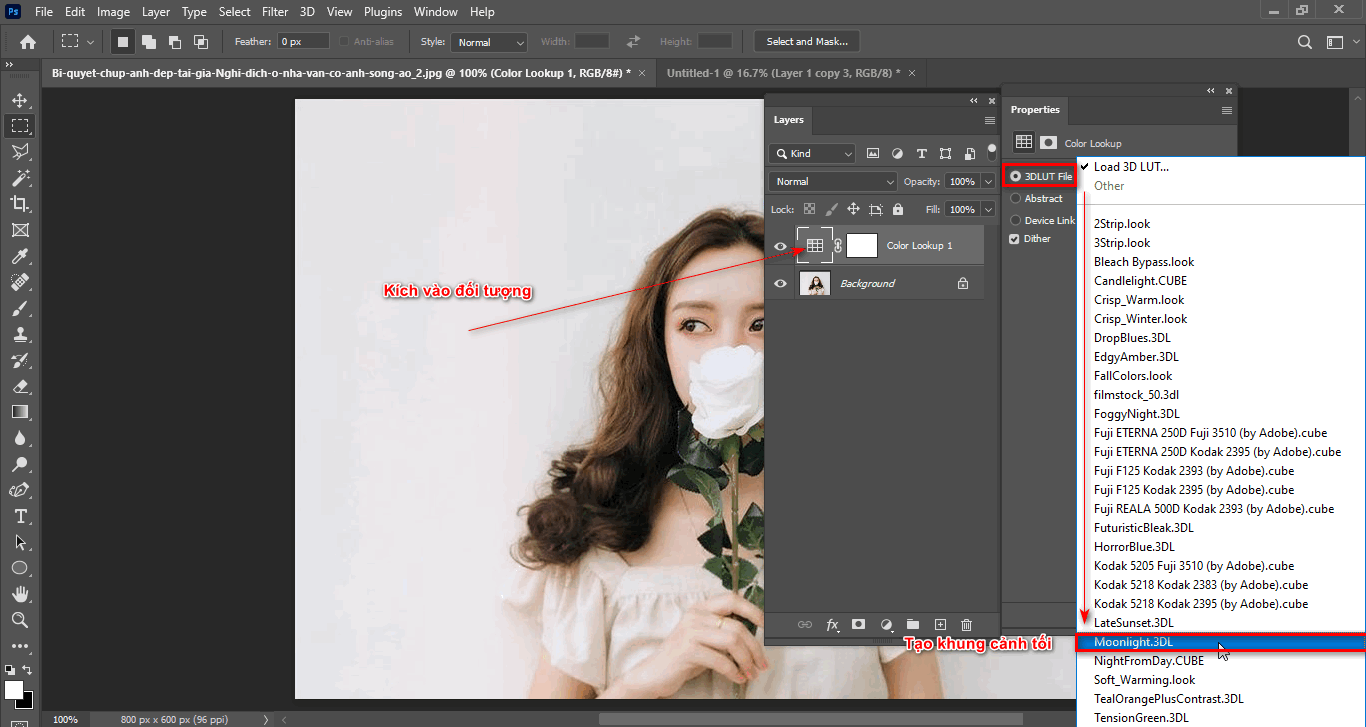
How to create natural light in Photoshop
Create an evening scene
  • Now I will create an empty layer to contain the window frame
  • I use tools Brush window image that I just saved
  • At this time, I set the color to white, then click on the image and a white window frame will appear
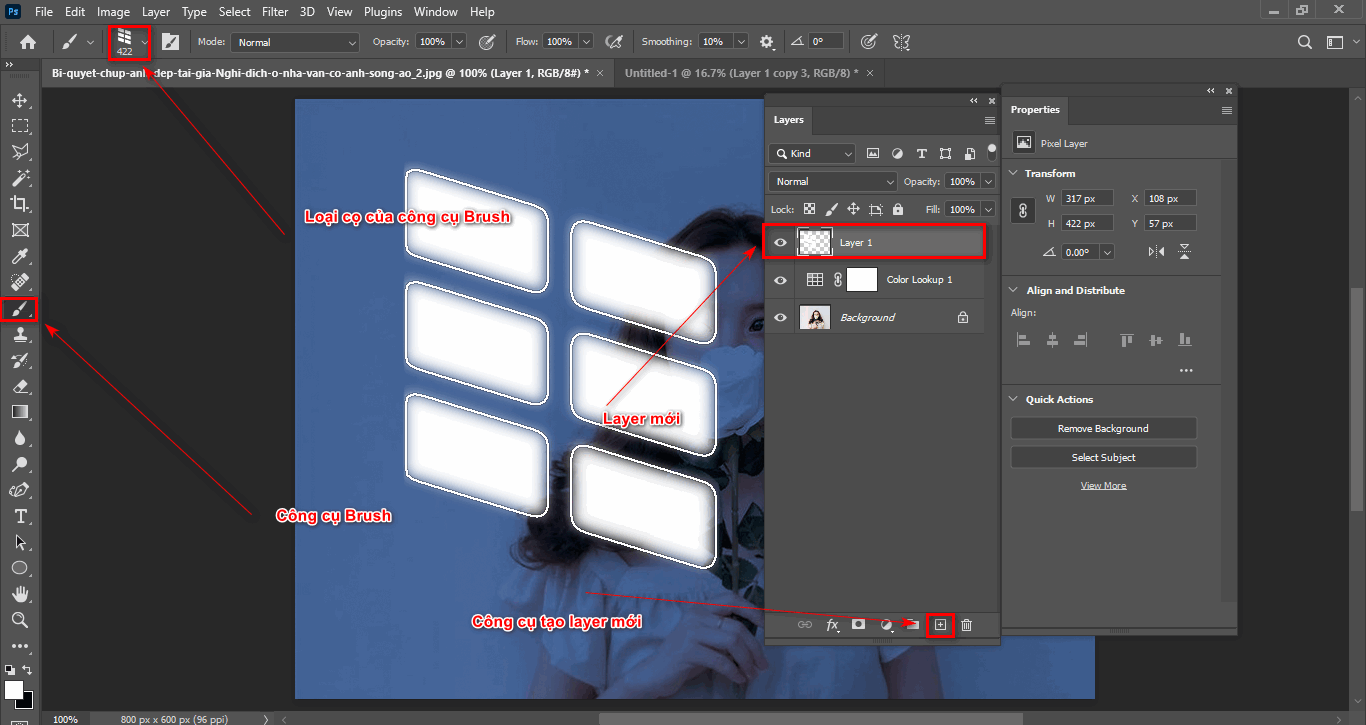
How to create natural light in Photoshop
Use the brush to create the door frame
  • Now, to make the window frame more realistic, I use the blending mode Softlight
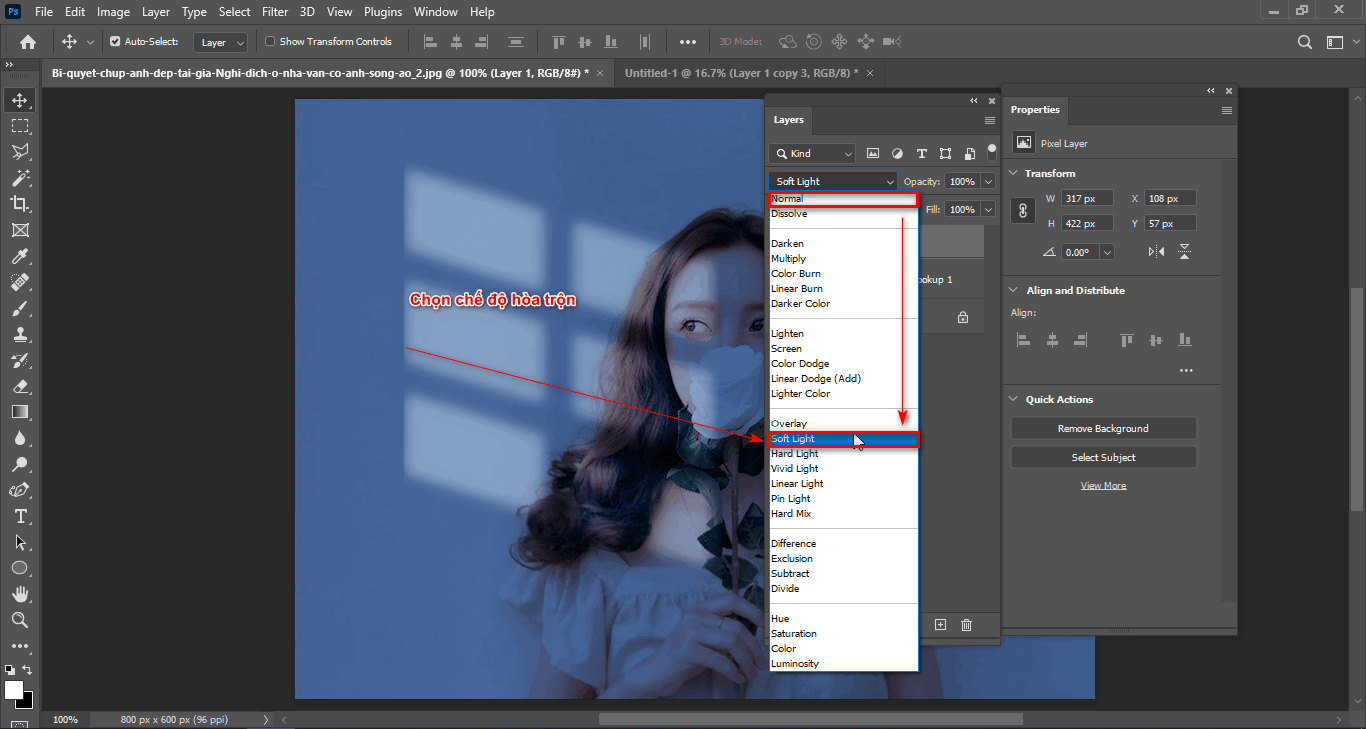
How to create natural light in Photoshop
Use the blend tool
  • In case if the window frame I think is not bright enough, I can double it Layer that goes up and down Opacity accordingly

Step 5: Finished product after performing the above steps
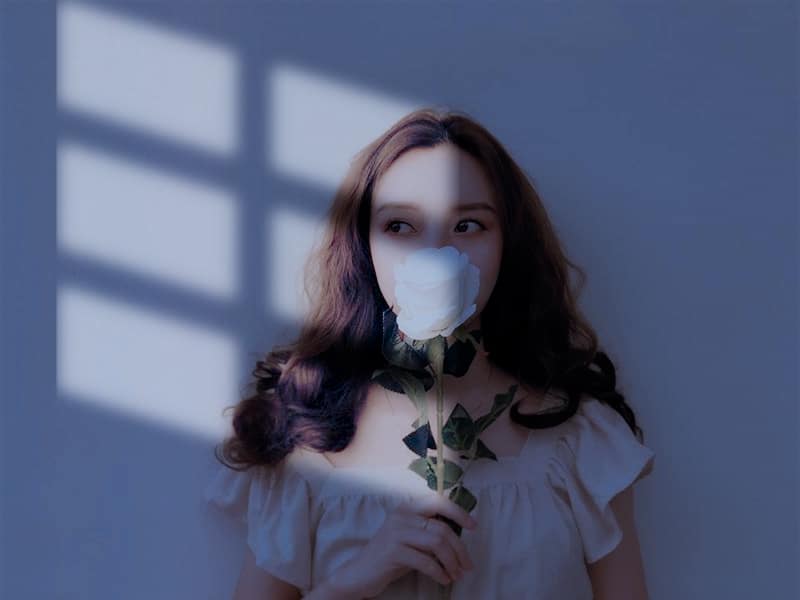
How to create natural light in Photoshop
Finished product after creating the photo

Epilogue

Through this article you already know How to create natural light in Photoshop Extremely simple, isn't it? If you find Photoshop interesting and want to learn, come here Graphic Express. We train Photoshop from basic to advanced. Even people who don't know anything can learn photoshop course ours. Instructions until you are proficient before passing the lesson.

Thank you for following and I wish you success

Tags : Tags adobe photoshop   learn photoshop   learn basic photoshop   study pts   study graphic design   good tips pts
Share
FacebookShare on FacebookpinterestShare on PinterestMessengerShare on Facebook Messenger
twitterShare on TwitterlinkedinShare on LinkedinvkShare on VkredditShare on ReddittumblrShare on TumblrvideoShare on Viadeobuffer. bufferShare on Bufferpocket. pocketShare on PocketwhatsappShare on WhatsappViberShare on ViberemailShare on EmailskypeShare on SkypediggShare on DiggmyspaceShare on MyspacebloggerShare on Blogger YahooMailShare on Yahoo mailtelegramShare on Telegram gmailShare on GmailAmazonShare on AmazonSMSShare on SMS

Tung Thai

As a student at the center. I write what I know to share with you.
1 is to share with you so you can know and learn.
2 improve knowledge and remember longer, with the motto of giving to receive, I want to write more

Related articles

How to create natural light in Photoshop

Remove tool in photoshop

By How To 27/03/2026 0

Remove tool in Photoshop Introduced in…

How to create natural light in Photoshop

4 Ways to create speed effects in Photoshop

By Tung Thai 27/03/2026 0

Here are 4 ways to create speed effects in Photoshop...

How to create natural light in Photoshop

How to delete excess details in Photoshop

By Tung Thai 05/01/2026 0

How to delete excess details in Photoshop. Delete objects…

Leave a Comment Cancel reply

Categories Adobe Photoshop Remove tool in photoshop

Remove tool in photoshop

27/03/2026
4 Ways to create speed effects in Photoshop

4 Ways to create speed effects in Photoshop

27/03/2026
Graphic Design

Graphic Design The art of creating appeal

27/02/2026
What is google plays app? Is installation necessary?

What is google plays app? Is installation necessary?

24/02/2026
create flatsome slider

How to create a slider that runs super smoothly on flatsome

05/01/2026

Recent comments

  • male2 years ago
    On How to create a fade effect in Photoshop
    Great
  • phat phat2 years ago
    On Who is 5SMedia?
    Useful article
  • Minh Anh3 years ago
    On How to create basic materials in vray Sketchup
    Very good, admin
Copyright © 2026 HOWTO - Powered by HOWTO

5SMedia.net | hocdohoacaptoc.com | huongdansudung.vn | webantam.com

Back to Top
Hello!
  • All
    • Tips
      • Google
      • Facebook
      • Tiktok
    • Instruct
      • What is Q&A?
      • Taobao
    • WordPress
      • Code
      • Plugins
      • Themes
        • Flatsome
        • Theme Nevo
  • Share
    • WordPress
    • Code
    • Plugins
    • Tips
    • Windows
    • Apple
    • Graphics
    • Experience
  • Graphics documents
    • illustrator
    • Sketchup
    • Coreldraw
    • 3ds max
    • Enscape
    • Photoshop
    • Graphics Plugin
  • Course
    • Photoshop course
    • illustrator course
    • Coreldraw course
    • Edit video course
    • Course Sketchup
    • Autocad course
    • Website management course
  • Service
  • Software
    • Windows
      • Tips
      • Office
      • Necessary
      • Tools
    • Apple
  • Game
  • News
    • Technology
    • Review
EN
EN
VI
Hello!

  • Lost your password ?