Skip to content
FacebookTwitterPinterest
HOWTOHOWTO
  • All
    • Tips
      • Google
      • Facebook
      • Tiktok
    • Instruct
      • What is Q&A?
      • Taobao
    • WordPress
      • Code
      • Plugins
      • Themes
        • Flatsome
        • Theme Nevo
  • Share
    • WordPress
    • Code
    • Plugins
    • Tips
    • Windows
    • Apple
    • Graphics
    • Experience
  • Graphics documents
    • illustrator
    • Sketchup
    • Coreldraw
    • 3ds max
    • Enscape
    • Photoshop
    • Graphics Plugin
  • Course
    • Photoshop course
    • illustrator course
    • Coreldraw course
    • Edit video course
    • Course Sketchup
    • Autocad course
    • Website management course
  • Service
  • Software
    • Windows
      • Tips
      • Office
      • Necessary
      • Tools
    • Apple
  • Game
  • News
    • Technology
    • Review
HOWTOHOWTO
  • Home > 
  • Graphics > 
  • Adobe Photoshop > 
  • How to create moving images in photoshop

How to create moving images in photoshop

By Tung Thai 31/03/2026 0 968 Views
How to create moving images in photoshop
Article categories

How to create moving images in photoshop. Creating moving images in Photoshop is quite easy and extremely effective. An animated image, often called a GIF file, is a type of file that includes images and music cut together at different lengths and with repetition. again continuously.

When used and know how to create, you can create images that help advertise better and more effectively than with regular photos. I won't let you wait any longer and I will guide you How to create moving images in Photoshop Please follow along:

How to create moving images in photoshop

Limbs 3 See more: How to create snow in Photoshop is extremely simple

How to create moving images in photoshop

Method 1: Use a photo with a video that you want to combine

Step 1: You open your image file

  • File > Open to open the image file then enter Window > Timeline to create animations
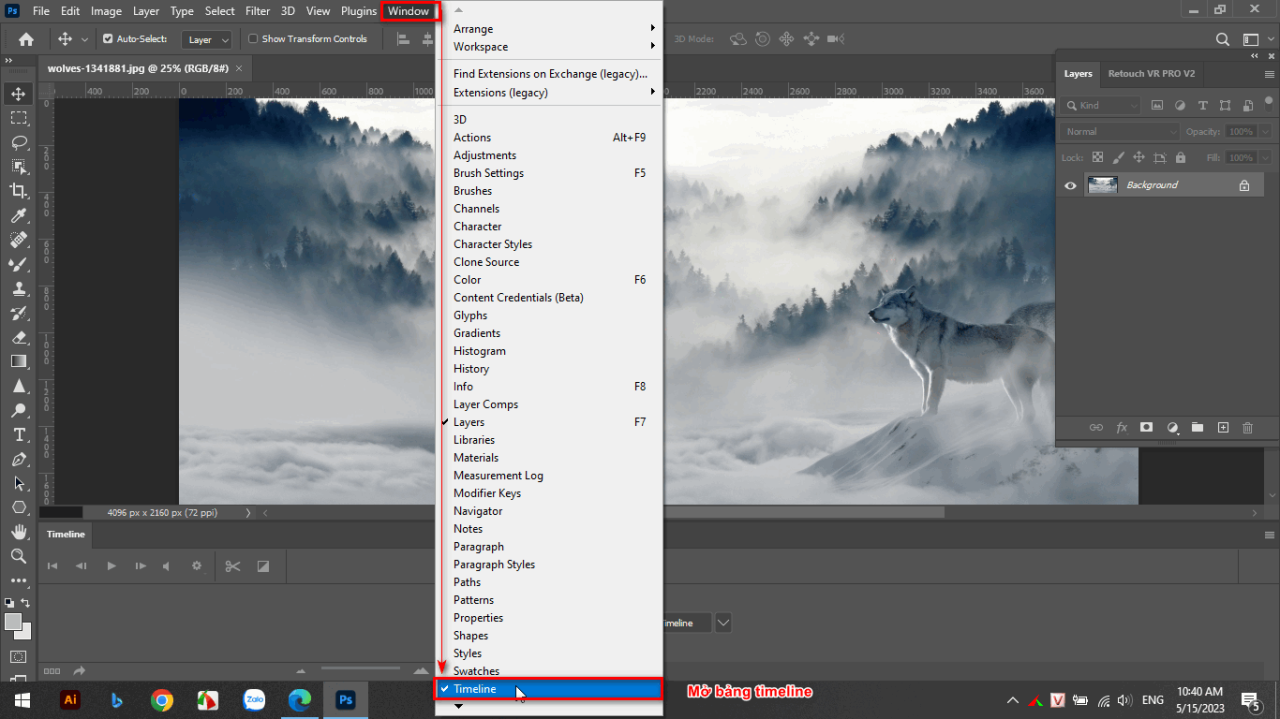
How to create moving images in photoshop

Step 2: Bring video objects and image files onto one page

  • Now when you look at the timeline panel, 2 objects will appear: Create Video Timeline and Craate Frame Animation

How to create moving images in photoshop

  • You will select the section Create Video Timeline At this point, there will be a mark below the table + at the end so we can add the video you want to animate
  • You'll find the video you downloaded and then you can align it to fit the photo frame you want to create
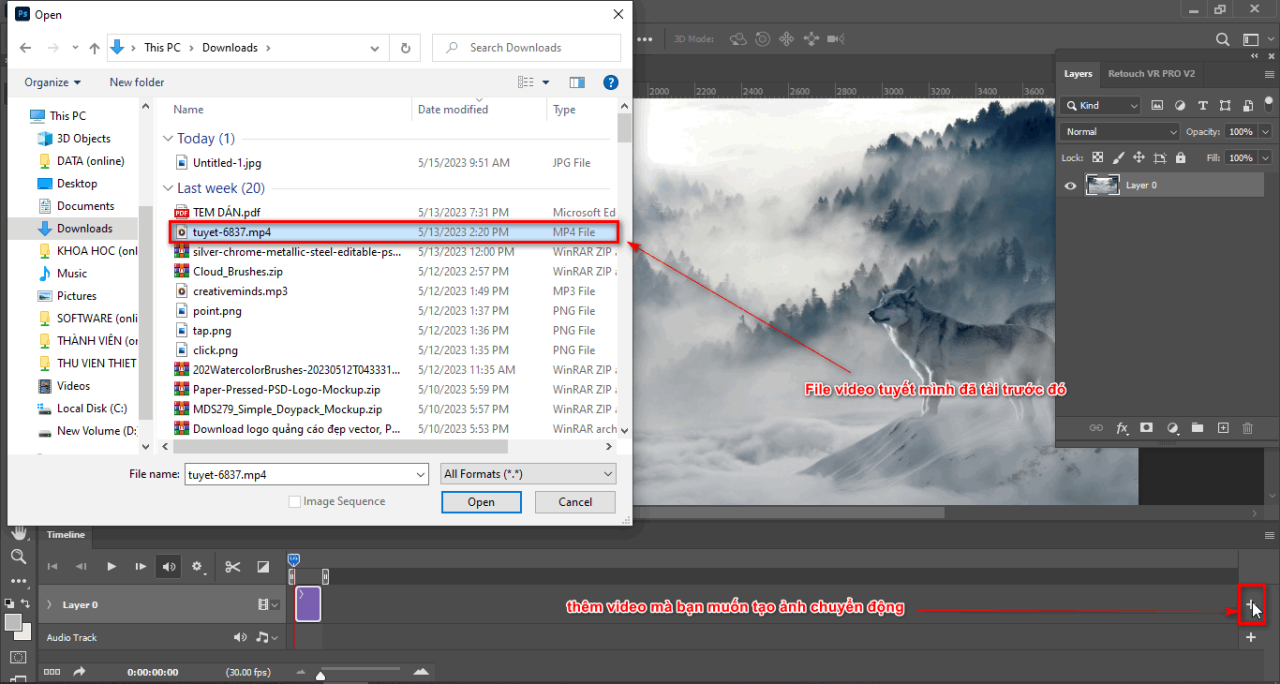
How to create moving images in photoshop

  • After you are done, size and length of the video so that it is equal to the image you placed
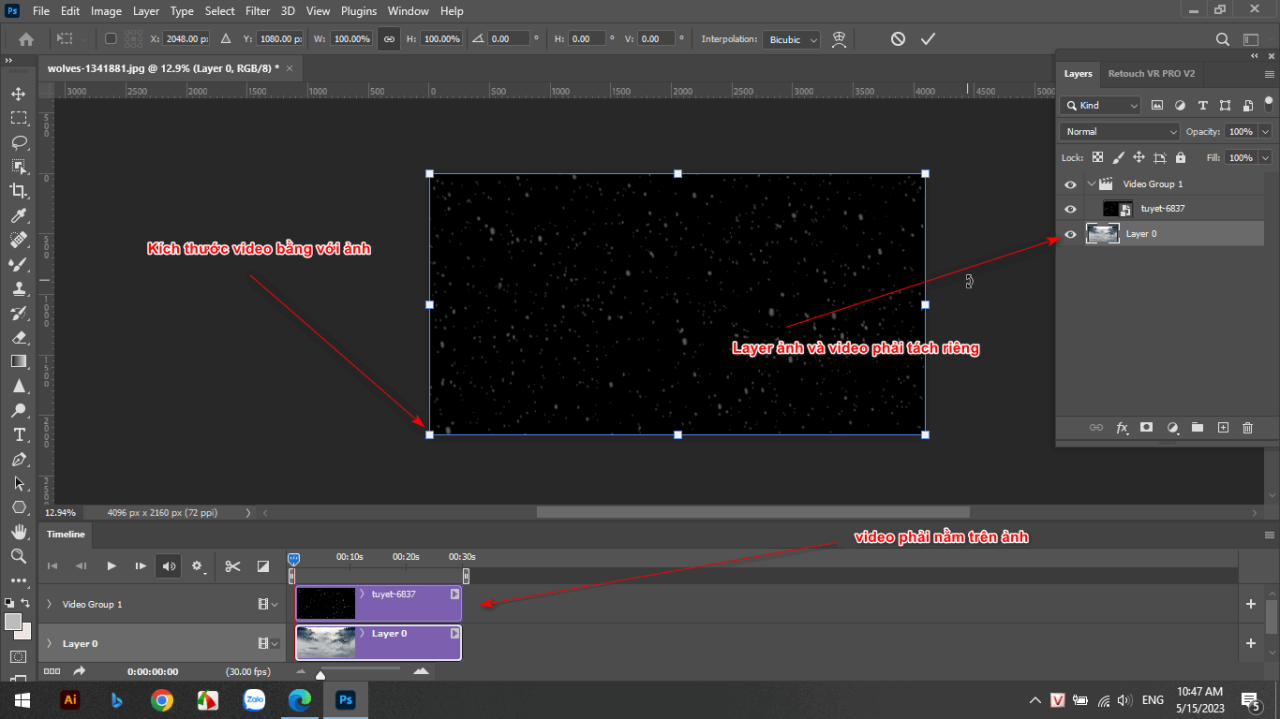
How to create moving images in photoshop

  • You can use the blending or brightening part of the photo or video you added before. Here, because the video I downloaded is black and white, the background I will use is the blending mode. Screen to match the image object below that I added
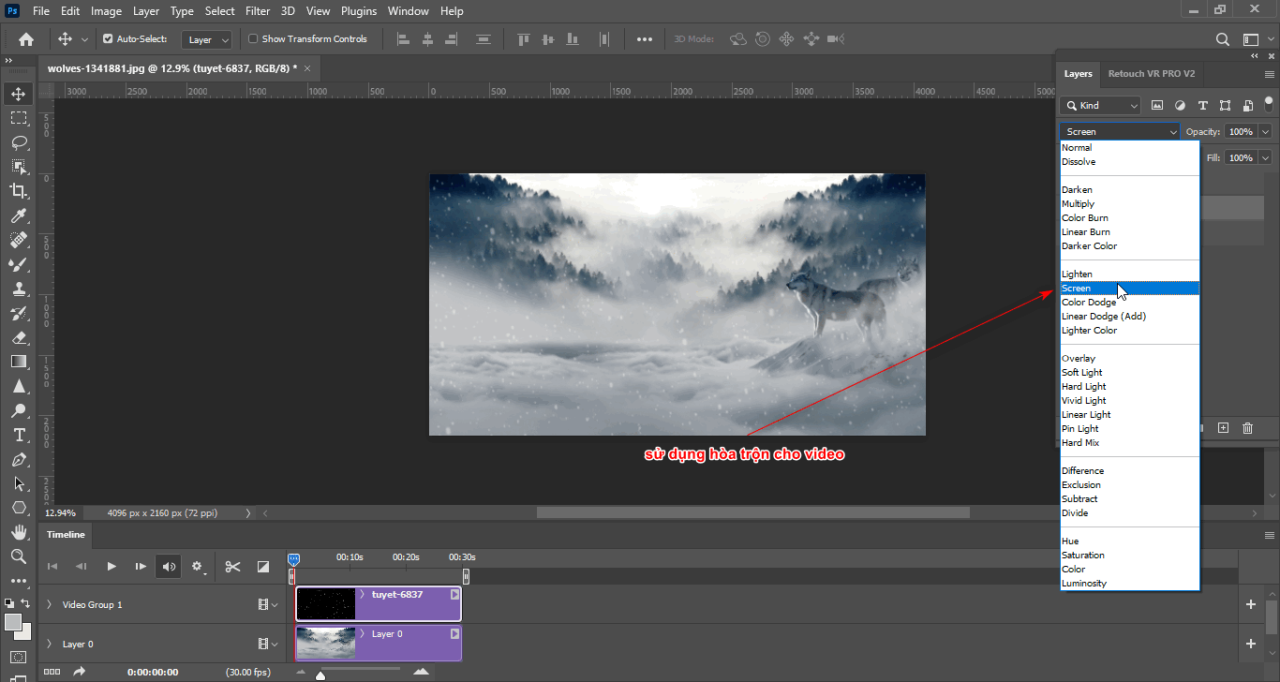
How to create moving images in photoshop

Step 3: I can edit the speed or cut out the part of the video you added

  • You can change the speed of the video by shortening it or lengthening it
  • Also the toolbar adds tables timeline. timeline I also have a section to cut out the sections you don't want with the scissors tool
  • Or there is some type of transition already available next to the drag tool
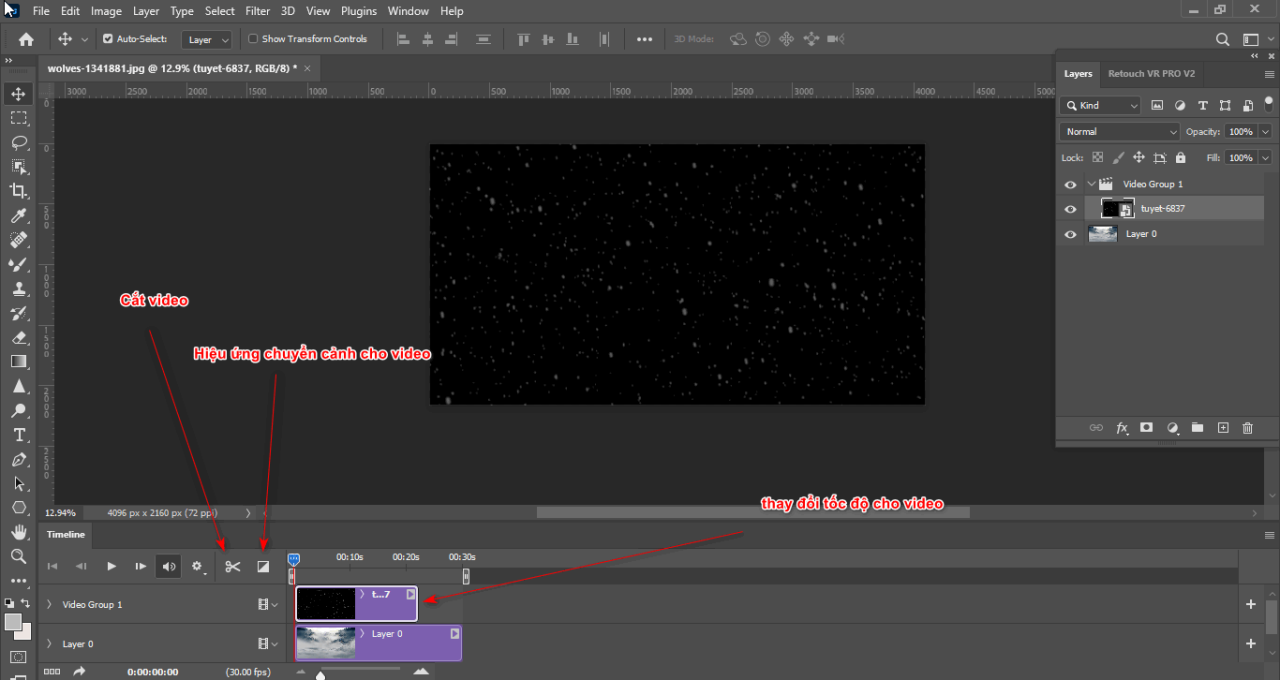
How to create moving images in photoshop

Step 4: After completing how to create moving images in Photoshop, I will have a short video for you

  • To run, click on Play to test the short video you created
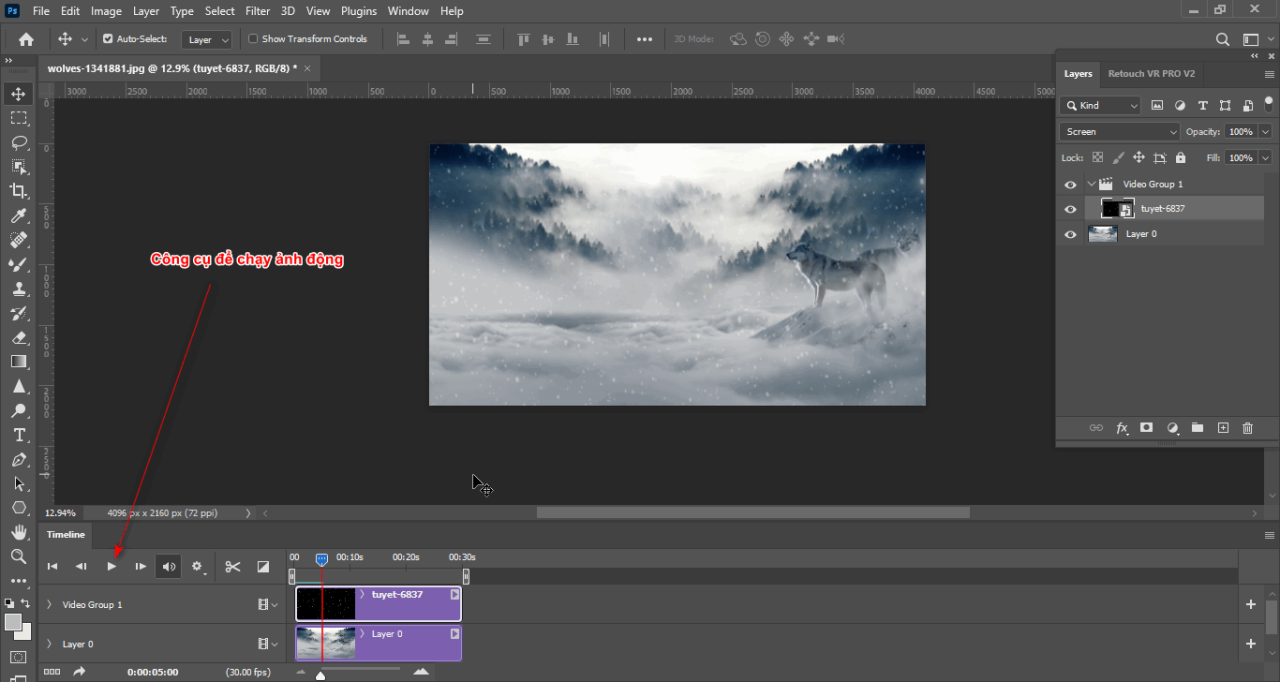
How to create moving images in photoshop

see more

  • Instructions for removing photoshop background very quickly
  • Instructions for smoothing skin in Photoshop
  • How to create snow in Photoshop is extremely simple
  • How to create rain in Photoshop is extremely simple
  • The best way to remove acne in photoshop in 2022

Method 2: Create animations through the Frame of the image

Step 1: You also open a photo that you already have

  • You enter File > Open to open the photo that you want to make into a motion picture

Step 2: You also open the timeline panel

  • You enter the section Window > Timeline to open the animation tool for your photo

How to create moving images in photoshop

  • Now you will choose the part Create Frame Timeline

How to create moving images in photoshop

  • After selecting, you will get a table containing the Frames of the image you opened
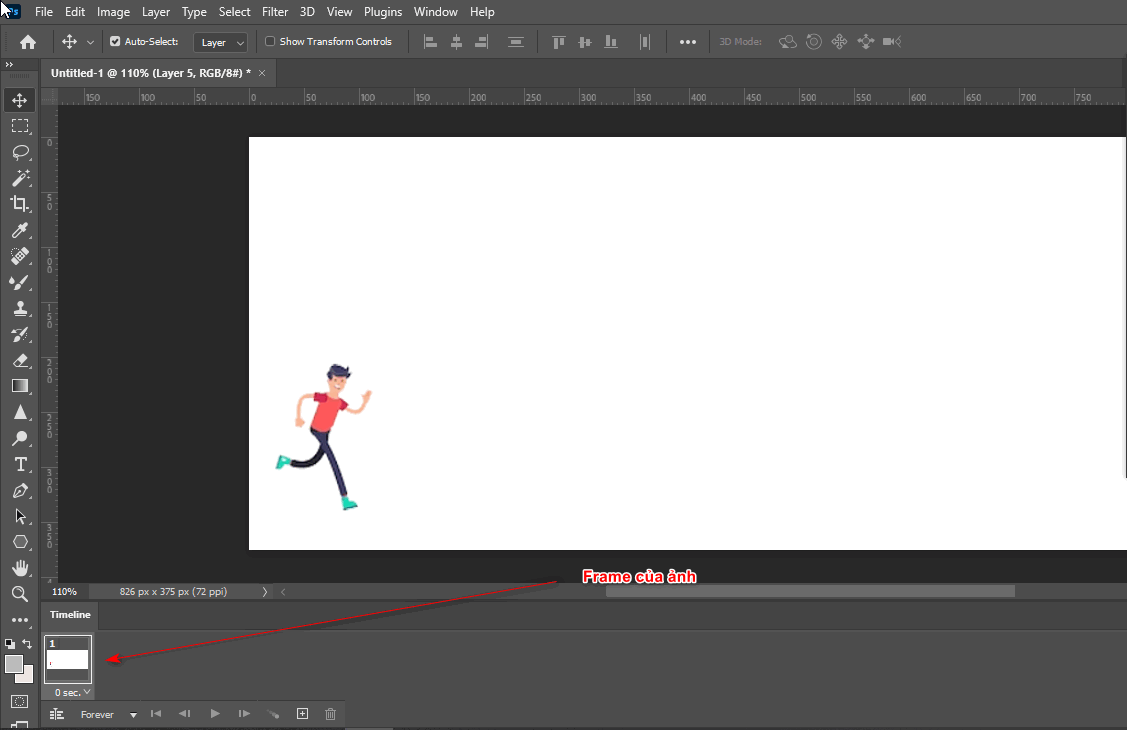
How to create moving images in photoshop

Step 3: Create effects on the Layer of each Frame and some tools in the Frame

  • I select the first Frame, I open layer 1, then in the second Frame, I open Layer 2 and turn off Layer 1.
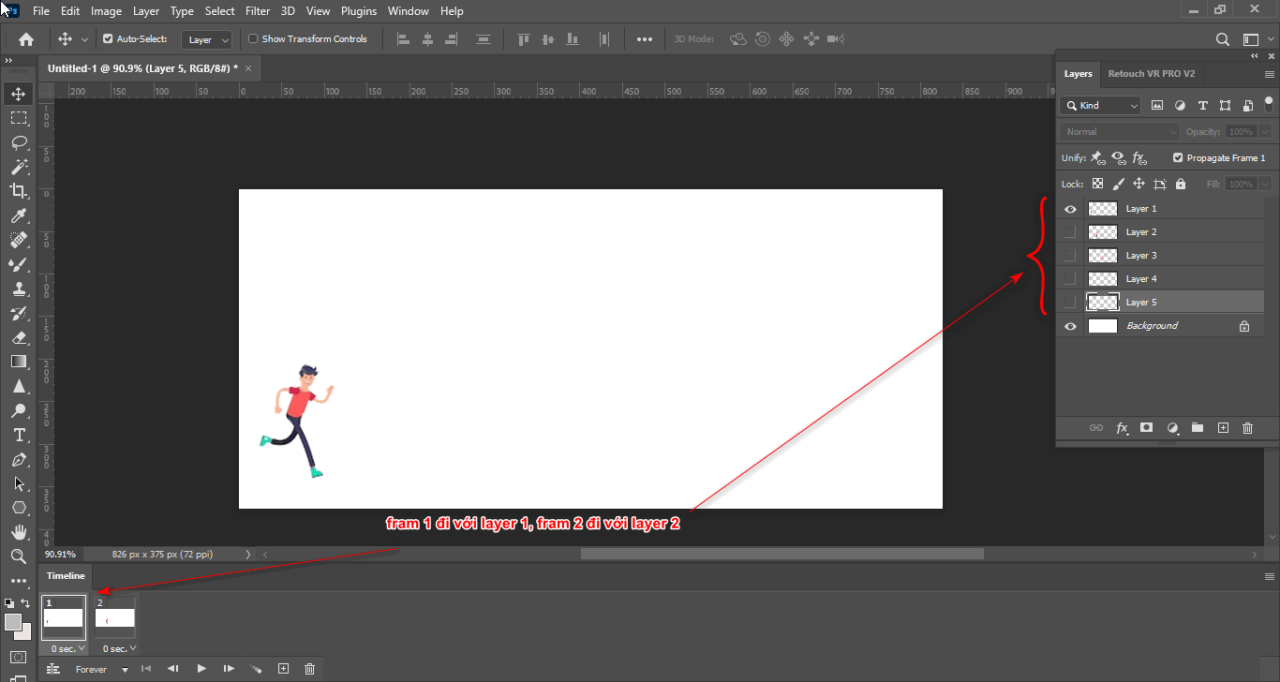
How to create moving images in photoshop

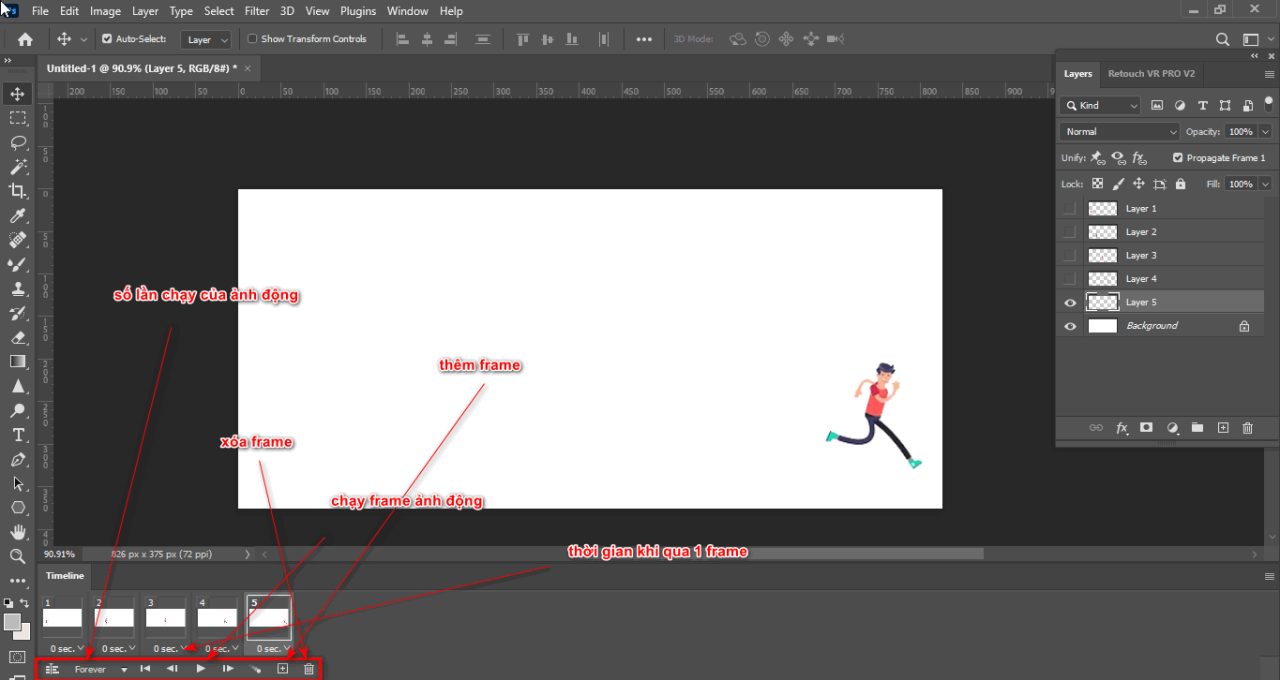
  • Then I added Frame using the plus icon below
  • Or you can discard that Frame using the trash icon
  • You can change the running time when passing a Frame or the running time of an entire animation
How to create moving images in photoshop

Step 4: After completing how to create moving images in Photoshop, you will have a short video running with Frame

  • To run it, click on the part Play animation to test the short video you created

How to create moving images in photoshop

Step 5: How to save files of how to create moving images in Photoshop in each format

Here's how to save it How to create moving images in Photoshop There will be 2 ways for you to choose File > Export > Save for web > GIF > Save for use Create Frame Timeline
You can also save by doing Export > Render Video for use Create Video Timeline, Then you choose the folder you want to put the video in, then click Render

In short

Posts How to create moving images in Photoshop has guided you How to create moving images in Photoshop Fast and effective, very suitable for those running marketing ads. In addition, you can create interesting and beautiful animations to attract viewers more effectively. If you are interested photoshop course then you can visit our website Graphic Express for advice.

Wishing you success in your assignment.

Tags : Tags adobe photoshop   Photoshop animation   How to create moving images in photoshop   learn photoshop   learn basic photoshop   study graphic design   create GIF images in photoshop
Share
FacebookShare on FacebookpinterestShare on PinterestMessengerShare on Facebook Messenger
twitterShare on TwitterlinkedinShare on LinkedinvkShare on VkredditShare on ReddittumblrShare on TumblrvideoShare on Viadeobuffer. bufferShare on Bufferpocket. pocketShare on PocketwhatsappShare on WhatsappViberShare on ViberemailShare on EmailskypeShare on SkypediggShare on DiggmyspaceShare on MyspacebloggerShare on Blogger YahooMailShare on Yahoo mailtelegramShare on Telegram gmailShare on GmailAmazonShare on AmazonSMSShare on SMS

Tung Thai

As a student at the center. I write what I know to share with you.
1 is to share with you so you can know and learn.
2 improve knowledge and remember longer, with the motto of giving to receive, I want to write more

Related articles

How to create moving images in photoshop

Remove tool in photoshop

By How To 27/03/2026 0

Remove tool in Photoshop Introduced in…

How to create moving images in photoshop

4 Ways to create speed effects in Photoshop

By Tung Thai 27/03/2026 0

Here are 4 ways to create speed effects in Photoshop...

How to create moving images in photoshop

How to delete excess details in Photoshop

By Tung Thai 05/01/2026 0

How to delete excess details in Photoshop. Delete objects…

Leave a Comment Cancel reply

Categories Adobe Photoshop How to create moving images in photoshop

How to create moving images in photoshop

31/03/2026
Remove tool in photoshop

Remove tool in photoshop

27/03/2026
4 Ways to create speed effects in Photoshop

4 Ways to create speed effects in Photoshop

27/03/2026
Graphic Design

Graphic Design The art of creating appeal

27/02/2026
What is google plays app? Is installation necessary?

What is google plays app? Is installation necessary?

24/02/2026

Recent comments

  • male2 years ago
    On How to create a fade effect in Photoshop
    Great
  • phat phat2 years ago
    On Who is 5SMedia?
    Useful article
  • Minh Anh3 years ago
    On How to create basic materials in vray Sketchup
    Very good, admin
Copyright © 2026 HOWTO - Powered by HOWTO

5SMedia.net | hocdohoacaptoc.com | huongdansudung.vn | webantam.com

Back to Top
Hello!
  • All
    • Tips
      • Google
      • Facebook
      • Tiktok
    • Instruct
      • What is Q&A?
      • Taobao
    • WordPress
      • Code
      • Plugins
      • Themes
        • Flatsome
        • Theme Nevo
  • Share
    • WordPress
    • Code
    • Plugins
    • Tips
    • Windows
    • Apple
    • Graphics
    • Experience
  • Graphics documents
    • illustrator
    • Sketchup
    • Coreldraw
    • 3ds max
    • Enscape
    • Photoshop
    • Graphics Plugin
  • Course
    • Photoshop course
    • illustrator course
    • Coreldraw course
    • Edit video course
    • Course Sketchup
    • Autocad course
    • Website management course
  • Service
  • Software
    • Windows
      • Tips
      • Office
      • Necessary
      • Tools
    • Apple
  • Game
  • News
    • Technology
    • Review
EN
EN
VI
Hello!

  • Lost your password ?