Skip to content
  • About us
  • Contact
  • en_USEN
  • viVI
FacebookTwitterPinterest
HOWTOHOWTO
  • All
    • Tips
      • Google
      • Facebook
      • Tiktok
    • Instruct
      • What is Q&A?
      • Taobao
    • WordPress
      • Code
      • Plugins
      • Themes
        • Flatsome
        • Theme Nevo
  • ShareHot
    • WordPress
    • Code
    • Plugins
    • Tips
    • Windows
    • Apple
    • Graphics
    • Experience
  • Graphics documents
    • illustrator
    • Sketchup
    • Coreldraw
    • 3ds max
    • Enscape
    • Photoshop
    • Graphics Plugin
  • Course
    • Photoshop course
    • illustrator course
    • Coreldraw course
    • Edit video course
    • Course Sketchup
    • Autocad course
    • Website management course
  • Service
  • Software
    • Windows
      • Tips
      • Office
      • Necessary
      • Tools
    • Apple
  • Game
  • News
    • Technology
    • Review
Hello!

  • Lost your password ?
HOWTOHOWTO
  • Home > 
  • Graphics > 
  • Adobe Photoshop > 
  • How to create a background in Photoshop is extremely simple

How to create a background in Photoshop is extremely simple

By Tung Thai 17/11/2025 0 573 Views
How to create a background in Photoshop is extremely simple
Article categories

How to create background in Photoshop. Adobe Photoshop is a software that helps us edit or cut a photo as we want. It contains many tools to help us edit images in the most beautiful way. This is also a fairly long-standing and well-known software. until it was the first acne removal and photo collage software.

In later versions, it is improved from the basic tools, in addition, it also releases some additional tools, helping users better in editing photos. Let's follow the instructions for use cHow to create background in Photoshop Very simple in photoshop

  • Instructions for removing photoshop background very quickly
  • Instructions for smoothing skin in Photoshop
  • How to create snow in Photoshop is extremely simple
  • How to create rain in Photoshop is extremely simple
  • The latest way to remove acne in photoshop

How to create a background in Photoshop to create a swirl in Photoshop

Steps to create a beautiful backgroup

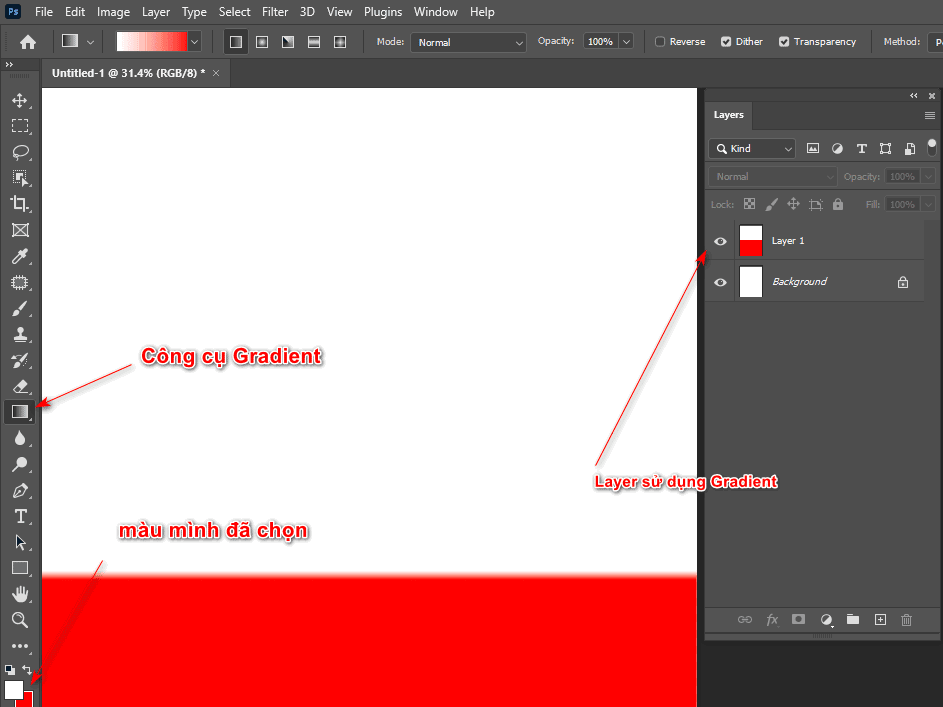
Step 1: We create a new empty layer

Step 2: Use the Gradient tool then let the 2 colors you want to create blend

Step 3: Then use that tool and drag from the top of the layer to the bottom of the layer so that the layer appears in the 2 colors you have chosen.
How to create a background in Photoshop is extremely simple
Step 3

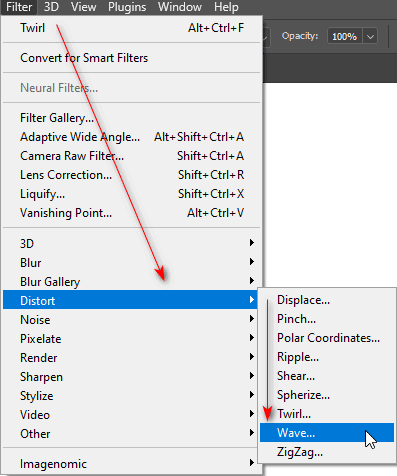
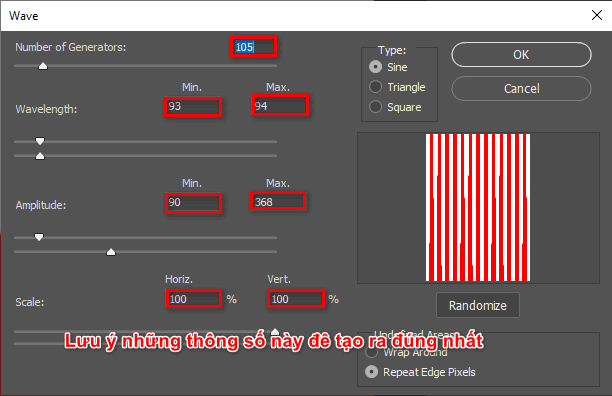
Step 4: Then I looked up at the menu bar and clicked on it Filter > Distort > Wave (Number of generators: 105, Wavelength: 93; 94, Amplitude: 90; 368, Scale: 100;100)
How to create a background in Photoshop is extremely simple

You can customize the parameters and refer to our parameters below
How to create a background in Photoshop is extremely simple
Wave parameter table

Step 5: Then click OK, this time the layer will create stripes of the 2 colors I selected earlier

Step 6: Select Filter > Distort > Polar Coordinates > OK
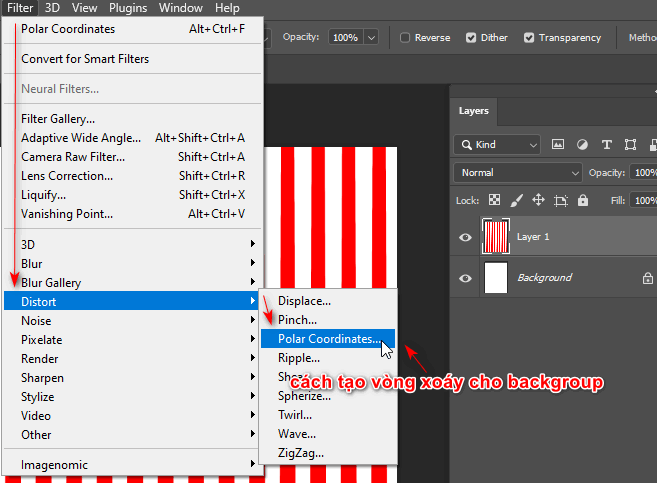
How to create a background in Photoshop is extremely simple
Create a rotating and bunching effect in one position

When you choose this tool, it will help you have an effect like the image below
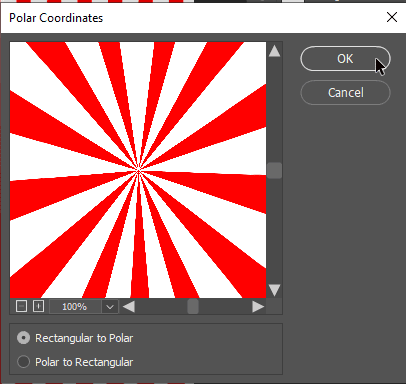
How to create a background in Photoshop is extremely simple
Polar Coordinates parameter table

Step 7: At this point we see a circle converging those two colors

How to create background in Photoshop

Step 8: Then we choose Filter > Distort > Twirl to create a swirl for that layer
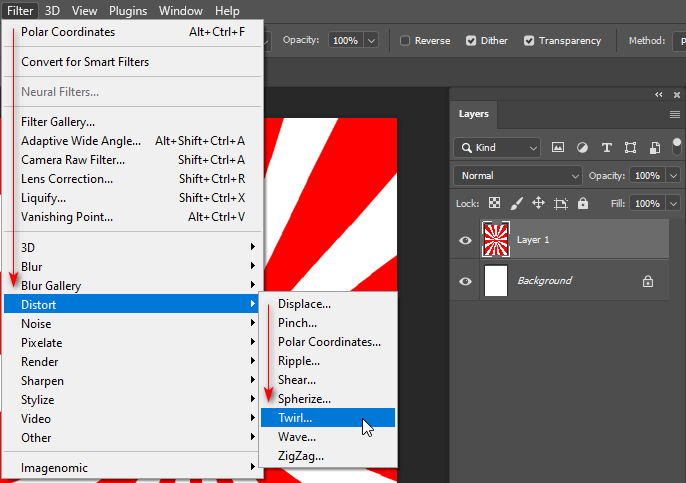
Select the twirl effect to create a twisted shape effect

After you choose the effect, go to the image below and drag the slider to make our image more or less twisted depending on this parameter.
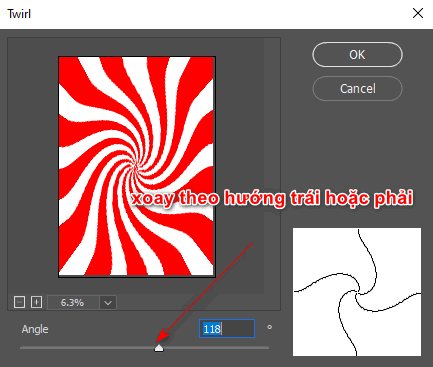
How to create background in Photoshop

Step 9: Now we can only pull the bar Angle Increase or decrease to spin in the left or right direction you want > OK (The lower or higher the number, the more focused it is, so increasing or decreasing it a little will make that backgroup look better)

Epilogue

I just gave you detailed instructions How to create background in Photoshop. This article helps you to blend with a background that you want to make your product more beautiful and eye-catching. At the same time, I also clearly write down the steps so that those who do not understand or want to do it quickly can see it to make it easier to use the tools.

Thank you for your interest and following. If you find the article interesting, please support and follow me through the channel Fanpage instructions for use mine.

Tags : Tags adobe photoshop   learn photoshop   learn basic photoshop   photoshop   create photoshop background   self-study photoshop
Share
FacebookShare on FacebookpinterestShare on PinterestMessengerShare on Facebook Messenger
twitterShare on TwitterlinkedinShare on LinkedinvkShare on VkredditShare on ReddittumblrShare on TumblrvideoShare on Viadeobuffer. bufferShare on Bufferpocket. pocketShare on PocketwhatsappShare on WhatsappViberShare on ViberemailShare on EmailskypeShare on SkypediggShare on DiggmyspaceShare on MyspacebloggerShare on Blogger YahooMailShare on Yahoo mailtelegramShare on Telegram gmailShare on GmailAmazonShare on AmazonSMSShare on SMS
Tung Thai

Tung Thai

As a student at the center. I write what I know to share with you.
1 is to share with you so you can know and learn.
2 improve knowledge and remember longer, with the motto of giving to receive, I want to write more

Related articles

How to create a background in Photoshop is extremely simple

How to use camera Raw in photoshop

By How To 08/12/2025

Camera Raw in photoshop is a tool that has been around since…

How to create a background in Photoshop is extremely simple

Latest instructions for using camera raw in photoshop

By How To 07/12/2025

Camera raw in photoshop is a correction tool…

How to create a background in Photoshop is extremely simple

3 Ways to create speed effects in Photoshop

By Tung Thai 06/12/2025 0

3 Ways to create speed effects in photoshop Speed effects…

Leave a Comment Cancel reply

Categories What is Q&A? What is the structure of that place?

What is Interior Design? How much does an interior design job pay?

12/12/2025
What is Material?

What is Material? Material application in the field of design

11/12/2025
What is the poster?

What are posters? 9 Tips for designing beautiful, quick Posters

11/12/2025
What does graphic design do? Is it easy to get a job?

What does graphic design do? Is it easy to get a job?

11/12/2025
Water is the water material in Enscap

Water is the water material in Enscap

11/12/2025

Recent comments

  • male1 year ago
    On How to create a fade effect in Photoshop
    Great
  • phat phat2 years ago
    On Who is 5SMedia?
    Useful article
  • Minh Anh3 years ago
    On How to create basic materials in vray Sketchup
    Very good, admin
Copyright © 2025 HOWTO - Powered by HOWTO

5SMedia.net | hocdohoacaptoc.com | huongdansudung.vn | webantam.com

Back to Top
Hello!
  • All
    • Tips
      • Google
      • Facebook
      • Tiktok
    • Instruct
      • What is Q&A?
      • Taobao
    • WordPress
      • Code
      • Plugins
      • Themes
        • Flatsome
        • Theme Nevo
  • Share
    • WordPress
    • Code
    • Plugins
    • Tips
    • Windows
    • Apple
    • Graphics
    • Experience
  • Graphics documents
    • illustrator
    • Sketchup
    • Coreldraw
    • 3ds max
    • Enscape
    • Photoshop
    • Graphics Plugin
  • Course
    • Photoshop course
    • illustrator course
    • Coreldraw course
    • Edit video course
    • Course Sketchup
    • Autocad course
    • Website management course
  • Service
  • Software
    • Windows
      • Tips
      • Office
      • Necessary
      • Tools
    • Apple
  • Game
  • News
    • Technology
    • Review
en_US EN
en_US EN vi VI