Skip to content
  • About us
  • Contact
  • en_USEN
  • viVI
FacebookTwitterPinterest
HOWTOHOWTO
  • All
    • Tips
      • Google
      • Facebook
      • Tiktok
    • Instruct
      • What is Q&A?
      • Taobao
    • WordPress
      • Code
      • Plugins
      • Themes
        • Flatsome
        • Theme Nevo
  • ShareHot
    • WordPress
    • Code
    • Plugins
    • Tips
    • Windows
    • Apple
    • Graphics
    • Experience
  • Graphics documents
    • illustrator
    • Sketchup
    • Coreldraw
    • 3ds max
    • Enscape
    • Photoshop
    • Graphics Plugin
  • Course
    • Photoshop course
    • illustrator course
    • Coreldraw course
    • Edit video course
    • Course Sketchup
    • Autocad course
    • Website management course
  • Service
  • Software
    • Windows
      • Tips
      • Office
      • Necessary
      • Tools
    • Apple
  • Game
  • News
    • Technology
    • Review
Hello!

  • Lost your password ?
HOWTOHOWTO
  • Home > 
  • Graphics > 
  • Adobe Photoshop > 
  • How to create a tiled frame in Photoshop

How to create a tiled frame in Photoshop

By Tung Thai 05/12/2025 0 270 Views
How to create a tiled frame in Photoshop
Article categories

How to create a tiled frame in Photoshop Creating a frame in Photoshop is now quite easy for you when there is a detailed tutorial article on it. how to create a folding frame in photoshop help you create the folding frames you love, you can also make or sell frames for students, this article helps you review the knowledge you have learned and helps you be more creative in design.

Here I will guide you how to create a folding frame in photoshop follow me

Limbs 3 See more: How to remove extra details in photoshop latest 2023

[note]

  • Instructions for removing photoshop background very quickly
  • Instructions for smoothing skin in Photoshop
  • How to create snow in Photoshop is extremely simple
  • How to create rain in Photoshop is extremely simple
  • The best way to remove acne in photoshop in 2022

[/note]

How to create a tiled frame in Photoshop

Step 1: Open the image file you want to create a collage frame for.

  • Go to File > Open and find the photo you want to frame.

Step 2: View photo size to create a photo frame

  • You and the item Image > Image Size to see the size of the image
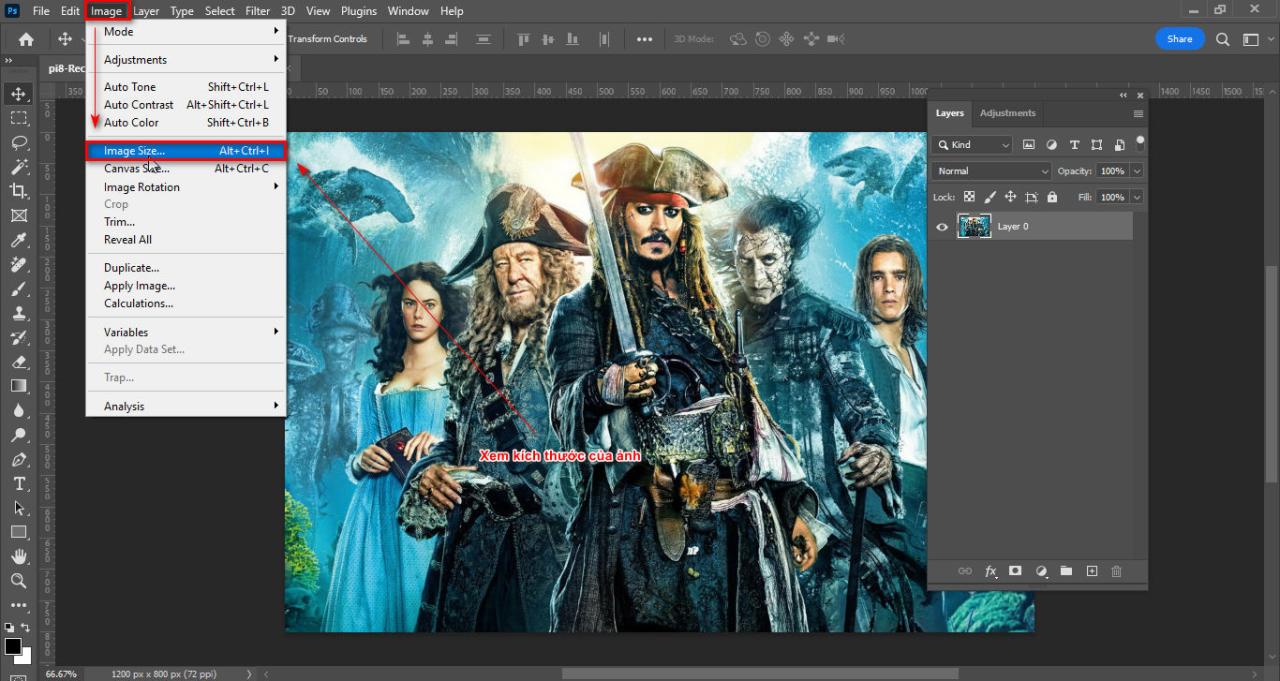
How to create a tiled frame in Photoshop
Step 2 View image size
  • After viewing, I choose the size. pixels look at the vertical and horizontal dimensions of the image then I give a number that divides the horizontal and vertical dimensions of the image (here I give it as 400px)
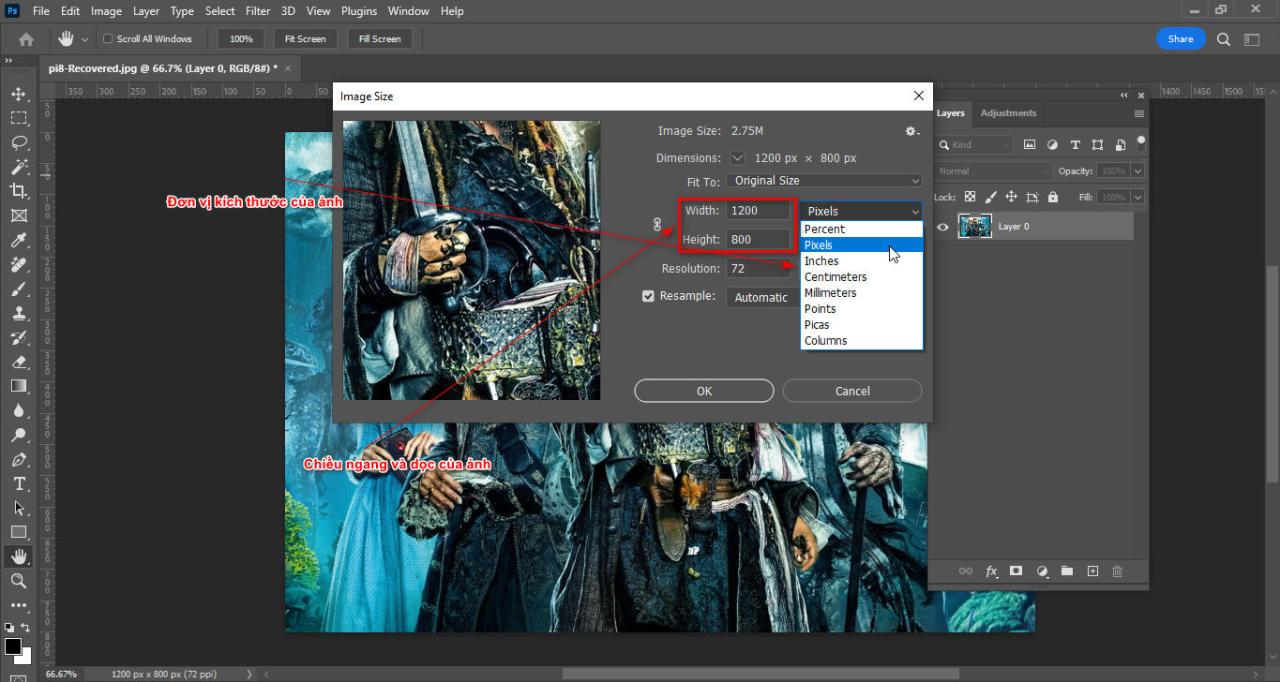
How to create a tiled frame in Photoshop
Step 2.1 Select the size unit of the image
  • Now you create a new page with vertical and horizontal dimensions of 400px in black.
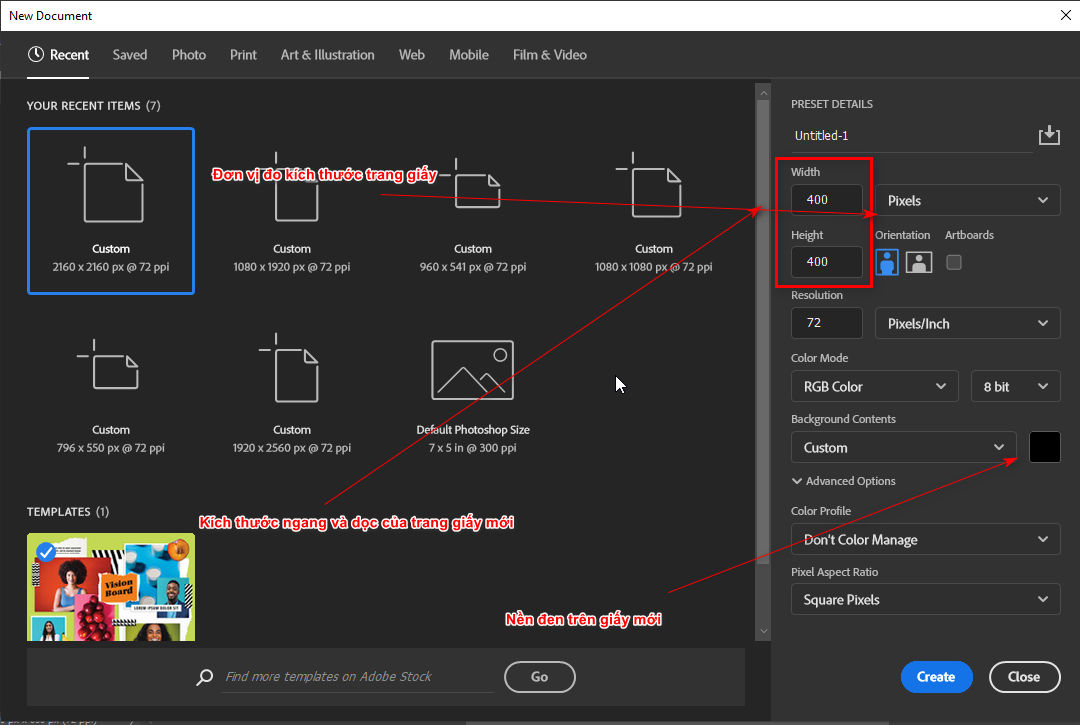
How to create a tiled frame in Photoshop
Step 2.2 Create a new page
  • Then convert Background to Layer Ctrl + T resize on menu bar i will reduce vertical and horizontal 50%
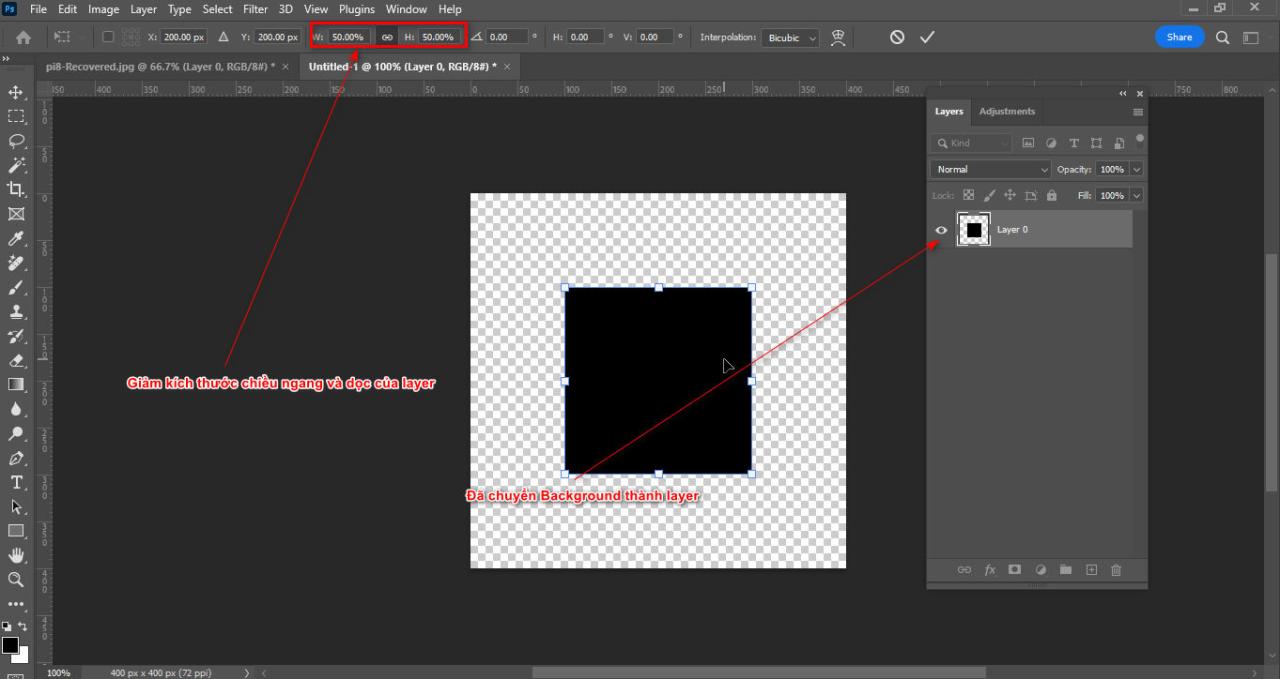
How to create a tiled frame in Photoshop
Step 2.3 Change the size of the new page
  • Move that square close to the origin then you create 2 circles
  • A circle lies between the right edge of the square and a circle lies between the bottom edge of the square.
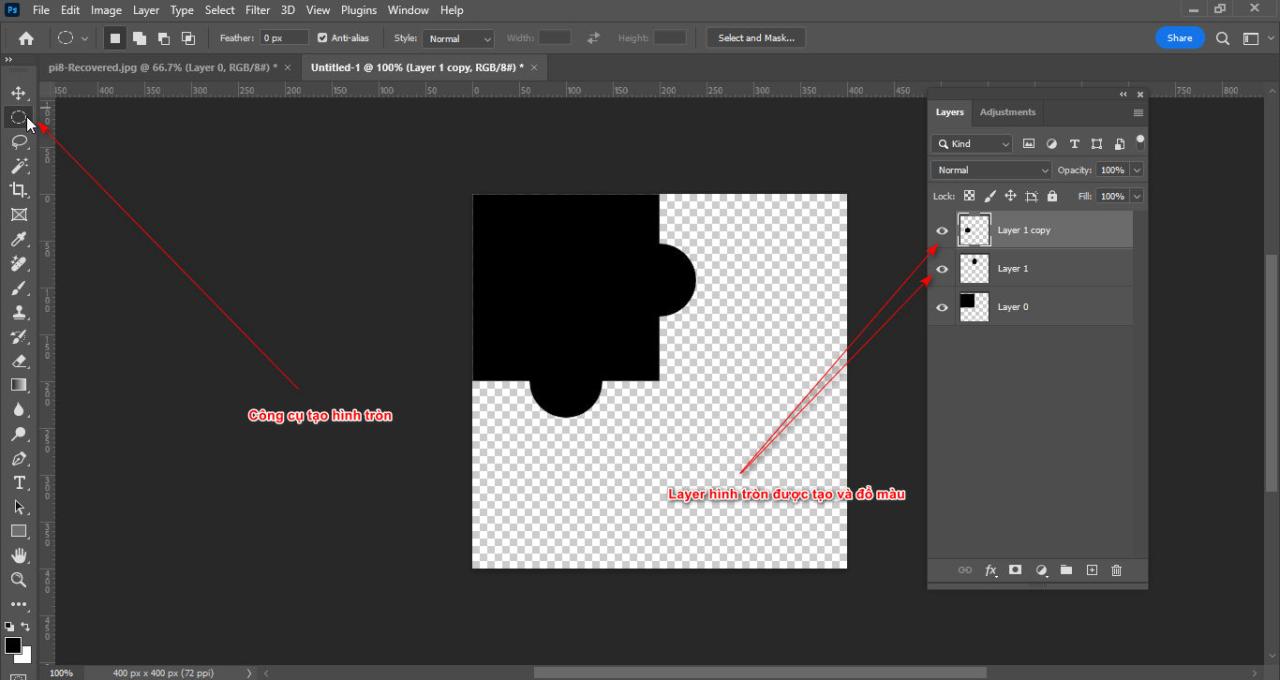
How to create a tiled frame in Photoshop
Step 2.4 Create 2 circle layers
  • Hold down the key Ctrl Click on the circle layer below then Delete round and square layers, Ctrl + D turn off selection
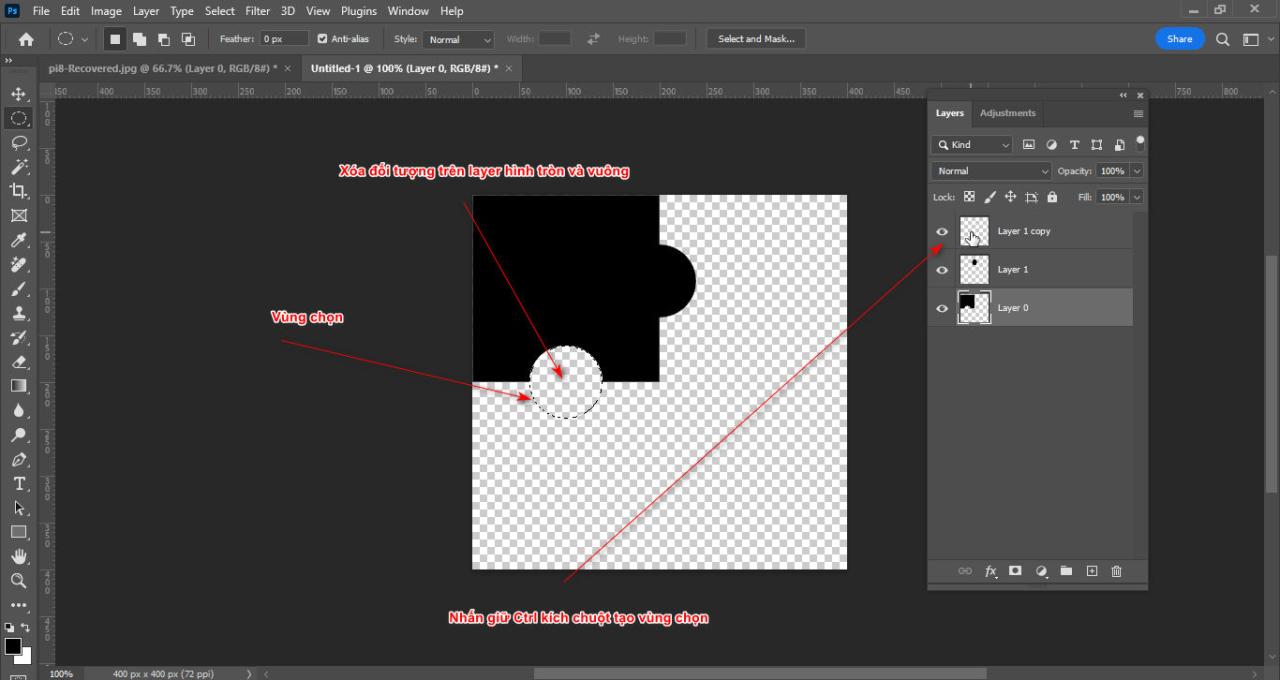
How to create a tiled frame in Photoshop
Step 2.5 Delete the selection for the image
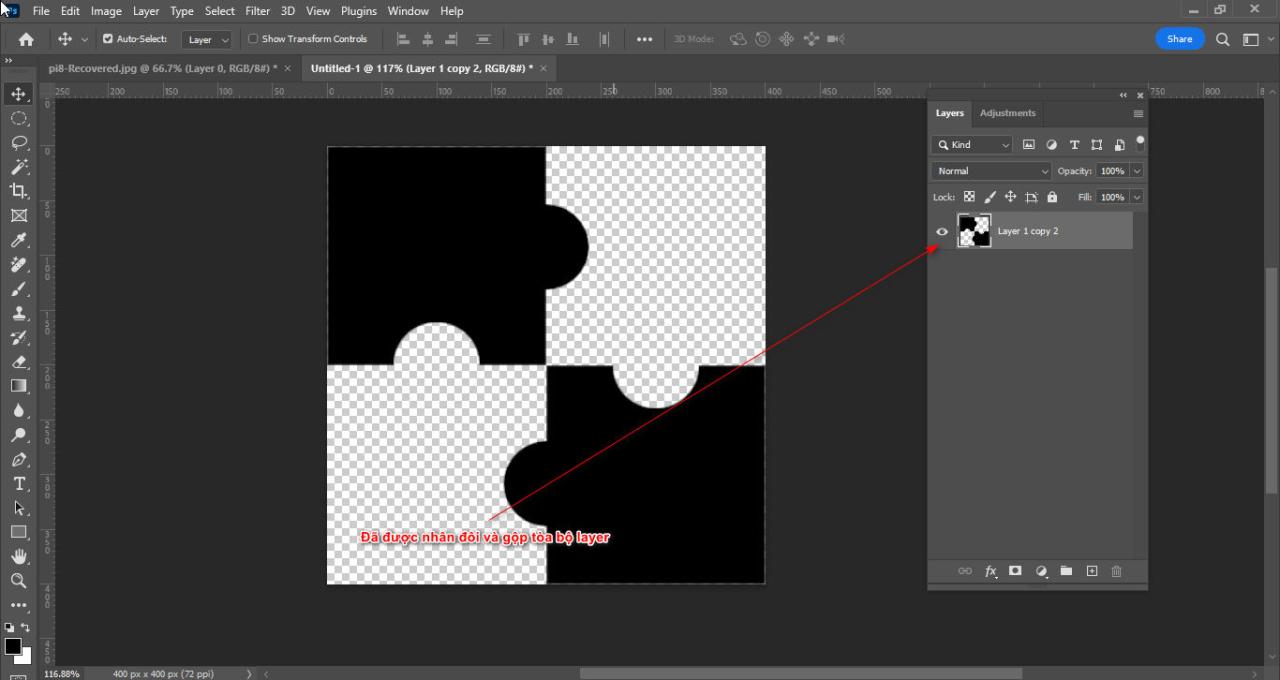
  • Merge all layers with command Ctrl + E and duplicate that layer then flip horizontally and vertically and place that layer at the bottom right corner of the square frame
  • Now merge all the layers together.
How to create a tiled frame in Photoshop
Step 2.6 duplicate layer and merge layer

Step 3: Save the photo frame layer as a material and then apply it to the photo layer you want to create a folding frame.

  • You select the photo frame layer then go to the command Edit > Define Pattern
  • Now you name the photo frame you just saved.
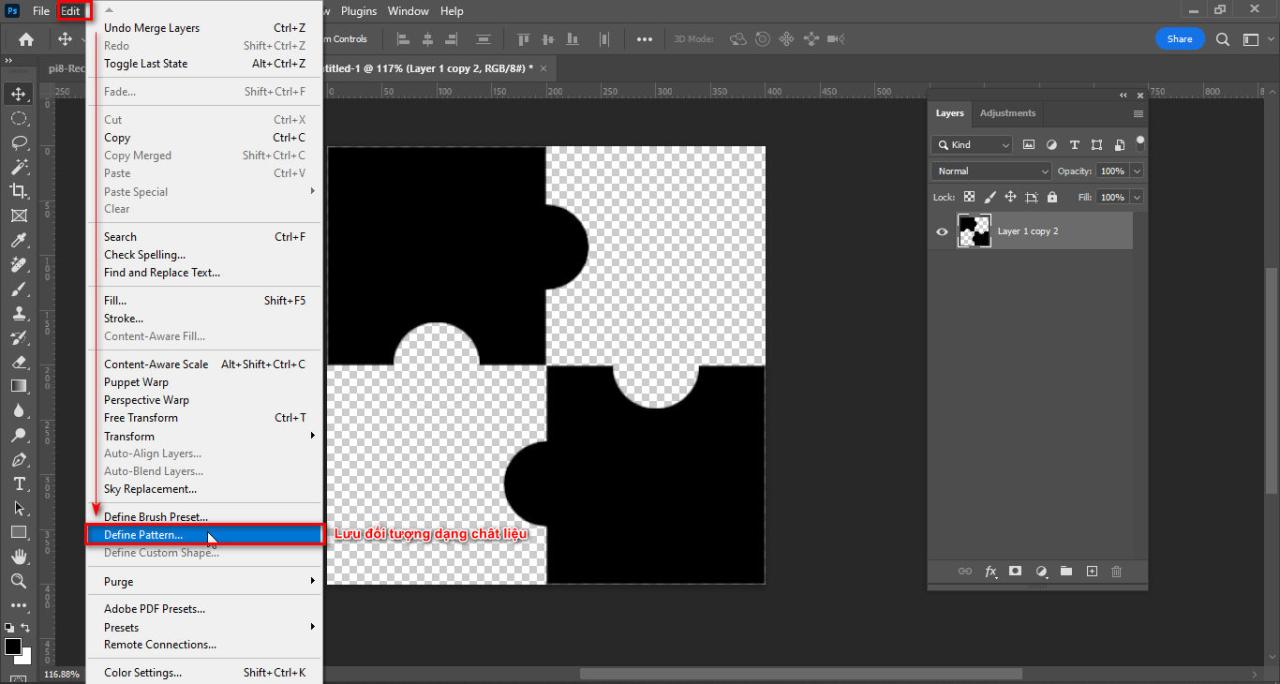
How to create a tiled frame in Photoshop
Step 3 Save material
  • You go to the page that contains the photo you want, then you duplicate the photo using the command Ctrl + J
  • And you create a new layer with the icon + located under the layer panel
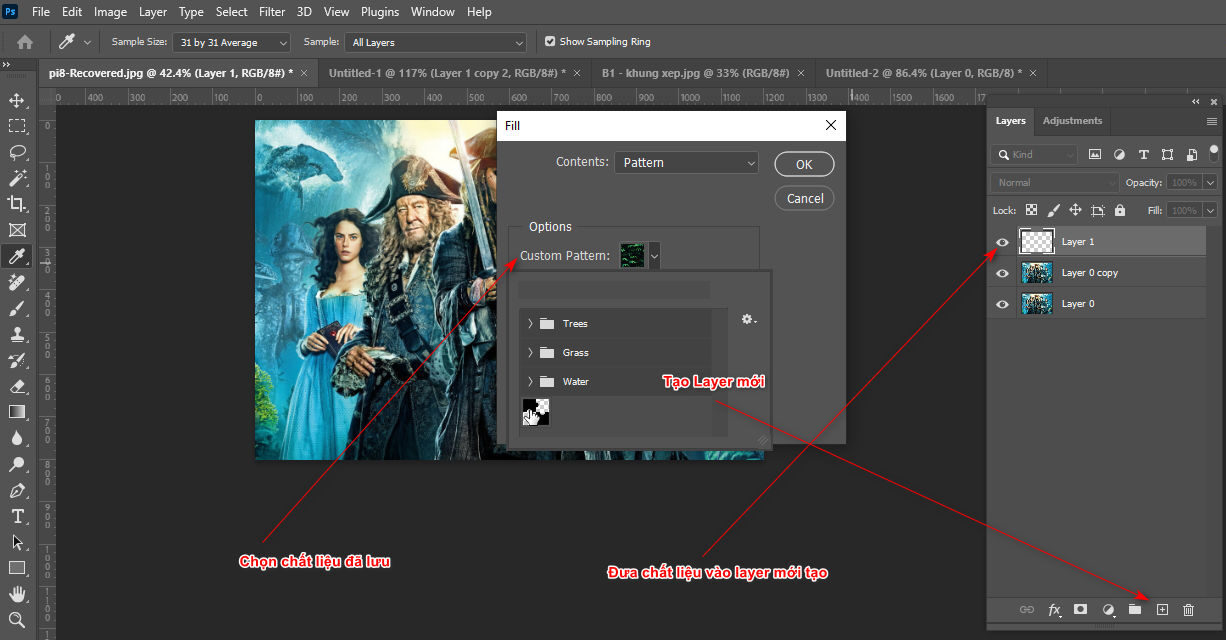
  • Once done, select the command. Edit > Fill (Content: Pattern) You find the frame pattern you just saved before. >OK
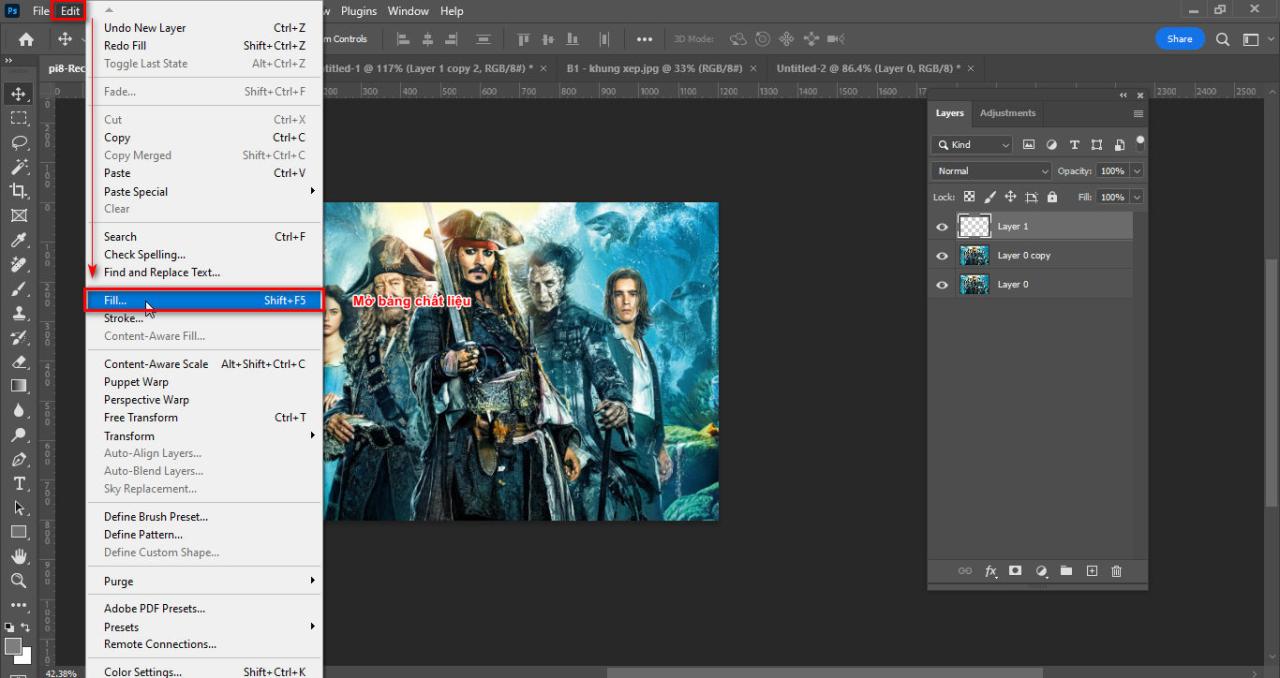
How to create a tiled frame in Photoshop
Step 3.1 Open the Fill parameter table
How to create a tiled frame in Photoshop
Step 3.2 Add material to layer

Step 4: Create border effects for photo frames and photos

  • You select the photo frame layer then select the icon fx
  • Select Blending Options reduce Fill Opacity reduce dark areas but still retain the effect fx
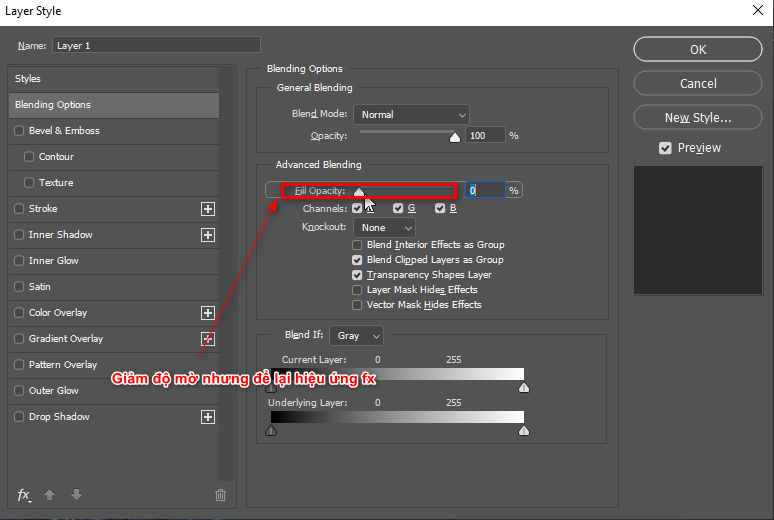
How to create a tiled frame in Photoshop
Step 4 Create frame effect
  • Then you select the item Bevel & Emboss ( Style: Pillow Emboss, Depth: 1000%, Size: 5px)
  • After you are done you also create a pill. Bevel & Emboss for photo
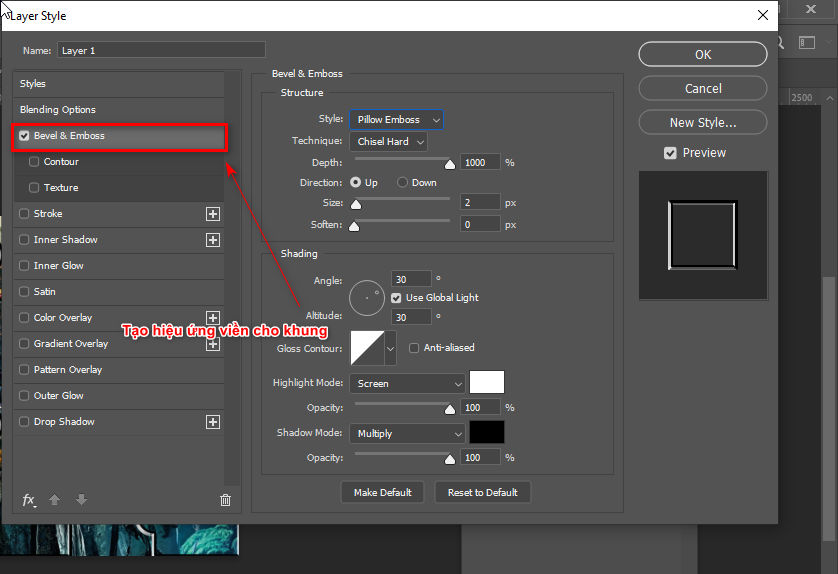
How to create a tiled frame in Photoshop
Step 4.1 Create a border for the frame

Step 5: Select and separate each part of the photo according to the photo frame

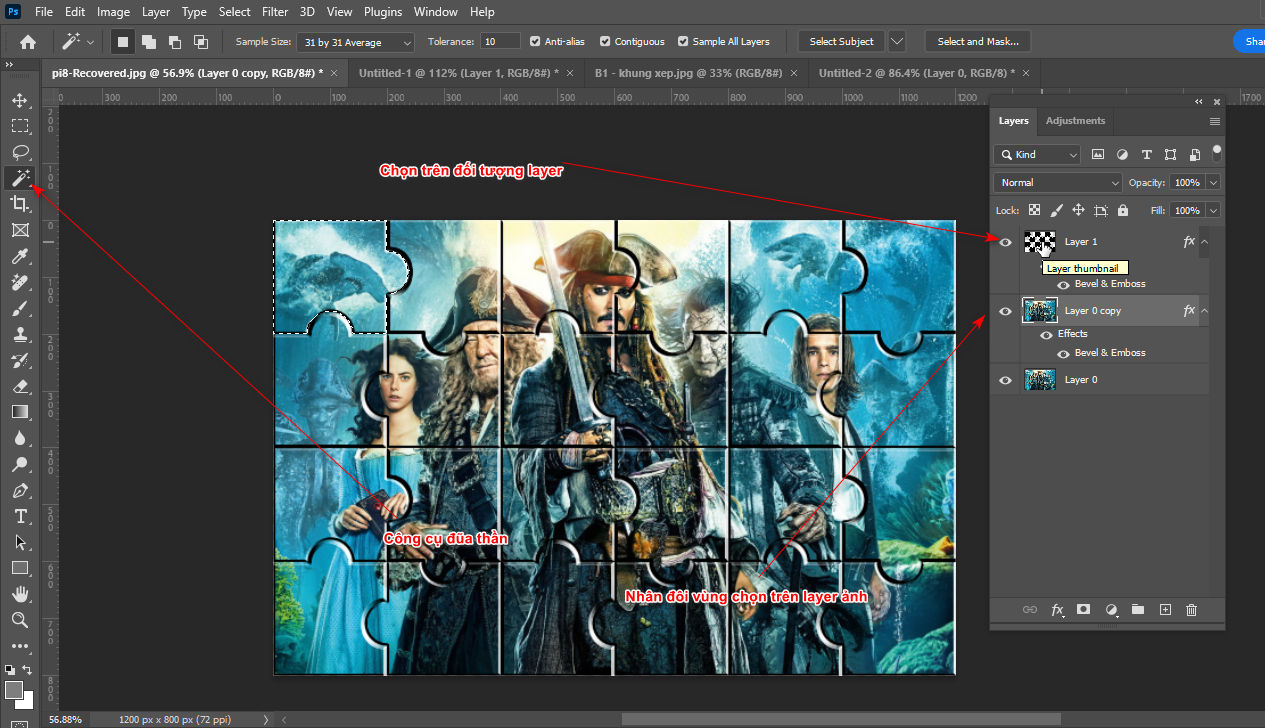
  • Select the photo frame layer then use the tool Magic Wand Tool to select those black area on the photo frame layer
How to create a tiled frame in Photoshop
Step 5 Extract the object from the photo
  • Now there is a black area selected, you select the duplicated image layer, then you duplicate the selected area you have.
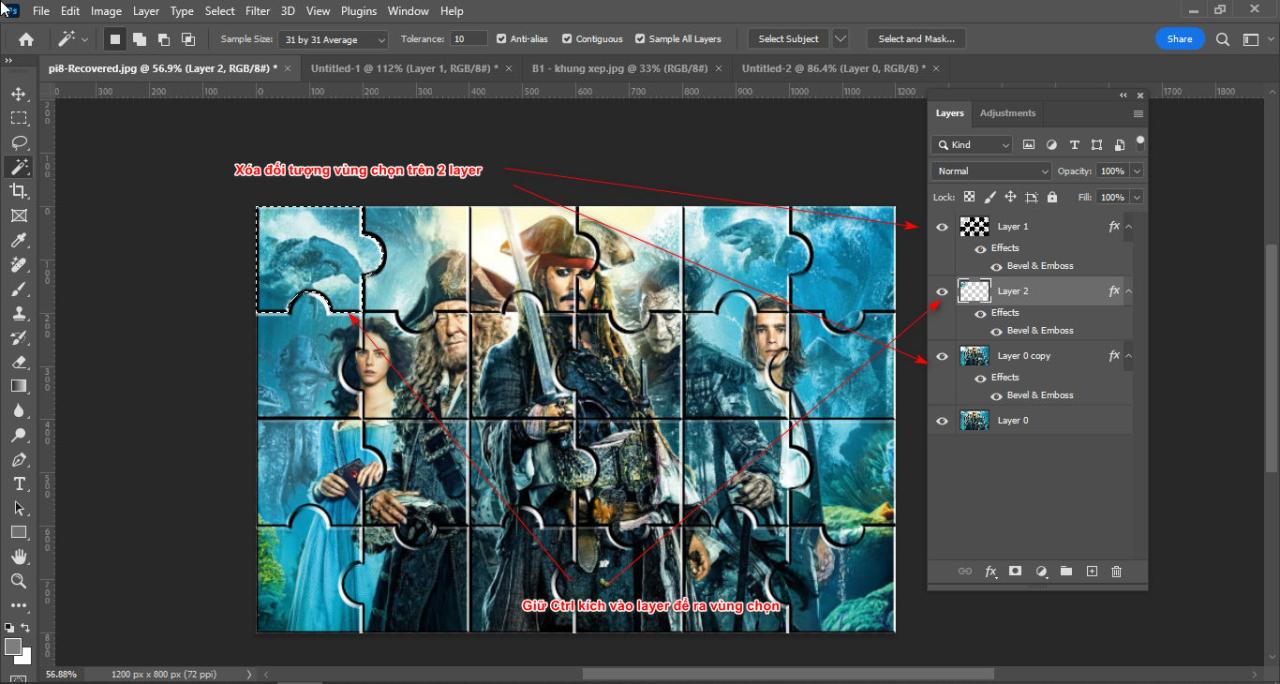
  • After that, you hold down the key. Ctrl + click on layer you just duplicated then deleted the selection above frame layer and image layer
How to create a tiled frame in Photoshop
Step 5.1 delete objects on frame and image layer
  • You repeat this operation for other black areas.
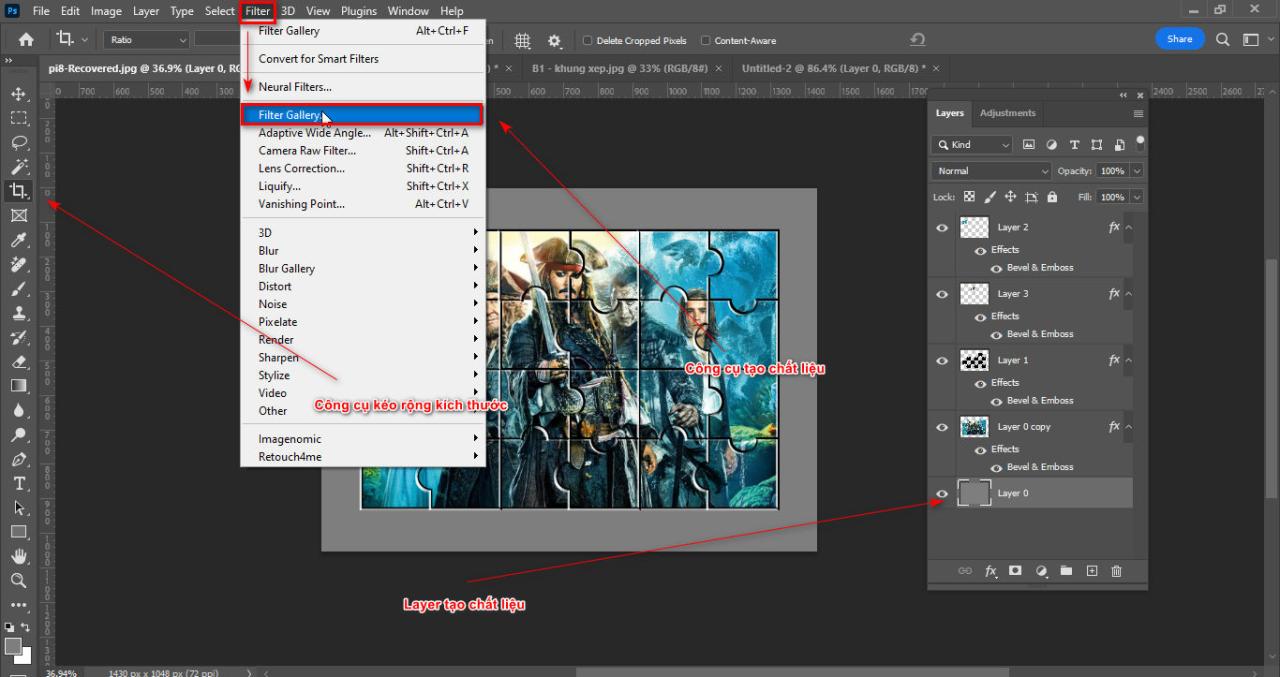
  • You select the first image layer then expand it with the tool. (C) then you fill the object with gray
  • You enter the order Filter > Filter Gallery create texture for that gray background
How to create a tiled frame in Photoshop
Step 5.2 Create material

Limbs 3 See more: Download Capcut PC for free to use full features

How to create a tiled frame in Photoshop

In short

How to create a tiled frame in Photoshop Instructions for you on how to create beautiful photo frames that can be given as gifts or for entertainment, this lesson may be a bit difficult for some of you but if you do it a few times it will be easy for you. It also helps those who have learned Photoshop to embrace the tools again. If you find this article interesting, please share it with me. In addition, I have other good articles that you can refer to and do. I wish you success.

You want to learn about photoshop course then come right away Graphic Express for free consultation


Tags : Tags adobe photoshop   How to create a tiled frame in Photoshop   learn adobe photoshop   study pts   study graphic design
Share
FacebookShare on FacebookpinterestShare on PinterestMessengerShare on Facebook Messenger
twitterShare on TwitterlinkedinShare on LinkedinvkShare on VkredditShare on ReddittumblrShare on TumblrvideoShare on Viadeobuffer. bufferShare on Bufferpocket. pocketShare on PocketwhatsappShare on WhatsappViberShare on ViberemailShare on EmailskypeShare on SkypediggShare on DiggmyspaceShare on MyspacebloggerShare on Blogger YahooMailShare on Yahoo mailtelegramShare on Telegram gmailShare on GmailAmazonShare on AmazonSMSShare on SMS
Tung Thai

Tung Thai

As a student at the center. I write what I know to share with you.
1 is to share with you so you can know and learn.
2 improve knowledge and remember longer, with the motto of giving to receive, I want to write more

Related articles

How to create a tiled frame in Photoshop

How to use camera Raw in photoshop

By How To 08/12/2025

Camera Raw in photoshop is a tool that has been around since…

How to create a tiled frame in Photoshop

Latest instructions for using camera raw in photoshop

By How To 07/12/2025

Camera raw in photoshop is a correction tool…

How to create a tiled frame in Photoshop

3 Ways to create speed effects in Photoshop

By Tung Thai 06/12/2025 0

3 Ways to create speed effects in photoshop Speed effects…

Leave a Comment Cancel reply

Categories What is Q&A? What is the structure of that place?

What is Interior Design? How much does an interior design job pay?

12/12/2025
What is Material?

What is Material? Material application in the field of design

11/12/2025
What is the poster?

What are posters? 9 Tips for designing beautiful, quick Posters

11/12/2025
What does graphic design do? Is it easy to get a job?

What does graphic design do? Is it easy to get a job?

11/12/2025
Water is the water material in Enscap

Water is the water material in Enscap

11/12/2025

Recent comments

  • male1 year ago
    On How to create a fade effect in Photoshop
    Great
  • phat phat2 years ago
    On Who is 5SMedia?
    Useful article
  • Minh Anh3 years ago
    On How to create basic materials in vray Sketchup
    Very good, admin
Copyright © 2025 HOWTO - Powered by HOWTO

5SMedia.net | hocdohoacaptoc.com | huongdansudung.vn | webantam.com

Back to Top
Hello!
  • All
    • Tips
      • Google
      • Facebook
      • Tiktok
    • Instruct
      • What is Q&A?
      • Taobao
    • WordPress
      • Code
      • Plugins
      • Themes
        • Flatsome
        • Theme Nevo
  • Share
    • WordPress
    • Code
    • Plugins
    • Tips
    • Windows
    • Apple
    • Graphics
    • Experience
  • Graphics documents
    • illustrator
    • Sketchup
    • Coreldraw
    • 3ds max
    • Enscape
    • Photoshop
    • Graphics Plugin
  • Course
    • Photoshop course
    • illustrator course
    • Coreldraw course
    • Edit video course
    • Course Sketchup
    • Autocad course
    • Website management course
  • Service
  • Software
    • Windows
      • Tips
      • Office
      • Necessary
      • Tools
    • Apple
  • Game
  • News
    • Technology
    • Review
en_US EN
en_US EN vi VI