Skip to content
  • About us
  • Contact
  • en_USEN
  • viVI
FacebookTwitterPinterest
HOWTOHOWTO
  • All
    • Tips
      • Google
      • Facebook
      • Tiktok
    • Instruct
      • What is Q&A?
      • Taobao
    • WordPress
      • Code
      • Plugins
      • Themes
        • Flatsome
        • Theme Nevo
  • ShareHot
    • WordPress
    • Code
    • Plugins
    • Tips
    • Windows
    • Apple
    • Graphics
    • Experience
  • Graphics documents
    • illustrator
    • Sketchup
    • Coreldraw
    • 3ds max
    • Enscape
    • Photoshop
    • Graphics Plugin
  • Course
    • Photoshop course
    • illustrator course
    • Coreldraw course
    • Edit video course
    • Course Sketchup
    • Autocad course
    • Website management course
  • Service
  • Software
    • Windows
      • Tips
      • Office
      • Necessary
      • Tools
    • Apple
  • Game
  • News
    • Technology
    • Review
Hello!

  • Lost your password ?
HOWTOHOWTO
  • Home > 
  • Graphics > 
  • Adobe Photoshop > 
  • How to create a fade effect in Photoshop

How to create a fade effect in Photoshop

By Tung Thai 04/12/2025 1 540 Views
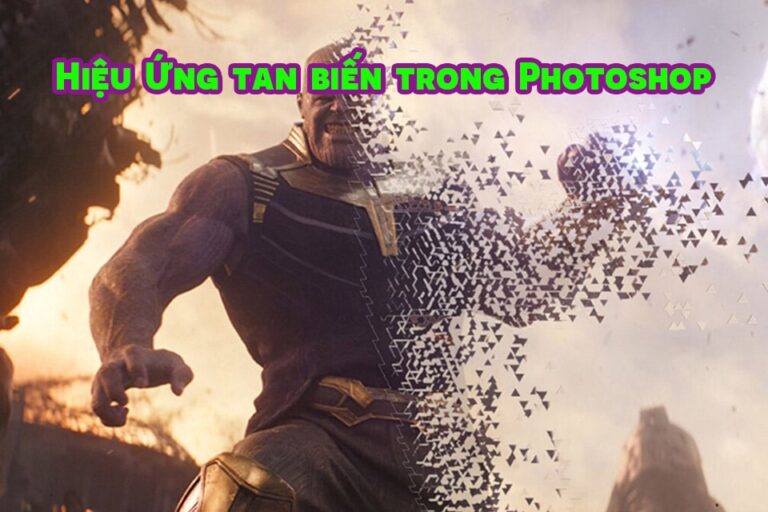
banner how to make images disappear in photoshop
Article categories

How to create a fade effect in Photoshop Adobe Photoshop is a professional image editing software developed by Adobe Systems. With Photoshop, users can create unique works of art, edit and enhance images, design graphics and produce multimedia content. Photoshop provides many advanced tools and features for editing and creating professional works, meeting the needs of photographers, graphic designers, filmmakers and digital content producers.

  • How to create natural light in Photoshop
  • How to create classic portraits in Photoshop simply
  • How to change background color in Photoshop
  • The ultimate way to smooth skin in Photoshop, part 2
  • Instructions for smoothing skin in Photoshop
  • The best way to remove acne in photoshop in 2022

How to create a fade effect in Photoshop

Step 1: Open the image file you want to work with

  • I go to the menu bar and select File > Open to open the image.

Step 2: Then the tool disappears for the Brush

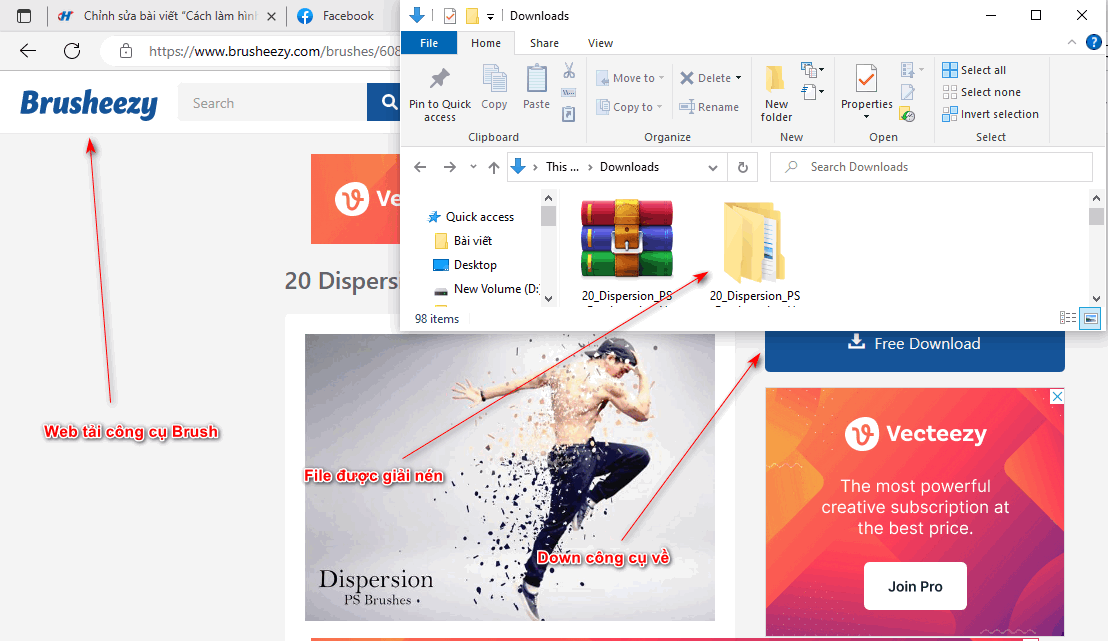
  • I go to the website of brusheezy to download the vanish tool
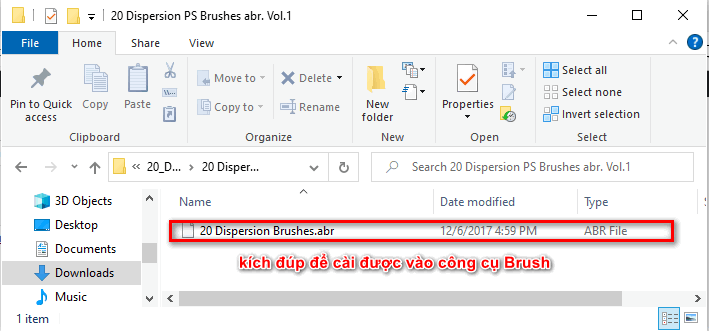
  • After unzipping, go into the test folder and select the file with the extension ABR and you can use it immediately.
How to create a fade effect in Photoshop
How to download Brush to your computer
  • How to use effects for the Brush tool
How to create a fade effect in Photoshop
How to set effects for the Brush tool

Step 3: Go back to the image you want to do

  • Duplicate that photo first Ctrl + J
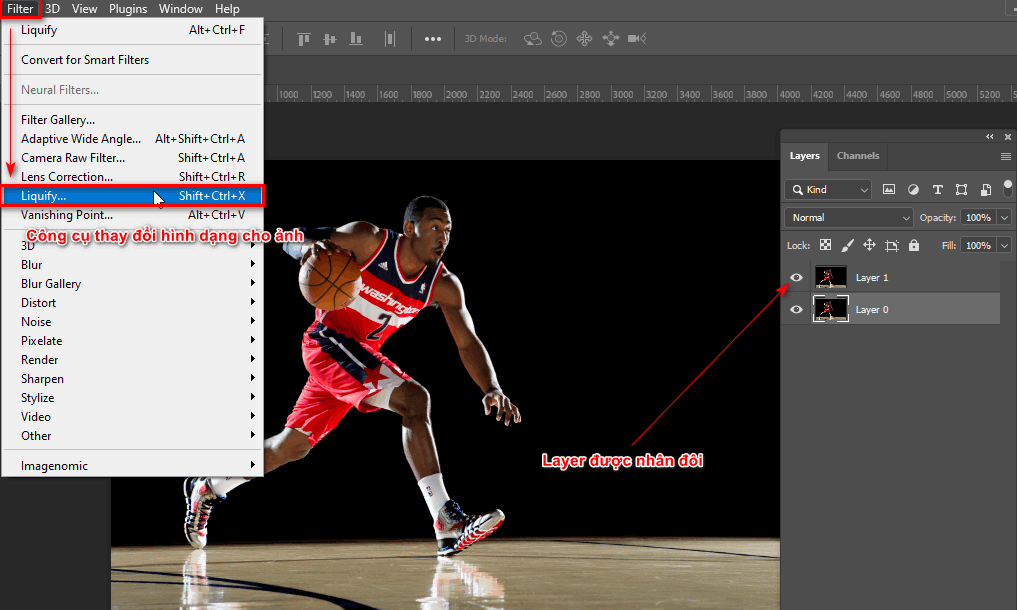
  • Then select the menu bar Filter > Liquify (deform the image as we want)
How to create a fade effect in Photoshop
Step 3 Use the Liquify tool
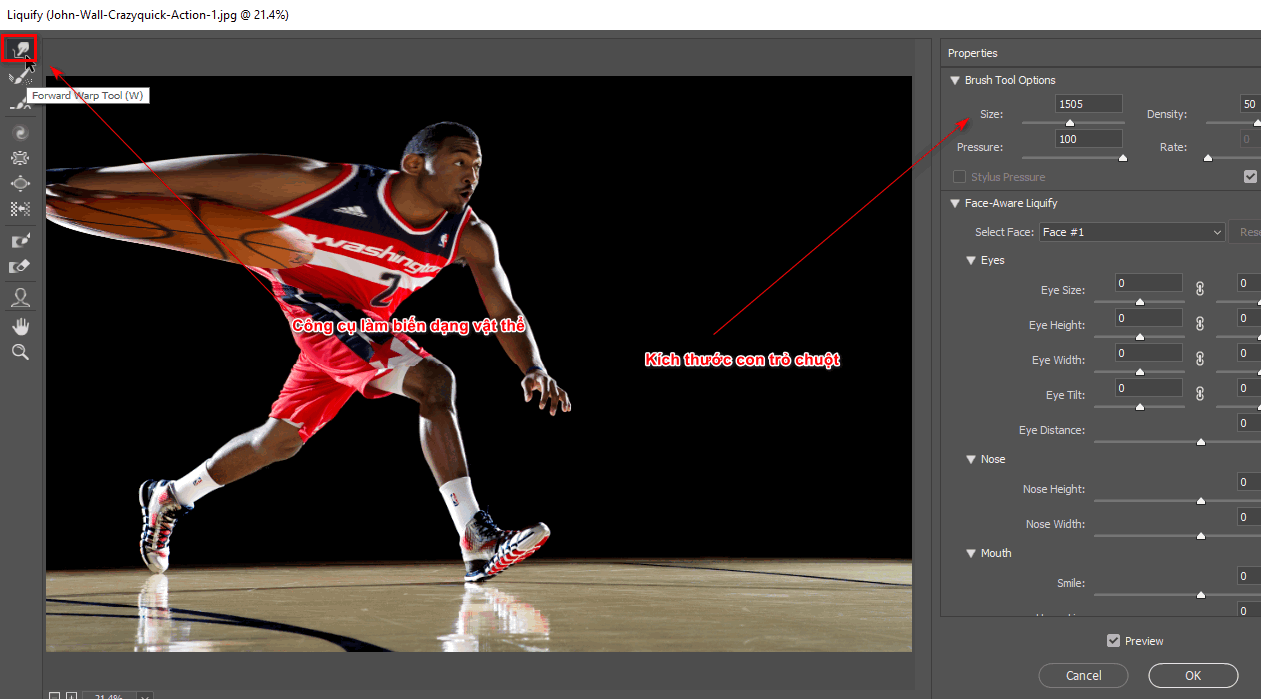
  • Now I will go into this tool and I will continue to use the tool. Forward Warp Tool (W) located on the left corner of the screen
  • Now I will stretch the areas where I want to create a fading effect for the photo.
  • I can change the size of the mouse pointer (size) by the parameter table on the right Brush Tool Options 
  • After I finished, I clicked OK
How to create a fade effect in Photoshop
Liquify tool information panel

Step 4: Now I will use the fade effect on that photo.

  • When I have a Layer and have used the Liquify tool
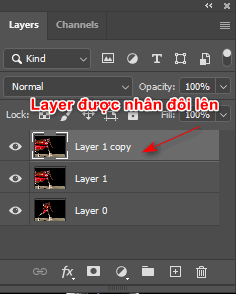
  • I will duplicate that Layer using the key Ctrl + J
How to create a fade effect in Photoshop
Duplicate the warped image layer
  • Now I will create 2 layer masks for those 2 layers.
  • A layer will have a layer mask of white by Click on the icon next to the fx icon below the Layers pane.
  • And a layer will have a layer mask that is black holding the key Alt + Click on the icon next to the fx icon below the Layers pane.
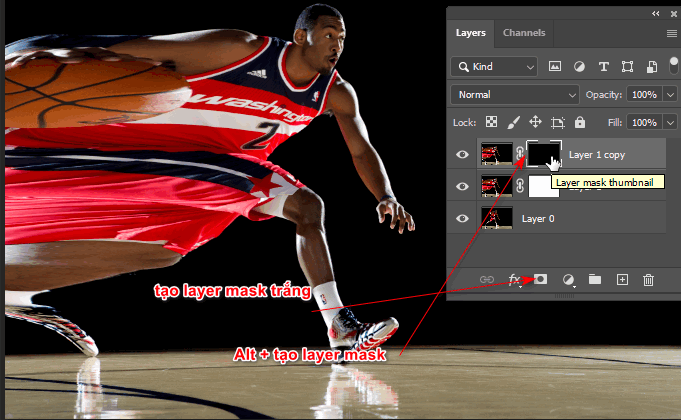
How to make an image disappear in photoshop
Create layer mask for 2 layers

Step 6: Use Brush to create a disintegrating image in photoshop

  • I used the Brush tool then found the Disappear Brush I just downloaded.
  • Under the menu bar, there will be a small frame next to the Brush icon. When you click on it, you can change the brush tip, size and hardness of the brush.
  • After selecting everything, I select the layer mask of a layer, then use the Brush to paint the opposite color of the layer mask and erase it.
  • Similar to layer when I also use this tool

See more: >> HOW TO Brush tool in photoshop
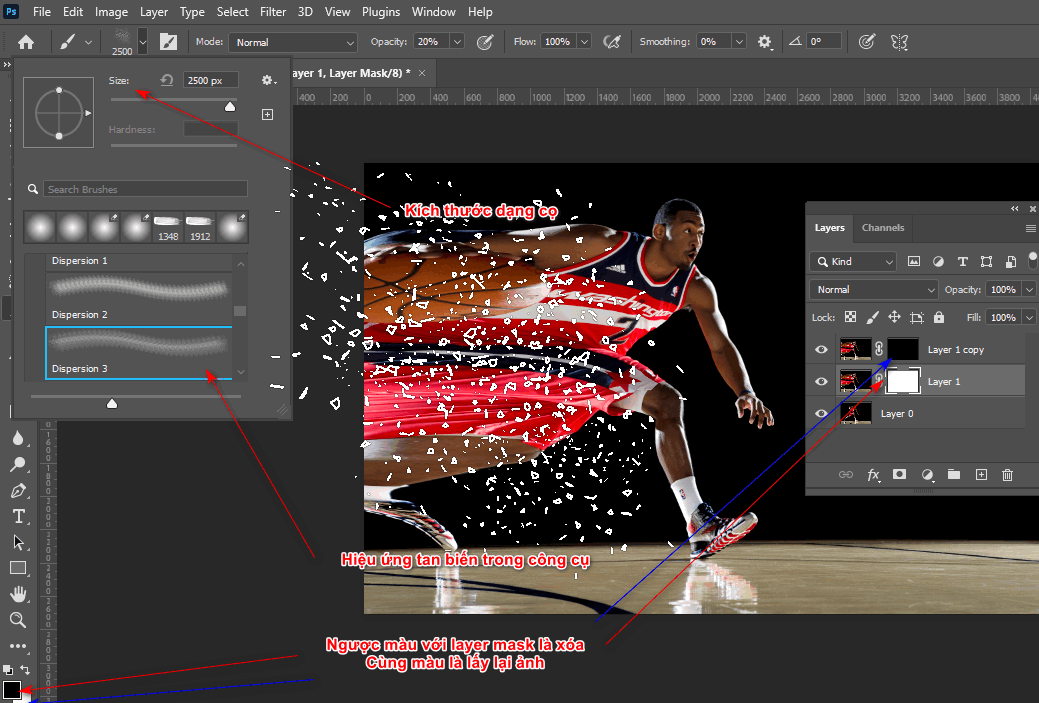
How to make an image disappear in photoshop
Create a dissolving effect

Step 7: Product used How to make image disappear in photoshop
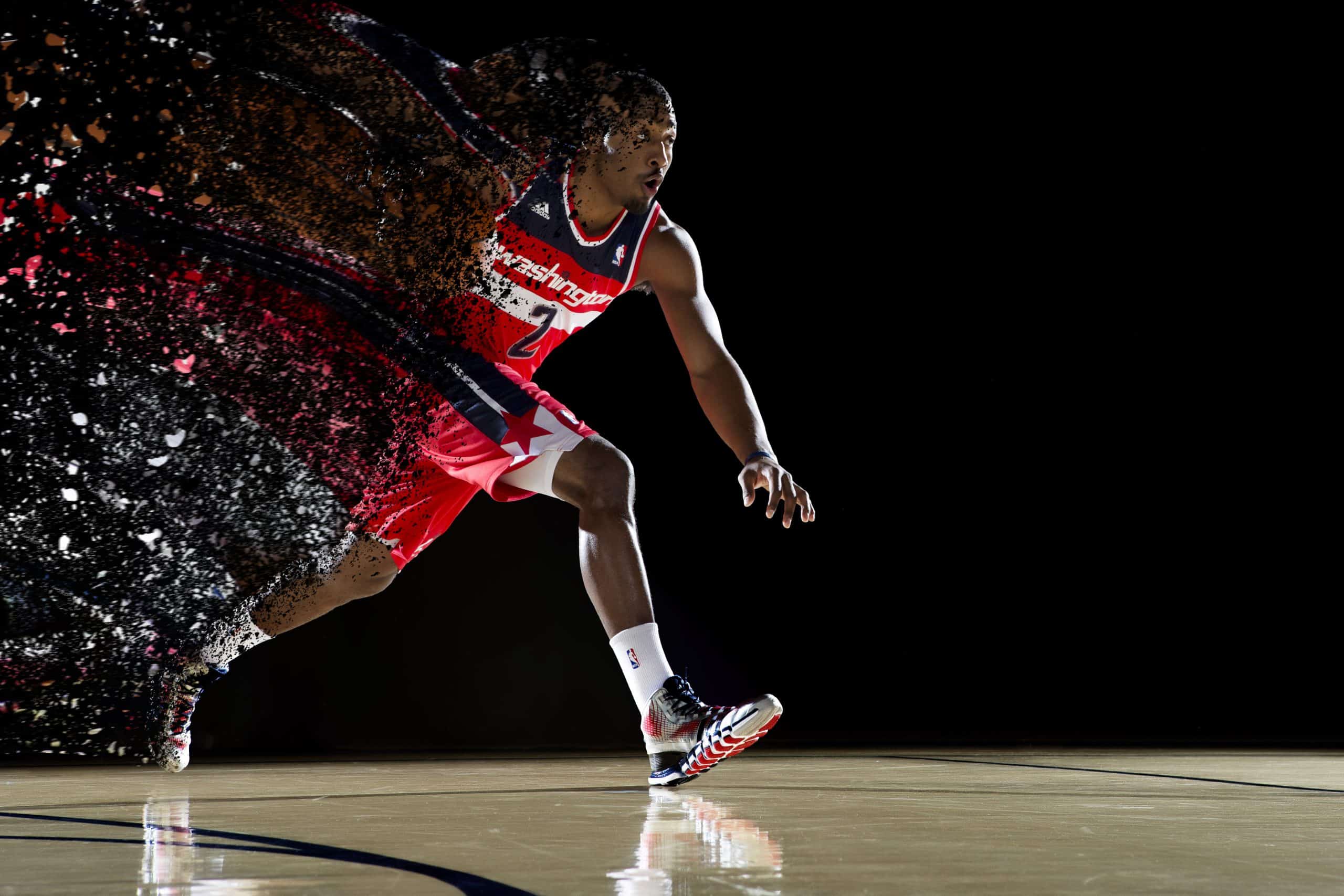
How to make an image disappear in photoshop
Product when using the fade effect

Epilogue

How to create a fade effect in Photoshop is a great way to transform objects. This tool helps users get the most out of the tool. Brush. In addition, Brush also has many other forms such as: water, fire, smoke, ... or you can also create any Brush stroke including eyebrows, hair, eyelashes.

If you like the post how to create fade effect in photoshop If you like it, don't forget to share it with me and you can refer to some articles and tips in Photoshop. If you are interested in this graphic subject but haven't found a suitable place to study, you can visit or send a message directly to the page. Graphic Express for course support Photoshop, in addition, we have many subjects such as Ai, Corel, Id, Video, ... The study time is suitable for office workers, low cost and comes with a valuable set of documents. Wish you success in your exam.

Tags : Tags adobe photoshop   learn photoshop   learn basic photoshop   study graphic design
Share
FacebookShare on FacebookpinterestShare on PinterestMessengerShare on Facebook Messenger
twitterShare on TwitterlinkedinShare on LinkedinvkShare on VkredditShare on ReddittumblrShare on TumblrvideoShare on Viadeobuffer. bufferShare on Bufferpocket. pocketShare on PocketwhatsappShare on WhatsappViberShare on ViberemailShare on EmailskypeShare on SkypediggShare on DiggmyspaceShare on MyspacebloggerShare on Blogger YahooMailShare on Yahoo mailtelegramShare on Telegram gmailShare on GmailAmazonShare on AmazonSMSShare on SMS
Tung Thai

Tung Thai

As a student at the center. I write what I know to share with you.
1 is to share with you so you can know and learn.
2 improve knowledge and remember longer, with the motto of giving to receive, I want to write more

Related articles

How to create a fade effect in Photoshop

How to use camera Raw in photoshop

By How To 08/12/2025

Camera Raw in photoshop is a tool that has been around since…

How to create a fade effect in Photoshop

Latest instructions for using camera raw in photoshop

By How To 07/12/2025

Camera raw in photoshop is a correction tool…

How to create a fade effect in Photoshop

3 Ways to create speed effects in Photoshop

By Tung Thai 06/12/2025 0

3 Ways to create speed effects in photoshop Speed effects…

Leave a Comment Cancel reply

1 Comment

  1. Guest
    1
    male
    1 year ago

    Great

    Reply
Categories Enscape Self illuminated 3

Self-illuminated material in Enscape

11/12/2025
Foliage information in enscape 8

Foliage of grass and leaf materials in Enscape

10/12/2025
Clearcoat metal materials in Enscape 1 1

Clearcoat metallic material in Enscape

10/12/2025
How to create flowers in illustrator

How to create flowers in illustrator

10/12/2025
Carpet in Enscape banner

Carpet in Enscape material Carpet, Fur

10/12/2025

Recent comments

  • male1 year ago
    On How to create a fade effect in Photoshop
    Great
  • phat phat2 years ago
    On Who is 5SMedia?
    Useful article
  • Minh Anh3 years ago
    On How to create basic materials in vray Sketchup
    Very good, admin
Copyright © 2025 HOWTO - Powered by HOWTO

5SMedia.net | hocdohoacaptoc.com | huongdansudung.vn | webantam.com

Back to Top
Hello!
  • All
    • Tips
      • Google
      • Facebook
      • Tiktok
    • Instruct
      • What is Q&A?
      • Taobao
    • WordPress
      • Code
      • Plugins
      • Themes
        • Flatsome
        • Theme Nevo
  • Share
    • WordPress
    • Code
    • Plugins
    • Tips
    • Windows
    • Apple
    • Graphics
    • Experience
  • Graphics documents
    • illustrator
    • Sketchup
    • Coreldraw
    • 3ds max
    • Enscape
    • Photoshop
    • Graphics Plugin
  • Course
    • Photoshop course
    • illustrator course
    • Coreldraw course
    • Edit video course
    • Course Sketchup
    • Autocad course
    • Website management course
  • Service
  • Software
    • Windows
      • Tips
      • Office
      • Necessary
      • Tools
    • Apple
  • Game
  • News
    • Technology
    • Review
en_US EN
en_US EN vi VI