
How to create a standard Facebook Fanpage Not everyone knows. When you use Facebook, surely any Facebook account has seen the appearance of Fanpages every time you surf Facebook.
This is an important tool that helps businesses connect online with a large number of users. However, do you know how to create a Facebook Fanpage? Today, 5SMedia will guide you How to create a standard Facebook Fanpage fast on both phone and computer!
1. Benefits of Fanpage
A Fanpage, also known as a Facebook Page, is a page created by an individual, organization or business to share information or conduct business activities. The Fanpage page is publicly displayed, allowing people to connect and update information by interacting such as: liking (like/heart), following (following) and thereby becoming fans of the Page.
One more thing is that the personal Facebook page only supports a maximum of 5,000 friends, and the Fanpage has no regulations limiting the number of followers. With a Fanpage, the more followers you have, the better because it will increase your chances of reaching more customers, especially potential customer groups, while enhancing the brand's influence.
Currently, Fanpage plays an important role not only in the business field but also in promoting the images of individuals, community organizations, or politicians closer to the public.
See more:
- How to ask the Facebook help center to handle related issues
- Downloading Facebook to your computer or phone is simple
- Facebook photo size Optimize social media posts
- How to download the new version of messenger to your computer or phone
- Facebook ad image size | all you need to know
2. How to create a Facebook Fanpage on your phone
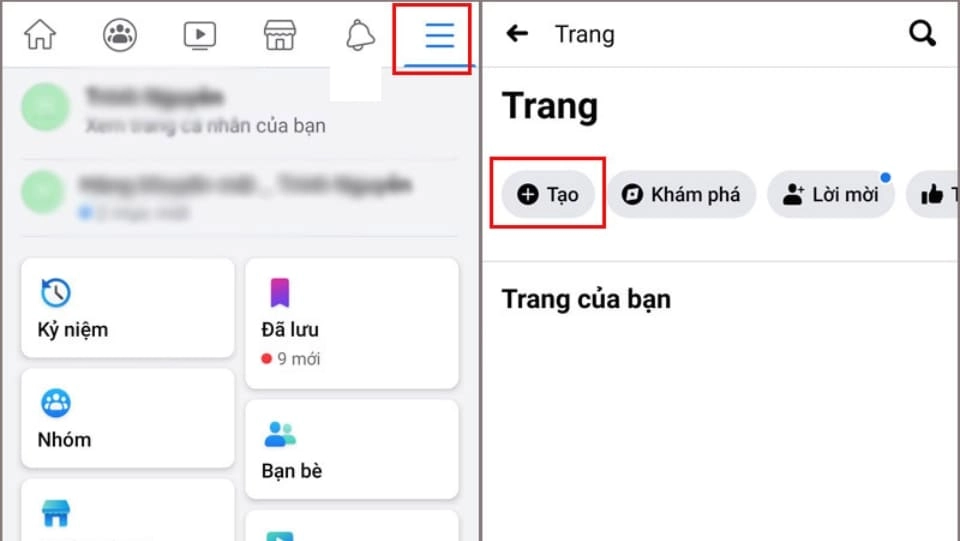
Step 1: Click to access the Facebook application available on your phone > Select the 3-line icon in the upper right corner of the application > Select the item Page > Select Create.
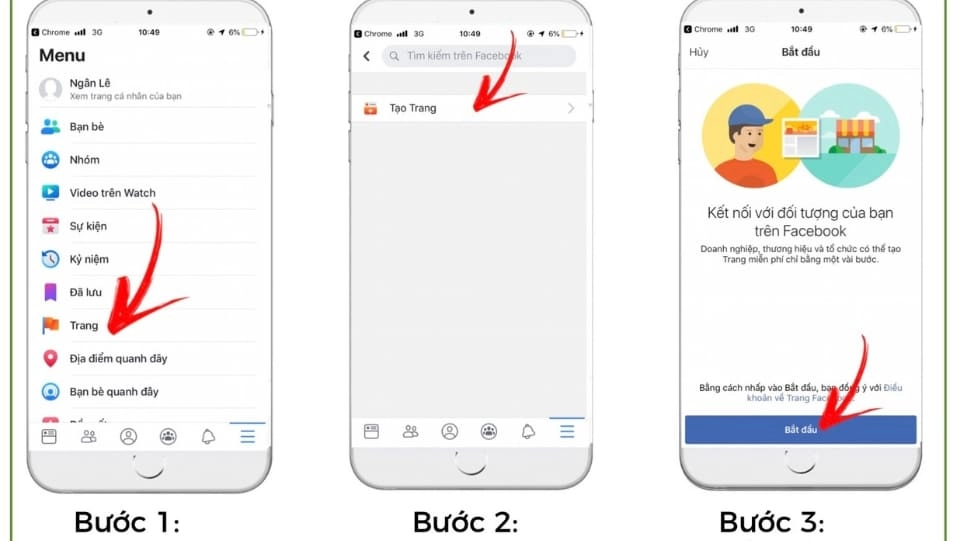
Step 2: Press Begin on the introduction interface of Facebook Fanpage.
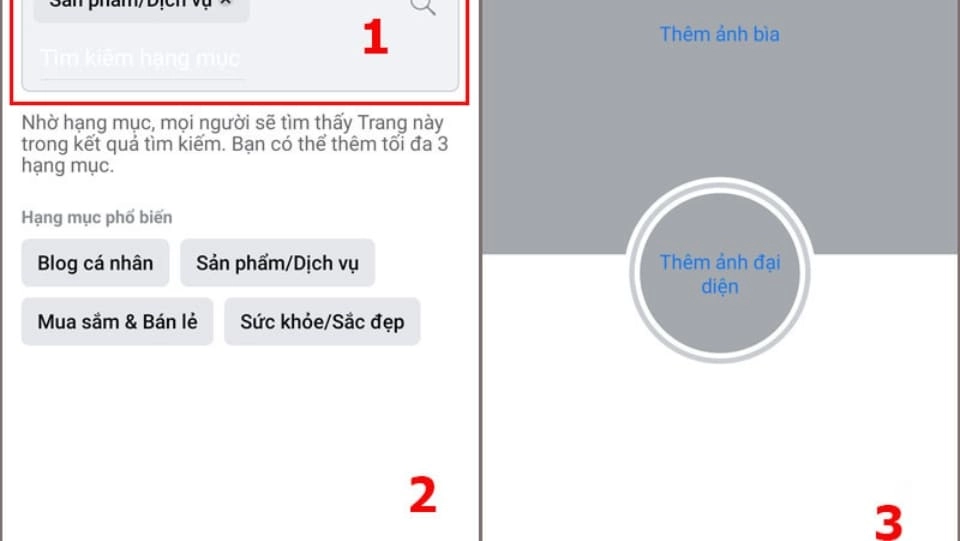
Step 3: After registering a name for the Page, select the description category for the Fanpage (for example: products, health, services,...) > Click Next > Name the Fanpage (needs to be related to the purpose) > Click Next.
Step 4: Choose a cover photo and avatar > To create a beautiful and properly sized avatar and cover photo, you can refer to the article. Facebook photo size After editing and posting the photo, click Finished. In case you have not found a suitable photo for your Page, Facebook will automatically display a random avatar for you, just press Finished and update the photo later.
3. How to create a Facebook Fanpage on your computer
How to create a Facebook Fanpage on your phone will have certain limitations in features, so you should refer to how to create a Facebook Fanpage using a computer to set up and fully use the useful functions.
Step 1: Access Facebook software right in the browser (Google, Chrome, CocCoc,...).
Step 2: Select button Create (plus icon) > Select item Page.
Step 3: Fill in the Page's information such as: Page name, category, avatar, cover photo,... > Click Create Page.
In addition, you can see many ways to create a Facebook Fanpage by going to Youtube to watch short instructional videos.
4. Basic settings when creating a Facebook page
a. Name of Fanpage
Note: When creating a page, you should not choose a Fanpage name that is too long or complicated to remember because customers usually do not search for products or services by the store name. You can refer to how to name Fanpage according to the following structure:
[Brand Name / Store Name] – [Item]
After completing the naming, press Next. Immediately after that, Facebook will display the forms and interfaces of the Page. Your job is to choose the type of Fanpage that best suits your purpose among the following types: Product, Business or Community.
b. Update profile picture
Step 1: After learning how to create a Facebook Fanpage, select the camera icon on your avatar > Click Edit profile picture.
Step 2: Select Upload photos in notification.
Step 3: Select and upload the avatar you want > Enter a description for the photo in the box describe > Drag the mouse to adjust the size appropriately > Click Save.
c. Update cover photo
Step 1: In the cover photo section on Fanpage, select Edit > Select Upload photos.
Step 2: Download the previously prepared cover photo > Align to the appropriate position > Click Save changes.
d.Create a new article
Step 1: At the home page of the newly created Fanpage, click Create articles.
Step 2: In the content input box, you fill in the text content and the content of images, videos, etc. posted into the box Create articles > Select Post.
5. How to create a Facebook Fanpage and optimize
Creating a Fanpage does not mean it automatically attracts a large number of followers and visitors. Therefore, after creating a Fanpage, it is more important that you know how to use that page effectively to attract interaction and the number of customers to follow every day. Here are some ways to help youOptimize Facebook Fanpage:
a. Fully update Fanpage information
This not only helps your Fanpage have a high position in Google search results, but also builds trust from users, while opening up more opportunities to reach and interact with potential customers. Please fill in all information such as address, phone number, field of activity... to create trust for the Page.
b. Invite friends to like the page
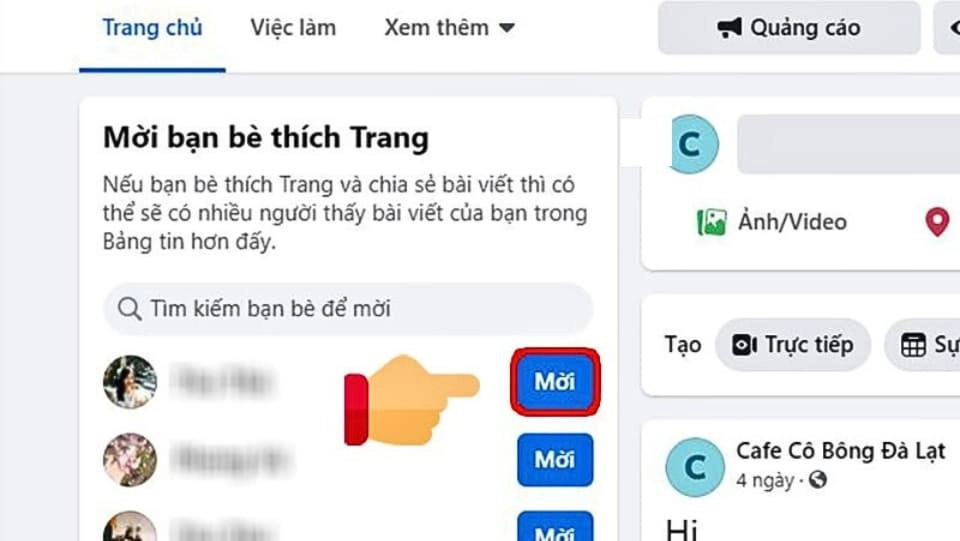
This is the method that most new Fanpage creators often apply to promote comments, likes, and shares for the Page's content.
When your friends like the page, this means your Fanpage will appeared on Newsfeed their. This helps your Fanpage become more widely known and attract the attention of more followers.
c. Build quality content
An important factor that helps your Fanpage attract attention is the ability to build an attractive, detailed and effective content strategy.
Besides sharing product information, you can also integrate additional content such as: Useful tips in life, tips, funny photos/videos or quotations that bring meaningful messages.
Note: Post content needs to be related to business or the message you want to convey, and must be suitable for the main customers you are targeting.
d. Invest in taking care of Fanpage

This is an important step that you need to take to keep your Fanpage fresh and notify your followers that your Fanpage is still operating normally. Fanpage care content needs to be consistent in theme, writing style and must focus on the products/services you provide to create a deep impression in the minds of users.
e. Use attractive images and videos
Take advantage of symbols Facebook Featured, image HD quality photos and sharp video is one of the important factors that helps Fanpage attract interaction and become popular. You can create viral videos and images simply by using the product you are promoting, along with creating post content to attract attention.
Posting content at the right time is an important decision for reaching potential customers, because users will often surf Facebook at specific hours such as: from 8 - 9 am, 11 - 12 pm, 4 - 5 pm, and then 8 p.m. These are Very ideal time to operate Page, helping to optimize access to users.
f. Run Facebook Ads

This method is favored by many online businesses on Facebook because it is highly effective and quick.
When you set advertising goals, choose the interaction section to create appeal and call for customers to take actions such as: liking Page, following Page,...
Learn about Effective, cost-optimized Facebook Advertising service
Conclude
Hopefully after reading the article Instructions on how to create a Facebook Fanpage Here, you can create your own Page and grow it effectively. Although Fanpage can be created on both phones and computers, for convenience and to use all the features, you should use creating a Facebook Fanpage on a computer!
If you are not confident enough in an effective campaign, please contact us at 5SMedia. With extremely preferential Facebook advertising service costs from only 5%. You will meet with consultants 24/7. Extremely effective advertising and support for image design, scripting, and strategies to run ads
Address 1: 05 Thanh Thai, Ward 14, District 10, Ho Chi Minh City
Hotline: 0965 165 166 or 0888 768 115
Fanpage: https://fb.com/howto.edu.vn
Tiktok: https://www.tiktok.com/@how.congdongso.net
Twitter: https://twitter.com/5smedianet
Youtube: https://www.youtube.com/@5smedianet
Email: infohowto.edu.vn@gmail.com