Adobe Photoshop is currently the most powerful download platform in the graphic design industry as well as the collage image editing industry, it helps users create many creative applications in designing banners, posters for websites or floors. ecommerce. It helps users produce sharp images, in addition to helping photographers create many photo colors and effects in the most natural and beautiful way.
How to create rain in photoshop
Here are detailed instructions on how to create rain in Adobe Photoshop:
Step 1: open photo
- We open a photo that we want to create a rain effect for
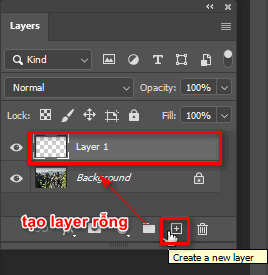
Step 2: create empty layer
- Create 1 empty layer equals (shortcut is Alt+Ctrl+Shift+N) or we can click on the (+) next to the trash can icon behind the layer grouping icon (Create a new layer)
Step 3: fill layer color
- Then we proceed to fill the background with black (shortcut key is Alt+Delete) directly onto that empty layer that we just created
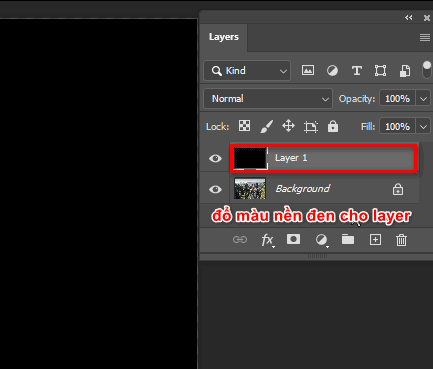
Step 4: select Fiber effect
- Now we look at the menu bar above and then click on the item Filter > Render > Fibers
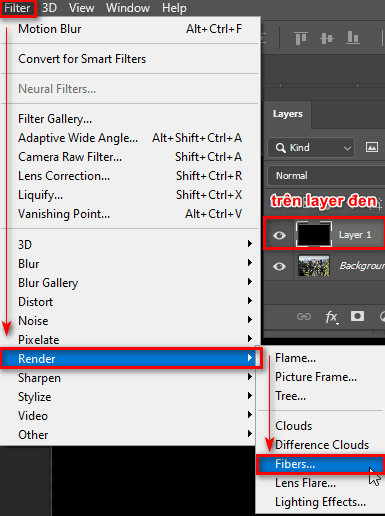
Step 5: set parameters
- A parameter table will appear for editing Variance (creates clearer black and white grooves), Strength (makes lines thinner), Randomize (randomly generated) then I can further edit through the above parameters to best suit
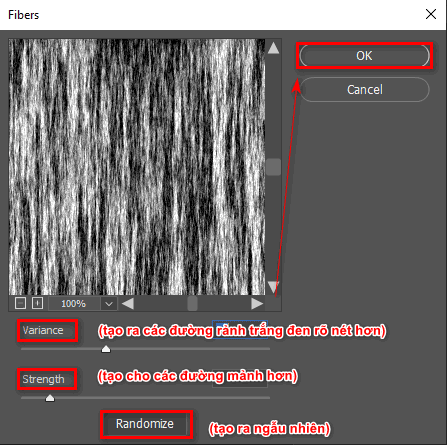
Step 6: use blend
- Now the layer where we create the rain effect is above our image layer. Now if we want to leave white streaks to create rain and erase the black areas, we choose the blending mode as Screen located on the layer bar we are working on (next to section Opacity(layer opacity))
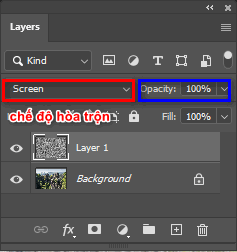
Step 7: create mask
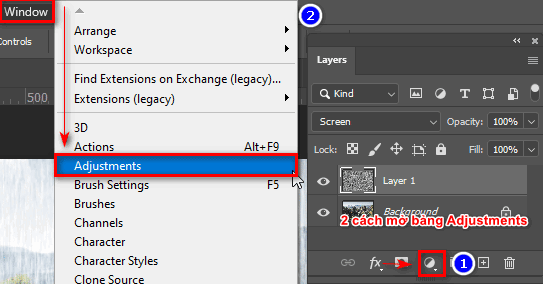
- At this time, the rain effect is not beautiful and we really have to choose more parts Levels is in the table Adjustments
(To open the Adjustment panel, go to the menu bar and select Window > Adjustments ) or we can open directly at the layer with the circle icon (Create New Fill Or Adjustment Layer) icon design add vector mask (create a mask)
Step 8: applied to the target area
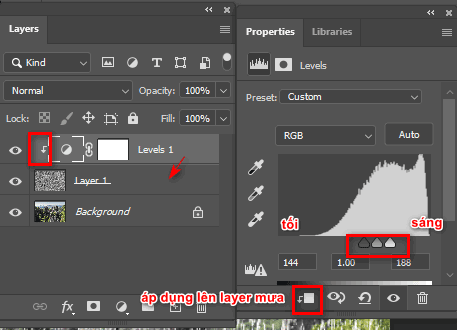
- Then we control the light and dark bar Levels so that the white areas of rain appear more or less (if there is a lot of rain, increase the light areas to high, conversely if the rain is light, increase the dark areas to high) and at the same time press the Alt key and click on the layer Levels to affect the correct rain effect layer
Step 9: create blur effect
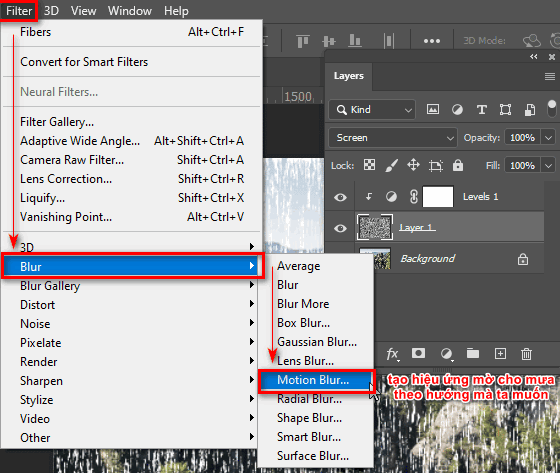
- After finishing, we further adjust the opacity and direction of the rain so that it is as natural and realistic as possible by going to the menu bar and selecting the item Filter > Blur > Motion Blur (used to blur and create blur direction for the layer)
Step 10: set blur parameters
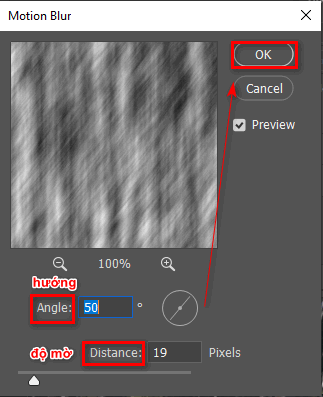
- At this time, the parameter table will appear Motion Blur , Angle (the direction we want it to tilt), Distance (the opacity we want) after editing, click OK
(If the rain effect is too strong, we can reduce it a bit Opacity or Fill for them to be the most beautiful and natural)
Here are images of the above steps. Look at the photos and follow them to get the results of the rain effect in Photoshop:
Step 11: results
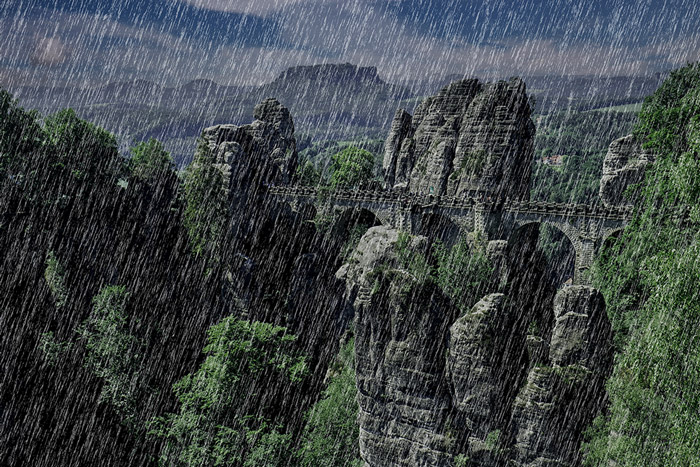
This effect is most suitable for images holding umbrellas with romantic evening colors to create a more realistic feeling.
In addition, you can add rain layers and effects to create blurry areas of rain at a distance to create a more realistic feeling. Maybe when you first learn about this effect, what you do will not be as beautiful as you want or as beautiful as you do, but the more you do it, the more beautiful and realistic your future photos will be, and if you already know When all the functions of the toolbar are exhausted, you can apply them to achieve greater efficiency.
If you are new to Photoshop, you should read the tools I wrote on the page first so you can grasp them thoroughly and use them more easily.
- How to create Photoshop actions extremely quickly
- The best way to remove acne in photoshop in 2022
- How to combine funny pictures with Photoshop
- Instructions on how to make product mockups in Photoshop.
Epilogue
– I just gave you instructions How to create rain in photoshop. In addition to creating rain, you can also create snow in Photoshop with just this tool.
If you are interested in learning 2D graphic design for work purposes or want to increase your income, don't hesitate to text me. page for us. Access lock up Learn graphics quickly for consultation and registration. In addition, we also teach more about Video, 3D, and other industries related to interior and exterior. In terms of study time, we are very favorable and suitable for working people and students, and at the same time, the price is very reasonable. Studying is also very suitable. Come to Graphic Express You can also tutor 1:1 and receive valuable copyright resources.
Good luck
If you feel good and want me to write more articles about creating effects in Adobe Photoshop or good and useful tips, please don't hesitate to give me 5* and share with everyone to know about the rain effect that I taught. Be as detailed as possible.