Skip to content
  • About us
  • Contact
  • en_USEN
  • viVI
FacebookTwitterPinterest
HOWTOHOWTO
  • All
    • Tips
      • Google
      • Facebook
      • Tiktok
    • Instruct
      • What is Q&A?
      • Taobao
    • WordPress
      • Code
      • Plugins
      • Themes
        • Flatsome
        • Theme Nevo
  • ShareHot
    • WordPress
    • Code
    • Plugins
    • Tips
    • Windows
    • Apple
    • Graphics
    • Experience
  • Graphics documents
    • illustrator
    • Sketchup
    • Coreldraw
    • 3ds max
    • Enscape
    • Photoshop
    • Graphics Plugin
  • Course
    • Photoshop course
    • illustrator course
    • Coreldraw course
    • Edit video course
    • Course Sketchup
    • Autocad course
    • Website management course
  • Service
  • Software
    • Windows
      • Tips
      • Office
      • Necessary
      • Tools
    • Apple
  • Game
  • News
    • Technology
    • Review
Hello!

  • Lost your password ?
HOWTOHOWTO
  • Home > 
  • Graphics > 
  • Adobe Photoshop > 
  • How to change background color in Photoshop

How to change background color in Photoshop

By Tung Thai 14/11/2025 0 485 Views
How to change backgroup color in Photoshop
Article categories

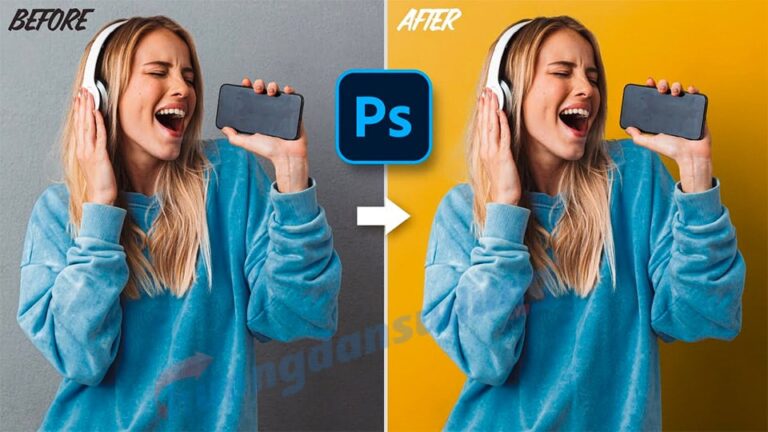
How to change background color in Photoshop This is something everyone must do when they know Photoshop software. It is an indispensable tool when editing images.

– Adobe Photoshop is a graphics software commonly used in graphic design and photo editing. With a simple interface and diverse tools, Photoshop allows users to perform basic to advanced tasks such as creating photos, collage, creating effects, color correction, and RAW image processing. and vector graphics.

– In addition, Photoshop also supports features such as layer management, using filters, 3D graphics, text, animated graphics, and more. Widely used in graphic design, advertising, and photography, Photoshop is an important tool for artists and designers.

  • Instructions for smoothing skin in Photoshop
  • The best way to remove acne in photoshop
  • What is Photoshop? How to learn Photoshop effectively and quickly
  • HOW TO Photoshop for beginners
  • How to create snow in Photoshop is extremely simple
  • How to create rain in Photoshop is extremely simple
  • Instructions on how to make product mockups in Photoshop

How to change background color in Photoshop

Step 1: Open the image file that needs to be changed

  • I come in File > Open (O) to open the photo you want to change

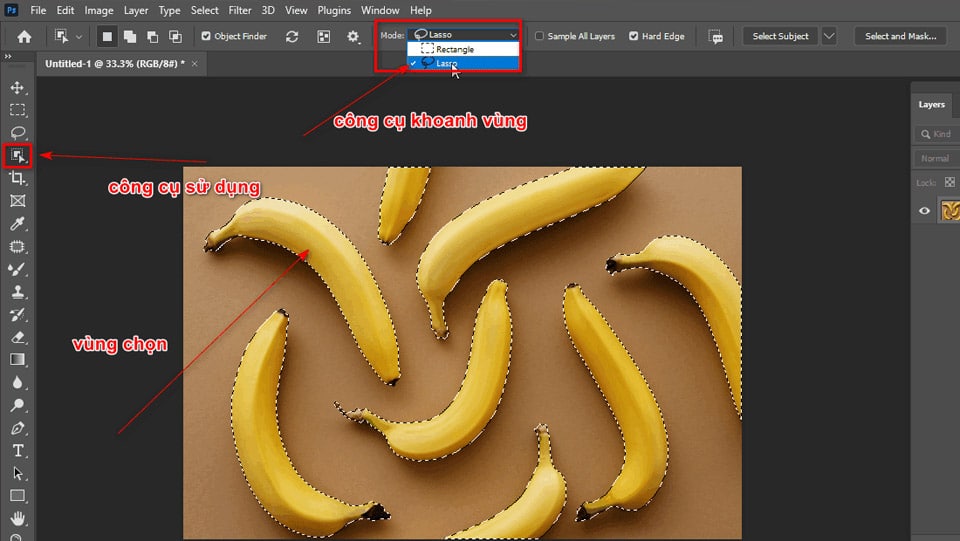
Step 2: Then we select the object of that photo

  • We use tools Object Selection Tool (W) To scan objects, add more keys Shift After selecting an object
  • We look at the menu bar and select the section Mode: Lasso for better zoning

Step 3: Duplicate the object and create a layer mask

  • We duplicate that image then click Click on Layer mask (create black layer mask)
How to change background color in Photoshop
Duplicate the shape and create a mask

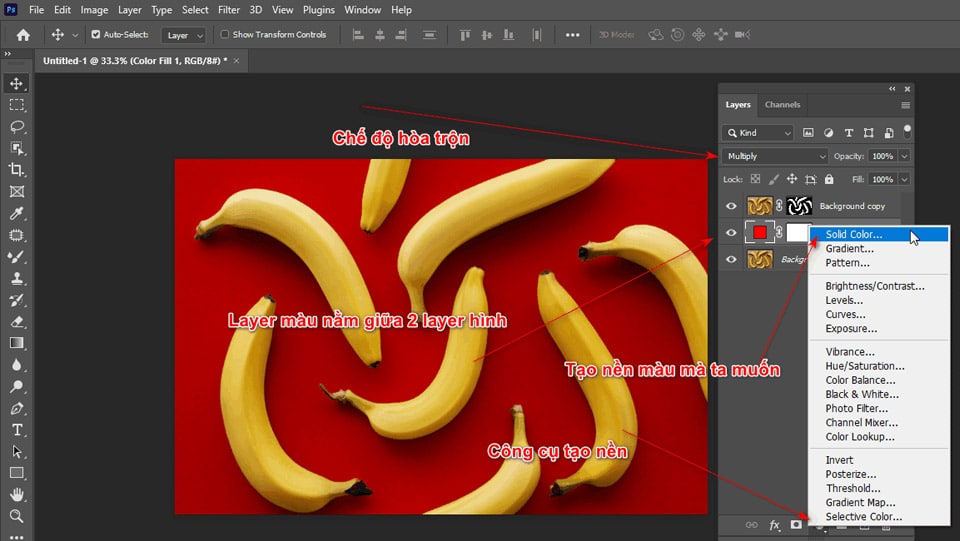
Step 4: Put the background color you want

  • We use it Create new fill is next to the create section Layer masks
  • After clicking on it, I choose the command Solid Color 
  • Now I choose the background color we want to change (the background color layer must be between the two layers above).
  • Then I choose Color layers Adjust the blending level Multiply
  • At this time Color layers blended with the underlying background layer
How to change background color in Photoshop
Create a background color and use blending

Step 5: Adjust the blending level of the image to make it most beautiful and realistic

  • Use section fx under the Layers panel
  • Select item Blending Options
  • Now hold down the key Alt Drag the small half point of the black and white areas of the section Underlying Layers
  • Drag the black and white area halfway to the middle so that the gloss of the product appears > Ok
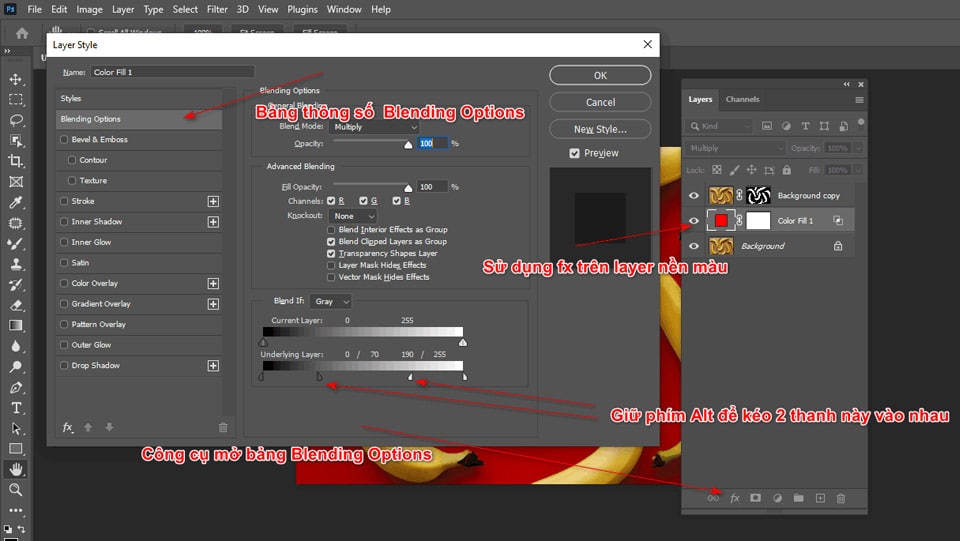
How to change background color in Photoshop
Use fx to create more realistic photos

The result after changing the background color

How to change background color in Photoshop
After changing the background color is complete

Conclude

This article has just guided you How to change background color in Photoshop of an image so that we can retain the details and shadows of that object in the most natural, effective and fastest way. At the same time, I also have articles with detailed instructions on how to beautify, remove acne, create rain and snow in the most natural way, and I also have articles introducing Photoshop tools for beginners. learn graphics.

– Photoshop is a powerful and indispensable tool for those working in the field of graphics and design. It helps you a lot How to change background color in Photoshop brings users great experiences when creating and transforming images, from simple to complex, from realistic to abstract. With a variety of features and customization capabilities, Photoshop not only helps you create beautiful and professional works, but also helps you enhance your creativity and develop your career.

– Photoshop is an extremely popular and versatile graphic photo editing software. With Photoshop, you can turn simple photos into sophisticated and creative works of art. It also allows you to create unique and professional designs, from advertising posters to product demonstrations. More than just a photo editing tool, Photoshop is also a creative platform and an endless source of inspiration for art and design enthusiasts.

- If you know How to change background color in Photoshop then your photos will become more soulful than ever. If you want to learn about graphics, please message our page directly Graphic Express or refer Photoshop course for dedicated advice.

In addition, the center installs the software for free when you join the course, the course time and package are very preferential, and you will receive a set of valuable resources when registering for the course.

Tags : Tags How to change beautiful background color in photoshop   learn photoshop   learn basic photoshop   study pts   study graphic design   me
Share
FacebookShare on FacebookpinterestShare on PinterestMessengerShare on Facebook Messenger
twitterShare on TwitterlinkedinShare on LinkedinvkShare on VkredditShare on ReddittumblrShare on TumblrvideoShare on Viadeobuffer. bufferShare on Bufferpocket. pocketShare on PocketwhatsappShare on WhatsappViberShare on ViberemailShare on EmailskypeShare on SkypediggShare on DiggmyspaceShare on MyspacebloggerShare on Blogger YahooMailShare on Yahoo mailtelegramShare on Telegram gmailShare on GmailAmazonShare on AmazonSMSShare on SMS
Tung Thai

Tung Thai

As a student at the center. I write what I know to share with you.
1 is to share with you so you can know and learn.
2 improve knowledge and remember longer, with the motto of giving to receive, I want to write more

Related articles

How to change background color in Photoshop

How to use camera Raw in photoshop

By How To 08/12/2025

Camera Raw in photoshop is a tool that has been around since…

How to change background color in Photoshop

Latest instructions for using camera raw in photoshop

By How To 07/12/2025

Camera raw in photoshop is a correction tool…

How to change background color in Photoshop

3 Ways to create speed effects in Photoshop

By Tung Thai 06/12/2025 0

3 Ways to create speed effects in photoshop Speed effects…

Leave a Comment Cancel reply

Categories What is Q&A? What is the structure of that place?

What is Interior Design? How much does an interior design job pay?

12/12/2025
What is Material?

What is Material? Material application in the field of design

11/12/2025
What is the poster?

What are posters? 9 Tips for designing beautiful, quick Posters

11/12/2025
What does graphic design do? Is it easy to get a job?

What does graphic design do? Is it easy to get a job?

11/12/2025
Water is the water material in Enscap

Water is the water material in Enscap

11/12/2025

Recent comments

  • male1 year ago
    On How to create a fade effect in Photoshop
    Great
  • phat phat2 years ago
    On Who is 5SMedia?
    Useful article
  • Minh Anh3 years ago
    On How to create basic materials in vray Sketchup
    Very good, admin
Copyright © 2025 HOWTO - Powered by HOWTO

5SMedia.net | hocdohoacaptoc.com | huongdansudung.vn | webantam.com

Back to Top
Hello!
  • All
    • Tips
      • Google
      • Facebook
      • Tiktok
    • Instruct
      • What is Q&A?
      • Taobao
    • WordPress
      • Code
      • Plugins
      • Themes
        • Flatsome
        • Theme Nevo
  • Share
    • WordPress
    • Code
    • Plugins
    • Tips
    • Windows
    • Apple
    • Graphics
    • Experience
  • Graphics documents
    • illustrator
    • Sketchup
    • Coreldraw
    • 3ds max
    • Enscape
    • Photoshop
    • Graphics Plugin
  • Course
    • Photoshop course
    • illustrator course
    • Coreldraw course
    • Edit video course
    • Course Sketchup
    • Autocad course
    • Website management course
  • Service
  • Software
    • Windows
      • Tips
      • Office
      • Necessary
      • Tools
    • Apple
  • Game
  • News
    • Technology
    • Review
en_US EN
en_US EN vi VI