Skip to content
  • About us
  • Contact
  • en_USEN
  • viVI
FacebookTwitterPinterest
HOWTOHOWTO
  • All
    • Tips
      • Google
      • Facebook
      • Tiktok
    • Instruct
      • What is Q&A?
      • Taobao
    • WordPress
      • Code
      • Plugins
      • Themes
        • Flatsome
        • Theme Nevo
  • ShareHot
    • WordPress
    • Code
    • Plugins
    • Tips
    • Windows
    • Apple
    • Graphics
    • Experience
  • Graphics documents
    • illustrator
    • Sketchup
    • Coreldraw
    • 3ds max
    • Enscape
    • Photoshop
    • Graphics Plugin
  • Course
    • Photoshop course
    • illustrator course
    • Coreldraw course
    • Edit video course
    • Course Sketchup
    • Autocad course
    • Website management course
  • Service
  • Software
    • Windows
      • Tips
      • Office
      • Necessary
      • Tools
    • Apple
  • Game
  • News
    • Technology
    • Review
Hello!

  • Lost your password ?
HOWTOHOWTO
  • Home > 
  • Graphics > 
  • Adobe Photoshop > 
  • How to Blend colors in Photoshop

How to Blend colors in Photoshop

By Tung Thai 18/11/2025 0 449 Views
How to Blend colors in Photoshop
Article categories

How to Blend colors in Photoshop. Adobe Photoshop is a useful tool for adjusting, editing and creating unique works of art from photos. With Photoshop, users can increase brightness, increase contrast, correct technical errors in photos, remove unwanted objects, change the background and create unique graphic effects.

In addition, Photoshop also allows users to create drawings, posters, web designs and more. With diverse and powerful features, Photoshop is an indispensable tool for professional photographers and photography lovers.

Now let's go find out How to Blend colors in Photoshop.

See more.

  • How to create coastal city effects in photoshop
  • How to create background in Photoshop
  • How to separate transparent material background in Photoshop
  • How to create classic portraits in Photoshop
  • How to change background color in Photoshop
  • How to create natural light in Photoshop

How to Blend colors in Photoshop

Step 1: Open the image that you want to Blend color to the object you want

  • Open File > Open Then find the image step that you want to Blend color

Step 2: Create an Adjustment Gradient Map to create a color layer for the image object

  • Let's go in Layer > New Adjustment Layer > Gradient Map > OK
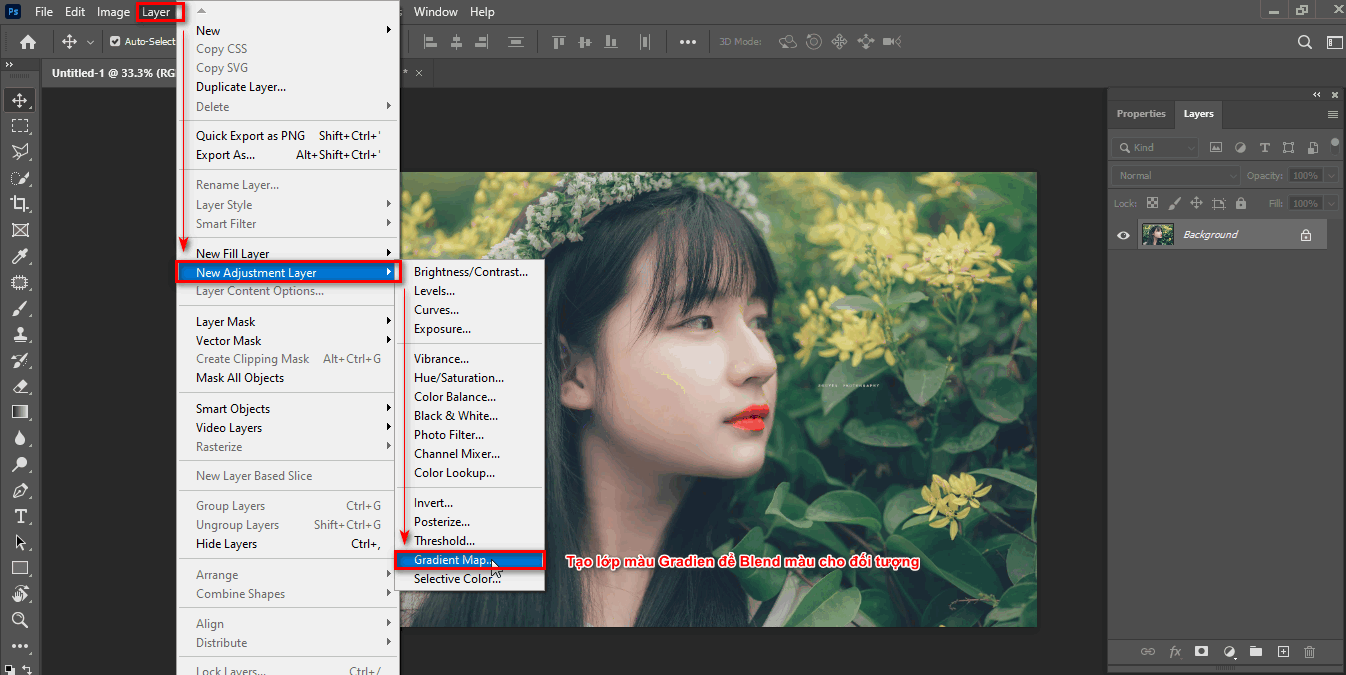
Basic and simple way to blend colors in photoshop
Step 2 create a color Blend layer for the image object
  • Go back to the Layers section and set the blending mode to Soft Light and decrease Opacity down 30%
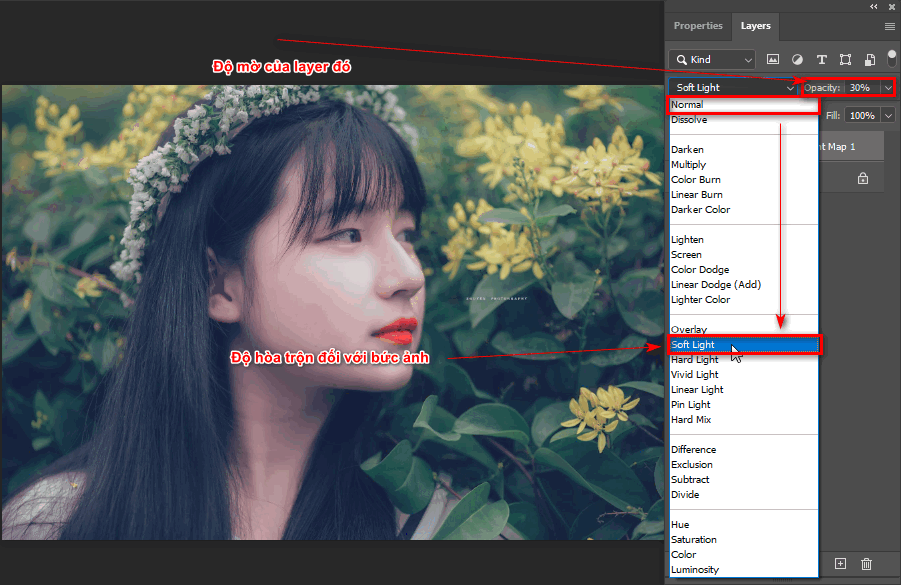
Basic and simple way to blend colors in photoshop
Step 2.1 blends and blurs that layer

Step 3: Change any color to suit the object

  • Double-click the color Gradient to open the editing parameters panel
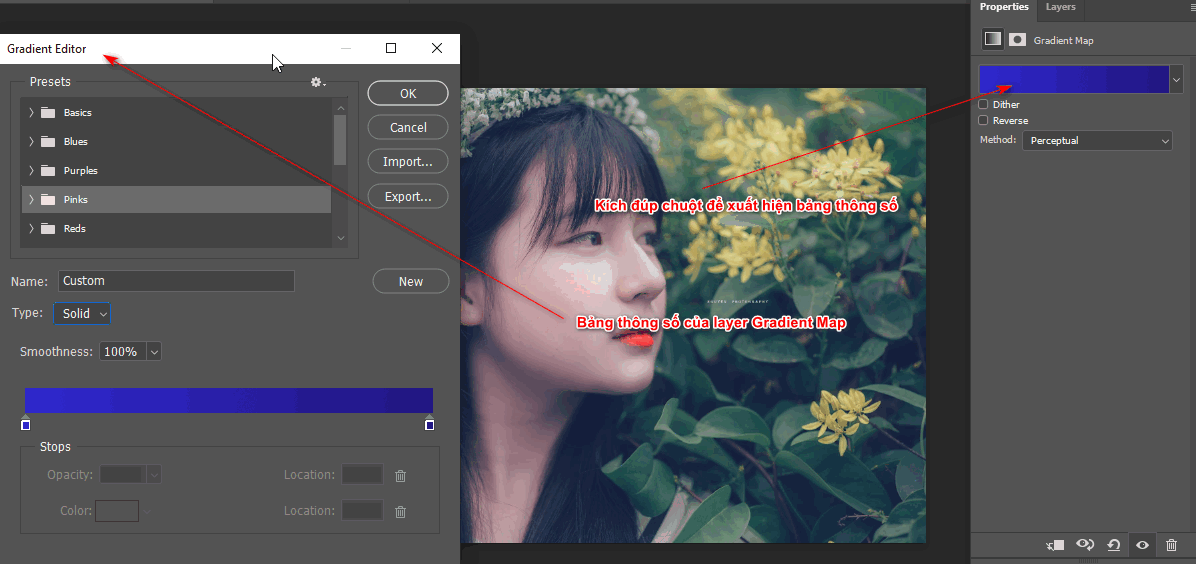
Basic and simple way to blend colors in photoshop
Step 3 how to change parameters
  • Then the information panel appears and then adjusts the section Type Solid wall Type Noise
  • This part Roughness We reduce it to 7 or 8 % to get the most beautiful and natural Blend color
  • Now I see the item Randomize to change the color to match the image you want to Blend > OK
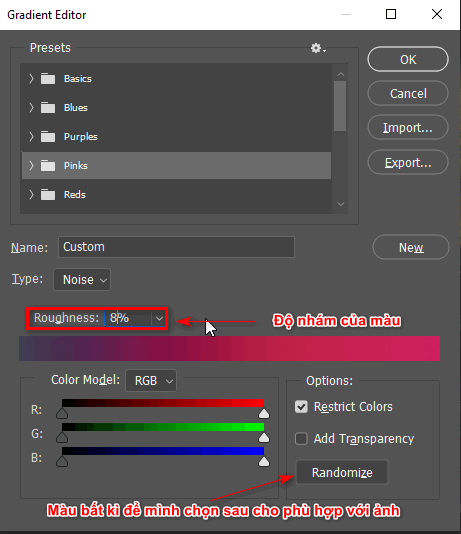
Or change the parameters and choose the appropriate color

Step 4: Product after using basic and simple color blending in photoshop

Below is the result when you apply basic color blending in Photoshop software.
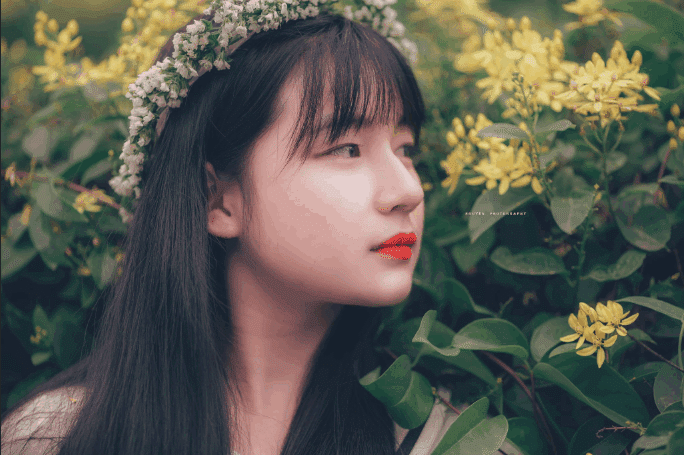
After applying the basic and simple color blending method in Photoshop

Epilogue

Posts How to Blend colors in Photoshop taught us how to blend basic and effective colors for those of you who are not good at blending colors for the photos you want. Post Basic and simple way to blend colors in photoshop It's just a small part about color blending. If you want to blend colors better, use it Camera Raw to achieve the best color effect.

Limbs 3 see more… Detailed instructions for using camera raw

If you are a photographer and want to edit images, you should learn Photoshop in Graphic Express The course not only focuses on color correction but also guides you from basic to advanced levels in Photoshop.

Currently we have courses and time periods that are suitable for students and office workers. When you register, you will receive 1:1 instructions. At the same time, there are more documents and libraries for the process of working and studying more effectively and quickly.

If you find it interesting, don't forget to like and share the article to let more people know about this method. I will give more good tips to help those who don't know how to improve the process of using the application and have more creativity.

Wishing you success in your assignment.

Tags : Tags adobe photoshop   Basic and simple way to blend colors in photoshop   learn photoshop   study pts   study graphic design
Share
FacebookShare on FacebookpinterestShare on PinterestMessengerShare on Facebook Messenger
twitterShare on TwitterlinkedinShare on LinkedinvkShare on VkredditShare on ReddittumblrShare on TumblrvideoShare on Viadeobuffer. bufferShare on Bufferpocket. pocketShare on PocketwhatsappShare on WhatsappViberShare on ViberemailShare on EmailskypeShare on SkypediggShare on DiggmyspaceShare on MyspacebloggerShare on Blogger YahooMailShare on Yahoo mailtelegramShare on Telegram gmailShare on GmailAmazonShare on AmazonSMSShare on SMS
Tung Thai

Tung Thai

As a student at the center. I write what I know to share with you.
1 is to share with you so you can know and learn.
2 improve knowledge and remember longer, with the motto of giving to receive, I want to write more

Related articles

How to Blend colors in Photoshop

How to use camera Raw in photoshop

By How To 08/12/2025

Camera Raw in photoshop is a tool that has been around since…

How to Blend colors in Photoshop

Latest instructions for using camera raw in photoshop

By How To 07/12/2025

Camera raw in photoshop is a correction tool…

How to Blend colors in Photoshop

3 Ways to create speed effects in Photoshop

By Tung Thai 06/12/2025 0

3 Ways to create speed effects in photoshop Speed effects…

Leave a Comment Cancel reply

Categories Enscape Foliage information in enscape 8

Foliage of grass and leaf materials in Enscape

10/12/2025
Clearcoat metal materials in Enscape 1 1

Clearcoat metallic material in Enscape

10/12/2025
How to create flowers in illustrator

How to create flowers in illustrator

10/12/2025
Carpet in Enscape banner

Carpet in Enscape material Carpet, Fur

10/12/2025
How to create borders for text in illustrator

How to create borders for text in illustrator

10/12/2025

Recent comments

  • male1 year ago
    On How to create a fade effect in Photoshop
    Great
  • phat phat2 years ago
    On Who is 5SMedia?
    Useful article
  • Minh Anh3 years ago
    On How to create basic materials in vray Sketchup
    Very good, admin
Copyright © 2025 HOWTO - Powered by HOWTO

5SMedia.net | hocdohoacaptoc.com | huongdansudung.vn | webantam.com

Back to Top
Hello!
  • All
    • Tips
      • Google
      • Facebook
      • Tiktok
    • Instruct
      • What is Q&A?
      • Taobao
    • WordPress
      • Code
      • Plugins
      • Themes
        • Flatsome
        • Theme Nevo
  • Share
    • WordPress
    • Code
    • Plugins
    • Tips
    • Windows
    • Apple
    • Graphics
    • Experience
  • Graphics documents
    • illustrator
    • Sketchup
    • Coreldraw
    • 3ds max
    • Enscape
    • Photoshop
    • Graphics Plugin
  • Course
    • Photoshop course
    • illustrator course
    • Coreldraw course
    • Edit video course
    • Course Sketchup
    • Autocad course
    • Website management course
  • Service
  • Software
    • Windows
      • Tips
      • Office
      • Necessary
      • Tools
    • Apple
  • Game
  • News
    • Technology
    • Review
en_US EN
en_US EN vi VI