Skip to content
  • About us
  • Contact
  • en_USEN
  • viVI
FacebookTwitterPinterest
HOWTOHOWTO
  • All
    • Tips
      • Google
      • Facebook
      • Tiktok
    • Instruct
      • What is Q&A?
      • Taobao
    • WordPress
      • Code
      • Plugins
      • Themes
        • Flatsome
        • Theme Nevo
  • ShareHot
    • WordPress
    • Code
    • Plugins
    • Tips
    • Windows
    • Apple
    • Graphics
    • Experience
  • Graphics documents
    • illustrator
    • Sketchup
    • Coreldraw
    • 3ds max
    • Enscape
    • Photoshop
    • Graphics Plugin
  • Course
    • Photoshop course
    • illustrator course
    • Coreldraw course
    • Edit video course
    • Course Sketchup
    • Autocad course
    • Website management course
  • Service
  • Software
    • Windows
      • Tips
      • Office
      • Necessary
      • Tools
    • Apple
  • Game
  • News
    • Technology
    • Review
Hello!

  • Lost your password ?
HOWTOHOWTO
  • Home > 
  • Software > 
  • Foxtool plugin is a must-have toolkit for a website

Foxtool plugin is a must-have toolkit for a website

By How To 22/09/2024 0 577 Views
foxtool
Article categories

Do you want to create a website without being slow and heavy due to installing many different software and tools? Then I have just the right one for you! I would like to recommend a free plugin to you that meets all your requirements for useful tools, security and optimization for your website. Join me to explore the rich world of Foxtool.

Foxtool Plugin functions:
foxtool
foxtool

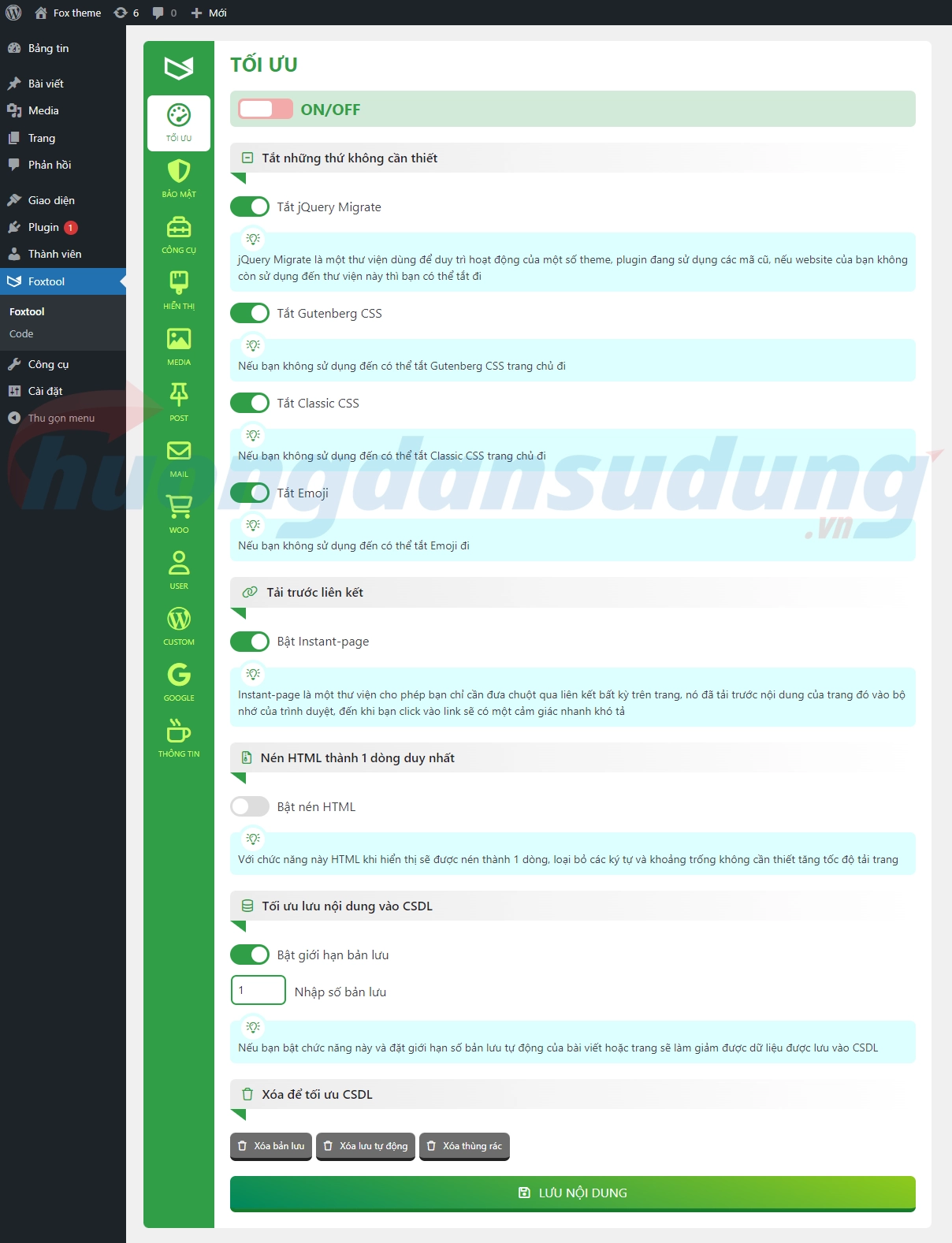
Website optimization function

Everyone wants their website to run fast and smoothly. With this function you can achieve that.

You can disable unwanted functions:

Disable jQuery Migrate Disable Gutenberg CSS Disable Classic CSS Disable emojis

In addition, there are functions such as:

Instant-Page: This function loads the content of the linked page in the background, so that when you click the link, the web page is displayed immediately. Compress HTML: This function compresses HTML code to reduce the load time of your website. Optimize database content: Here, you can limit the number of posts or pages that autosave. Database optimization: You can delete archived drafts, automatic archives, and trash, for example.

Website security function

Website security is a must for everyone. These functions protect your website from attacks and usually come at a cost. With Foxtool, it's all free!

You can disable functions like REST API, XML RPC, Wp-Embed, and X-Pingback to protect your website. Additionally, you can also remove unnecessary header information and block uploads of non-image files.

Tool functions for the website

With these functions, you can customize your website. You can enable the Classic Editor, use the Classic Extension Manager, and add custom code to the page source.

Display functions

These functions improve the look and feel of your website. You can add Font Awesome icon sets, change fonts, and add animated effects like falling snow or Luna sky.

Multimedia functions for the website

These functions allow you to optimize your images. You can enable uploading of SVG files, compress JPG images on upload, convert PNG images to JPG, and convert images to WebP format.

Functions for posts and pages

These functions make creating and managing posts and pages easier. You can choose display options for posts and pages and add custom functions to the Classic Editor and Extension Manager.

Email functions

These functions allow you to configure and send emails. You can send emails welcoming new users and notifying them of comments or responding to comments.

WooCommerce functions

These functions are specifically for e-commerce websites. You can enable advanced Ajax functions for shopping cart and product viewing.

Custom functions

These functions allow you to customize the login URL and appearance of the login screen.

Google login function

With this function, users can log in with their Google account and avoid SPAM.

Information

This function provides detailed information about your website and its versions.

Conclude

Foxtool is an extremely useful tool for website operators. With just a single plugin, you have access to all the functionality you need for your website. You don't need to install and configure expensive or different plugins. I would like to thank the author of this plugin for his great work and for making it available for free.

So what are you waiting for? Try Foxtool and optimize your website now!

Tags : Tags foxtool   fox plugin
Share
FacebookShare on FacebookpinterestShare on PinterestMessengerShare on Facebook Messenger
twitterShare on TwitterlinkedinShare on LinkedinvkShare on VkredditShare on ReddittumblrShare on TumblrvideoShare on Viadeobuffer. bufferShare on Bufferpocket. pocketShare on PocketwhatsappShare on WhatsappViberShare on ViberemailShare on EmailskypeShare on SkypediggShare on DiggmyspaceShare on MyspacebloggerShare on Blogger YahooMailShare on Yahoo mailtelegramShare on Telegram gmailShare on GmailAmazonShare on AmazonSMSShare on SMS
How To

How To

A person who is passionate about sharing knowledge from life. Common knowledge in life. Sharing is my passion. Hopefully my knowledge will bring many benefits to you

Related articles

Foxtool plugin is a must-have toolkit for a website

Key Screaming Frog SEO Spider

By How To 04/12/2025 0

Screaming Frog SEO Spider is a useful tool…

Foxtool plugin is a must-have toolkit for a website

Instructions on how to Download YouTube Videos using software

By thindv 13/11/2025 0

Introduction Downloading YouTube videos using software is a way…

Foxtool plugin is a must-have toolkit for a website

Best mp3 mp4 converter software

By How To 17/09/2024 0

Nowadays the world of technology is increasingly developing.…

Leave a Comment Cancel reply

Categories What is Q&A? What is the structure of that place?

What is Interior Design? How much does an interior design job pay?

12/12/2025
What is Material?

What is Material? Material application in the field of design

11/12/2025
What is the poster?

What are posters? 9 Tips for designing beautiful, quick Posters

11/12/2025
What does graphic design do? Is it easy to get a job?

What does graphic design do? Is it easy to get a job?

11/12/2025
Water is the water material in Enscap

Water is the water material in Enscap

11/12/2025

Recent comments

  • male1 year ago
    On How to create a fade effect in Photoshop
    Great
  • phat phat2 years ago
    On Who is 5SMedia?
    Useful article
  • Minh Anh3 years ago
    On How to create basic materials in vray Sketchup
    Very good, admin
Copyright © 2025 HOWTO - Powered by HOWTO

5SMedia.net | hocdohoacaptoc.com | huongdansudung.vn | webantam.com

Back to Top
Hello!
  • All
    • Tips
      • Google
      • Facebook
      • Tiktok
    • Instruct
      • What is Q&A?
      • Taobao
    • WordPress
      • Code
      • Plugins
      • Themes
        • Flatsome
        • Theme Nevo
  • Share
    • WordPress
    • Code
    • Plugins
    • Tips
    • Windows
    • Apple
    • Graphics
    • Experience
  • Graphics documents
    • illustrator
    • Sketchup
    • Coreldraw
    • 3ds max
    • Enscape
    • Photoshop
    • Graphics Plugin
  • Course
    • Photoshop course
    • illustrator course
    • Coreldraw course
    • Edit video course
    • Course Sketchup
    • Autocad course
    • Website management course
  • Service
  • Software
    • Windows
      • Tips
      • Office
      • Necessary
      • Tools
    • Apple
  • Game
  • News
    • Technology
    • Review
en_US EN
en_US EN vi VI