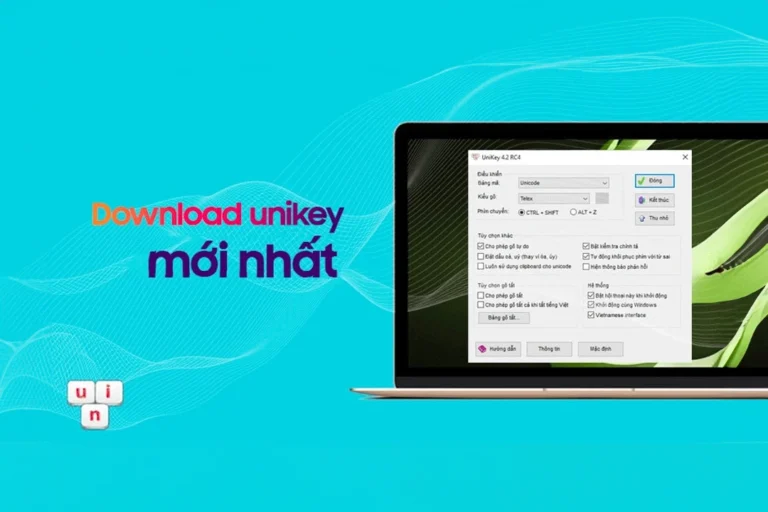
Download unikey
Unikey is released in many different versions to suit the majority of users across operating system platforms. Unikey is a very light software that can be downloaded and used immediately. Below are the versions that you can download unikey about and use.
Note: See the operating system version below to download the version for your computer
| Download the latest Unikey 64 bit | Download the latest Unikey 32 bit | Code table conversion toolkit (Unicode, VNI…) |
Introducing UniKey
UniKey was first announced for use in 1999. Since its inception, UniKey has been very positively received by users thanks to its simplicity, convenience, speed, and reliability. UniKey quickly became the best and most popular Vietnamese typing program on Windows. Currently, UniKey is present on almost all Vietnamese computers running Windows.
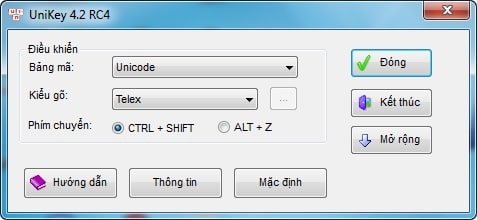
The author has given permission to everyone download unikey, download unikey for free on the author's homepage. Unikey is software that specializes in handling typing in Vietnamese. They use many different typing methods, and the mechanism for switching typing methods with keyboard shortcuts is convenient and fast.
So let's Download Unikey latest on computers to be able to type in Vietnamese. This tool also provides many different encodings for typing Vietnamese: Telecx Unicode, TCVN3 (ABC), VNI Windows, VIQR, Vietnamese locale CP 1258, Combined Unicode, UTP-8 Literal, NCR Decimal, NCR Hex, Unicode Cstring, X UTF-8, VISCII, VPS, BK HCM1, BK HCM2, Vietware X, Vietware F.
Unikey has 3 main typing methods that people often use: Telex, VNI, TCVN3. The mechanism of action is extremely simple. Unikey also integrates the ability to automatically start with windows so people don't have to reopen it. This function saves you time and can be used immediately.
The English to Vietnamese conversion feature is also used with keyboard shortcuts to help you switch languages more conveniently. Currently unikey supports most operating systems today. They support Vietnamese typing extremely well.
see more
- Download and choose the most beautiful Vietnamese font set
- How to use WinRAR to extract files
- EVKEY is the best and most standard Vietnamese percussion tool in 2023
- Online Computer Software Installation Service
- How to draw arrows in Word is super simple and fast
Check the operating system to install the correct version
Before download unikey about and use you need to check see Windows operating system Yours are Which version does it run?. If you download the wrong version, it may not be usable. So you need to check exactly which operating system version you are using.
Doing
- Click Right click on computer or This PC or my computer on screen > Choose the last one
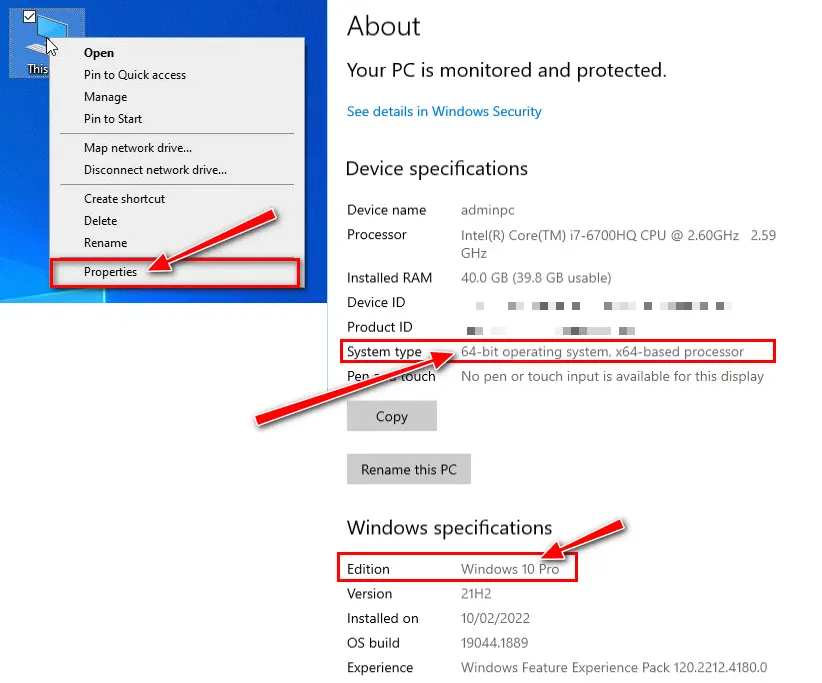
So my computer is using Windows 10 64bit version. Please download the correct version for the best experience.
Latest detailed unikey installation instructions
Installing unikey is extremely easy and quick. Once you have determined your operating system and version, do the following.
Step 1: Download Unikey with the latest version
- Please go to the website interface at the top to download unikey to your device
Step 2: run the latest version of the unikey application
- After downloading Unikey to your computer, use the software to unzip it and you will get a folder as shown below.
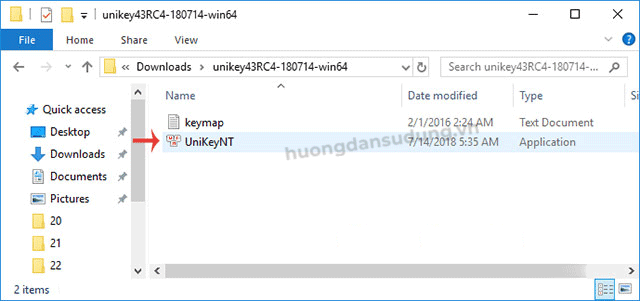
- Continue, right-click and select Run Administrator on the UniKeyNT.exe file to run with highest rights. Unikey Vietnamese typing support tool on your computer.
- For convenience for future use, you should take it out to the main screen.
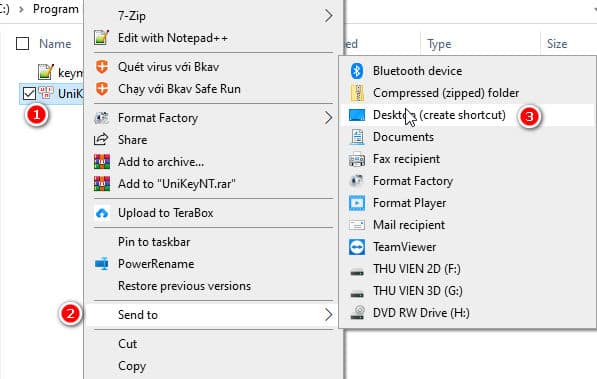
- You set it to start with Windows so that every time you open it, you don't need to open the unikey software again
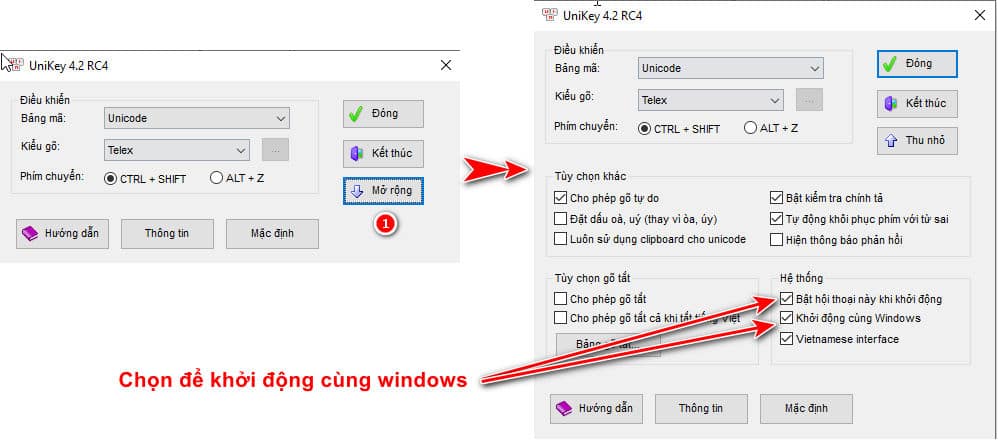
So with just a few simple steps, you have successfully downloaded and installed unikey.
How to check the author's copyright certification.
- UniKey is not checked by the system Windows Defender SmartScreen False warnings are malware.
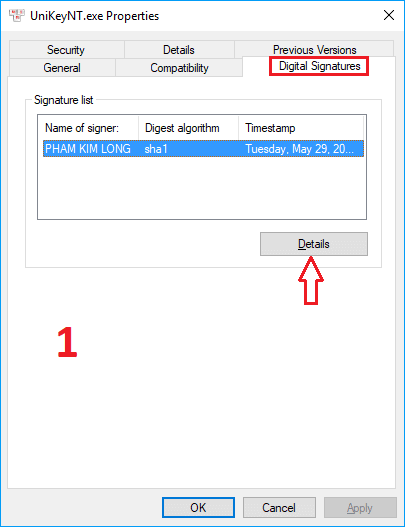
- You can always check to make sure the program belongs to the author Pham Kim Long provided and not subject to change.
Windows Defender SmartScreen warning
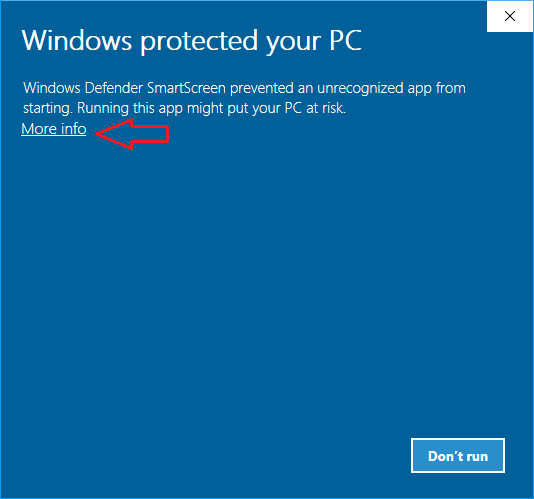
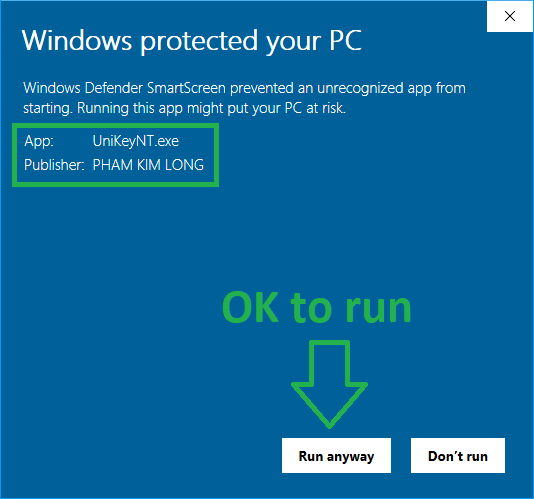
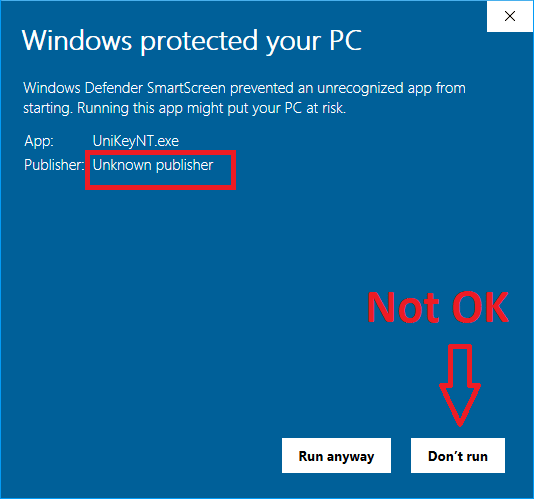
Even though UniKey has been digitally signed, every time a new version of UniKey is announced not long ago, you may still encounter a SmartScreen warning when running UniKey as follows:
 |
 |
 |
 |
|
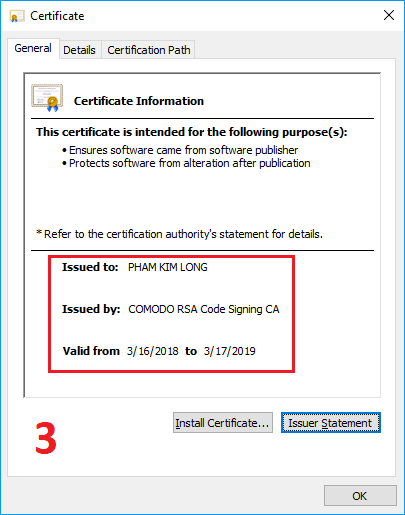 |
Before running UniKey for the first time, please review the instructions UniKey authentication with electronic signature to make sure you are using a clean version of UniKey, which comes from the author.
Unikey version change historyThis is the latest version of UniKey.
Minor update: Added “Simple Telex” to the available input methods. This function will help you type w that is not ư or some other useful functions
UniKey 4.6 RC2, 64 bit, ZIP file: Build 230919. Supports Windows 64-bit.
UniKey 4.6 RC2, 32 bit, ZIP file: Build 230919. Supports Windows 32-bit and 64-bit.
Add important feature: Enable/Disable Vietnamese for each application
UniKey 4.6 RC1, 64 bit, ZIP file: Build 230912. Supports Windows 64-bit.
UniKey 4.6 RC1, 32 bit, ZIP file: Build 230912. Supports Windows 32-bit and 64-bit.
This version has many important improvements. See details here
UniKey 4.5 RC1, 64 bit, ZIP file: Build 230808. Supports Windows 64-bit.
UniKey 4.5 RC1, 32 bit, ZIP file: Build 230808. Supports Windows 32-bit and 64-bit.
This is the old, stable version, released since October 2020. You should use this version if the latest version is not stable.
UniKey 4.3 RC5
This is the latest version of UniKey.
- Improvements of this version: See here
- UniKey 4.3 RC5, 64 bit, ZIP file: Build 200929. Supports Windows 64-bit.
- UniKey 4.3 RC5, 32 bit, ZIP file: Build 200929. Supports Windows 32-bit and 64-bit.
- October 15, 2020: Released version 4.3 RC5, fixing some minor errors.
- Added option to enable/mute when switching languages.
- Better compatibility with Windows' new Edge browser.
UniKey 4.3 RC4
This is an old, stable version, released since July 2018.
- UniKey 4.3 RC4, 64 bit, ZIP file: Build 180714. Supports Windows 64-bit.
- UniKey 4.3 RC4, 32 bit, ZIP file: Build 180714. Supports Windows 32-bit.
UVConverter
UVConverter is a versatile command line program used to convert between different Vietnamese encodings. (Unicode, UTF8, TCVN3, VNI...)
UVConverter has versions for Windows and Linux.
UniKey Software for Linux
X-Unikey
X-Unikey is Unikey ported to Linux and FreeBSD. X-Unikey lets you type Vietnamese in X Window environment. It has been tested with many popular programs, such as OpenOffice, emacs, vim, QT applications, GTK applications... X-Unikey has all the features of the Windows version, except that its GUI is still too simplified. All options are set through configuration file or keyboard shortcuts.
Download X-Unikey
- Source code: x-unikey 1.0.4
X-Unikey User Manual in Vietnamese
(User Manual in English is provided in the above packages)
- X-Unikey Manual, HTML, edited by Pham Thanh Long.
- X-Unikey Manual, PDF, LaTeX typesetting by Phan Vinh Thinh.
Help
Notes
- Authenticate UniKey to determine that the UniKey you are using has a clean source and has not been modified. Please check the Unikey's digital signature.
- Automatically run UniKey with adminstrator rightsOptional Start with Windows In UniKey it is not possible to run with administrator rights.
HOW TO
HOW TO UniKey: This document has many outdated parts. Sorry I haven't had time to update this document yet.
Vietnamese font sets
Below are extremely beautiful font sets so you can type extremely beautiful letters. These font sets of ours are Vietnamese font sets. This is the most standard and beautiful unicode font set that we have compiled.
Source: unikey.org
Conclude
When you use the computer, you will never forget download Unikey, Download Unikey. Because this is a software that cannot be missing on the computer. It helps you create content in Vietnamese extremely quickly.
Even more special when you guys download Unikey, Download Unikey This is a completely free software that is extremely light. The Unikey version is downloaded and updated continuously