Skip to content
  • About us
  • Contact
  • en_USEN
  • viVI
FacebookTwitterPinterest
HOWTOHOWTO
  • All
    • Tips
      • Google
      • Facebook
      • Tiktok
    • Instruct
      • What is Q&A?
      • Taobao
    • WordPress
      • Code
      • Plugins
      • Themes
        • Flatsome
        • Theme Nevo
  • ShareHot
    • WordPress
    • Code
    • Plugins
    • Tips
    • Windows
    • Apple
    • Graphics
    • Experience
  • Graphics documents
    • illustrator
    • Sketchup
    • Coreldraw
    • 3ds max
    • Enscape
    • Photoshop
    • Graphics Plugin
  • Course
    • Photoshop course
    • illustrator course
    • Coreldraw course
    • Edit video course
    • Course Sketchup
    • Autocad course
    • Website management course
  • Service
  • Software
    • Windows
      • Tips
      • Office
      • Necessary
      • Tools
    • Apple
  • Game
  • News
    • Technology
    • Review
Hello!

  • Lost your password ?
HOWTOHOWTO
  • Home > 
  • Graphics > 
  • Sketchup > 
  • Download Profile builder 3 full Vietnamese version

Download Profile builder 3 full Vietnamese version

By How To 09/11/2025 0 1666 Views
Profile builder 3 2.1 1
Article categories

Download Profile builder 3 full Vietnamese version

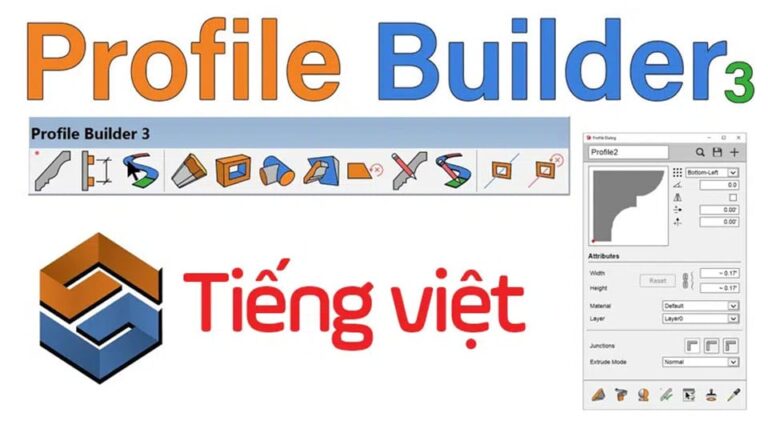
  • Profile builder 3 is an extremely fast rendering software in Sketchup. It allows you to create patterns, moldings, and solve objects with just 1 click.
  • The company's Profile Builder 3 is currently selling at a very high price. In this article, I will guide you to download and install this software for free.

Provide Profile builder 3 library automatically good price Just 1 click to get what you want

Contact: 0965 165 166

  • How to create basic materials in vray Sketchup
  • How to use tools in sketchup
  • Instructions for Setting up sketchup when first installing
  • Fix Enscape Render error with file thrown out
  • What Enscape is all about

Profile builder 3 full auto library is available for a fee

II. Install Profile builder 3 version 3.0.6

Note: This Profile builder 3 version can only be used for Skechup from 2020 and below. They work best in Sketchup versions from 2018-2020. If you do not do it correctly, it may cause errors and make it unusable

Step 1: Download Profile builder 3 version 3.0.6 (Vietnamese available)

Download Profile builder 3 for sketchup 2020 and below

Unzip Pass: hocdohoacaptoc.com

Step 2: Install
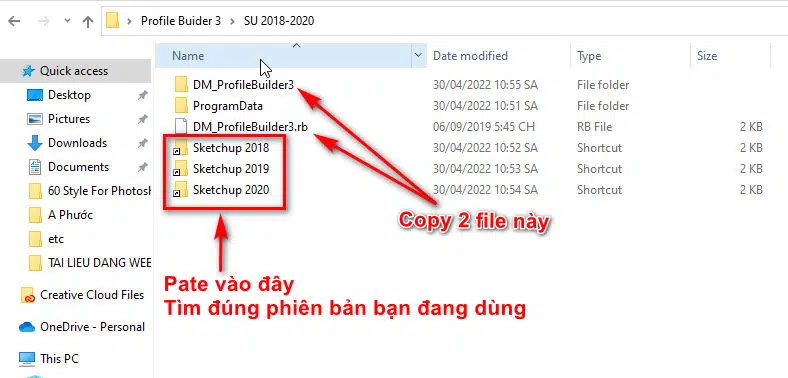
Download Profile builder 3 full Vietnamese version
Instructions for installing Profile builder 3 version 3.0.6
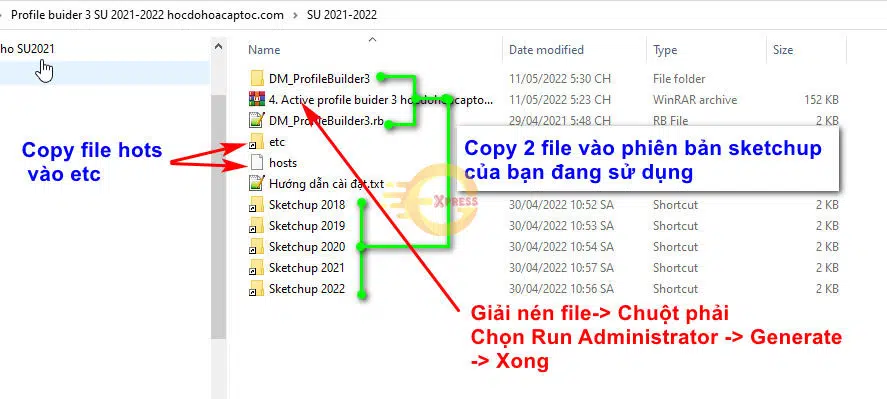
  1. As shown in the picture, all you need is copy file DM_ProfileBuilder3 and DM_ProfileBuilder3.rb Go to the Sketchup folder right below. If you use any version, copy it to that version.
  2. Copy files ProgramData Pate comes in drive C is to be.
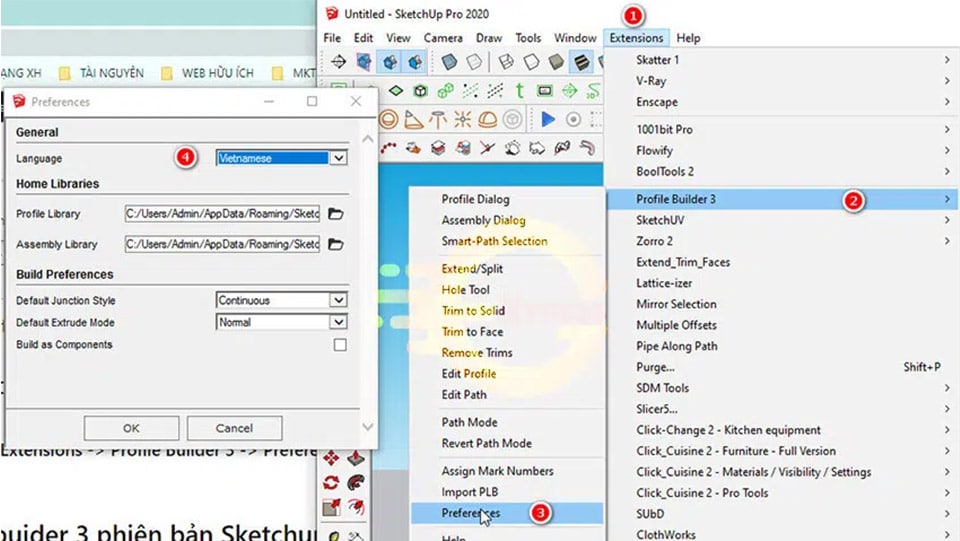
  3. If you open the software but do not have Vietnamese, you can go to settings as follows: Open Sketchup > Menu > Extensions > Profile Builder 3 > Preferences > Select Vietnamies. 
Download Profile builder 3 full Vietnamese version
Instructions for changing Vietnamese in profile builder 3

Note: Once selected, you need to reboot to be able to use Vietnamese. Some versions of Sketchup may have to restart the system 2-3 times to receive the Vietnamese language.

Video instructions for downloading and installing Profile builder 3 in detail

I. Install Profile builder 3 version 3.2.1

With this version of Profile builder 3 3.2.1 you can use it for all versions of Sketchup. However, installing it is a bit more complicated than previous versions. Profile builder 3 versions work best from sketchup 2022-2018

Step 1: Download Profile builder 3 Version 3.2.1 (Vietnamese available)

Download Profile builder 3 for sketchup 2021 and above

Unzip Pass: hocdohoacaptoc.com

Step 2: Install Profile builder 3 version 3.2.1
Download Profile builder 3 full Vietnamese version
Instructions for installing Profile builder 3 version 3.2.1
  1. Copy file DM_ProfileBuilder3 and DM_ProfileBuilder3.rb Go to the Sketchup folder right below. If you use any version, copy it to that version.
  2. Copy files hots pate into the directory etc inside the folder then select yes to overwrite
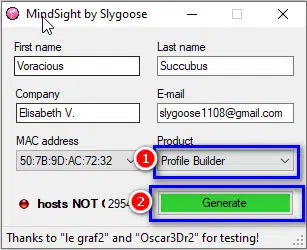
  3. Extract the Active Profile builder 3 file and run it by clicking Right-click and select Adminnistrator -> Note, remember to select Profile builder 3 before selecting Generate as shown below
Instructions to change Vietnamese in profile builder 3
Active Profile builder 3

Done. Just enjoy the results.

Step 3: How to transfer software Profile builder 3 into Vietnamese

Open Sketchup > Menu > Extensions > Profile Builder 3 > Preferences > Choose Vietnam > Ok

Note: Turn off Sketchup and turn it back on to see Vietnamese

III. Message:

Using cracked software is discouraged. If possible, please support the manufacturer so that it can be used safely and with full features without viruses.

I just gave you instructions Download Profile builder 3 version 3.0.6 and version 3.2.1 for sketchup. If you have difficulty during the installation process, please leave a comment or visit the zalo group to discuss.

Zalo team supports

Good luck

Source: https://hocdohoacaptoc.com/download-profile-builder-3/

Tags : Tags Download Profile builder 3   Profile builder 3
Share
FacebookShare on FacebookpinterestShare on PinterestMessengerShare on Facebook Messenger
twitterShare on TwitterlinkedinShare on LinkedinvkShare on VkredditShare on ReddittumblrShare on TumblrvideoShare on Viadeobuffer. bufferShare on Bufferpocket. pocketShare on PocketwhatsappShare on WhatsappViberShare on ViberemailShare on EmailskypeShare on SkypediggShare on DiggmyspaceShare on MyspacebloggerShare on Blogger YahooMailShare on Yahoo mailtelegramShare on Telegram gmailShare on GmailAmazonShare on AmazonSMSShare on SMS
How To

How To

A person who is passionate about sharing knowledge from life. Common knowledge in life. Sharing is my passion. Hopefully my knowledge will bring many benefits to you

Related articles

Download Profile builder 3 full Vietnamese version

Fix failure to load 3dwarehouse Sketchup library

By How To 21/11/2025 0

Fix failure to load 3dwarehouse Sketchup library. 3D…

Download Profile builder 3 full Vietnamese version

Fix using sketchup plugin saying not licensed

By How To 10/11/2025 0

Fix using sketchup plugin saying not licensed Please…

Download Profile builder 3 full Vietnamese version

Download 1001 bit pro Vietnameseization plugin 100%

By How To 09/11/2025 0

Download 1001 bit pro plugin 1001 bit plugin…

Leave a Comment Cancel reply

Categories What is Q&A? What is the structure of that place?

What is Interior Design? How much does an interior design job pay?

12/12/2025
What is Material?

What is Material? Material application in the field of design

11/12/2025
What is the poster?

What are posters? 9 Tips for designing beautiful, quick Posters

11/12/2025
What does graphic design do? Is it easy to get a job?

What does graphic design do? Is it easy to get a job?

11/12/2025
Water is the water material in Enscap

Water is the water material in Enscap

11/12/2025

Recent comments

  • male1 year ago
    On How to create a fade effect in Photoshop
    Great
  • phat phat2 years ago
    On Who is 5SMedia?
    Useful article
  • Minh Anh3 years ago
    On How to create basic materials in vray Sketchup
    Very good, admin
Copyright © 2025 HOWTO - Powered by HOWTO

5SMedia.net | hocdohoacaptoc.com | huongdansudung.vn | webantam.com

Back to Top
Hello!
  • All
    • Tips
      • Google
      • Facebook
      • Tiktok
    • Instruct
      • What is Q&A?
      • Taobao
    • WordPress
      • Code
      • Plugins
      • Themes
        • Flatsome
        • Theme Nevo
  • Share
    • WordPress
    • Code
    • Plugins
    • Tips
    • Windows
    • Apple
    • Graphics
    • Experience
  • Graphics documents
    • illustrator
    • Sketchup
    • Coreldraw
    • 3ds max
    • Enscape
    • Photoshop
    • Graphics Plugin
  • Course
    • Photoshop course
    • illustrator course
    • Coreldraw course
    • Edit video course
    • Course Sketchup
    • Autocad course
    • Website management course
  • Service
  • Software
    • Windows
      • Tips
      • Office
      • Necessary
      • Tools
    • Apple
  • Game
  • News
    • Technology
    • Review
en_US EN
en_US EN vi VI