
How to download Google Drive PC now, Google Drive software can be said to be indispensable software because it is like a place "ideal" for users to store files online. With many outstanding features, the demand for using Google Drive is increasing, so many people want to find a way to download the software. Google Drive PC this to your device. Therefore, today 5SMedia will guide you how to download Google Drive PC extremely simple
1. Overview of Google Drive
Google Drive PC Officially launched on April 24, 2012, it has been available for you for nearly 12 years now. download Google Drive PC extremely convenient. According to statistics, this software has about 800 million users worldwide, compatible with 68 languages.
Google Drive PC is an extremely secure online data storage and editing service with a capacity of 15GB completely freeUsers can store many different types of data such as: text, images, video, audio, PDF,… on the basis of "cloud”. In addition, Google Drive PC also helps users easily access data and documents everywhere – edit documents anywhere or share files to work together with friends.
Google Drive PC currently includes: Google Docs, Google Sheets and Google Slides. This is an office suite that allows editing documents, presentations, spreadsheets, drawings, forms, etc. And in Google+ Photos, image size must be smaller than 2048 x 2048 pixels and video length must be shorter than 15 minutes.
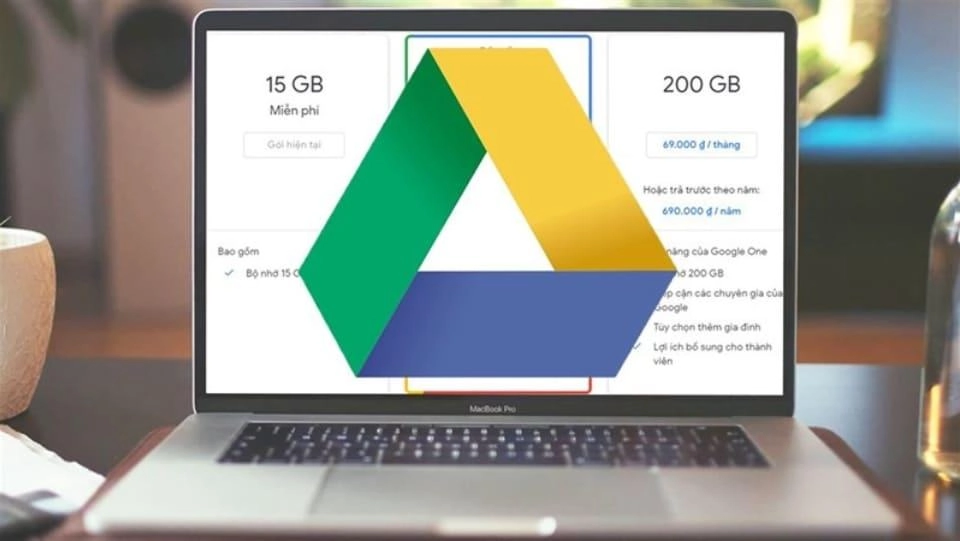
If everyone uses download Google Drive PC If you need more capacity to use, you will have to pay a monthly maintenance fee. The cost packages in Vietnam will be as follows.
See more.
- What is google plays app? Is installation necessary?
- Simple ways to create a Google Ads account for newbies
- What outstanding features does Google Translate have that are difficult to replace?
| Package | Expense | |
| 15 GB | Free (default) | |
| 100 GB | 45,000/month | 450,000/year |
| 1TB | 225,000/month | 2,250,000/year |
| 2TB | 450,000/month | 4,500,000/month |
| 10TB | 2,250,000/month | |
| 20TB | 4,500,000/month | |
| 30TB | 6,750,000/month | |
SEE NOW Professional Advertising Services - Effective with extremely low cost:
2. Simple instructions for downloading Google Drive on PC
Download Google Drive PC It's not as difficult as you think, just follow the steps below and you will be able to download it:
Step 1: Download the Google Drive software to your computer (Windows or MacOS).
You access Google Drive PC direct download link from the home page below

Step 2: You open the file Google Drive Setup just downloaded.
Step 3: Next, select Install to start the process of installing Google Drive on your computer.
Step 4: When the installation complete message appears, select Sign in with browser (Log in with browser).
Step 5: To download data from Google's cloud, you need to continue to select your Google account to link to Google Drive. If you do not have a Google account, see the instructions on how to create a Google account in part 3 below.
Step 6: In this step, select Sign in to login.
Step 7: After Google reported Success and a notification appears, click to select OK to complete the installation process.
3. Instructions for downloading Google Drive on your phone
Step 1: Download Google Drive
On the phone Androids or iphone: You guys go to CH Play or App Store > Type “Google Drive"You find the right application and download the application to your device. The Google Drive download process will take place within 1 minute.
Step 2: Sign in to Google Drive
Once the application has been installed on your phone, open the application > Click to select Log in > Enter address email/phone number your > Select Next > Fill password > Press Next. So you have just completed the process of downloading Google Drive and logging into Google Drive on your phone and computer.
3. Instructions for creating a Google account
How to create a google account on your phone
Step 1: Access and register an account
Please visit Create google account > You fill in the information > Click Next.
Step 2: Continue to fill in the information. date of birth, month, year, gender > Click Next.
Step 3: Create Gmail
If you want to be quick and not create duplicates, you can choose gmail according to Google's suggestions. If you want to create your own gmail account, you need to pay attention. The gmail name cannot be the same as the previous account, your gmail account is unique. In case you create a duplicate, Google will notify you that you will need to choose another name > Select Next.
Step 4: Set password
To keep your account safe, you should set a password with uppercase and lowercase letters, numbers and special characters, for example: Create account 123$ This is called a secure password > Click Next.
Step 5: Add recovery account
When the screen shows the interface Add phone number and gmail to restore, You can add or not add.
If not add you just baamms continue to skip this step
If you add a phone number or gmail to recover, you just need to fill in the phone number and gmail to recover so that when you forget your account, you can recover it easily.
Once completed, click I agree to accept google terms.
Step 6: review account information
When the screen shows the interface review your account information, click Next.
Step 7: When the screen shows the interface Privacy and Terms, click I agree.
How to create a google account on computer
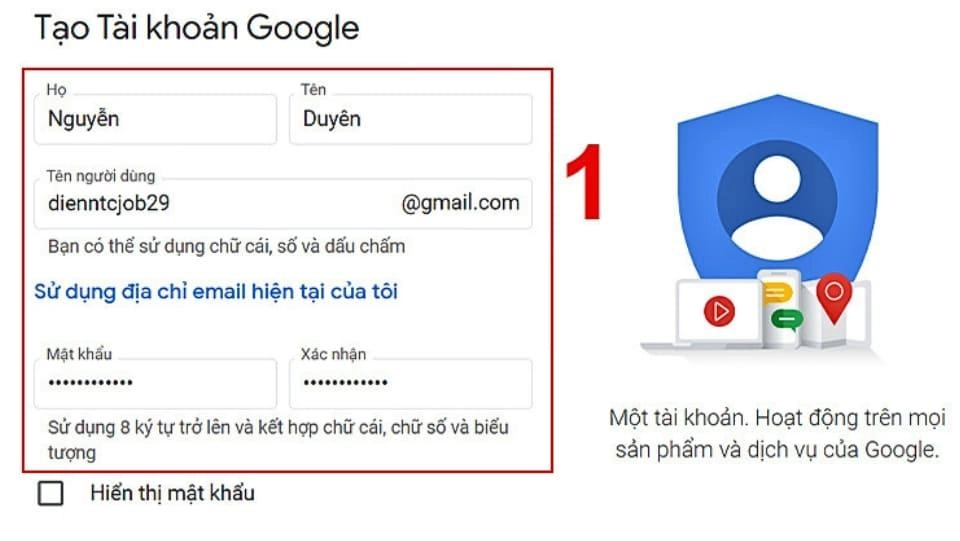
If you do not have a Google account, follow these steps to create one:
Step 1: Visit the link to register new
You click on the link Create google account > select create account to proceed to create a new Google account > You enter your correct information. You enter full in items below > Click Next.
Step 2: Fill in all personal information as required > Click Next.
Note: Although phone number and gmail are not required, these 2 pieces of information are very necessary because they will better secure your Gmail account. If your account password is forgotten, you can easily recover it. If you do not fill in, it will be very difficult to recover your account.
Step 3: Read the policy carefully. Privacy and Terms > Click I agree to complete.
So you have created a google account on your phone and computer very easily, right?
4. Outstanding features of Google Drive
Software Google Drive PC There are some main outstanding features as follows:
- Cloud file storage: Google Drive allows users to store files in the cloud, so you can access your files from any device, as long as there is an internet connection.
- Create and edit documents: Google Drive has a suite of applications and tools that allow users to create and edit document files like Word documents online, Excel spreadsheets, and Powerpoint presentations all for free use.
- Multiple people accessing at the same time to edit: When your file is shared, you can also set the access rights of others to view or edit your file. When the user has the link that you have granted permission to, that person can collaborate with you and others on the file in real time.
- Back up your photos: Google Drive allows you to automatically back up your photos from your mobile devices as well as your computer, which is very convenient.
- File sharing: Easily share your files with others by copying the link and sending it to them. Now as long as you share the permissions, the other party can receive it.
- View a variety of content: You can open more than 30 types of files in the same browser such as: Adobe Illustrator, Photoshop, HD videos even if you do not install those software on your computer, you can still preview the content inside the file in thumbnail mode.
- Protect your device from malware: Google Drive's system can proactively scan uploaded or downloaded files when shared with you and delete them if it detects that the file contains malware, ransomware, spam or phishing content or cracked software...
- Return to action in time: Google Drive keeps track of all the changes you have made before. So when you click the save button, the new revision will be saved. Within 30 days, if you want to return to the document file or review the history, you can completely go back, you can actively review or choose to save the revision permanently.
5. How to download multiple files at once on Google Drive
Step 1: Visit website Google Drive
Step 2: Login account
If you are not signed in to your Google account, you should sign in now. access google drive and log in your account information.
Step 3: Access the file download link
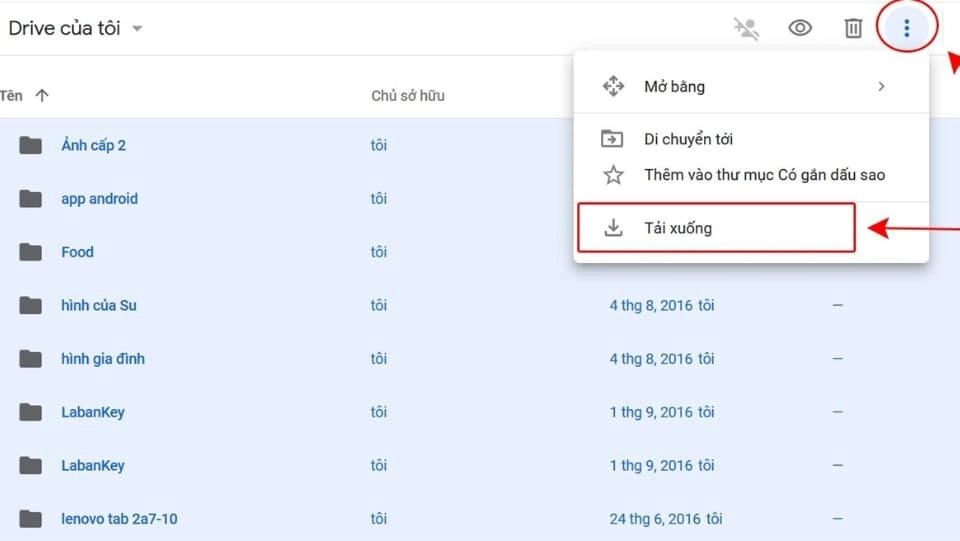
To download multiple files at the same time on Google driver, you need to have a download link for that file. Select the folder containing the files you want to download or select multiple files at the same time as below:
- You can select multiple files at the same time, while holding down the “Ctrl” on the keyboard to select multiple files at once.
- After clicking on the file, press “Ctrl + A” from the keyboard to select all the files currently in your Drive. If you are a Macbook user, use “cmd” ⌘ Command+A instead of “Ctrl”.
Step 4: When you select successfully, all items on the main Drive page will turn green and are in selection mode.
Step 5: You right click on the green area or you can go to the menu icon in the top right corner of the Google Drive window to access Other tasks.
Step 6: Select Download.
Note: Since the downloaded files are in compressed format, to open them you need to unzip the files by: Select the file you want to unzip > Right click > Select Extract All > Select Extract. In some cases, if the downloaded file is too large and is interrupted, you will need to download it again from the beginning. So when downloading, consider dividing the file to avoid having to download it again from the beginning.
Conclude
After watching, do you still feel download Google Drive PC too difficult? Google Drive can be downloaded on both phones and computers, allowing you to work anytime, anywhere (as long as you have an Internet connection). How to download Google Drive on PC or phone is quite simple, you just need to follow the instructions to install it.
Good luck!
If you are a seller who needs to increase sales. Please contact us at 5SMedia, with extremely preferential advertising costs from only 5%. You will meet with consultants 24/7. Your products will reach users at the right time.
Address 1: 05 Thanh Thai, Ward 14, District 10, Ho Chi Minh City
Hotline: 0965 165 166 or 0888 768 115
Fanpage: https://fb.com/howto.edu.vn
Email: infohowto.edu.vn@gmail.com


 EN
EN  VI
VI