
How to create basic materials in vray Sketchup
When you design, it is extremely necessary that we decorate the doors and windows. But not everyone knows how to create curtains properly. In this article, I will guide you How to create basic materials in vray Sketchup Extremely fast and efficient. At the end of the writing table, I will give you basic material settings that are available so you just need to put them in and use them.
1. Create translucent curtains in Vray
How to create translucent curtains in vray
Step 1: Create basic materials: You choose according to the numbers below material table > Materials > Generic
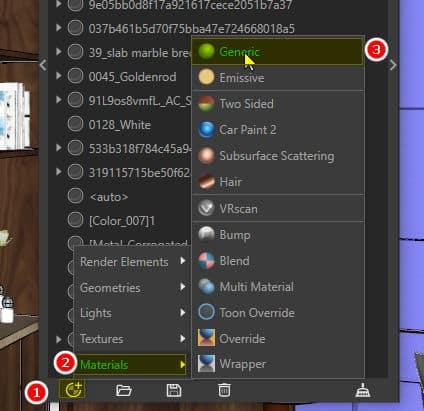
Step 2: Name the curtain Note to put the number character at the beginning to choose easily. For now, let's name the material 01 Name the curtain
+ Number 1 below your name can be changed.
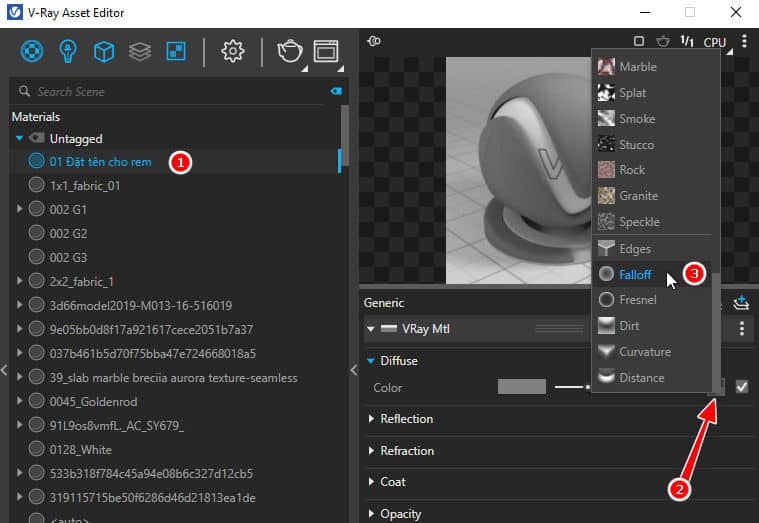
+ Number 2: You assign the 2-sided brightness mode by selecting the mode Falloff
[note]
- Details of Setting parameters in Enscape
- HOW TO toolbar in Enscape
- Detailed instructions on how to use tools in sketchup
- Self-illuminated material in Enscape
[/note]
Step 3: Next, we create materials for translucent curtains
+ You repeat the first operation and choose in the numerical order below.
Number 1: Select materials table > 2 Materials > 3 Two Sided (2-sided glowing material)
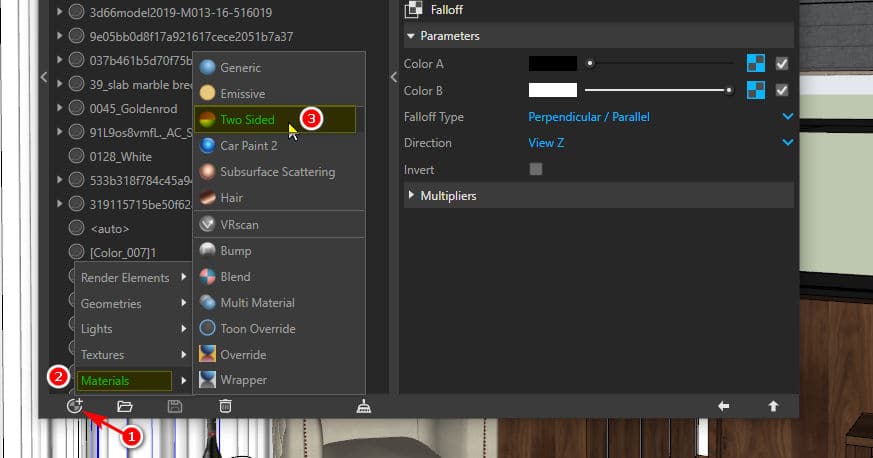
Step 4: Assign 2-sided data to curtains
You choose according to the arrow direction below: Select the box  material then select Bitmap and leads to the material that needs to be attached to the curtain
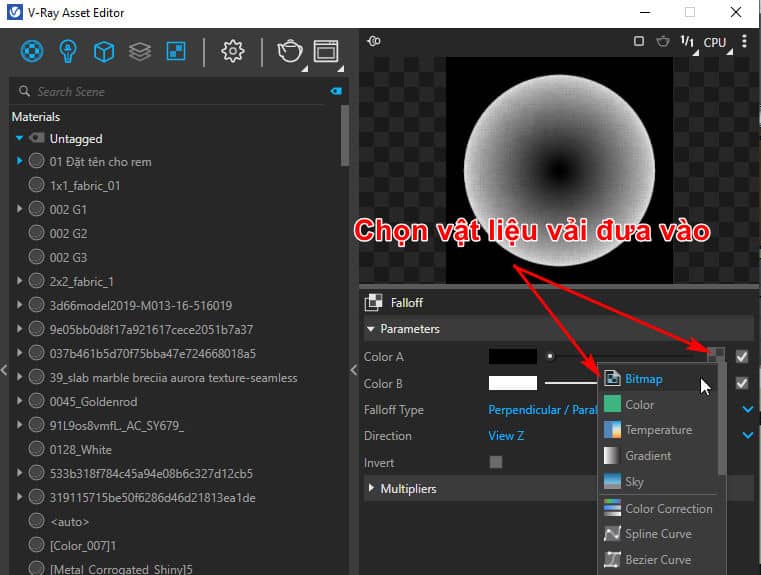
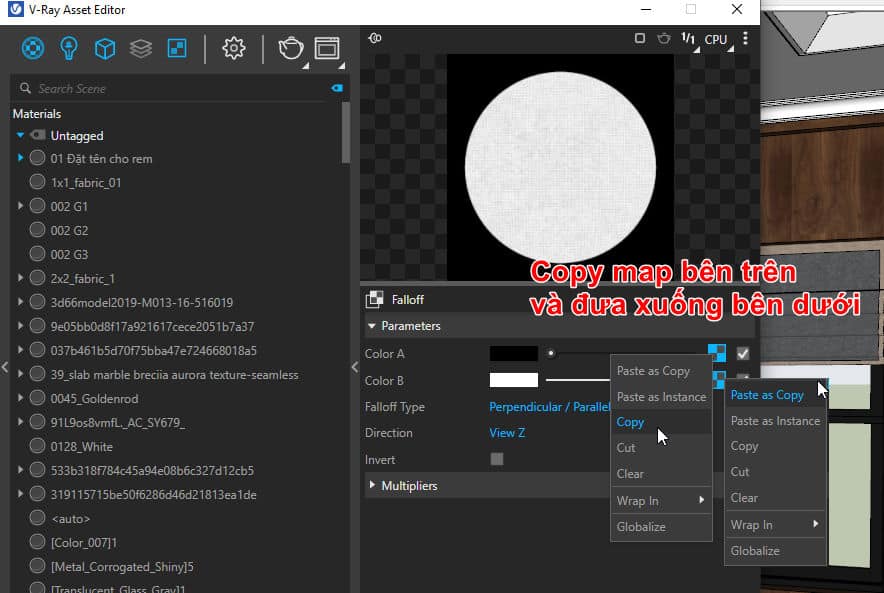
After assigning in the above cell, copy from the upper cell to the lower cell as shown below. We temporarily name the 2-sided material 1 Light-transmitting materials
Step 5: Assign a material to the curtain at the beginning of creation
At first we created is 01 Name the curtain, Then in the 2 boxes below we select the material as shown in the arrow, both of which we choose are 01 Name the curtain
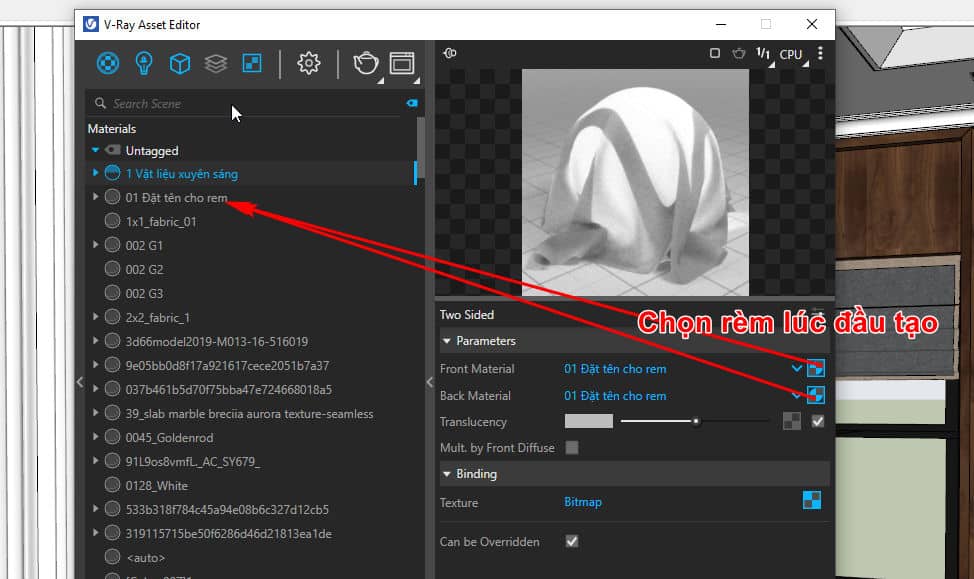
Note: We can increase the item Translucency In vray let more or less light enter.
Step 6: Select the object to assign material afterwards right mouse Go to the selected material > select Apply to Selection
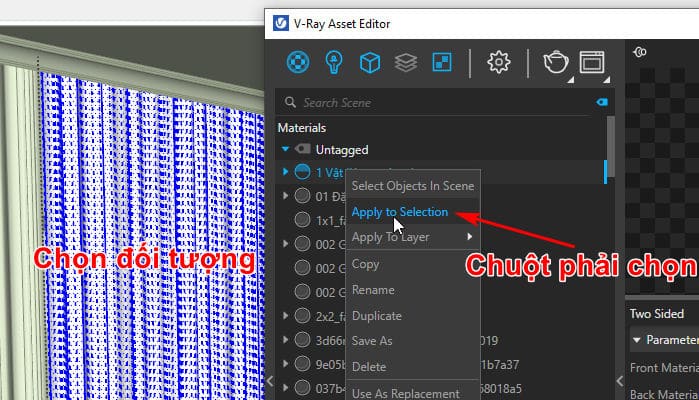
Step 7. Test rendering to see if it works. If you follow the correct order of operations, the result will be successful. Below are the results create translucent curtains in Vray
+> So creating translucent curtains in vray is not too difficult, we just need to do the correct operation a few times to remember ^^. Essentially this is just that Basic material in vray okay
2. How to create glossy white stainless steel material in vray
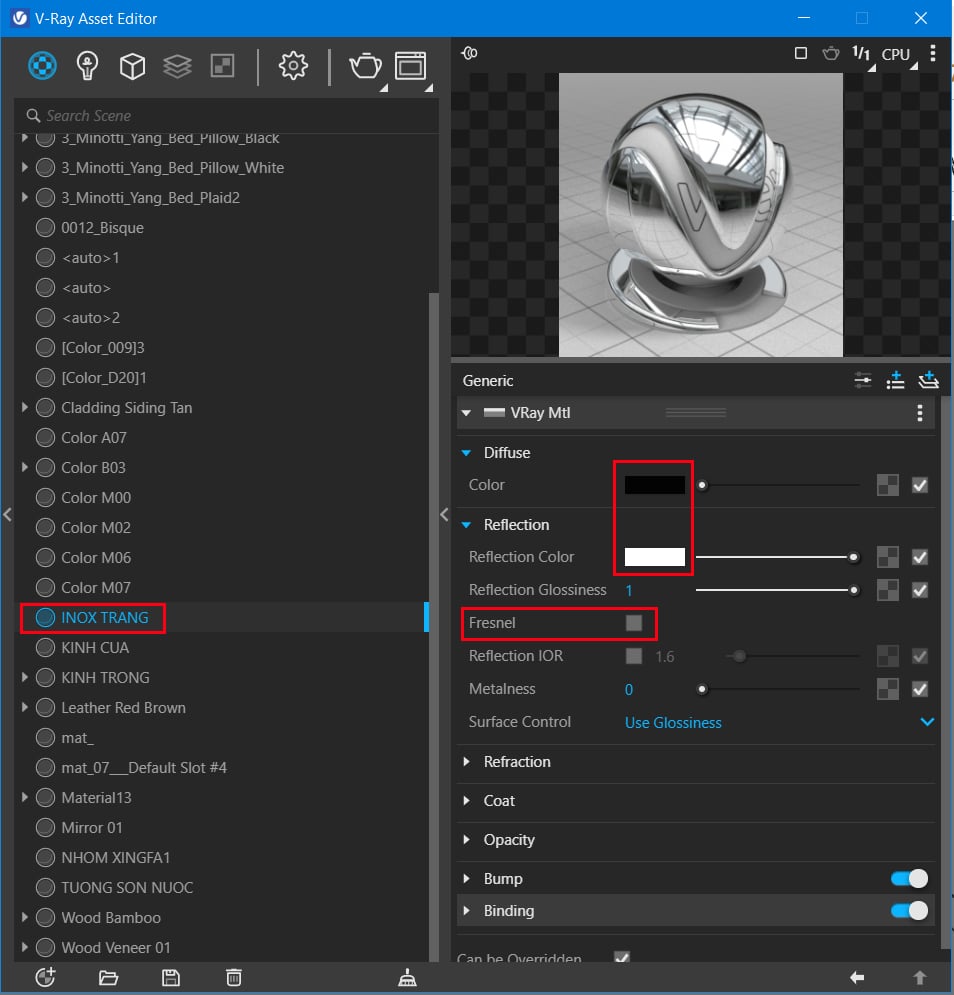
To create polished stainless steel material, you need to pay attention to the following parameters
- Diffuse: black
- Reflection color: 100% white creates 100% reflectivity
- Fresnel: Uncheck to switch to stainless steel mode
For rough stainless steel, you just need to adjust the parameters Reflection glossiness: 1 from 0.75 to 0.95 => matte stainless steel is fine
For scratched stainless steel, you just need to replace the map Diffuse: into scratched stainless steel material (keyword search for scratched stainless steel texture)
If you want to create yellow stainless steel material, just change the parameters Reflection color: to orange or yellow so that the reflection turns yellow as shown below
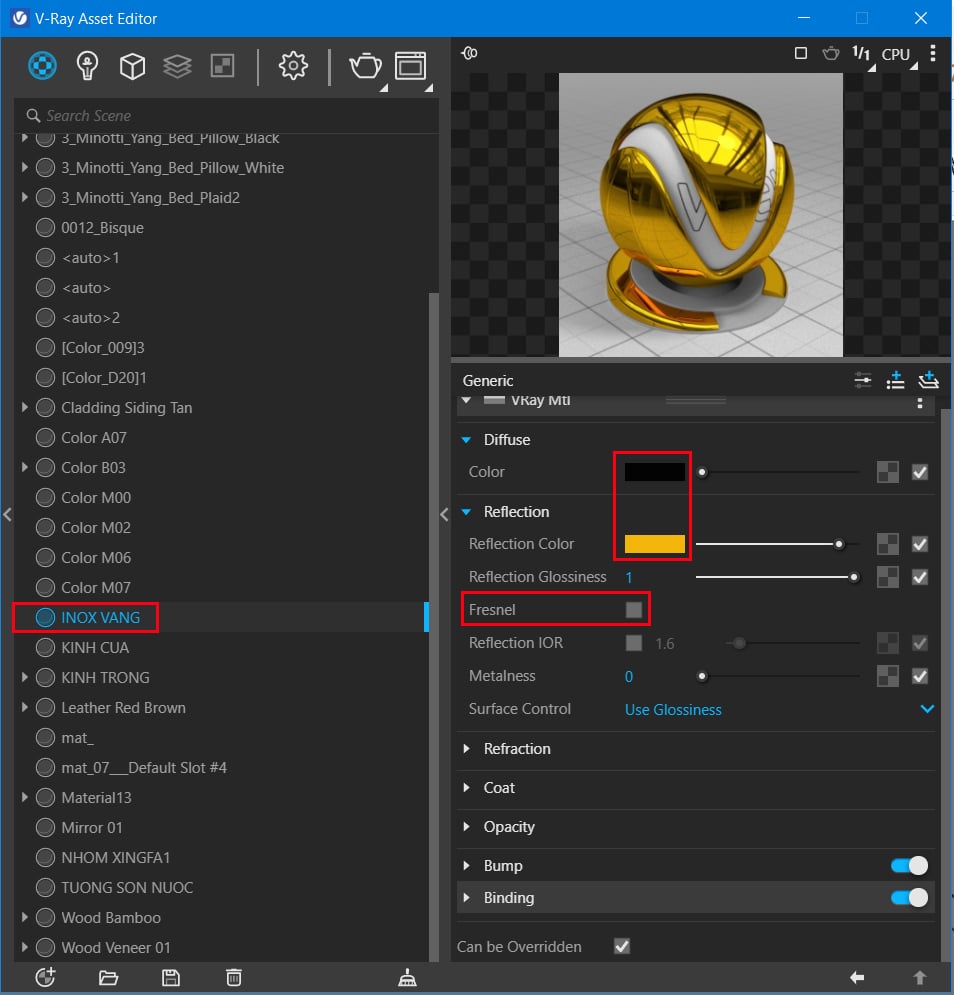
For scratched or rough gold stainless steel materials, you can do the same as in the stainless steel section above.
3. Vray clear glass material
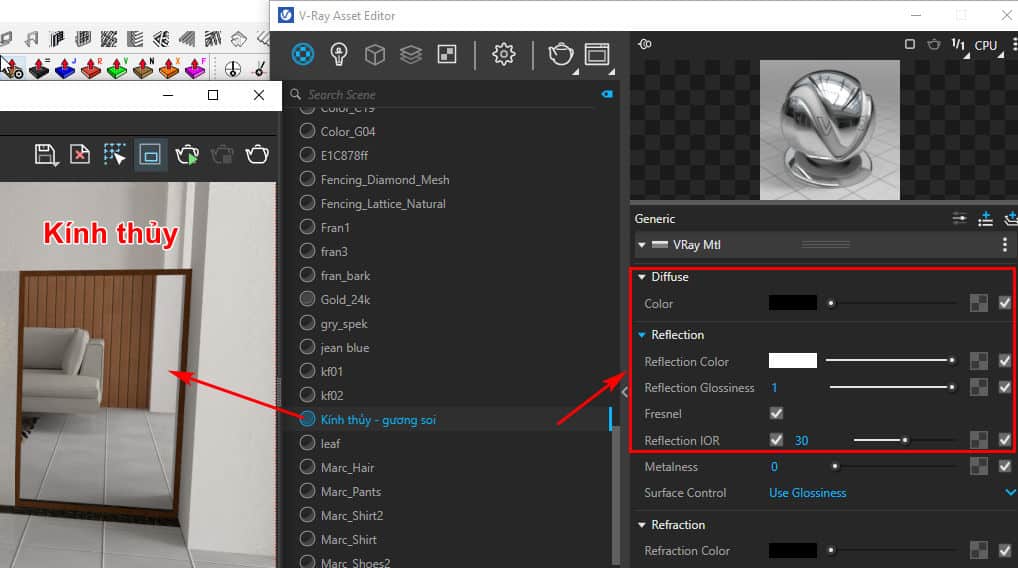
- Diffuse: black 100%
- Reflection color: white 100% reflective of glass. The higher it is, the more reflection it has
- Reflection glossiness: The more 1 decreases to 0, the rougher it can be applied to bathroom frosted glass
- Fresnel: tick select
- Reflection IOR: 30 Increase this parameter to make the display mirror brighter
4. Create transparent glass material in vray
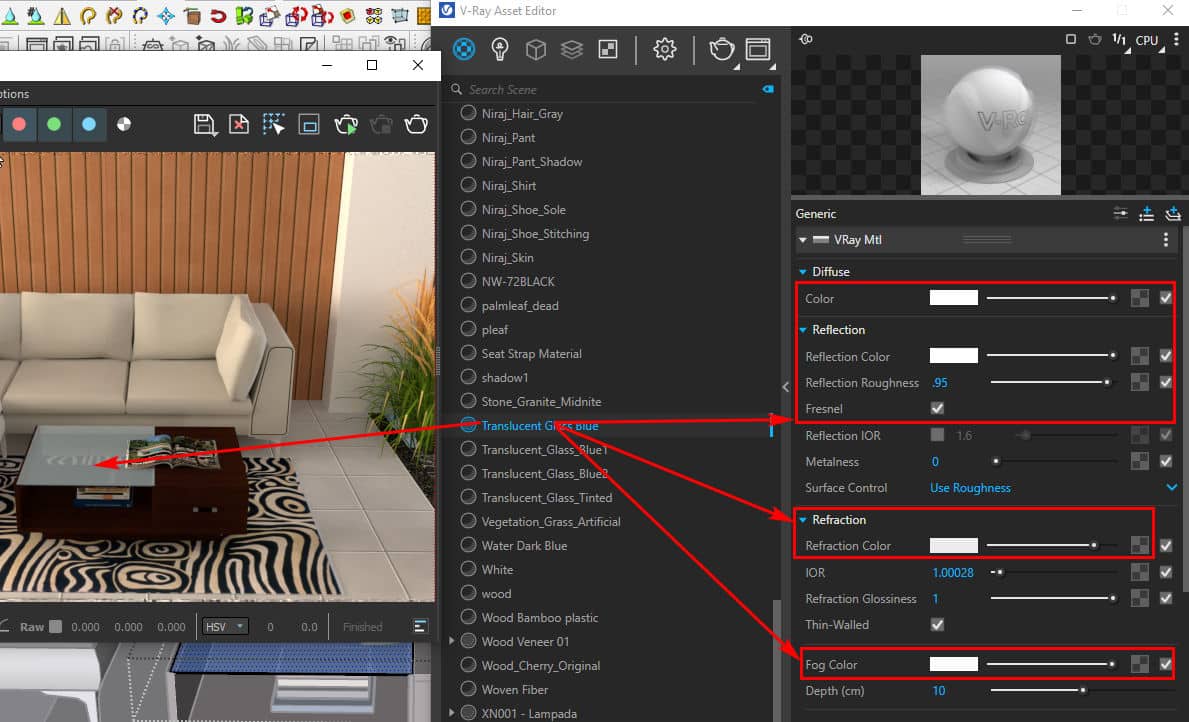
To create transparent glass material, you should pay attention to some of the following parameters.
- Diffuse: black 100%
- Reflection color: white 100% for the best reflection of the object
- Reflection glossiness: 1
- Fresnel: tick select
- Reflection IOR: not selected
- Refraction color: white 100% The more this parameter increases, the more transparent the glass becomes. In addition, you can adjust the transparency Fog multiplier The lower the parameter, the clearer the glass; the higher it increases, the more opaque it becomes
This glass is often applied to tea table tops, glass railings, and glass panels on the outside of high-rise buildings today...
5. Create stained glass material in vray
To create stained glass, we need to pay attention to the parameters Fog color: glass color. When you change this parameter, your glass color will also change. The parameters above are similar to the transparent glass material system above.
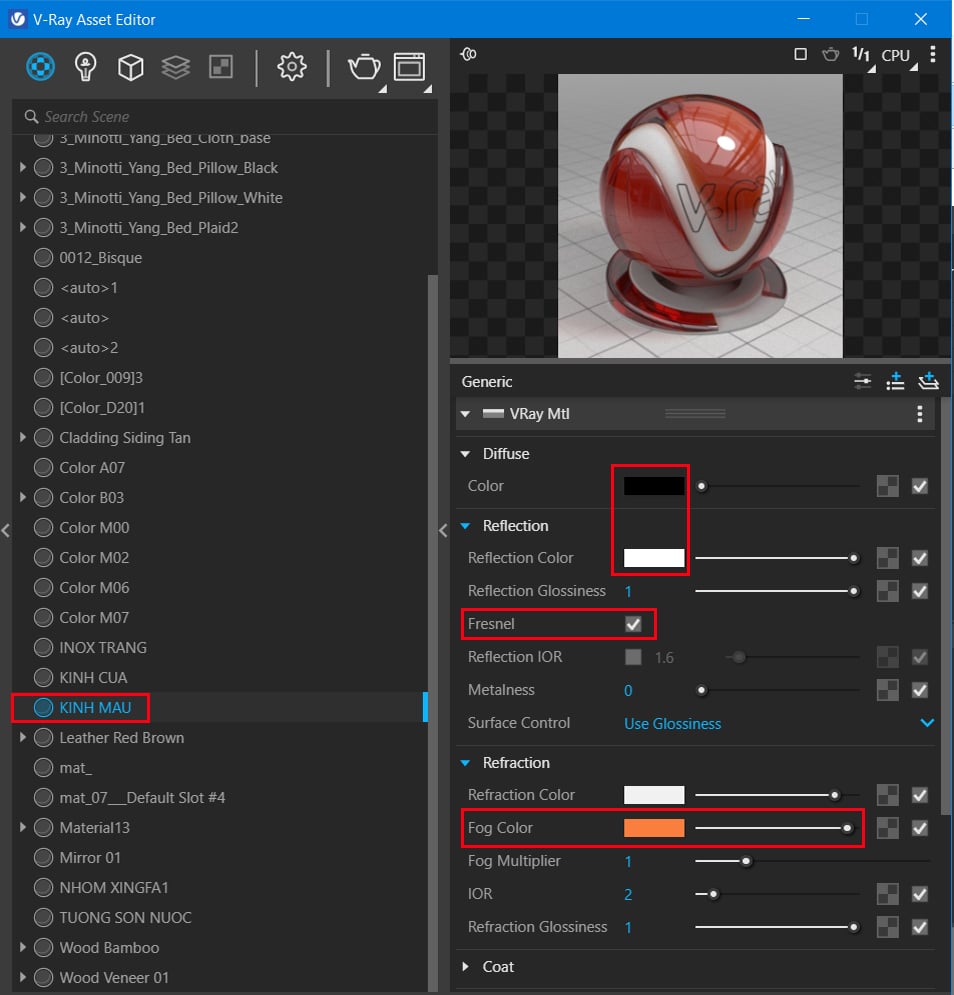
- If you want to choose gradient colored glasses, you can choose from the Fog color section To be Gradient color.
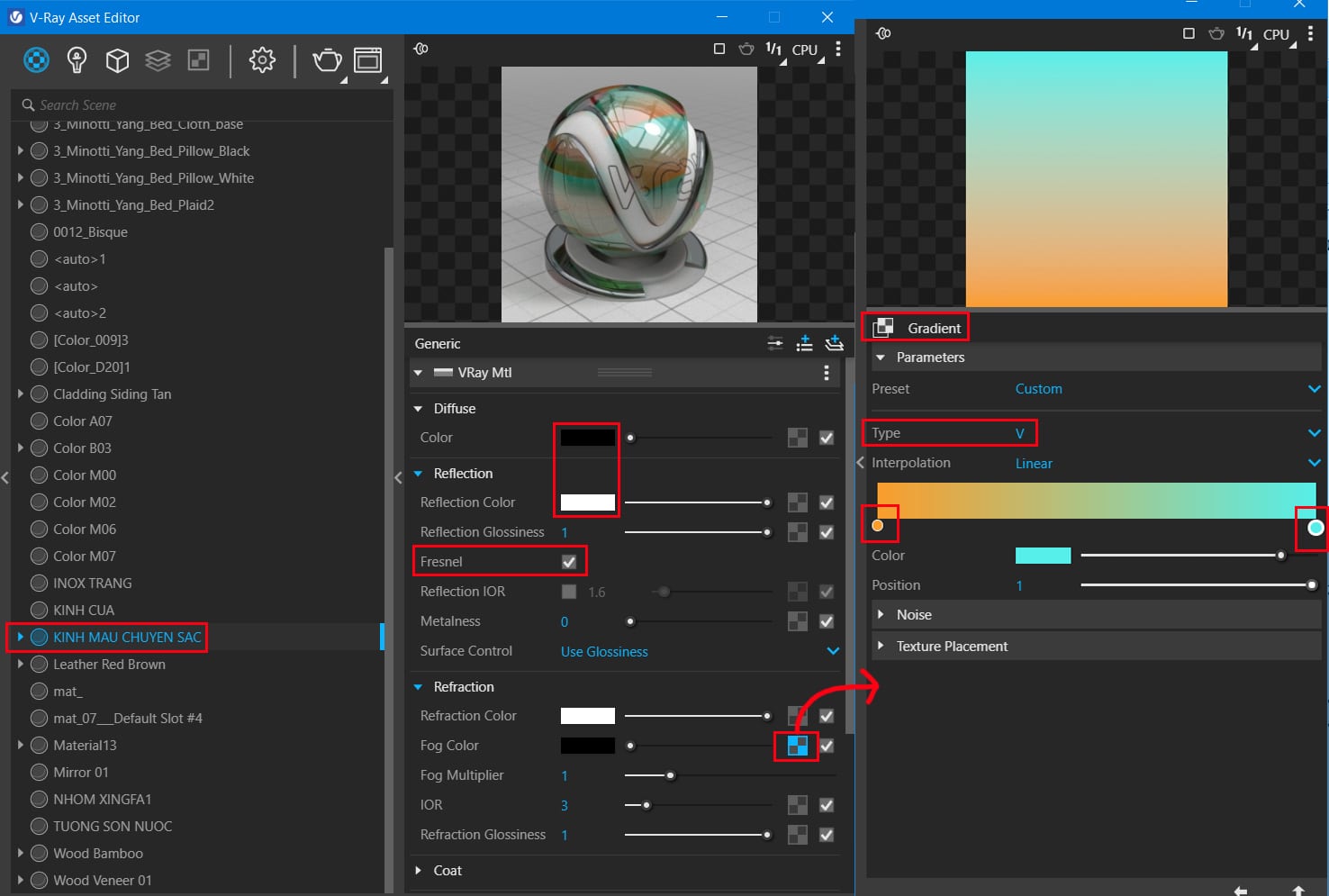
- This is the gradient for the material. If you want to change the color direction, go inside the section Gradient color > Type > Change parameters u and v
6. How to create water material in vray
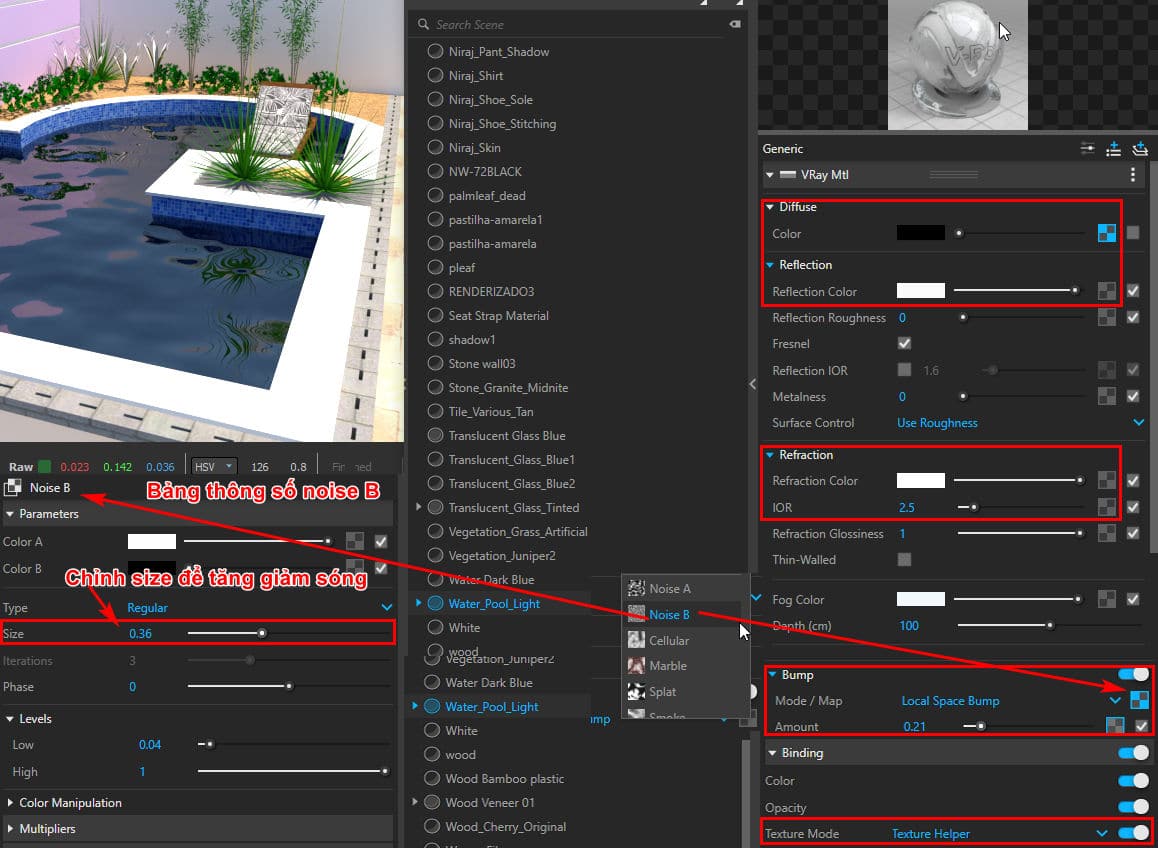
- Diffuse: choose water color or map
- Create reflection Reflection= 100%
- IOR = 1.6 > 2.5
- Create Refraction= 100% to help make water transparent
- Fog color: choose water color
- Reduce Fog Muntiplier for lighter water IOR = 1.33
- At Map add BUM: Method 1: BUM uses Nois B
- Binding brings back the Texture Helper to increase or decrease the large size in the noise table B. After converting Texture Helper You can change the size in the material section.
- Increasing or decreasing Size is equivalent to wavelengths
7. Create discoloration materials
When you pour brick red marble tiles or any color that has reflections. Because of the bounce of light on a white wall, your wall will be tinted. To overcome this problem of discolored materials, you will create the following.
Step 1: Vacuum the previously stained material. Rename the material to make it easier to remember
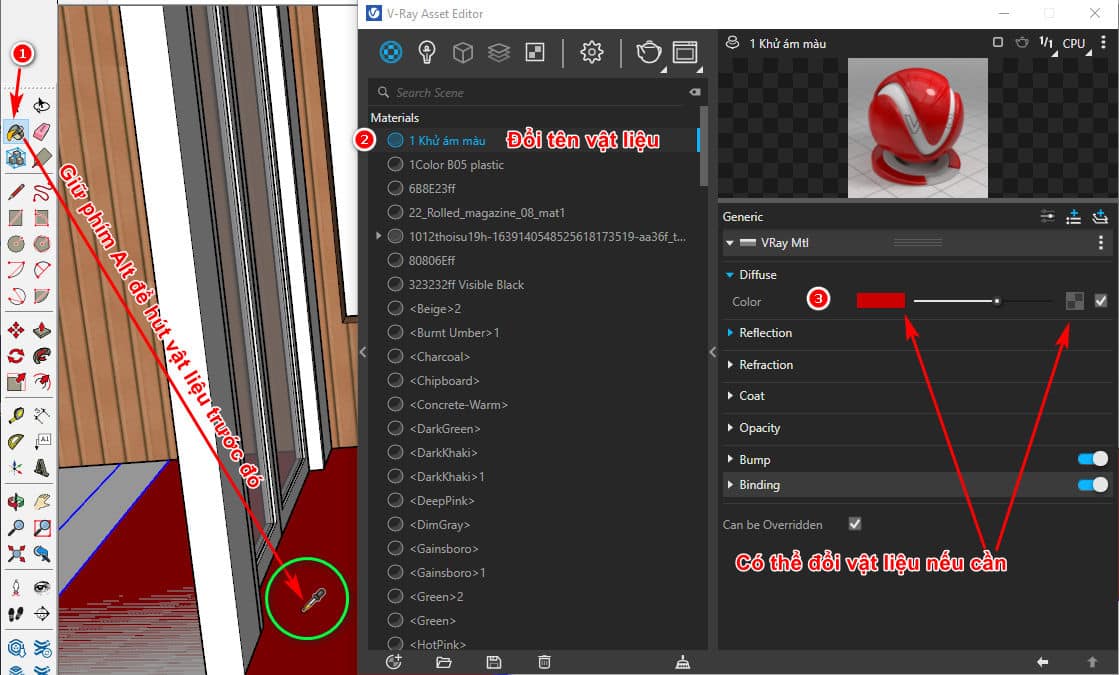
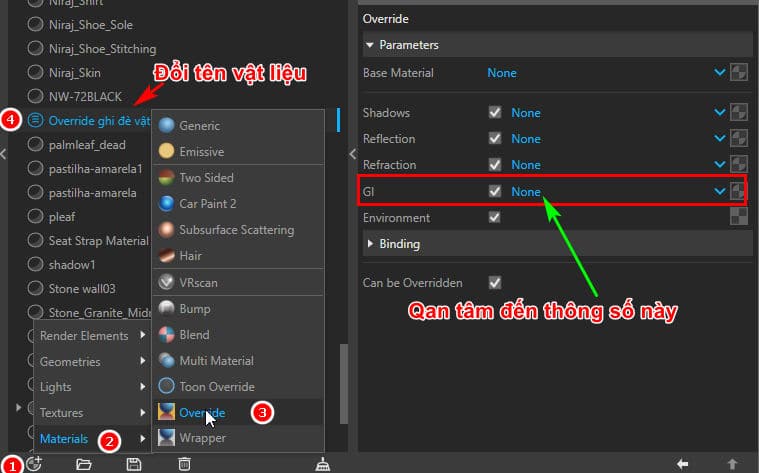
Step 2: Create new materials Override > Rename to 01 Override material The number 01 in front puts the material on top for easy selection
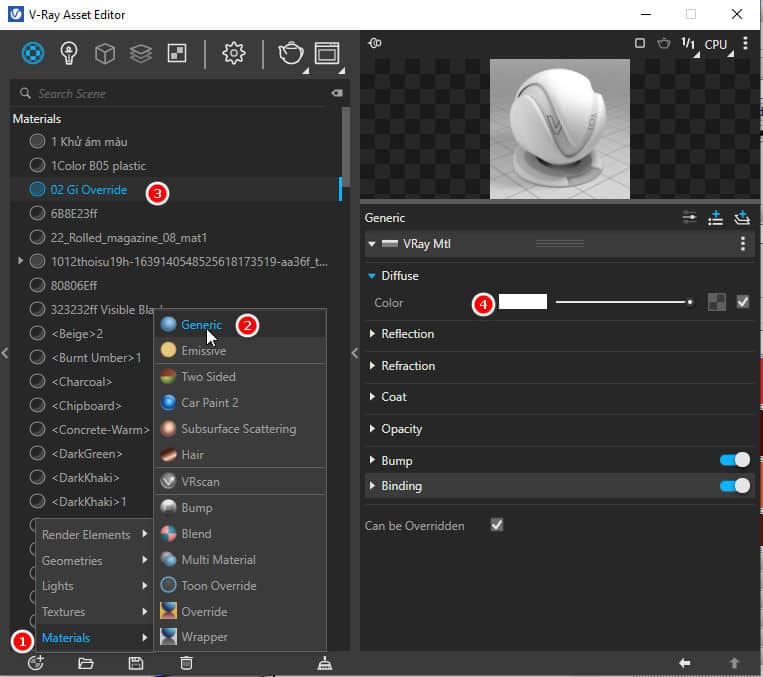
Step 3: Create new Generic materials named 02 Gi Override to insert into item GI in step number 1
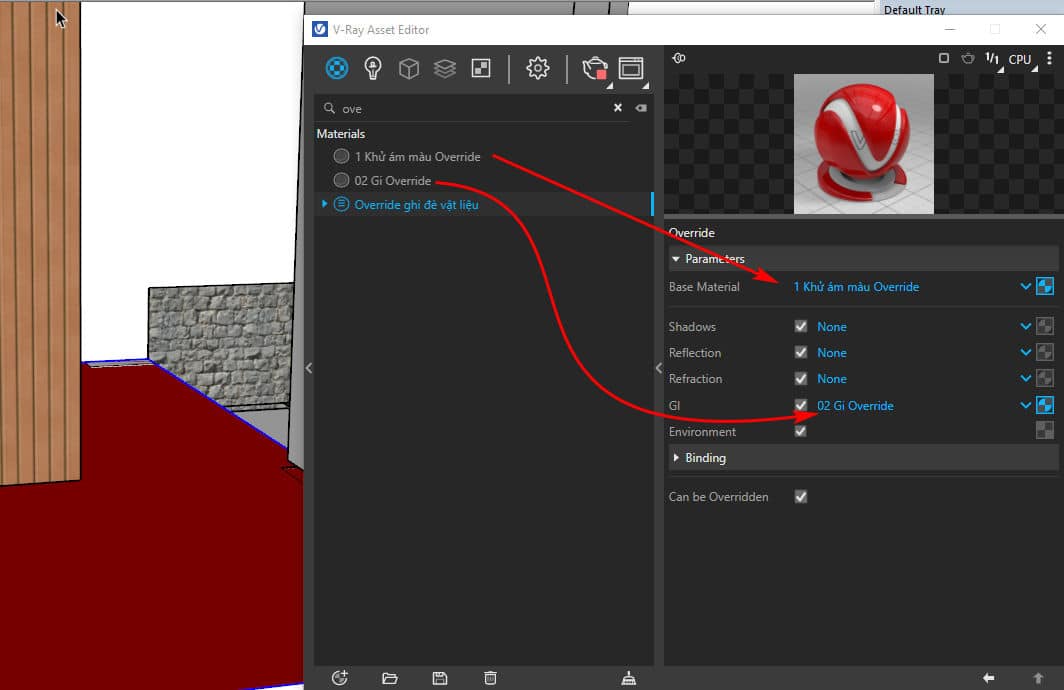
Step 4: Proceed to put them together to eliminate ghosts.
Step 5: After you have finished setting up, apply the Override material to the object here, which is the floor, so that it no longer reflects color on the wall.
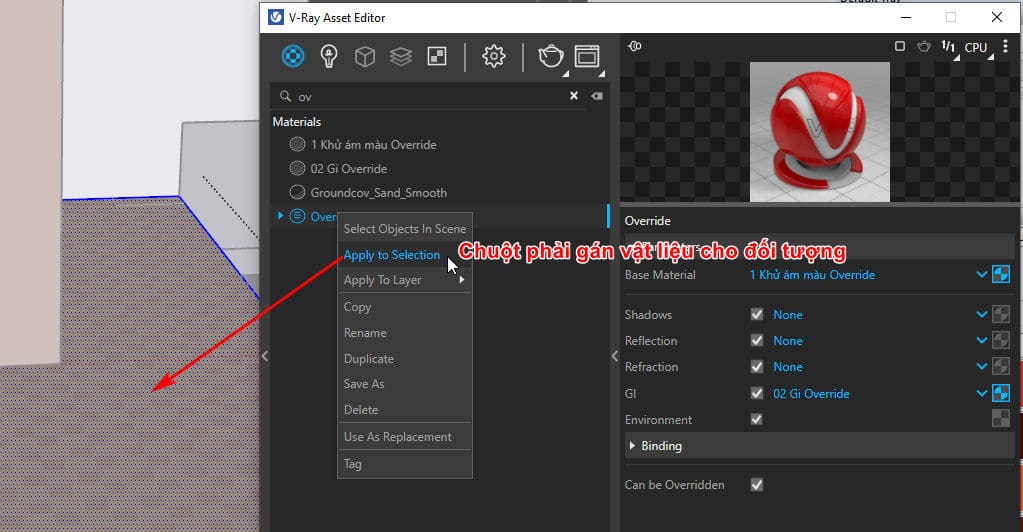
If you do this correctly, your card will no longer be colored in the background.
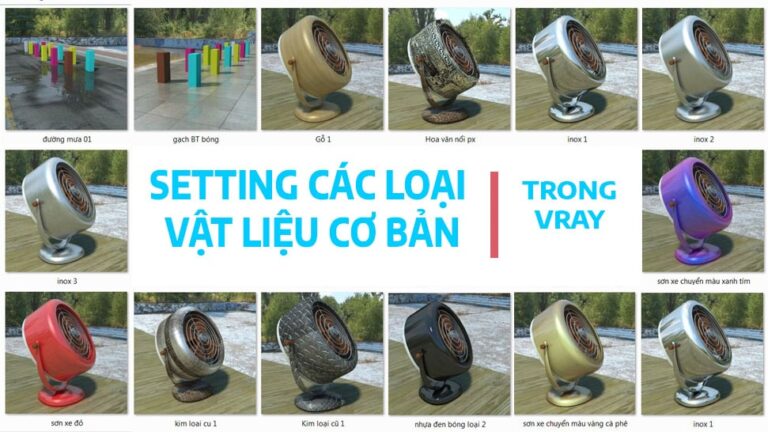
Finally, I give you the file vray material has been preset Just insert it and you can use it immediately
[windows]https://drive.google.com/drive/folders/1olXlqEpQROdACzY_k7t1tvL5idlfJxas?usp=sharing[/windows]
| Polished concrete brick material | Polished stainless steel material | Rough stainless steel material | Scratched stainless steel material |
| Rain road materials 01 | Wooden materials | px embossed pattern material | Old metal materials |
| Old floor metal material | Glossy black plastic material | Glossy black plastic material type 2 | Car paint material turns coffee yellow |
| Car paint material turns purple blue | Red car paint material | Green car paint materials | Material: WHITE Porcelain |
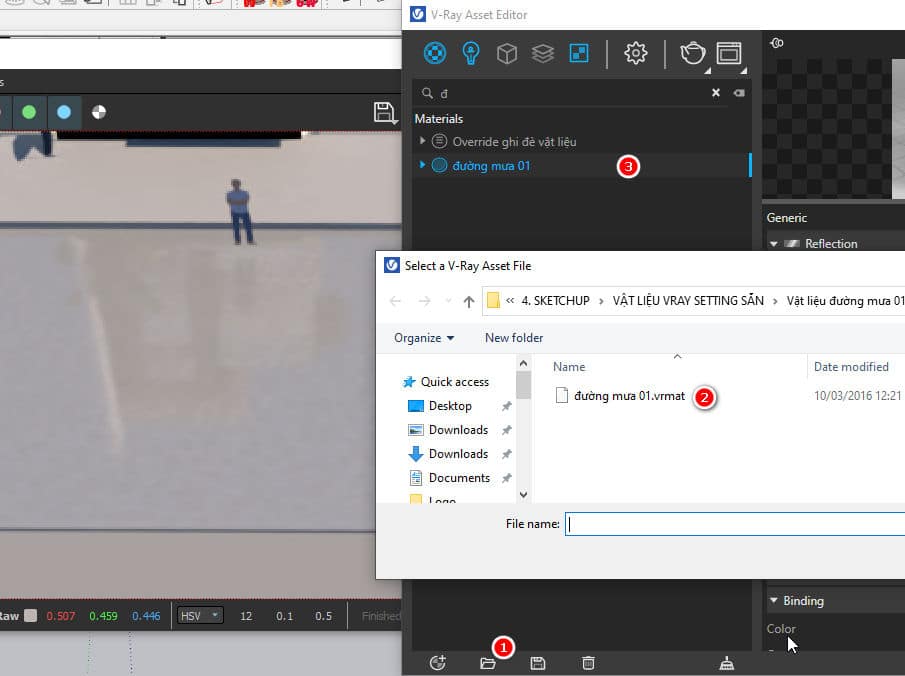
HOW TO: After you download all you need to do is import into material table then right click Apply to selection it's ok
Give you an additional 20k of materials from basic to advanced for Vray to use at your leisure
Epilogue
The creation of these Basic material in vray relatively easy. However, because vray software has many tools and many applications, we often feel confused. If you are stuck on any part of the material, you can look it up yourself and we will see.
If you want to become a professional designer, please learn methodically so that we can do all of this content. Reference Sketchup course from basic to advanced From basic drawing to CNC are all integrated in one course.





Very good, admin