Detailed instructions for installing USB DLC Boot 2022
USB Boot Installer Version DLC Boot Released by dlcboot.com the latest version is currently build Build 220629 2022 version 4.1. With this toolkit, you no longer have to worry about your computer failing.
What functions does DLC BOOT 2022 have?
DLC BOOT 2022 Surely there will be many new improvements for you so you can have a better experience. Fix some errors when you use the previous 2019 version
- DLC boot 2022 Integrates Mini Windows 10 32Bit & 64Bit working environment similar to Mini Windows XP in Hiren's BootCD version.
- Integrated boot mode according to new UEFI and Legacy standards
- Integrated Mini Windows 11 64Bit (Editing, Listening to music, Watching movies, USB 3.0, USB 3G, UEFI), has built a working environment similar to Mini Windows XP in the extremely easy-to-use Hiren's BootCD version
- Mini Windows XP integration is extracted from Hiren's BootCD 15.2 and has been built and optimized.
- DLC boot 2022 Can boot with many current operating systems. Boot from windows, ios, USB, lan, androids operating systems...
- The 2022 USB boot kit supports booting via LAN, the new version integrates many useful functions for users.
- Online software installation service
- Fix the 2 most common errors in Photoshop
How to use DLC bool 2022
Step 1: Download DLC boot software latest version 2022
https://drive.google.com/file/d/1F5BoHGKbLoY7UFiQ-XjqZ_ADmCCjgvVr/view
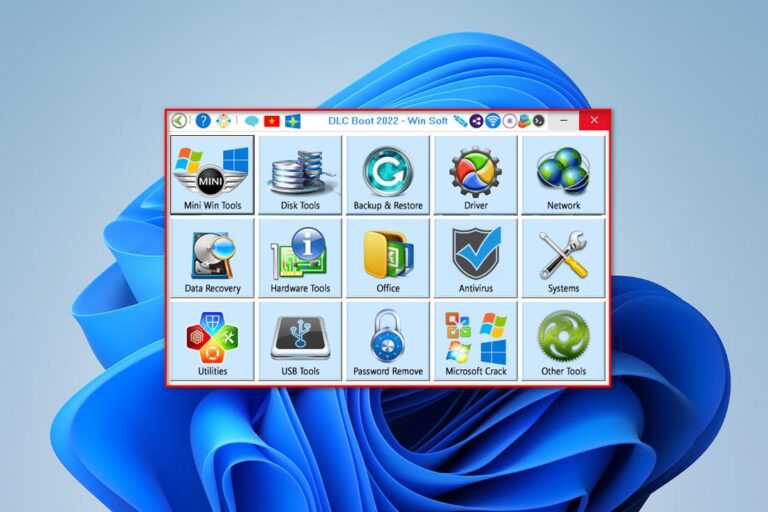
Step 2: After downloading, unzip it and run it with Administrator rights. This is what the version looks like
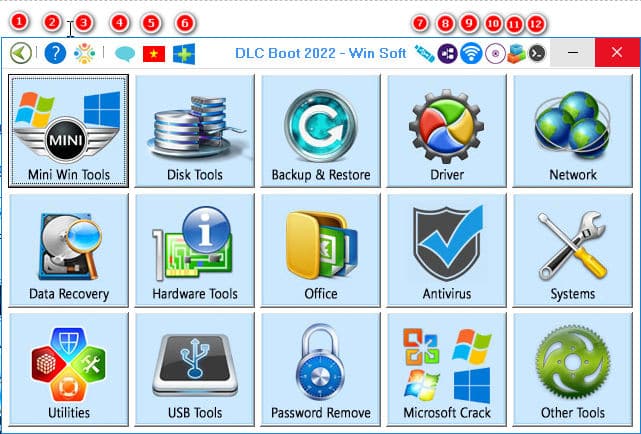
After opening it, you will have the following functions
- The return key when you enter tools with many small folders
- Information about DLC boot 2022
- Thank you author
- Support for DLC boot 2022 will only go to the dlc boot homepage
- Switch the software's English and Vietnamese languages
- Create bootable DLC for windows
- Create bootable DLC for USB
- DLC boot lan
- Backup wifi
- Add or update functionality for DLC boot
- Dos soft manager
In addition, below you can see many useful functions displayed with very clear images and content.
How to create USB boot DLC 2022
To create USB boot DLC 2022 You need to do the following steps.
Step 1: Prepare 1 USB 8Gb or higher
Step 2: Create DLC 2022 bootable USB
You use function number 7 as shown in the image above.
First, select the USB you want to create a bootable USB from
- Part Boot kernet: You choose the boot type
- Phan Boot type: You can choose normal to display or hide to hide
- Part USB formats: you choose USB boot format as Fat 32 UEFI
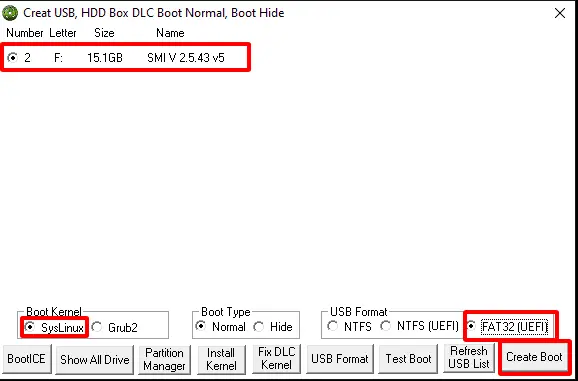
After selecting, click Create Boot. The system will format the USB and then copy data to your USB. So in just one moment you will have a satisfactory USB to be able to fix all Windows errors.
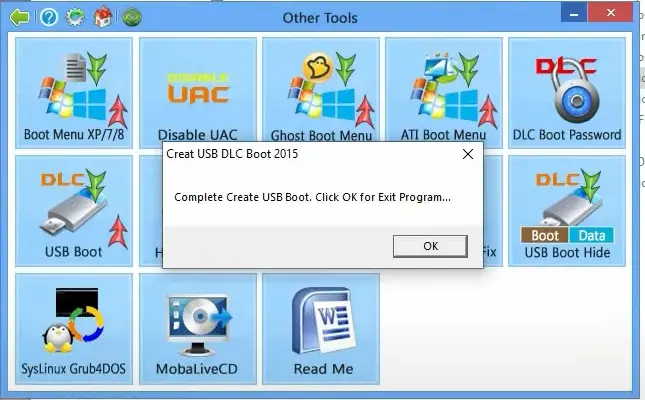
When the system creates successfully, a dialog box will appear like this
How to create usb boot menu for windows
When you use a computer, there will certainly be times when your computer fails. But since you are not a professional, this will help you quickly have a boots menu for windows. This can help you, even if your computer is faulty or doesn't have USB, you can still access the boot function to restore your windows.
Tip 1: Prepare the files you just need Download the file according to the link above
Step 2: Use
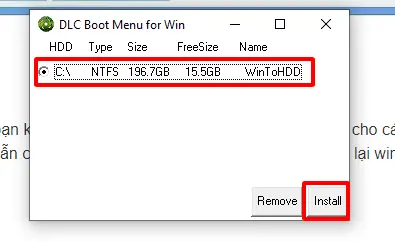
Select function number 6 to create USB DLC boot for windows
Step 3: Select the drive to install the boot function for windows. You just need to select the drive you want to install then click install. Wait a few minutes and you will immediately have a boot menu for windows.
Toolkit before entering mini windows can be used
| Backup Tools: Norton Ghost 11.5.1TeraByte Drive Image 3.52True Image Home 2014 |
Disk Tools: Partition Guru ProHDD Regenerator 2011 11.12.2013MHDD 4.6HDAT2 4.5.3NTFS4Dos 1.9Smart Fdisk 2.05Disk Patch 4.0.300Samsung Quick Tool 1.9Norton Disk Doctor 2002Norton Disk Editor 2002Partition Magic Pro 8.05Ontrack Disk Manager 9.57Partition Table Doctor 3.5 |
| Other Tools: Test LCDMemTest86Kon-Boot 2.4Active Password Changer Pro 5.0Offline XP/Vista/7 Password Changer |
|
| UEFI Tools: MemTest86 DRevitalize 4.01 (fix hard drive bad sectors) DRevitalize 4.10 (fix hard drive bad sectors) EFI Shell Mok Manager Load ISO IMG IMA Ventoy |
Toolkit when entering Mini Windows XP/10:
| Tools for Mini Windows: Add Fonts for Mini XP Set DLC1Temp Disable TeraCopy Pro 2.27 Enable TeraCopy Pro 2.27 Set PageFile ImDisk Virtual Disk Driver 1.9.1 Clear Temp Folder Disk Tools: Partition Wizard Technician 12.6Aomei Partition Assistant Technician 9.7.0DiskGenius Pro 5.4.3.1342HDD Regenerator 2011Hard Disk Sentinel 6.01BootICE 1.3.4.0Active Kill Disk 14.0.23Crystal Disk Info 8.16.4Crystal Disk Mark 8.0.4aVictoria 4.47HD Tune Pro 5.70HDD Low Level Format Tool 4.40LinuxReader 4.12 WinContig 4.0.0.0 Backups: Acronis True Image Shell True Image Home 2014 17.6673 True Image Home 2021 4.25.1.30480 Aomei Backupper 6.9.2 Active Disk Image 11.0.0 NortonGhost 12.0.0.4112 Ghost Explorer 11.5.1.2266 GhostCast Server 12.0.0.11331 MSActBackUp 1.2.5 Driver: Double Driver 4.1.0 3DP Chip Lite 22.04.1 Network: Cent Browser 4.3.9.248 Internet Download Manager 6.40.11 TeamViewer 6.0.10642 and 15.29.4 UltraSurf 21.32 SoftPerfect Network Scanner 8.1.4 Advanced IP Scanner 2.5.4594.1 TFtpd32 DNS Jumper 2.2 Change MAC Address 22.01 RealVNC Server 6.9.1 RealVNC Viewer 6.22.315 Recovery: EASEUS Data Recovery Wizard Technician 14.4.0 |
Recovery:
Ontrack EasyRecovery Technician 15.0.0.0 MiniTool Power Data Recovery Technician 10.0 iCare Data Recovery Pro 8.3.0.0 OO DiskRecovery Technician 12.0.65 CardRecovery 6.10.1210 Partition Find and Mount Pro 2.31 Active Partition Recovery 14.0.1 and 21.0.3 Active File Recovery 14.5.0 and 22.0.7 Disk Drill Enterprise 4.3.586.0 Hetman Partition Recovery 4.1 Diskgetor Data Recovery 4.0 MilfordSoft Data Recovery 4.0 Hardware Tools: CPU-Z 2.01 GPU-Z 2.46 Battery Info View 1.25 Devlib GetDiskSerial 5.00 Hard Disk Serial Number Changer Hardware Monitor 1.46 Video Memory Stress Test 1.7.116 Is My LCD OK 4.88 Is My HDD OK 3.51 Passmark Keyboard Test 3.2.1002 Dead Pixel Tester 3.0 Key Tweak 2.3.0 Office: EVKey 5.0.1 SumatraPDF 3.3.3 Antivirus: Dr.Web CureIt June 25, 2022 Bkav Ransomware Scan BK Anti Macro Virus 3.1 TN Anti virus macro 4 and names for Excel System: Revo Uninstaller Pro 5.0.1 WinNTSetup 4.2.5 x86 and 5.2.4 x64 Dism++ 10.1.1002.1 Active BCD Editor 1.0.3 Avast Registry Editor Defraggler Technician 2.22.995 Fix Printer Torchsoft Registry Workshop 5.0.1 PowerTool 1.8 Process Explorer 16.43 Fix NTLDR is Missing NTBOOT AutoFix 2.6.0 |
System:
Install NET Frame Win 8/10 (Offline) Active Load Hive DLLRegSVR 3.0 The Ultimate PID Checker 1.2.0.606 Utilities: 7Zip 21.07 CCleaner 5.86.9258 Resource Hacker 5.1.8 Turn Off Monitor 1.0 Blank And Secure 6.88 On Screen Keyboard Mouse Emulator UltraISO Premium 9.7.6.3829 BurnAware Professional 15.2 Nuclear Coffee Recover Keys 11.0.4.235 Duplicate File Finder 3.5.0.0 VLC Media Player 3.0.17.4 RenameFile 16.8.95 SmartRipper 2.41 Check File Hash 1.0 USB Tools: USB Unhide 1.0 Test USB 1.4 Rufus 3.18 Flash Memory Toolkit 2.00 SD Formatter 4.0 NTFS Drive Protection 1.5 Password Tools: Anti Deep Freeze 0.4 CMOS DeAnimator 3.0 Active Password Changer Pro 12.0.0 Daossoft Windows Password Tenorshare Windows Password 6.1 Admin Password Resetter WebBrowser Password Viewer 2.11 PDF Password Remover 3.12 Get Password 1.0 Windows Gate 1.1 Nuclear Coffee Recover Passwords 1.0.0.33 Crack your Windows: RemoveWAT 2.2.6 Windows 7 Loader 2.2.2 HEU KMS Activator 24.4.0 Re-Loader Activator 3.0 KMS Tools December 14, 2021 |
Epilogue
So I just showed you how Install USB DLC Boot 2022 most detailed. Hopefully this article will help you handle errors on your computer. If you find the article good, don't forget to give me a 5* rating or click on the ad. You are so great
Monitor Facebook fanpage or join the group Free computer repair to update many of the latest utilities.