Skip to content
  • About us
  • Contact
  • en_USEN
  • viVI
FacebookTwitterPinterest
HOWTOHOWTO
  • All
    • Tips
      • Google
      • Facebook
      • Tiktok
    • Instruct
      • What is Q&A?
      • Taobao
    • WordPress
      • Code
      • Plugins
      • Themes
        • Flatsome
        • Theme Nevo
  • ShareHot
    • WordPress
    • Code
    • Plugins
    • Tips
    • Windows
    • Apple
    • Graphics
    • Experience
  • Graphics documents
    • illustrator
    • Sketchup
    • Coreldraw
    • 3ds max
    • Enscape
    • Photoshop
    • Graphics Plugin
  • Course
    • Photoshop course
    • illustrator course
    • Coreldraw course
    • Edit video course
    • Course Sketchup
    • Autocad course
    • Website management course
  • Service
  • Software
    • Windows
      • Tips
      • Office
      • Necessary
      • Tools
    • Apple
  • Game
  • News
    • Technology
    • Review
Hello!

  • Lost your password ?
HOWTOHOWTO
  • Home > 
  • Graphics > 
  • Enscape > 
  • Generic materials in Enscape

Generic materials in Enscape

By How To 09/12/2025 0 1918 Views
data in enscape banner
Article categories

Basic material properties Generic materials in Enscape

Generic: Basic material properties

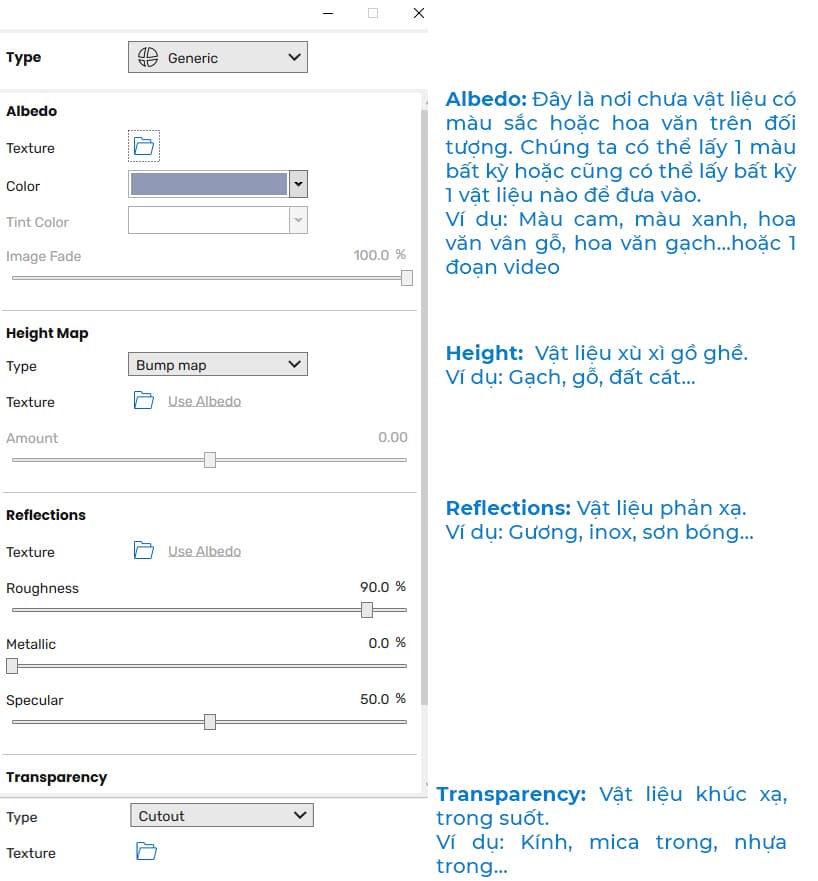
Enscape Materials: Based on the material created and assigned to the object by Sketchup, Enscape Materials will help you make deeper adjustments such as adjusting material properties, transparency, reflectivity, roughness, or converting into a self-luminous material...
data in enscape 4
Basic material properties

[note]

  • Detailed Setting instructions in Enscape
  • Toolbar functionality in Enscape
  • Detailed instructions for installing Enscape
  • Download Enscape full version
  • 6 Steps to learn interior design for beginners

[/note]

HOW TO base materials in Enscape

Instructions for pouring materials and editing material parameters in Enscape

  • Assign materials using the Pain Bucket tool HOW TO materials in Enscape then edit material parameters. If we don't know what material it is, we can find it in the following two ways

Method 1: Open the Enscape Materials window, in the SketchUp window. Select the text shortcut tool B Paint Bucket HOW TO materials in Enscape while holding down the key Alt and click on the object that needs to edit the material, the parameters when editing in this window will be updated. To see directly whether you can see it or not and what the result will be, you need to open the render panel to see it

Method 2: Open the Enscape Materials window, select the correct material in the material list on the left or you can search for the material in the Search box.

Detailed material table specifications in Enscape

1. Type

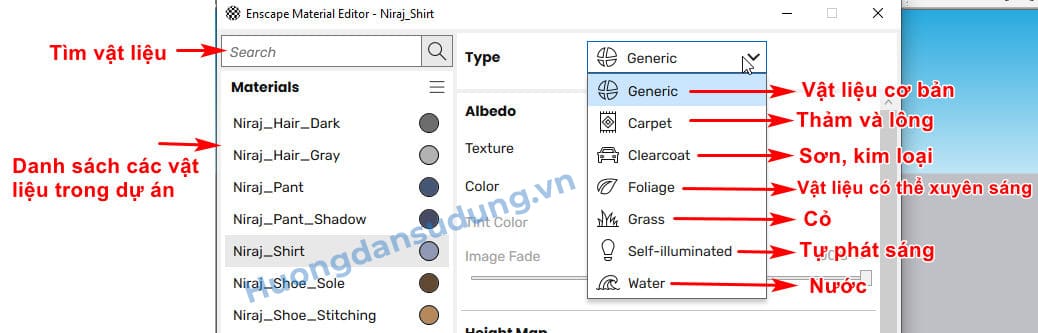
There are 7 types of materials in Enscape as shown in the image below
materials in Enscape
Enscape material palette meaning

a. Generic: Basic materials
b. Carpet: Shag carpet material
c. Clearcoat: Paint and metal materials
d. Foliage: Materials that can penetrate light
e. Grass: Grass material
g. Self-illuminated: So is it self-luminous?
H. Water: Water

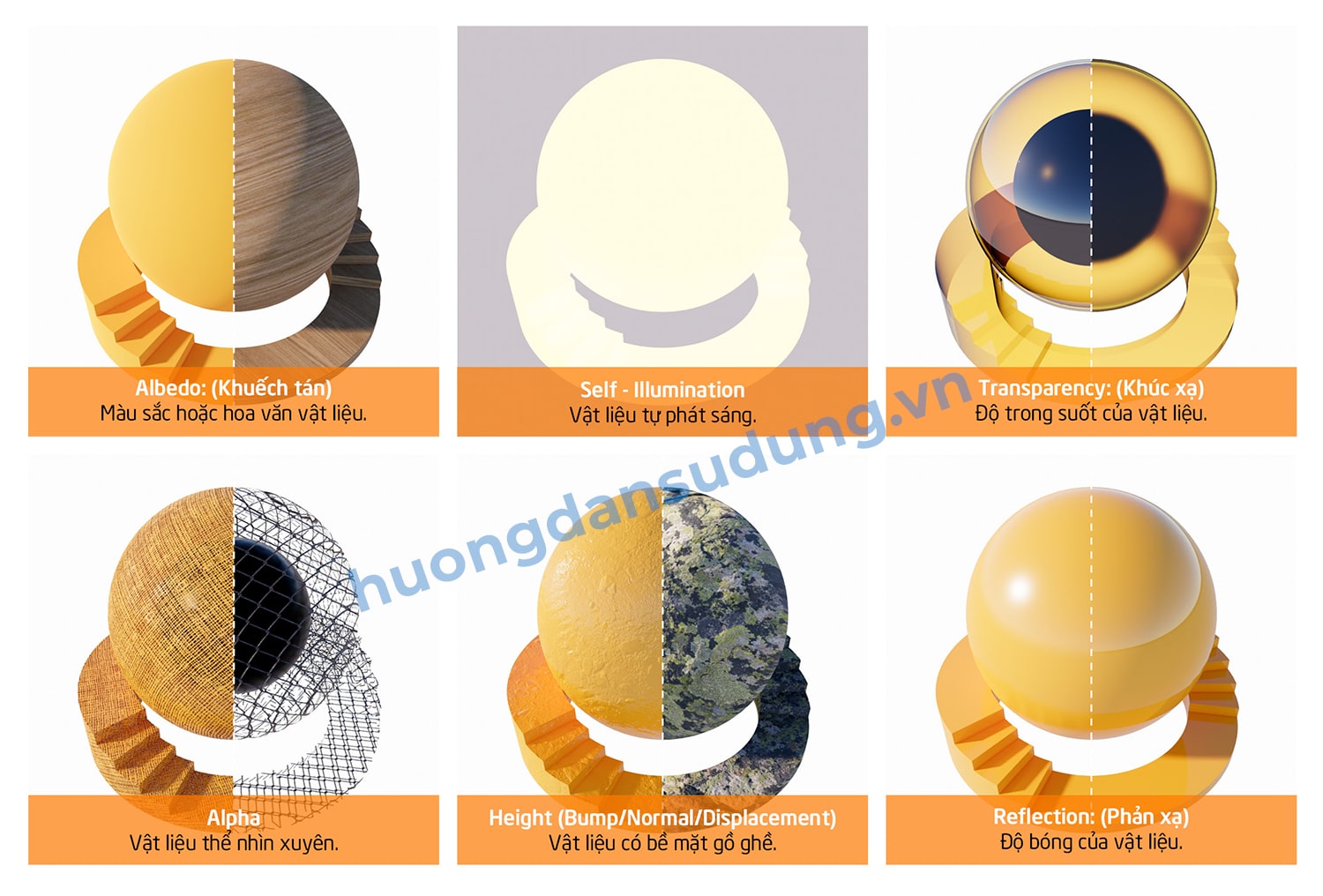
Some material properties that we can easily identify through the images below
materials in Enscape

Detailed material properties in Enscape

  1. General tab

materials in Enscape
Enscape basic material properties

Albedo: This is where colored or patterned materials are placed on the object. We can take any color or we can take any material to put in.
For example: Orange, blue, wood grain pattern, brick pattern... or a video
Enscape metrics

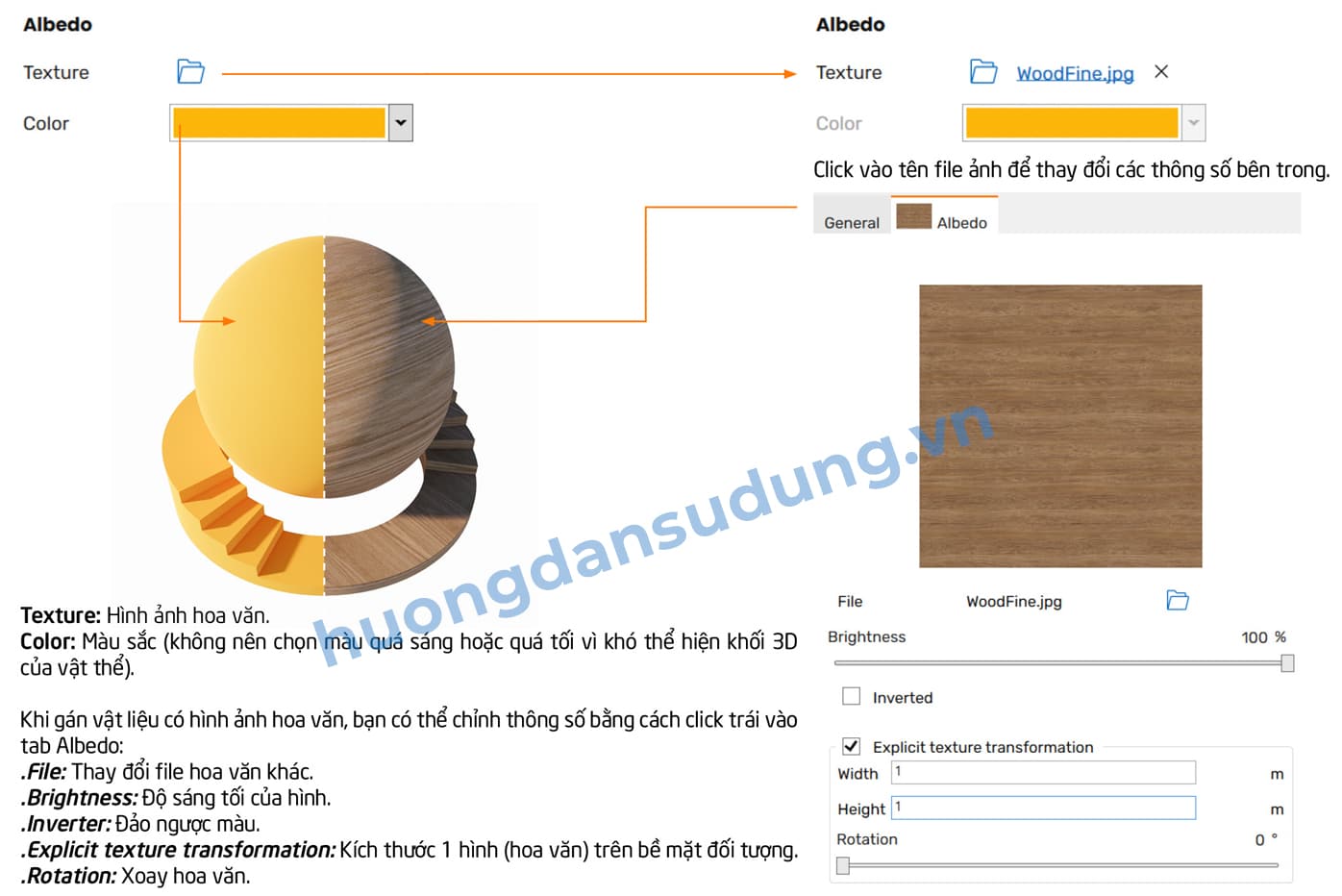
Texture: A place to store materials or videos

Color: Space to store materials.

Tint Color: Change the color of materials when they are mapped to materials. The text below will fade away. To increase color correction you can change the color slider. See illustrative example below

Enscape metrics
Material color in Enscape

2. Tab height

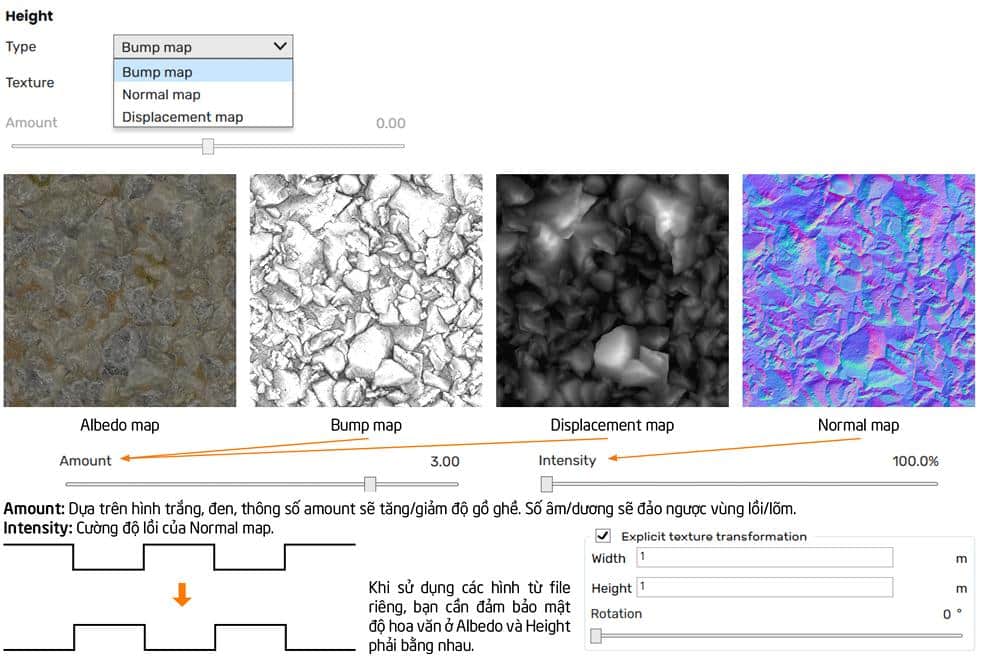
Is a place to store material property information to help materials display correct properties such as convexity, roughness... They are clearly shown through 3 channels: Bump map, Normal map, Displacement map.

Bump map: It is a form of detailed reproduction of materials. They are used through black and white images. The white part is retained, the black part will be clarified

Enscape metrics
Bump map in Enscape

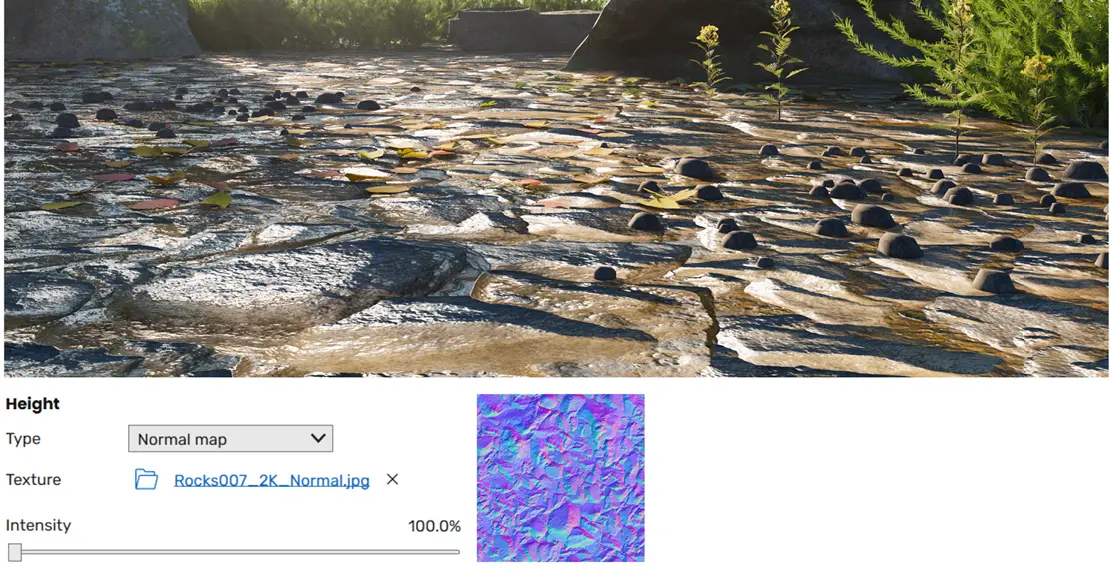
Normal maps: It is also a form of detail reconstruction but is a bit more convex than a bump map. They also work based on a gradient color image that carries a lot of information in the image.
Enscape metrics
Normal map in Enscape

Displacement map: As a true convex shape, they can also be used with black and white maps, but the borders are soft and not too hard to interfere with each other.

Enscape metrics
Displacement Enscape

Note: All modes are dependent on Amount intensity. The larger the amount, the clearer the objects

The images show the colors of the maps in each mode
Enscape metrics
Detailed material properties in Enscape

3. Reflections

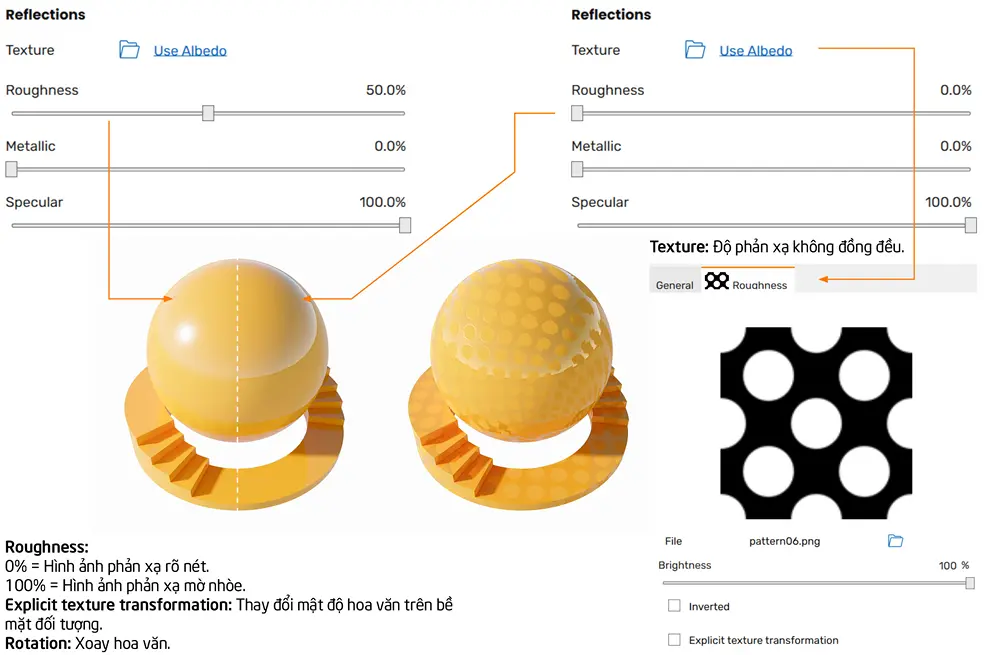
This is the reflection mode of the material. The reflection rate depends on the image parameters below.
Enscape metrics
Reflections

Texture: Is the reflection map included. Whatever shape our map has, it will reflect that shape (note: Use black and white images)

Roughnuess: This is the gloss of the material: The lower the parameter, the stronger the reflection; the higher the parameter, the less reflection

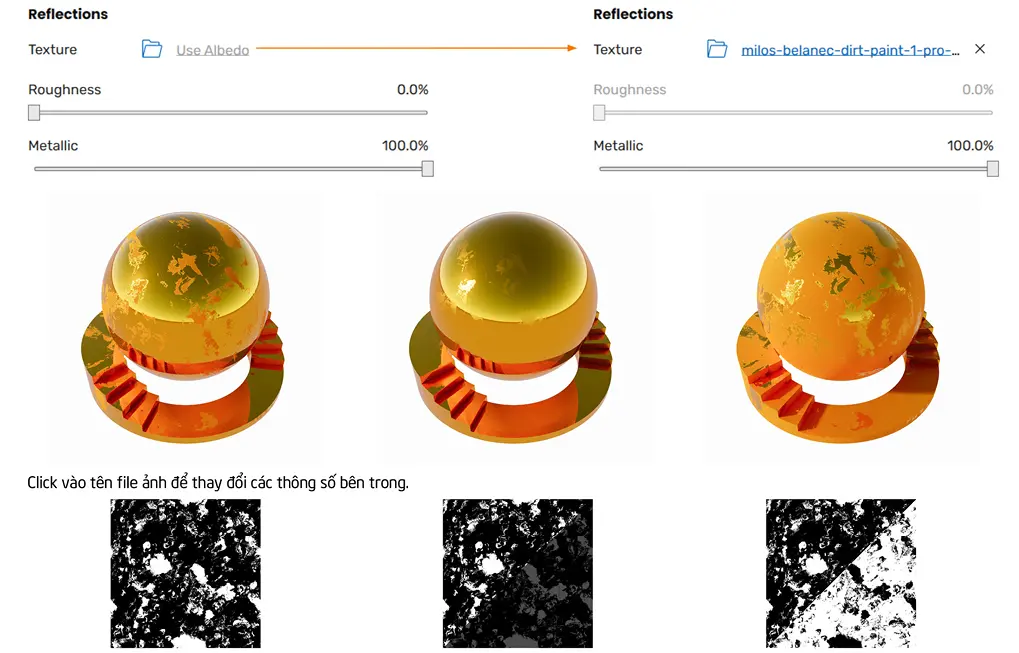
Metallic: This is a property of metallic materials. The lower the parameter, the more gloss, the higher the parameter, the less gloss. This feature can be used to create mirrors or stainless steel

Enscape metrics
The material has metallic properties

Specular: Shows the freshness of the material's color. The higher the parameter, the brighter the color. The lower the parameter, the lighter the color
Enscape metrics
Metalic material properties in Enscape

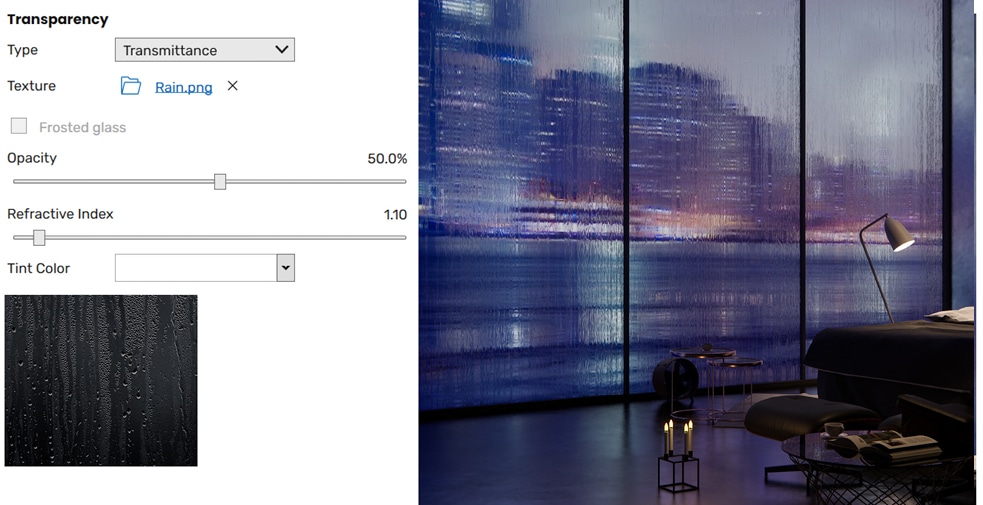
4. Transparency

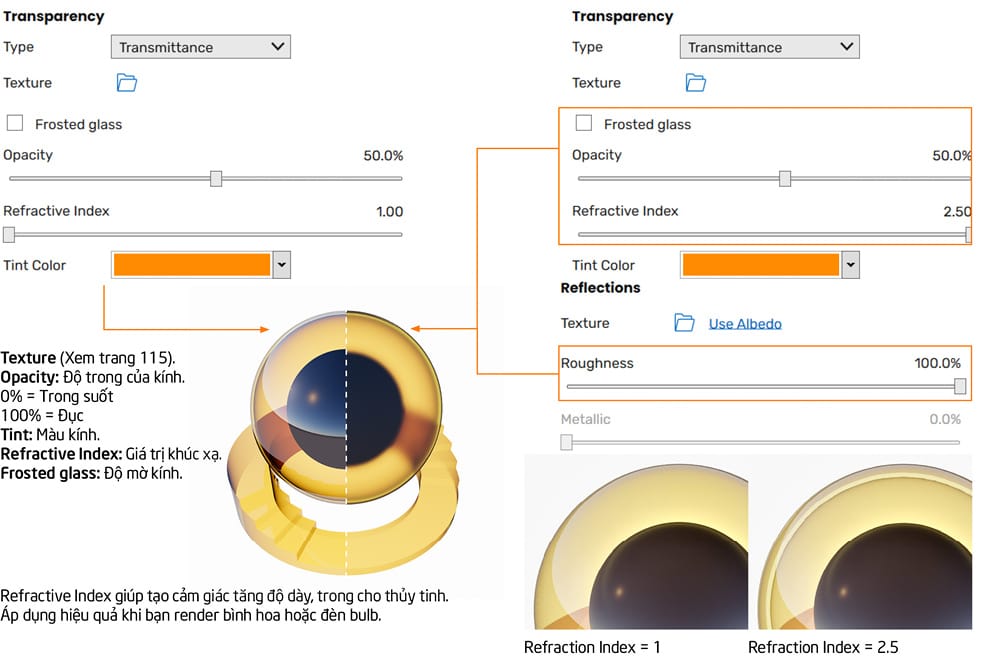
A channel that creates refraction in a material. Often used with glass materials such as: Glass, light bulbs, bottles, jars... The smaller the opacity, the more transparent the material becomes. When the Opacity is larger, the object becomes clearer. They are shown through the examples below.

Enscape metrics
Transparency material properties
Enscape metrics
Transparency panel in Enscape
Enscape metrics
Transparency transparent material in enscape

Conclude:

So I just finished guiding you through the Generic tab material in enscape. In the next part, we will update and guide you on fur carpet materials Carpet in Enscape Please.

Don't forget to follow us on facebook to be updated with the latest information

Tags : Tags Enscape Materials   material properties in enscape   material in enscape
Share
FacebookShare on FacebookpinterestShare on PinterestMessengerShare on Facebook Messenger
twitterShare on TwitterlinkedinShare on LinkedinvkShare on VkredditShare on ReddittumblrShare on TumblrvideoShare on Viadeobuffer. bufferShare on Bufferpocket. pocketShare on PocketwhatsappShare on WhatsappViberShare on ViberemailShare on EmailskypeShare on SkypediggShare on DiggmyspaceShare on MyspacebloggerShare on Blogger YahooMailShare on Yahoo mailtelegramShare on Telegram gmailShare on GmailAmazonShare on AmazonSMSShare on SMS
How To

How To

A person who is passionate about sharing knowledge from life. Common knowledge in life. Sharing is my passion. Hopefully my knowledge will bring many benefits to you

Related articles

Generic materials in Enscape

Water is the water material in Enscap

By How To 11/12/2025 0

Water water material in Enscape This is the edit panel…

Generic materials in Enscape

Self-illuminated material in Enscape

By How To 11/12/2025 0

Self-illuminated materials in Enscape. It is a form of…

Generic materials in Enscape

Foliage of grass and leaf materials in Enscape

By How To 10/12/2025 0

Foliage of grass leaves material in Enscape Material…

Leave a Comment Cancel reply

Categories What is Q&A? What is the structure of that place?

What is Interior Design? How much does an interior design job pay?

12/12/2025
What is Material?

What is Material? Material application in the field of design

11/12/2025
What is the poster?

What are posters? 9 Tips for designing beautiful, quick Posters

11/12/2025
What does graphic design do? Is it easy to get a job?

What does graphic design do? Is it easy to get a job?

11/12/2025
Water is the water material in Enscap

Water is the water material in Enscap

11/12/2025

Recent comments

  • male1 year ago
    On How to create a fade effect in Photoshop
    Great
  • phat phat2 years ago
    On Who is 5SMedia?
    Useful article
  • Minh Anh3 years ago
    On How to create basic materials in vray Sketchup
    Very good, admin
Copyright © 2025 HOWTO - Powered by HOWTO

5SMedia.net | hocdohoacaptoc.com | huongdansudung.vn | webantam.com

Back to Top
Hello!
  • All
    • Tips
      • Google
      • Facebook
      • Tiktok
    • Instruct
      • What is Q&A?
      • Taobao
    • WordPress
      • Code
      • Plugins
      • Themes
        • Flatsome
        • Theme Nevo
  • Share
    • WordPress
    • Code
    • Plugins
    • Tips
    • Windows
    • Apple
    • Graphics
    • Experience
  • Graphics documents
    • illustrator
    • Sketchup
    • Coreldraw
    • 3ds max
    • Enscape
    • Photoshop
    • Graphics Plugin
  • Course
    • Photoshop course
    • illustrator course
    • Coreldraw course
    • Edit video course
    • Course Sketchup
    • Autocad course
    • Website management course
  • Service
  • Software
    • Windows
      • Tips
      • Office
      • Necessary
      • Tools
    • Apple
  • Game
  • News
    • Technology
    • Review
en_US EN
en_US EN vi VI