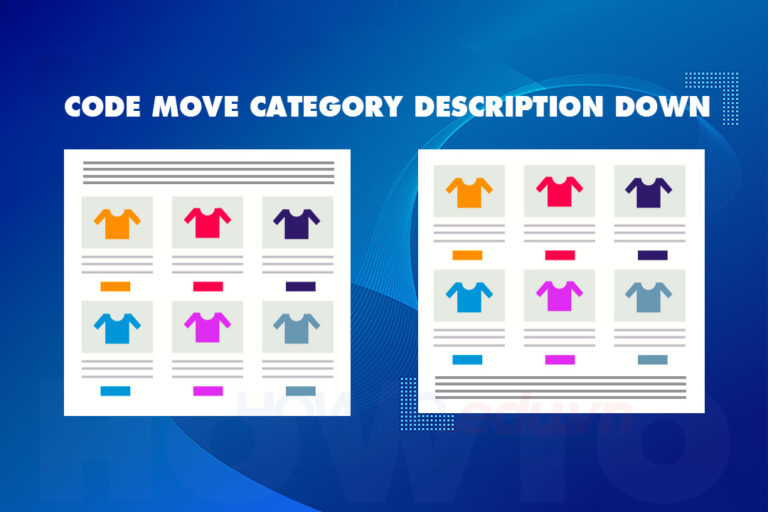
Code condenses content is one of the common techniques used in programming to make code more concise and easier to understand. Instead of using many lines of code to perform a specific function, we can use some techniques such as abbreviation or code reuse to reduce the amount of code that has to be written. This helps make the source code more compact, easier to read and maintain.
In this article, we will learn about the techniques code to collapse content and how to apply them to our website. Or you can also find more content at Code or Code wordpress
Note. This content reduction code can only be used on the Flatsome interface and cannot be used on other interfaces. Please check carefully before using.

Because this code only collapses the content, if you want this content section to be moved below the product, see this article: How to put category descriptions below products Please
see more
- Course on website management using wordpress
- The code shows nice promotions for flatsome like Cellphones
- Website design service according to SEO standards, good conversion
- How to create automated content using the free Playground Open Ai
- Website management services effectively take care of websites
The code collapses the content in the product details section

The code below allows you Collapse description content of product detail content on Flatsome. This code allows you to view more as well as collapse the content to its original state.
This code can also customize the length of the content in the paragraph max-height: 800px; and let your_height = 800 current financial value is 800. This is the length of the frame displaying the product description content. If you want your content to be long or short, you just need to adjust this parameter to suit your content.
add_action('wp_footer', 'how_to_readmore_flatsome'); function how_to_readmore_flatsome() { ?>
<style>
.single-product div#tab-description {
overflow: hidden;
position: relative;
padding-bottom: 25px;
}
.fix_height {
max-height: 800px;
overflow: hidden;
position: relative;
}
.single-product .tab-panels div#tab-description.panel:not(.active) {
height: 0 !important;
}
.how_to_readmore_flatsome {
text-align: center;
cursor: pointer;
position: absolute;
z-index: 10;
bottom: 0;
width: 100%;
background: #fff;
}
.how_to_readmore_flatsome:before {
height: 55px;
margin-top: -45px;
content: "";
background: linear-gradient(to bottom, rgba(255,255,255,0) 0%, rgba(255,255,255,1) 100%);
display: block;
}
.how_to_readmore_flatsome a {
color: #318A00;
display: block;
}
.how_to_readmore_flatsome a:after {
content: '';
width: 0;
right: 0;
border-top: 6px solid #318A00;
border-left: 6px solid transparent;
border-right: 6px solid transparent;
display: inline-block;
vertical-align: middle;
margin: -2px 0 0 5px;
}
.how_to_readmore_flatsome_less a:after {
border-top: 0;
border-left: 6px solid transparent;
border-right: 6px solid transparent;
border-bottom: 6px solid #318A00;
}
.how_to_readmore_flatsome_less:before {
display: none;
}
</style>

<script>
(function($) {
$(document).ready(function() {
$(window).on('load', function() {
const wrap = $('.single-product div#tab-description');
if (wrap.length > 0 && wrap.height() > 800) {
wrap.addClass('fix_height').append(`
<div class="how_to_readmore_flatsome how_to_readmore_flatsome_more">
<a title="Xem thêm" href="javascript:void(0);">Xem thêm</a>
</div>
<div class="how_to_readmore_flatsome how_to_readmore_flatsome_less" style="display: none;">
<a title="Thu gọn" href="javascript:void(0);">Thu gọn</a>
</div>
`);

$('body').on('click', '.how_to_readmore_flatsome_more', function() {
wrap.removeClass('fix_height');
$('.how_to_readmore_flatsome_more').hide();
$('.how_to_readmore_flatsome_less').show();
});

$('body').on('click', '.how_to_readmore_flatsome_less', function() {
wrap.addClass('fix_height');
$('.how_to_readmore_flatsome_less').hide();
$('.how_to_readmore_flatsome_more').show();
});
}
});
});
})(jQuery);
</script>
<?php }
If you do so section tab In the product details section of Flatsome, find and replace everything
.single-product div#tab-description
wall
.product-page-sections .product-section:nth-child(1) > .row > .large-10
okay
The code condenses the description of the product category
When designing a sales website, the product catalog description is often one of the most important parts to attract customers and increase conversion rates. However, writing out detailed descriptions along with product images often results in the website's source code becoming bloated and difficult to read. Therefore, using content minification coding techniques is necessary to minimize the amount of code and help your website load faster. In this article, we will learn about the techniques Content collapsing code for the description of the product category, thereby creating a user-friendly and easy-to-maintain sales website.

add_action('wp_footer', 'how_to_readmore_taxonomy_flatsome'); function how_to_readmore_taxonomy_flatsome() { if (is_woocommerce() && is_tax('product_cat')): ?>
<style>
.term-description {
overflow: hidden;
position: relative;
margin-bottom: 20px;
padding-bottom: 25px;
}
.how_to_readmore_taxonomy_flatsome {
text-align: center;
cursor: pointer;
position: absolute;
z-index: 10;
bottom: 0;
width: 100%;
background: #fff;
}
.how_to_readmore_taxonomy_flatsome:before {
height: 55px;
margin-top: -45px;
content: "";
background: linear-gradient(to bottom, rgba(255,255,255,0) 0%, rgba(255,255,255,1) 100%);
}
.how_to_readmore_taxonomy_flatsome a {
color: #318A00;
display: block;
}
.how_to_readmore_taxonomy_flatsome a:after {
content: '';
width: 0;
right: 0;
border-top: 6px solid #318A00;
border-left: 6px solid transparent;
border-right: 6px solid transparent;
display: inline-block;
vertical-align: middle;
margin: -2px 0 0 5px;
}
.how_to_readmore_taxonomy_flatsome_less a:after {
border-top: 0;
border-left: 6px solid transparent;
border-right: 6px solid transparent;
border-bottom: 6px solid #318A00;
}
</style>

<script>
(function($) {
$(document).ready(function() {
$(window).on('load', function() {
const wrap = $('.term-description');
const your_height = 300;

if (wrap.length > 0 && wrap.height() > your_height) {
wrap.css('height', your_height + 'px').append(`
<div class="how_to_readmore_taxonomy_flatsome how_to_readmore_taxonomy_flatsome_show">
<a title="Xem thêm" href="javascript:void(0);">Xem thêm</a>
</div>
<div class="how_to_readmore_taxonomy_flatsome how_to_readmore_taxonomy_flatsome_less" style="display: none;">
<a title="Thu gọn" href="javascript:void(0);">Thu gọn</a>
</div>
`);

$('body').on('click', '.how_to_readmore_taxonomy_flatsome_show', function() {
wrap.removeAttr('style');
$('.how_to_readmore_taxonomy_flatsome_show').hide();
$('.how_to_readmore_taxonomy_flatsome_less').show();
});

$('body').on('click', '.how_to_readmore_taxonomy_flatsome_less', function() {
wrap.css('height', your_height + 'px');
$('.how_to_readmore_taxonomy_flatsome_show').show();
});
}
});
});
})(jQuery);
</script>
<?php endif;
}
See more… The code puts the description of the category content below the product
You find the line that says var your_height = 300 valuable is 300, this is the height of the product category description frame. You can change the value 300 to match the height of your website.
Instructions for inserting code to reduce content on Flatsome
Step 1: Log in to the website
You need to log in with the highest administrative rights to insert code into your website.
Step 2: Insert code
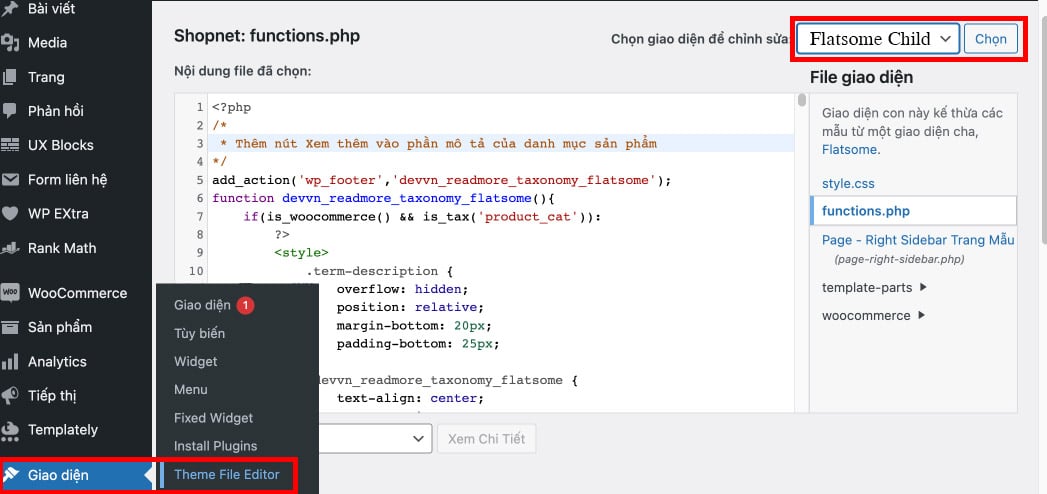
Please follow the following link to safely insert code without losing it when updating the interface. Interface > Theme file Editor > Functions.php then paste the above code here.
Note: You must choose Flatsome child so that when updating the interface, the code is not lost
summary
In short, Code to condense product content and code to condense product category content is an important technique in programming that makes your content concise, easier to read, and easier to maintain. Using techniques such as abbreviation or code reuse helps us save time and effort in writing code.
In particular, when building a website or application, content compact code also helps the website load faster and increase user experience. Therefore, understanding and applying content reduction code techniques will help us become better programmers and create higher quality products.