Skip to content
  • About us
  • Contact
  • en_USEN
  • viVI
FacebookTwitterPinterest
HOWTOHOWTO
  • All
    • Tips
      • Google
      • Facebook
      • Tiktok
    • Instruct
      • What is Q&A?
      • Taobao
    • WordPress
      • Code
      • Plugins
      • Themes
        • Flatsome
        • Theme Nevo
  • ShareHot
    • WordPress
    • Code
    • Plugins
    • Tips
    • Windows
    • Apple
    • Graphics
    • Experience
  • Graphics documents
    • illustrator
    • Sketchup
    • Coreldraw
    • 3ds max
    • Enscape
    • Photoshop
    • Graphics Plugin
  • Course
    • Photoshop course
    • illustrator course
    • Coreldraw course
    • Edit video course
    • Course Sketchup
    • Autocad course
    • Website management course
  • Service
  • Software
    • Windows
      • Tips
      • Office
      • Necessary
      • Tools
    • Apple
  • Game
  • News
    • Technology
    • Review
Hello!

  • Lost your password ?
HOWTOHOWTO
  • Home > 
  • Graphics > 
  • Adobe Photoshop > 
  • How to create classic portraits in Photoshop simply

How to create classic portraits in Photoshop simply

By Tung Thai 16/11/2025 369 Views
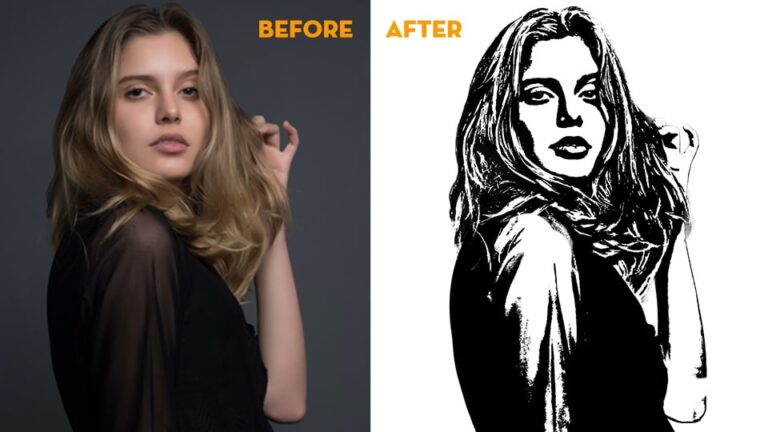
How to create classic portraits in Photoshop
Article categories

How to create classic portraits in Photoshop. Adobe Photoshop is a powerful and popular graphics software widely used worldwide. It allows users to create and edit images, graphics, graphic designs and other documents with high precision and great flexibility.

With diverse features, Adobe Photoshop is used to create beautiful works that attract users and customers in various fields such as graphic design, printing, advertising, photography, and digital art.

  • How to change background color in Photoshop
  •  Instructions for smoothing skin in Photoshop
  • The ultimate way to smooth skin in Photoshop, part 2
  • The best way to remove acne in photoshop in 2022
  • Instructions for removing photoshop background very quickly
  • How to create snow in Photoshop is extremely simple
  • How to create rain in Photoshop is extremely simple

How to create classic portraits in Photoshop

Step 1: Open the portrait photo you want to make

  • I looked up at the menu bar and selected File > Open Then select the photo you want to make

Step 2: Separate the background for portrait photos

  • I go to the menu bar and select Windows > Properties
  • Then the parameters table appears, I select the part Remove Background
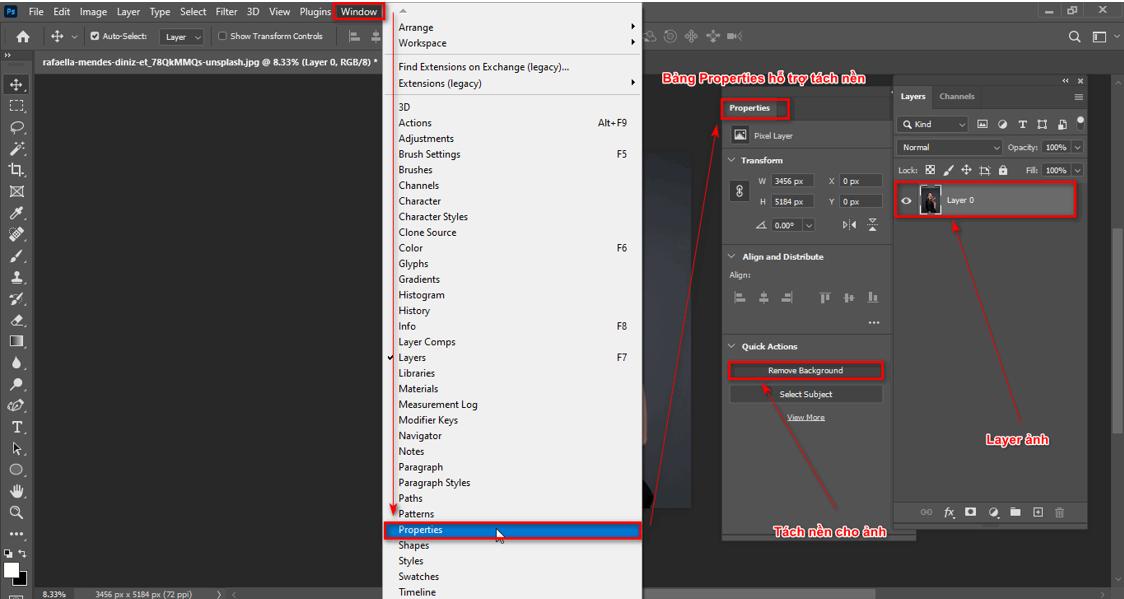
Simple way to create classic portraits in Photoshop

  • After separating, select the menu bar Filter > Convert for Smart Filters We will have something like the image below
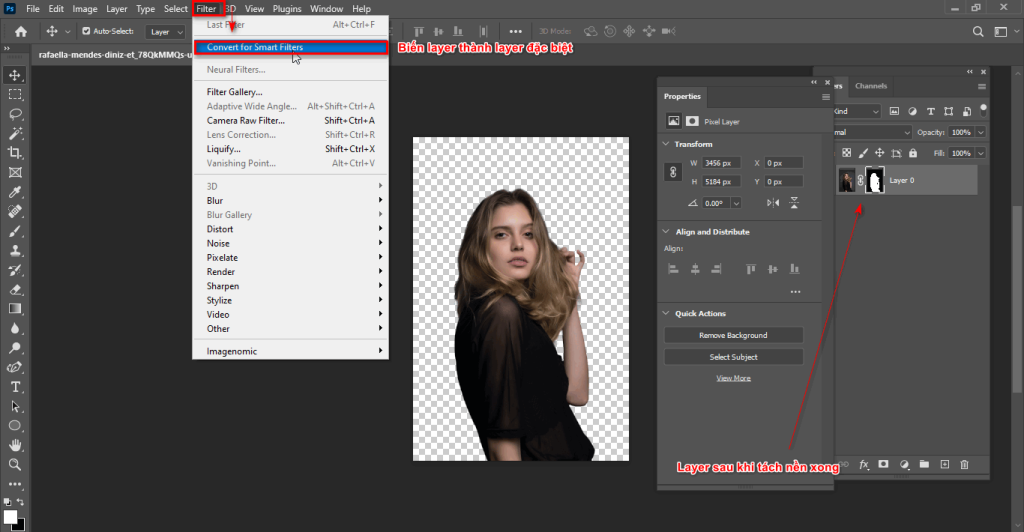
Tao anh trang den 2

Step 3: Create an oil painting image

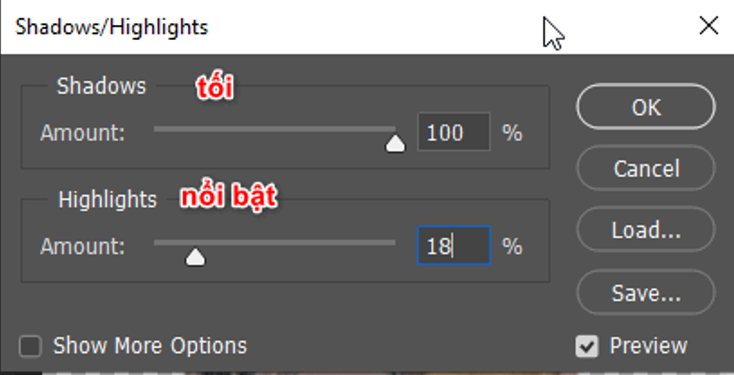
  • Select Filter > Stylize > Oil Paint
  • At this time, a parameter sheet appears for the image including the degree of stylization (Stylization), clean (Cleanliness), ratio (Scale), detail (Bristle Details) I can edit these parameters depending on the image I want
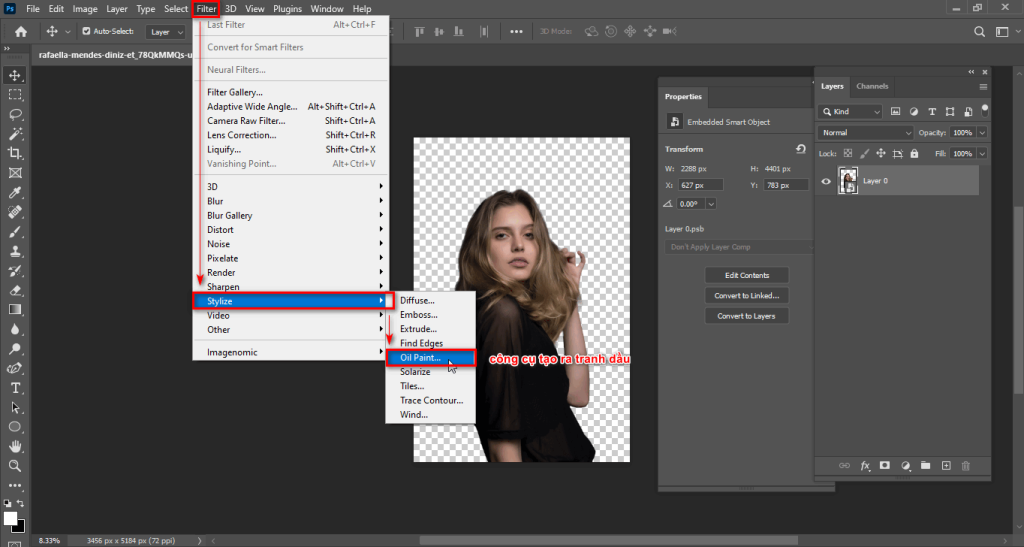
Tao anh trang den 3

  • You can customize the parameters accordingly or refer to our parameters if your photo is suitable
  • After choosing the appropriate parameters for the photo, I choose > OK
Simple way to create classic portraits in Photoshop

Oil Paint parameter table

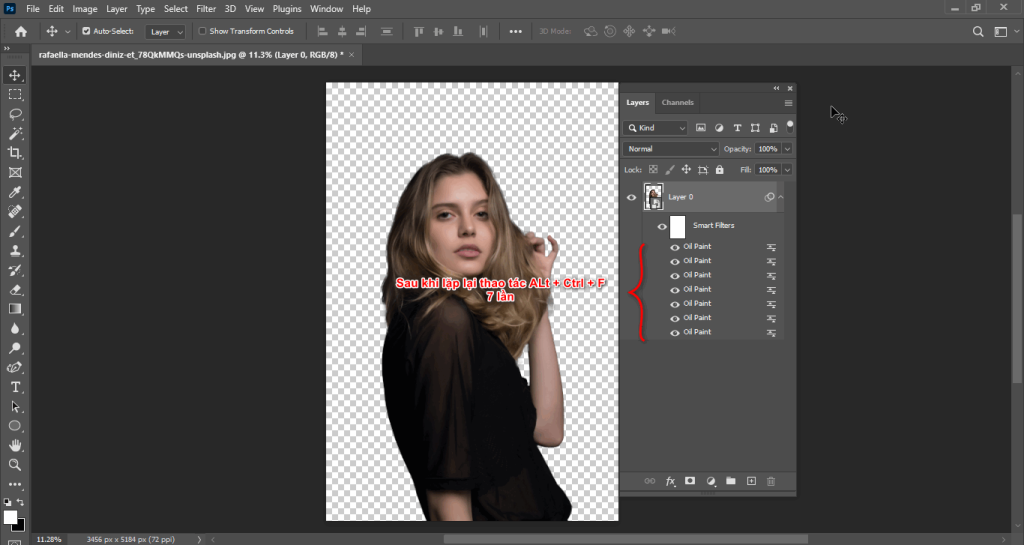
Step 4: Repeat the step of creating an oil painting image as many times as possible

  • I selected the layer where I made the oil painting photo
  • Then press the key Alt + Ctrl + F At this time, the parameters panel appears, I just press > OK
  • And I did this again 7 times

Simple way to create classic portraits in Photoshop

Repeat the operation

Step 5: Adjust the shadows and change the photo to black and white

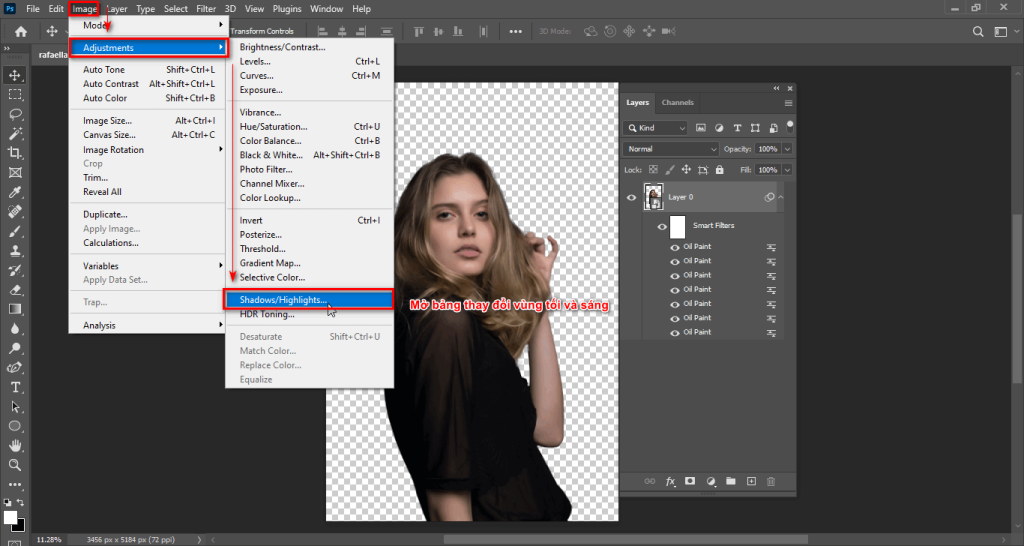
  • Then choose Image > Adjustments > Shadows/Highlights
  • At this point, a dark parameter panel will appear (Shadows) and highlights (Highlights) of the photo
Simple way to create classic portraits in Photoshop

Open the shadows and highlights panel

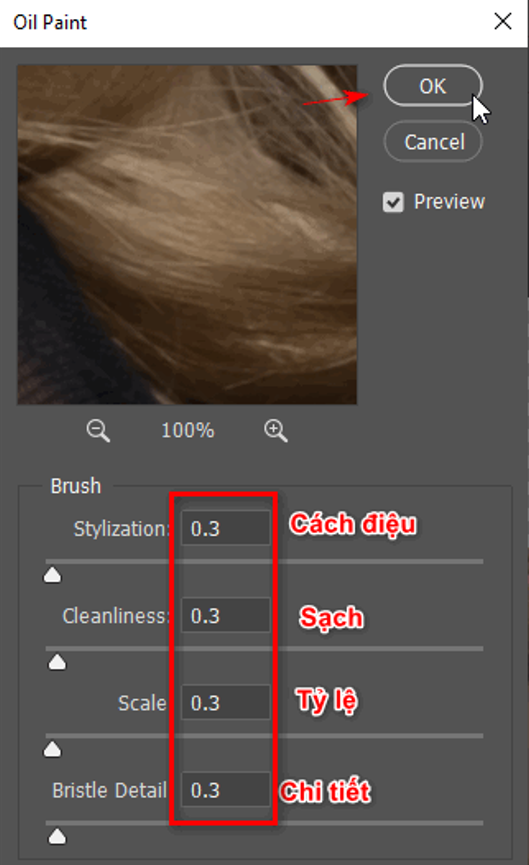
  • I usually leave this parameter as Shadows: 100% and part Highlights: 18% > OK
Simple way to create classic portraits in Photoshop

Shadows parameter table

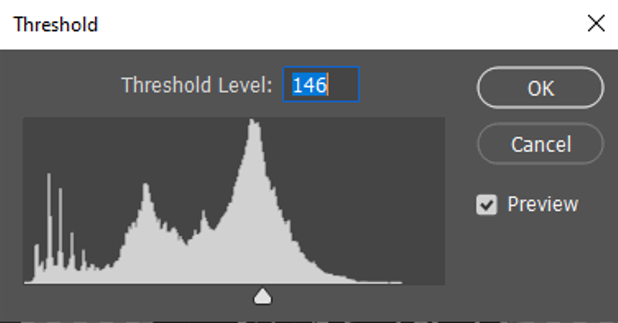
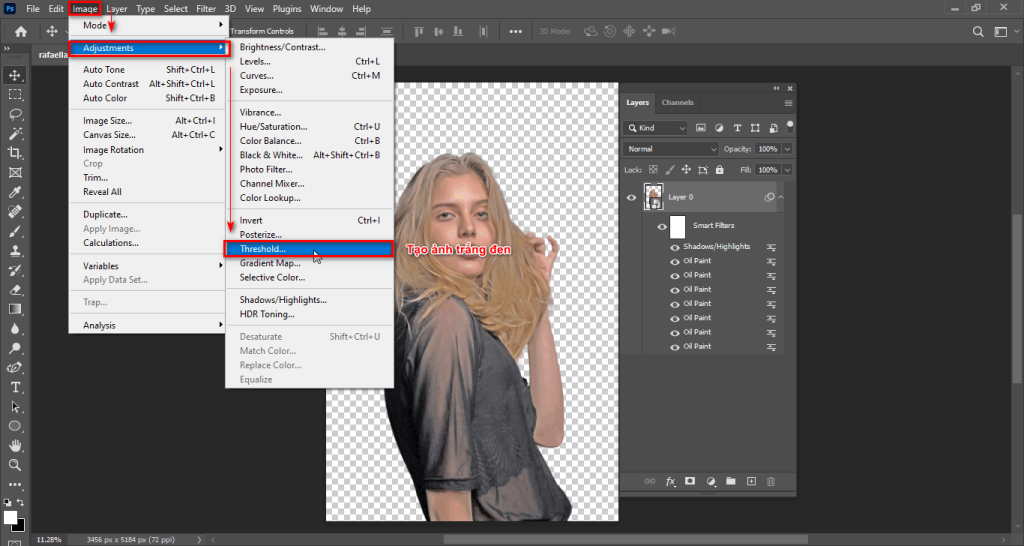
  • I will continue to choose again Image > Adjustments > Threshold This part helps me convert my photo to black and white and I can control the black and white area bar to suit the photo
Simple way to create classic portraits in Photoshop

Create black and white photos

Simple way to create classic portraits in Photoshop

Threshold parameter table

Step 6: Duplicate the layer and create a mask for the layer

  1. After completing the above steps, I duplicate that layer using the command Ctrl + J
  2. Then I clicked on the section Threshold of the layer that I just duplicated, I will adjust the black and white area accordingly
  3. Then I will create it Layer Mask for the layer just duplicated
  4. Now I will use the Brush tool to erase some details accordingly
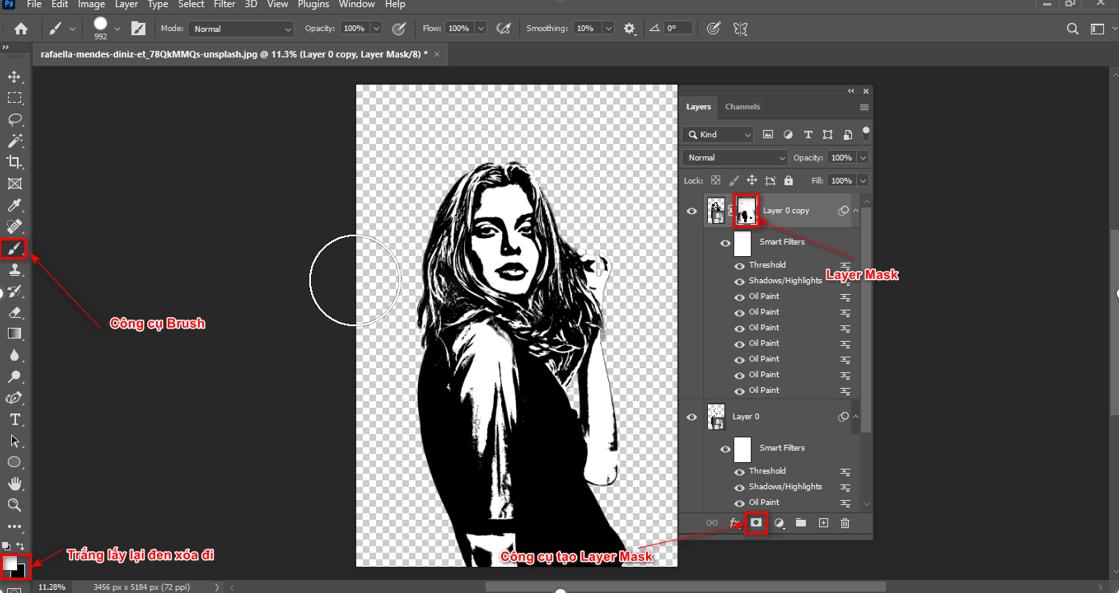
Simple way to create classic portraits in Photoshop

Step 6 Use Brush to erase some areas

Step 7: Results of creating classic portraits in Photoshop
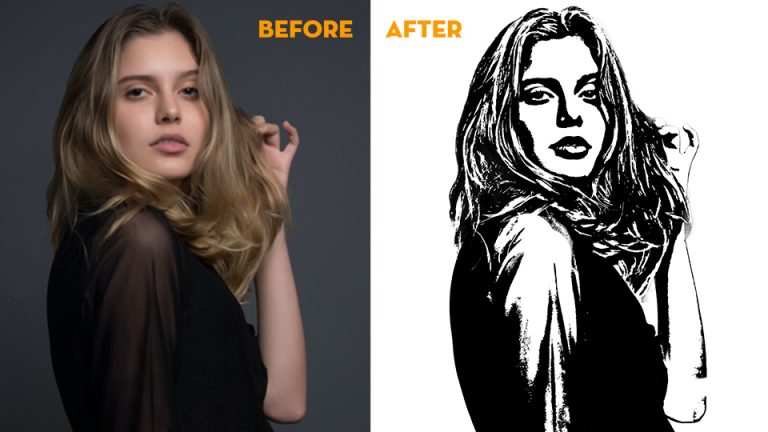
How to create classic portraits in Photoshop

How to create classic portraits in Photoshop

In short

Recently I just shared with you the details How to create classic portraits in Photoshop Adobe Photoshop is an indispensable tool for digital art and graphic design enthusiasts. With its diverse features and high customization capabilities, Adobe Photoshop has become one of the most powerful and popular photo and graphics editing software in the world. From simple images to complex works of art, Adobe Photoshop is the perfect tool to turn creative ideas into reality.

In this article, I have guided you How to create classic portraits in Photoshop beautiful just from the original photo, in addition, you can use the photo steps you like to create a masterpiece black and white photo for yourself. If you find this article interesting and interesting, please share it for me and Please follow the steps to get your own product.

If you want How to create classic portraits in Photoshop Even more classy, you can find out right away Image editing course or photoshop course then please contact immediately Graphic Express For advice, this course is suitable for all ages of students and office workers, the price is preferential and ensures you can go to work immediately after completing your studies. When you register early, you will be supported with valuable exclusive libraries to help you study and work quickly and effectively. I wish you success.

Tags : Tags adobe photoshop   learn photoshop   learn basic photoshop   study pts   study graphic design
Share
FacebookShare on FacebookpinterestShare on PinterestMessengerShare on Facebook Messenger
twitterShare on TwitterlinkedinShare on LinkedinvkShare on VkredditShare on ReddittumblrShare on TumblrvideoShare on Viadeobuffer. bufferShare on Bufferpocket. pocketShare on PocketwhatsappShare on WhatsappViberShare on ViberemailShare on EmailskypeShare on SkypediggShare on DiggmyspaceShare on MyspacebloggerShare on Blogger YahooMailShare on Yahoo mailtelegramShare on Telegram gmailShare on GmailAmazonShare on AmazonSMSShare on SMS
Tung Thai

Tung Thai

As a student at the center. I write what I know to share with you.
1 is to share with you so you can know and learn.
2 improve knowledge and remember longer, with the motto of giving to receive, I want to write more

Related articles

How to create classic portraits in Photoshop simply

How to use camera Raw in photoshop

By How To 08/12/2025

Camera Raw in photoshop is a tool that has been around since…

How to create classic portraits in Photoshop simply

Latest instructions for using camera raw in photoshop

By How To 07/12/2025

Camera raw in photoshop is a correction tool…

How to create classic portraits in Photoshop simply

3 Ways to create speed effects in Photoshop

By Tung Thai 06/12/2025 0

3 Ways to create speed effects in photoshop Speed effects…

Categories What is Q&A? What is the structure of that place?

What is Interior Design? How much does an interior design job pay?

12/12/2025
What is Material?

What is Material? Material application in the field of design

11/12/2025
What is the poster?

What are posters? 9 Tips for designing beautiful, quick Posters

11/12/2025
What does graphic design do? Is it easy to get a job?

What does graphic design do? Is it easy to get a job?

11/12/2025
Water is the water material in Enscap

Water is the water material in Enscap

11/12/2025

Recent comments

  • male1 year ago
    On How to create a fade effect in Photoshop
    Great
  • phat phat2 years ago
    On Who is 5SMedia?
    Useful article
  • Minh Anh3 years ago
    On How to create basic materials in vray Sketchup
    Very good, admin
Copyright © 2025 HOWTO - Powered by HOWTO

5SMedia.net | hocdohoacaptoc.com | huongdansudung.vn | webantam.com

Back to Top
Hello!
  • All
    • Tips
      • Google
      • Facebook
      • Tiktok
    • Instruct
      • What is Q&A?
      • Taobao
    • WordPress
      • Code
      • Plugins
      • Themes
        • Flatsome
        • Theme Nevo
  • Share
    • WordPress
    • Code
    • Plugins
    • Tips
    • Windows
    • Apple
    • Graphics
    • Experience
  • Graphics documents
    • illustrator
    • Sketchup
    • Coreldraw
    • 3ds max
    • Enscape
    • Photoshop
    • Graphics Plugin
  • Course
    • Photoshop course
    • illustrator course
    • Coreldraw course
    • Edit video course
    • Course Sketchup
    • Autocad course
    • Website management course
  • Service
  • Software
    • Windows
      • Tips
      • Office
      • Necessary
      • Tools
    • Apple
  • Game
  • News
    • Technology
    • Review
en_US EN
en_US EN vi VI